

SpringCloud
微服务架构的核心问题:
1.服务很多,客户端该怎么访问?
2.这么多服务,服务之间如何通信?
3.这么多服务,如何管理?
4.服务宕机怎么处理?
解决方案
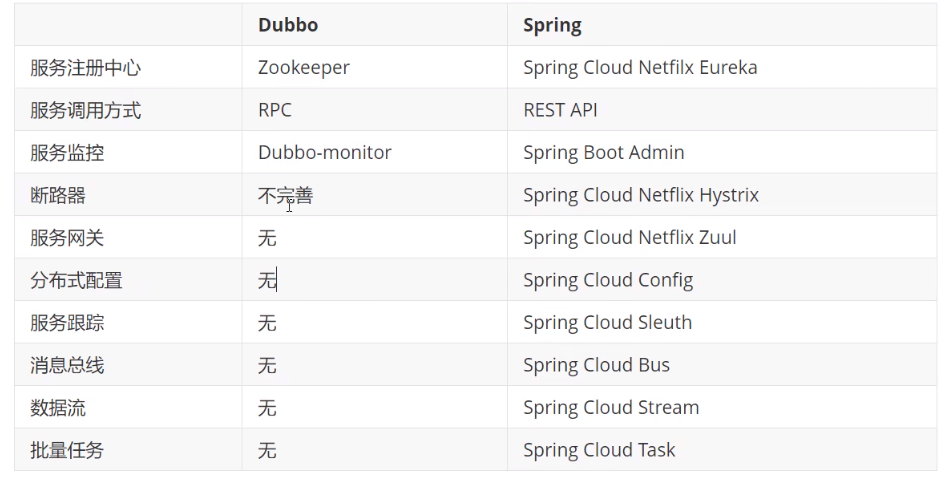
1.Spring cloud Netflix 一站式解决方案
核心 api 网关 zuul组建
2.Apache Dubbo Zookeeper 半自动,需要整合
3.Spring Cloud Alibaba 一站式解决方案



Springcloud 与 springboot的版本对应关系查询:
1.进入https://docs.spring.io/spring-cloud/docs

2.点击选择的springcloud版本,进入reference/html目录即可看到对应关系

常见对应关系

Eureka 服务注册与发现
EurekaServer pom.xml
<?xml version="1.0" encoding="UTF-8"?>
<project xmlns="http://maven.apache.org/POM/4.0.0"
         xmlns:xsi="http://www.w3.org/2001/XMLSchema-instance"
         xsi:schemaLocation="http://maven.apache.org/POM/4.0.0 http://maven.apache.org/xsd/maven-4.0.0.xsd">
    <parent>
        <artifactId>springcloud-learn</artifactId>
        <groupId>org.rf</groupId>
        <version>1.0-SNAPSHOT</version>
    </parent>
    <modelVersion>4.0.0</modelVersion>

    <artifactId>springcloud-eureka-7001</artifactId>

    <properties>
        <maven.compiler.source>8</maven.compiler.source>
        <maven.compiler.target>8</maven.compiler.target>
    </properties>
    <dependencies>
        <dependency>
            <groupId>org.springframework.cloud</groupId>
            <artifactId>spring-cloud-starter-eureka-server</artifactId>
            <version>1.4.7.RELEASE</version>
        </dependency>
    </dependencies>
</project>
EurekaServer application.yml
server:
  port: 7001

#Eureka 配置
eureka:
  instance:
    hostname: localhost #Eureka 服务端实例的名字
  client:
    registerWithEureka: false #是否向Eureka注册中心注册自己,服务器本身不需要注册自己
    fetchRegistry: false #如果未false,则表示自己为注册中心
    serviceUrl: #监控页面
      defaultZone: http://${eureka.instance.hostname}:${server.port}/eureka/
#  server:
#    enableSelfPreservation: false #关闭Eureka的自我保护机制
EurekaServer 启动类
@SpringBootApplication
@EnableEurekaServer// EnableEurekaServer 注解表示这是一个服务启动类,允许其他服务发现
public class EurekaServer_7001 {
    public static void main(String[] args) {
        SpringApplication.run(EurekaServer_7001.class,args);
    }
}
ServerProvider (服务提供者)
ServerProvider pom.xml
<?xml version="1.0" encoding="UTF-8"?>
<project xmlns="http://maven.apache.org/POM/4.0.0"
         xmlns:xsi="http://www.w3.org/2001/XMLSchema-instance"
         xsi:schemaLocation="http://maven.apache.org/POM/4.0.0 http://maven.apache.org/xsd/maven-4.0.0.xsd">
    <parent>
        <artifactId>springcloud-learn</artifactId>
        <groupId>org.rf</groupId>
        <version>1.0-SNAPSHOT</version>
    </parent>
    <modelVersion>4.0.0</modelVersion>

    <artifactId>springcloud-provider-dept-8001</artifactId>

    <properties>
        <maven.compiler.source>8</maven.compiler.source>
        <maven.compiler.target>8</maven.compiler.target>
    </properties>
    <dependencies>
        <dependency>
            <groupId>org.rf</groupId>
            <artifactId>springcloud-api</artifactId>
            <version>1.0-SNAPSHOT</version>
        </dependency>
        <dependency>
            <groupId>junit</groupId>
            <artifactId>junit</artifactId>
            <scope>test</scope>
        </dependency>
        <dependency>
            <groupId>mysql</groupId>
            <artifactId>mysql-connector-java</artifactId>
        </dependency>
        <dependency>
            <groupId>com.alibaba</groupId>
            <artifactId>druid</artifactId>
        </dependency>
        <dependency>
            <groupId>ch.qos.logback</groupId>
            <artifactId>logback-core</artifactId>
        </dependency>
        <dependency>
            <groupId>org.mybatis.spring.boot</groupId>
            <artifactId>mybatis-spring-boot-starter</artifactId>
        </dependency>
        <dependency>
            <groupId>org.springframework.boot</groupId>
            <artifactId>spring-boot-test</artifactId>
        </dependency>
        <dependency>
            <groupId>org.springframework.boot</groupId>
            <artifactId>spring-boot-starter-web</artifactId>
        </dependency>
        <dependency>
            <groupId>org.springframework.boot</groupId>
            <artifactId>spring-boot-starter-jetty</artifactId>
        </dependency>
        <!--热部署-->
        <dependency>
            <groupId>org.springframework.boot</groupId>
            <artifactId>spring-boot-devtools</artifactId>
        </dependency>
        <!-- 加入 Eureka ,向Eureka注册中心注册provider服务  -->
        <dependency>
            <groupId>org.springframework.cloud</groupId>
            <artifactId>spring-cloud-starter-eureka</artifactId>
            <version>1.4.7.RELEASE</version>
        </dependency>
        <!-- 完善监控信息 -->
        <dependency>
            <groupId>org.springframework.boot</groupId>
            <artifactId>spring-boot-starter-actuator</artifactId>
        </dependency>
    </dependencies>
</project>
ServerProvider application.yml
server:
  port: 8001
mybatis:
  typeAliasesPackage: org.rf.springcloud.pojo
  configLocation: classpath:mybatis/mybatis-config.xml
  mapperLocations: classpath:mybatis/mapper/*.xml

spring:
  application:
    name: springcloud-provider-dept
  datasource:
    type: com.alibaba.druid.pool.DruidDataSource
    driverClassName: com.mysql.cj.jdbc.Driver
    url: jdbc:mysql://localhost:3306/db01?useUnicode=true&characterEncoding=utf-8&allowMultiQueries=true&useSSL=false&serverTimezone=GMT%2B8&allowPublicKeyRetrieval=true
    username: root
    password: 123456
#Eureka配置,注册服务
eureka:
  host:
    name: localhost
    port: 7001
  client:
    serviceUrl:
      defaultZone: http://${eureka.host.name}:${eureka.host.port}/eureka/
  instance:
    instanceId: springcloud-provider-dept-8001 #修改默认描述
#info 信息配置
info:
  app.name: springcloud-部门提供者服务
  company.name: www.rf.com
ServerProvider 启动类
@SpringBootApplication
@EnableEurekaClient //Eureka客户端,在服务启动后自动注册到Eureka中!
public class DeptProvider {
    public static void main(String[] args) {
        SpringApplication.run(DeptProvider.class,args);
    }
}
Eureka集群
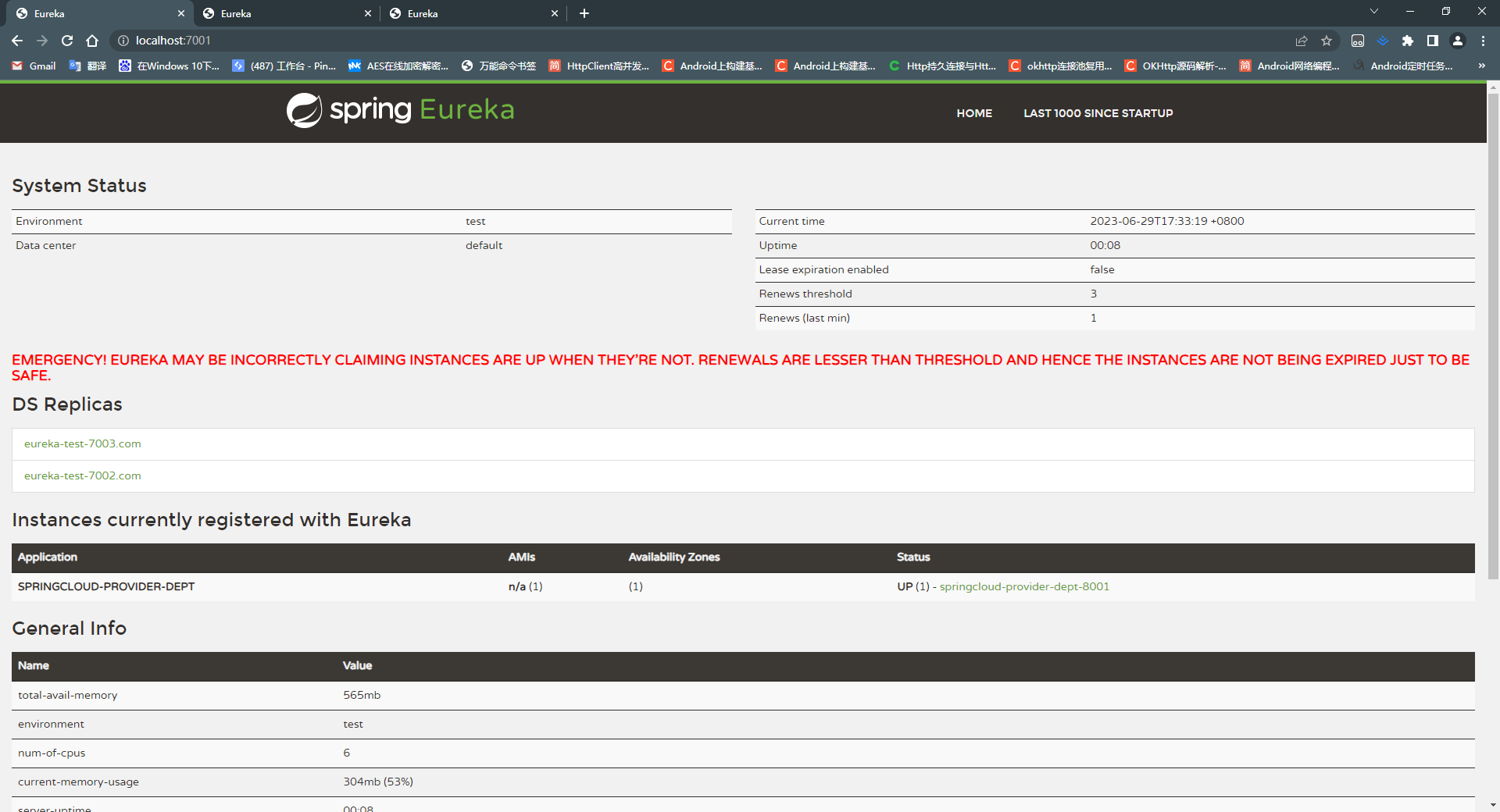
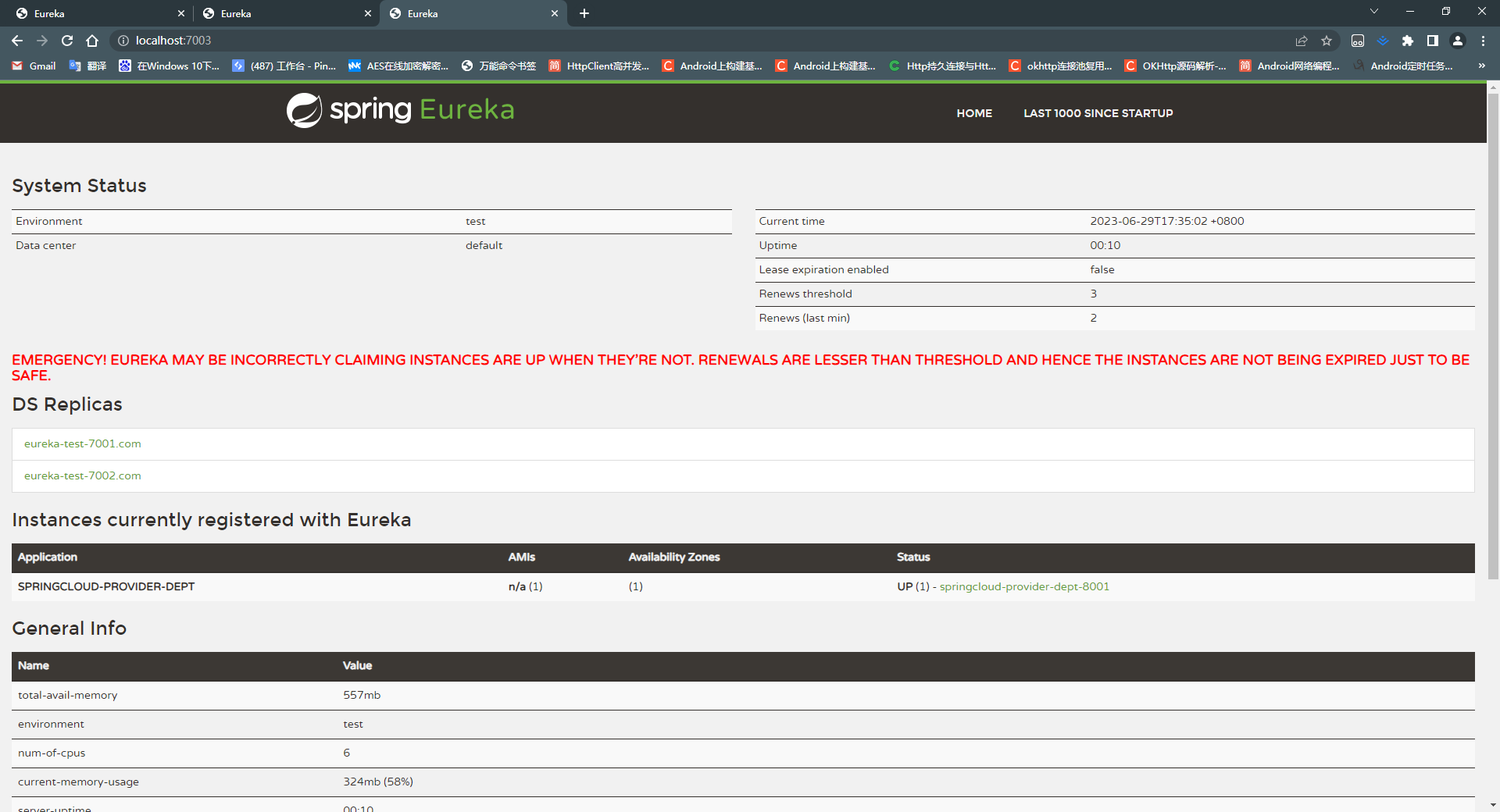
Eureka集群其实就是让多个EurekaServer之间相互认识,搭建EurekaServer集群的操作其实也很简单,只需要让每一个EurekaServer关注另外两个EurekaServer,并将需要发布的服务同时发布到集群中的每一个服务即可

集群配置
EurekaServe1 关注EurkaServer2和EurekaServer3
server:
  port: 7001

#Eureka 配置
eureka:
  instance:
    hostname: eureka-test-7001.com #Eureka 服务端实例的名字
  client:
    registerWithEureka: false #是否向Eureka注册中心注册自己,服务器本身不需要注册自己
    fetchRegistry: false #如果未false,则表示自己为注册中心
    serviceUrl: #监控页面
      defaultZone: http://eureka-test-7002.com:7002/eureka/,http://eureka-test-7003.com:7003/eureka/
#  server:
#    enableSelfPreservation: false #关闭Eureka的自我保护机制
EurkaServer2关注EurkeServer1和EurkeServer3
server:
  port: 7002

#Eureka 配置
eureka:
  instance:
    hostname: eureka-test-7002.com #Eureka 服务端实例的名字
  client:
    registerWithEureka: false #是否向Eureka注册中心注册自己,服务器本身不需要注册自己
    fetchRegistry: false #如果未false,则表示自己为注册中心
    serviceUrl: #监控页面
      defaultZone: http://eureka-test-7001.com:7001/eureka/,http://eureka-test-7003.com:7003/eureka/
#  server:
#    enableSelfPreservation: false #关闭Eureka的自我保护机制
EurkeServer3 关注EurkeServer1和EurkeServer2
server:
  port: 7003

#Eureka 配置
eureka:
  instance:
    hostname: eureka-test-7003.com #Eureka 服务端实例的名字
  client:
    registerWithEureka: false #是否向Eureka注册中心注册自己,服务器本身不需要注册自己
    fetchRegistry: false #如果未false,则表示自己为注册中心
    serviceUrl: #监控页面
      defaultZone: http://eureka-test-7002.com:7002/eureka/,http://eureka-test-7001.com:7001/eureka/
#  server:
#    enableSelfPreservation: false #关闭Eureka的自我保护机制
将服务发布到每一个EurekaServer
server:
  port: 8001
mybatis:
  typeAliasesPackage: org.rf.springcloud.pojo
  configLocation: classpath:mybatis/mybatis-config.xml
  mapperLocations: classpath:mybatis/mapper/*.xml

spring:
  application:
    name: springcloud-provider-dept
  datasource:
    type: com.alibaba.druid.pool.DruidDataSource
    driverClassName: com.mysql.cj.jdbc.Driver
    url: jdbc:mysql://localhost:3306/db01?useUnicode=true&characterEncoding=utf-8&allowMultiQueries=true&useSSL=false&serverTimezone=GMT%2B8&allowPublicKeyRetrieval=true
    username: root
    password: 123456
#Eureka配置,注册服务
eureka:
  host:
    name: localhost
    port: 7001
  client:
    serviceUrl:
      defaultZone: http://eureka-test-7001.com:7001/eureka/,http://eureka-test-7002.com:7002/eureka/,http://eureka-test-7003.com:7003/eureka/
  instance:
    instanceId: springcloud-provider-dept-8001 #修改默认描述
#info 信息配置
info:
  app.name: springcloud-部门提供者服务
  company.name: www.rf.com
集群效果图如下

Eureka与Zookeeper
CAP原则
CAP原则又称CAP定理,指的是在一个分布式系统中,[一致性](https://baike.baidu.com/item/一致性/9840083?fromModule=lemma_inlink)(Consistency)、[可用性](https://baike.baidu.com/item/可用性/109628?fromModule=lemma_inlink)(Availability)、[分区容错性](https://baike.baidu.com/item/分区容错性/23734073?fromModule=lemma_inlink)(Partition tolerance)。CAP 原则指的是,这三个[要素](https://baike.baidu.com/item/要素/5261200?fromModule=lemma_inlink)最多只能同时实现两点,不可能三者兼顾。
维基百科中对于CAP理论的定义:
Consistency : Every read receives the most recent write or an err
Availability : Every request receives a (non-error) response -without the guarantee that it contains the most recent write
Partition tolerance :The system continues to operate despite an arbitrary number of messages being dropped (or delayed) by the network between nodes
翻译:
一致性:对于客户端的每次读操作,要么读到的是最新的数据,要么读取失败。换句话说,一致性是站在分布式系统的角度,对访问本系统的客户端的一种承诺:要么我给您返回一个错误,要么我给你返回绝对一致的最新数据,不难看出,其强调的是数据正确。
可用性:任何客户端的请求都能得到响应数据,不会出现响应错误。换句话说,可用性是站在分布式系统的角度,对访问本系统的客户的另一种承诺:我一定会给您返回数据,不会给你返回错误,但不保证数据最新,强调的是不出错。
分区容忍性:由于分布式系统通过网络进行通信,网络是不可靠的。当任意数量的消息丢失或延迟到达时,系统仍会继续提供服务,不会挂掉。换句话说,分区容忍性是站在分布式系统的角度,对访问本系统的客户端的再一种承诺:我会一直运行,不管我的内部出现何种数据同步问题,强调的是不挂掉。
P(分区容忍)特性是分布式系统必须满足的一个特性,因此只能在A和C之间进行权衡,Zookeeper保证的是CP,而Eureka保证的是AP
Zookeeper保证CP
当向注册中心查询服务列表时,我们可以容忍注册中心返回的是几分钟以前的注册信息,但是不能接受服务器直接down掉不可用。也就是说服务注册功能对可用性的要求高于一致性,但是Zookeeper会出现这样的一些情况,当master节点因为网络故障与其他节点失去联系,剩余节点会重新进行leader选举,但是问题在于选举leader的时间太长,大约在30~120秒之间,而且在整个选举期间整个Zookeeper是不可用的,导致选举期间注册服务瘫痪。在云部署的环境下,因为网络问题是的Zookeeper集群失去master节点是较大概率发生的时间,虽然服务最终能够回复,但是漫长的选举时间导致的注册长期不可用是不能容忍的。
Eureka保证AP
Eureake在设计时就优先保证可用性。Eureka的各个节点都是平等的,几个节点挂掉并不会影响其他节点的正常工作,剩余的节点依旧可以提供注册和查询服务。而Eureka的客户端在想某个Eureka注册时,如果发现连接失败,则会自动切换到其他节点,只要有一台Eureka孩子啊,就能保证注册服务可用,但是查到的信息可能不是最新的,除此之外,Eureka还有一种自我保护机制,如果在15分钟内查过85%的节点都没有正常的心跳,那么Eureka就认为客户端与注册中心出现了网络故障,此时会有以下几种情况:
-
Eureka不再冲注册列表中移除因为长期没有收到心跳而应该过期的服务
-
Eureka仍然能够接受新服务的注册和查询请求,但是不会被同步到其他节点上,保证当前节点依然可用
-
当前网络稳定时,档期那实例新的注册信息会被同步到其他节点中
因此,Eureka可以很好的应对因为网络故障部分节点失去联系的情况,而不会想zookeeper那样使整个注册服务瘫痪
Ribbon
Ribbon是什么
Springcloud Ribbon是给予Netflix Ribbon实现的一套客户端负载均衡工具,主要功能是提供客户端的软件负载均衡算法,将NetFlix的中间层服务连接在一起。Ribbon的客户端组建提供一系列完整的配置项,如连接超时、重试等等。简而言之,就是在配置文件中列出LoadBalancer(负载均衡)后面所有的机器,Ribbong会自动基于某种规则(轮询、随机等等)去连接这些机器。我们也很容易使用Ribbon实现自定义的负载均衡算法。
Ribbon能做什么
- Load Balance在微服务活分布式集群中经常用到的一种应用。
- 负载均衡简单的说就是将用户的请求平均分配到多个服务器上,从而达到系统的搞可用(HA)
- 常见的负载均衡软件有Nginx、Lvs等
- dubbo 、Springcloud 中均为我们提供了负载均衡,springcloud的负载均衡算法支持自定义
- 负载均衡简单分类:
- 集中式Load Balance
- 即在服务的消费方和提供方之间使用独立的LB设施,如Nginx,由该设施负责把访问请求通过某种策略转发至服务器的提供方
- 进程式Load Balance
- 将LB逻辑集成到消费方,消费方从服务注册中心获得可用服务,然后自己从这些服务中选择合适的提供方
- Ribbon就属于进程式LB,它只是一个类库,集成于消费方进程,消费方通过它来获取到服务提供方地址
- 集中式Load Balance
在服务消费者中集成Ribbon
pom.xml 引入eureka客户端以及Ribbon
        <dependency>
            <groupId>org.springframework.cloud</groupId>
            <artifactId>spring-cloud-starter-netflix-ribbon</artifactId>
        </dependency>
        <dependency>
            <groupId>org.springframework.cloud</groupId>
            <artifactId>spring-cloud-starter-eureka</artifactId>
            <version>1.4.7.RELEASE</version>
        </dependency>
application.yml 中引入eureka配置
server:
  port: 8080

eureka:
  client:
    registerWithEureka: false # 不向Eureka注册自己
    serviceUrl:
      defaultZone: http://eureka-test-7001.com:7001/eureka/,http://eureka-test-7002.com:7002/eureka/,http://eureka-test-7003.com:7003/eureka/
服务启动类添加EurekaClient注解
import org.springframework.boot.SpringApplication;
import org.springframework.boot.autoconfigure.SpringBootApplication;
import org.springframework.cloud.netflix.eureka.EnableEurekaClient;

@SpringBootApplication
@EnableEurekaClient
public class DeptConsumerDeptApplication {
    public static void main(String[] args) {
        SpringApplication.run(DeptConsumerDeptApplication.class,args);
    }
}
RestTemplate Bean上添加负载均衡注解
package org.rf.springcloud.config;

import org.springframework.cloud.client.loadbalancer.LoadBalanced;
import org.springframework.context.annotation.Bean;
import org.springframework.context.annotation.Configuration;
import org.springframework.web.client.RestTemplate;


@Configuration
public class ConfigBean {
    @Bean
    @LoadBalanced
    public RestTemplate getRestTemplate(){
        return new RestTemplate();
    }
}
服务转发时不需要在写服务器地址,可以通过集群服务名获取服务信息
package org.rf.springcloud.controller;

import com.fasterxml.jackson.databind.ser.Serializers;
import lombok.experimental.Accessors;
import org.rf.springcloud.pojo.Dept;
import org.springframework.beans.factory.annotation.Autowired;
import org.springframework.web.bind.annotation.*;
import org.springframework.web.client.RestTemplate;

import java.util.List;

@RestController
@RequestMapping("/consumer/dept")
public class DeptConsumerController {
//    private static final String BASE_URL = "http://localhost:8001";
//    负载均衡通过集群服务名获取服务
    private static final String BASE_URL = "http://SPRINGCLOUD-PROVIDER-DEPT";
    @Autowired
    private RestTemplate restTemplate;

    @PostMapping("/add")
    public boolean add(Dept dept){
        return restTemplate.postForObject(BASE_URL+"/dept/add",dept,Boolean.class);
    }

    @GetMapping("/find/{deptNo}")
    public Dept findByDeptNo(@PathVariable Long deptNo){
        return restTemplate.getForObject(BASE_URL+"/dept/query/"+deptNo,Dept.class);
    }

    @GetMapping("/query/all")
    public List<Dept> queryAll(){
        return restTemplate.getForObject(BASE_URL+"/dept/query/all",List.class);
    }
}
代码持续更新中,源码仓库:https://gitee.com/develoven/springcloud.git**

 浙公网安备 33010602011771号