
Linux常用基础命令
1.top命令
Linux top 命令相当于Windows任务管理器
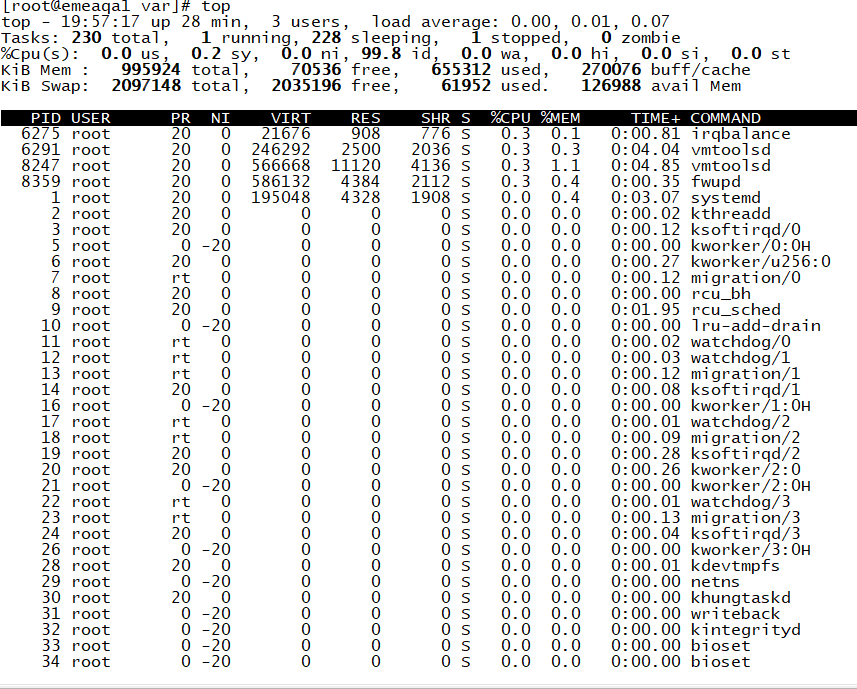
- 系统时间,登陆时间,终端数,负载均衡
- 进程分类和数目
- CPU占用百分比
- 物理内存总量和使用情况
- 虚拟内存总量和使用情况
2.pidof 命令
获取进程PID
1 [root@emeaqa1 var]# pidof top
2 9165 9138
3.kill命令
:终止指定进程服务,格式:kill [参数] [进程PID]”
kill -9 [进程PID]:终止指定PID服务的运行
kill -2 [进程PID]:终止指定进程正在运行的进程
[root@emeaqa1 var]# pidof top
9165 9138
[root@emeaqa1 var]# kill -9 9165
[root@emeaqa1 var]# pidof top
9138
[2]+  Killed                  top
4.who命令
:查看当前主机名称
[root@emeaqa1 ~]# who
root     :0           2019-03-27 19:29 (:0)
root     pts/0        2019-03-27 19:30 (:0)
root     pts/1        2019-03-27 20:16 (192.168.83.1)
<1>用户名
<2>终端设备
<3>登录到系统时间
5.pwd命令
查看当前目录
[root@emeaqa1 bin]# pwd
/usr/bin
6.cd命令
切换目录, 格式:cd [目录名称]
[root@emeaqa1 /]# cd usr/tmp
[root@emeaqa1 tmp]# pwd
/usr/tmp
7.ls命令
查看目录中的文件信息
[root@emeaqa1 tmp]# ls
abrt
systemd-private-55db078e783943b3bee0e95ed8b23e35-bolt.service-zxsc9f
systemd-private-55db078e783943b3bee0e95ed8b23e35-chronyd.service-RVO3nN
systemd-private-55db078e783943b3bee0e95ed8b23e35-colord.service-0IB05g
systemd-private-55db078e783943b3bee0e95ed8b23e35-cups.service-p1ePFR
systemd-private-55db078e783943b3bee0e95ed8b23e35-fwupd.service-Eybww6
systemd-private-55db078e783943b3bee0e95ed8b23e35-rtkit-daemon.service-HBdLus
8.cat 命令
查看纯文本文件信息
[root@emeaqa1 tmp]# cat -n initial-setup-ks.cfg
cat: initial-setup-ks.cfg: No such file or directory
[root@emeaqa1 tmp]# cd /
[root@emeaqa1 /]# cd root
[root@emeaqa1 ~]# cat -n initial-setup-ks.cfg
     1  #version=DEVEL
     2  # X Window System configuration information
     3  xconfig  --startxonboot
     4  # License agreement
     5  eula --agreed
     6  repo --name="Server-HighAvailability" --baseurl=file:///run/install/repo/addons/HighAvailability
     7  repo --name="Server-ResilientStorage" --baseurl=file:///run/install/repo/addons/ResilientStorage
     8  # System authorization information
     9  auth --enableshadow --passalgo=sha512
    10  # Use CDROM installation media
    11  cdrom
    12  # Use graphical install
    13  graphical
    14  # Run the Setup Agent on first boot
    15  firstboot --enable
    16  # System services
    17  services --enabled="chronyd"
    18  # Keyboard layouts
    19  keyboard --vckeymap=us --xlayouts='us'
    20  # System language
    21  lang en_US.UTF-8
    22
    23  ignoredisk --only-use=sda
9.mkdir命令
创建目录
[root@emeaqa1 tmp]# mkdir aip
[root@emeaqa1 tmp]# ls
aip

 浙公网安备 33010602011771号