注释练习
注释
在IDEA中一些英文意思
Module 		模块

Projet Structure	项目结构

Color Scheme	颜色模板样式

Code Style		代码样式

Annotations		注解

Comments		注释

Bkock comment	一块

Line comment	一行

Bold	粗体	ltalic	斜体

Background		背景颜色
改注释颜色
这是改一行注释颜色
File --> Settings... --> Editor --> Color Scheme --> java --> Comments --> javaDoc -->Linecomment --> Foreground 旁的颜色点击可改
(如第一次改颜色要把最下面的 lnherit valuex from 的勾去掉)
File --> Settings... --> Editor --> Color Scheme --> java --> Comments --> javaDoc -->Bkock comment --> Foreground 旁的颜色点击可改
(如第一次改颜色要把最下面的 lnherit valuex from 的勾去掉)
java中的三种注释
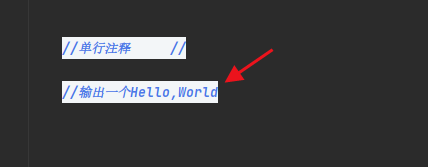
单行
多行
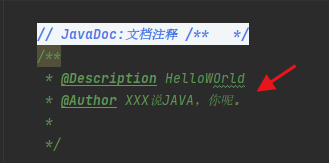
文档

 浙公网安备 33010602011771号