


Devexpress GridView使用技巧
1.表格数据根据前面列的值展示不同的值
例子:根据检测类型(定量、定性)展示,定性展示合格与不合格,定量展示实际值

实现方法:
使用 表格CustomColumnDisplayText事件
private void gvMainCheck_CustomColumnDisplayText(object sender, DevExpress.XtraGrid.Views.Base.CustomColumnDisplayTextEventArgs e)
        {
            if (e.Column.FieldName == "oldreally_value")
            {

                //获取当前行的数据
                FirstCheckDto item = (FirstCheckDto)this.gvMainCheck.GetRow(e.ListSourceRowIndex);
                //判断检测类型为定量 则展示实际值
                if (item.spec_type == "1")
                {
                    e.DisplayText = e.Value.ToString();
                }
                //判断检测类型为定性 则展示合格与不合格
                if (item.spec_type == "2")
                {
                    switch (e.Value.ToString().Trim())
                    {
                        case "1":
                            e.DisplayText = "合格";
                            break;
                        case "0":
                            e.DisplayText = "不合格";
                            break;
                        default:
                            e.DisplayText = "";
                            break;
                    }
                }
            }

        }
2.显示GridControl的横向滚动条
GridView的OptionView中的ColumnAutoWidth = False设置上即可

3.隐藏gridcontrol里面的小加号

解决办法:GridView1.OptionsDetail.EnableMasterViewMode = False
4.单元格根据输入的值,动态变化后面单元格数据与样式
实现效果

实现方法:
打开设计界面找到Views,事件:CellValueChanged

代码如下:
点击查看代码
private void gvMainCheck_CellValueChanged(object sender, DevExpressXtraGrid.Views.Base.CellValueChangedEventArgs e)
{
    string valueType = gvMainCheck.GetRowCellValue(e.RowHandle, colQa_Check_Value_Type_Name).ToString();

    string seq = gvMainCheck.GetRowCellValue(e.RowHandle, colQaSeq).ToString();
    //ParameterStandard:gridview绑定的数据源
    //通过唯一标识查找到当前的行数据
    ProcessParameterDto item = ParameterStandard.Find(x => x.Seq.ToString() == seq);

    if (item != null && e.Value != null)
    {

        if (e.Value.ToString() == "")
        {
            item.Qa_Check_CMB_Qualitative_Value = "";
            item.Qa_Check_Ration_Value = "";
            item.really_value = "";
            return;
        }
        //判断是不是监控的那一列:使用filedName绑定的属性值进行判断
        #region 定性值 radio
        if (e.Column == colQa_Check_CMB_Qualitative_Value)
        {
            if (e.Value != null)
            {
                //item.Qa_Check_Result = e.Value.ToString();
                if (e.Value.ToString() == "1")
                {
                    item.Qa_Check_Show_Value = "合格";
                    item.Qa_Check_Show_Value_Is_Standard = true;
                }
                else
                {
                    item.Qa_Check_Show_Value_Is_Standard = false;
                    item.Qa_Check_Show_Value = "不合格";
                }
            }
        }
        #endregion

        //判断是不是监控的那一列:使用filedName绑定的属性值进行判断
        if (e.Column == colQa_Check_Ration_Value)
        {
            if (item.spec_type == "2")
            {
                MessageBox.Show("请输入定性值");
                item.Qa_Check_Ration_Value = "";
            }
            else
            {
                if (e.Value != null)
                {

                    float reslut = 0;
                    bool ret = float.TryParse(e.Value.ToString(), out reslut);

                    if (!ret)
                    {
                        MessageBox.Show("请填写有效数字");
                        item.Qa_Check_Ration_Value = "";
                        return;
                    }
                    item.Qa_Check_Ration_Value = e.Value.ToString();
                    //上限值与下限值都有
                    if (!string.IsNullOrEmpty(item.up_limit) && !string.IsNullOrEmpty(item.dowm_limit))
                    {
                        if (Convert.ToDecimal(item.Qa_Check_Ration_Value) > Convert.ToDecimal(item.up_limit)
                            || Convert.ToDecimal(item.Qa_Check_Ration_Value) < Convert.ToDecimal(item.dowm_limit))
                        {
                            item.Qa_Check_Show_Value_Is_Standard = false;
                            item.Qa_Check_Show_Value = "不合格";
                        }
                        else
                        {
                            item.Qa_Check_Show_Value_Is_Standard = true;
                            item.Qa_Check_Show_Value = "合格";
                        }
                    }//仅有上限值
                    else if (!string.IsNullOrEmpty(item.up_limit))
                    {

                        if (Convert.ToDecimal(item.Qa_Check_Ration_Value) > Convert.ToDecimal(item.up_limit))
                        {
                            item.Qa_Check_Show_Value_Is_Standard = false;
                            item.Qa_Check_Show_Value = "不合格";
                        }
                        else
                        {
                            item.Qa_Check_Show_Value_Is_Standard = true;
                            item.Qa_Check_Show_Value = "合格";
                        }
                    }//仅有下限值
                    else if (!string.IsNullOrEmpty(item.dowm_limit))
                    {
                        if (Convert.ToDecimal(item.Qa_Check_Ration_Value) < Convert.ToDecimal(item.dowm_limit))
                        {
                            item.Qa_Check_Show_Value_Is_Standard = false;
                            item.Qa_Check_Show_Value = "不合格";
                        }
                        else
                        {
                            item.Qa_Check_Show_Value_Is_Standard = true;
                            item.Qa_Check_Show_Value = "合格";
                        }
                    }//没有上限值与下限值  则都合格
                    else
                    {
                        item.Qa_Check_Show_Value_Is_Standard = true;
                        item.Qa_Check_Show_Value = "合格";
                    }

                }

            }
        }
        //定量
        if (item.spec_type == "1")
        {
            item.really_value = item.Qa_Check_Ration_Value;
        }
        //定性
        if (item.spec_type == "2")
        {
            item.really_value = item.Qa_Check_CMB_Qualitative_Value;
        }

    }
}

</details>
····
5.对单元格输入的值进行校验
实现效果:
实现方法:
打开设计器 找到CellValueChanged事件

实现代码:
 private void gvmain_CellValueChanged(object sender, DevExpress.XtraGrid.Views.Base.CellValueChangedEventArgs e)
        {

            string seq = gvmain.GetRowCellValue(e.RowHandle, colQaSeq).ToString();
            QualityInfo item = dataInfo.Find(x => x.Seq.ToString() == seq);
            //匹配是否存在栈板号,不存在则报错,存在则匹配对应id
            if (!_ListPalletNum.Select(b => b.PALLET_NUMBER).Contains(item.pallet_number))
            {

                MessageBox.Show($"该工单不存在 {item.pallet_number}栈板号,请重新填写", "错误提示", MessageBoxButtons.OK, MessageBoxIcon.Error);
                dataInfo[e.RowHandle].pallet_number = string.Empty;
            }
            else
            {
                dataInfo[e.RowHandle].pallet_numberid = _ListPalletNum.First(b => b.PALLET_NUMBER == item.pallet_number).ID;
            }

        }
6.单元格根据值进行背景颜色变化
实现效果:

实现方法:
打开设计界面,左边点击Appearance,右边添加条件,Column为绑定的列名,Rule中选择BackColor, Options 属性中useBackColor为true,然后在Condition中添加判断规则,比如说Equal,between,Value1为条件:比如说合格,不合格等

7.设置表格选择框
实现效果:

实现方法:
打开设计界面:
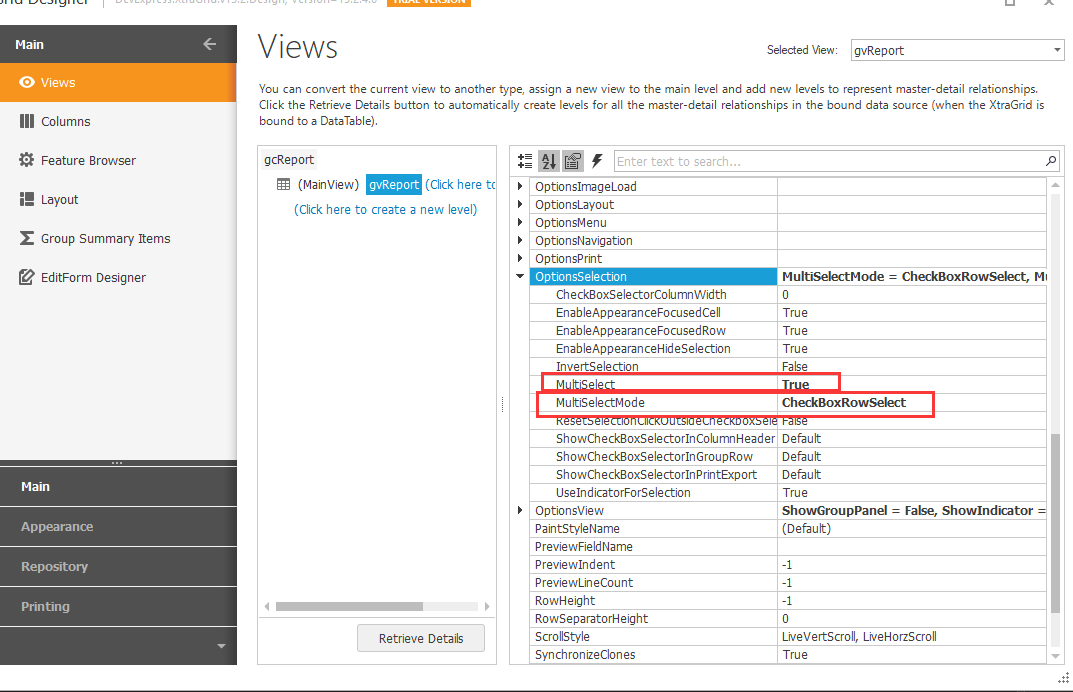
获取选中行的值
  			//获取选中的行
            int[] selectedRowHandles = gvReport.GetSelectedRows();
            List<WIP_PR_DATA_DETAILDTO> Checklist = new List<WIP_PR_DATA_DETAILDTO>();
            //根据索引找到绑定数据源的对应的数据然后添加到集合中
            for (int i = 0; i < selectedRowHandles.Length; i++)
             {
               Checklist.Add(gvreportlist[selectedRowHandles[i]]);
             }
8.表格设计为父子表结构
实现效果:
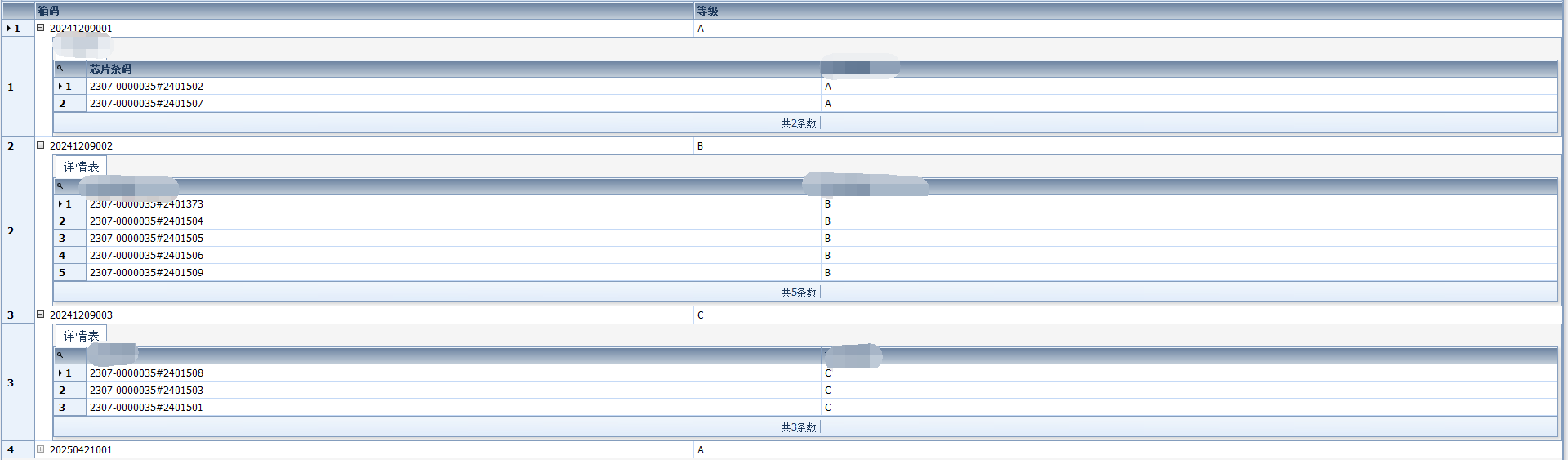
实现方法:
点击设计界面中的:
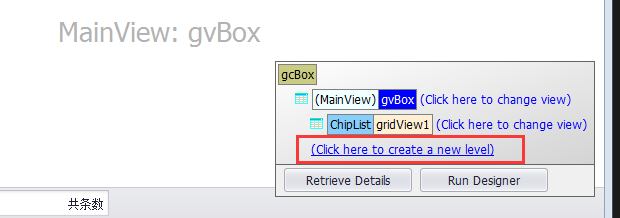
然后就会在原先的gvbox下面新增了一个子表格,点击设计按钮跟父级表格是一样的使用方法。
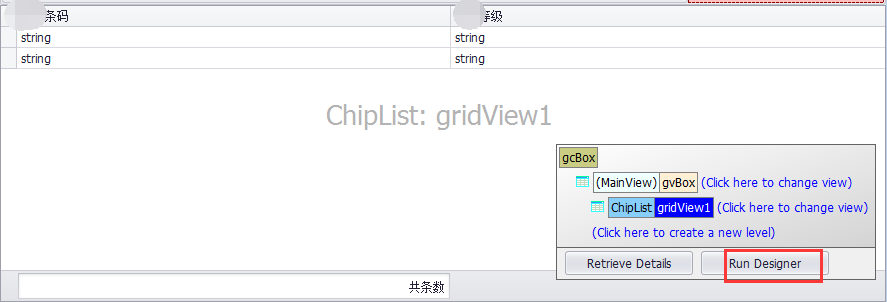
数据源绑定:子集数据源不需要单独进行绑定,只需要绑定父级数据源即可,对应的数据结构也应该设计为父子级结构
       //父表
       public class BoxLevChips
        {

            public int BoxId { get; set; }
            /// <summary>
            /// 外箱编码
            /// </summary>
            public string BOXCODE { get; set; }
            /// <summary>
            /// 箱码等级
            /// </summary>
            public string BOXLEV { get; set; }
            /// <summary>
            /// 箱码中所有的芯片  --对应的子数据集
            /// </summary>
            public List<wip_BoxCodeChip> ChipList { get; set; }

        }
   foreach (var item in boxs)
            {
                var chips = cbm.GetChipsBybox(item.ID);

                List<wip_BoxCodeChip> chipList = new List<wip_BoxCodeChip>();
                foreach (var c in chips)
                {
                    chipList.Add(new wip_BoxCodeChip() { BARCODE = c.BARCODE, CHIPLEV = c.CHIPLEV });
                }
                boxLevChips.Add(
                    new BoxLevChips()
                    {
                        BoxId = item.ID,
                        BOXCODE = item.BOXCODE,
                        BOXLEV = item.CHIPLEV,
                        ChipList = chipList
                    }
                );
            }
            gcBox.DataSource = boxLevChips;
9.表格显示自动展示序号
实现效果:
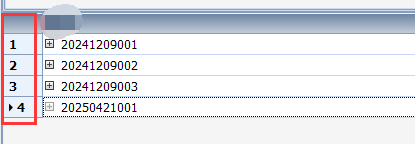
实现方法:使用 CustomDrawRowIndicator事件。
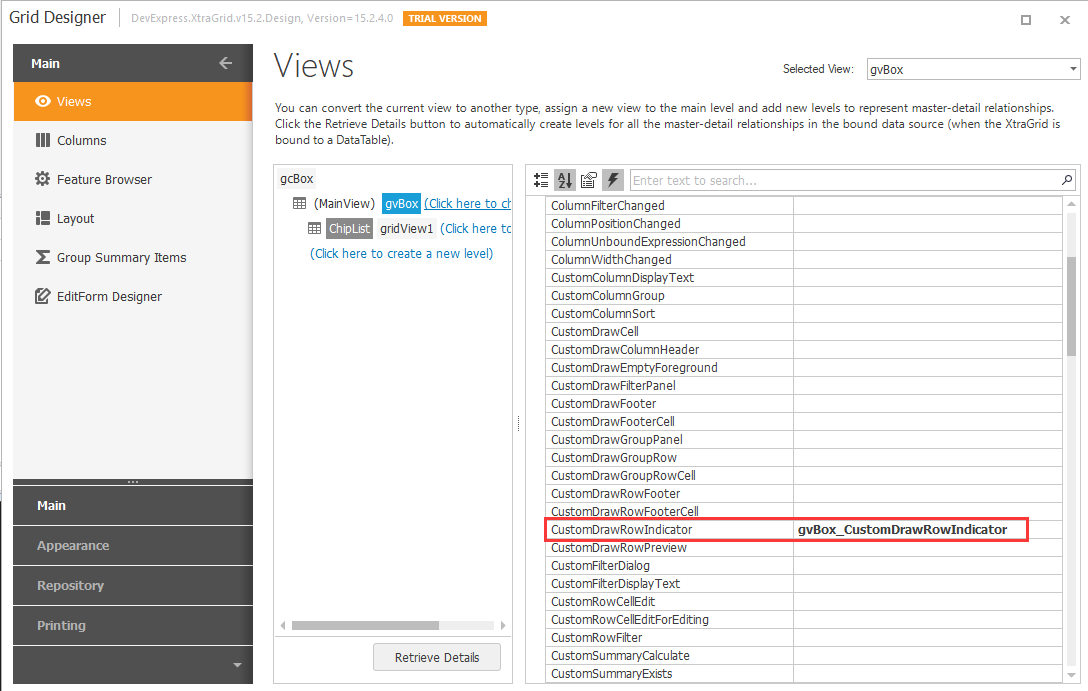
 private void gvBox_CustomDrawRowIndicator(object sender, DevExpress.XtraGrid.Views.Grid.RowIndicatorCustomDrawEventArgs e)
        {

            if (e.RowHandle >= 0)
            {
                e.Info.DisplayText = (e.RowHandle + 1).ToString();
            }
        }
设置序号的宽度
gridView1.IndicatorWidth = 40;
10.自定义表格列头背景颜色与字体颜色
实现效果:

实现方法:使用 CustomDrawColumnHeader事件。
private void gvhistory_CustomDrawColumnHeader(object sender, DevExpress.XtraGrid.Views.Grid.ColumnHeaderCustomDrawEventArgs e)
        {

            Rectangle rect = e.Bounds;
            rect.Inflate(-1, -1);
            // 填充标题颜色.
            e.Graphics.FillRectangle(new SolidBrush(Color.FromArgb(91, 155, 213)), rect);
            e.Appearance.DrawString(e.Cache, e.Info.Caption, e.Info.CaptionRect);
            // 绘制过滤和排序按钮.
            foreach (DrawElementInfo info in e.Info.InnerElements)
            {
                if (!info.Visible) continue;
                ObjectPainter.DrawObject(e.Cache, info.ElementPainter, info.ElementInfo);
            }
            e.Handled = true;
        }
		/// <summary>
        /// 表格列头字体颜色绘制
        /// </summary>
        private void DrawHeaderFontColor()
        {

            for (int i = 0; i < this.gvCollectionList.Columns.Count; i++)
            {
                this.gvCollectionList.Columns[i].AppearanceHeader.ForeColor = Color.White;
            }
	    }
11.设置下拉列表的字体大小
cmbLine.Properties.AppearanceDropDown.Font = new Font("Tahoma", 14F);

 浙公网安备 33010602011771号