
java接口自动化rest_assured
介绍
- 由java实现的REST API测试框架
- 支持POST,GET,PUT.DELETE等请求
- 可以用来校验响应信息
- 官网地址:http://res-assurd.io
环境准备
- 创建maven项目
- 依赖 单测junit,接口rest-assured,断言hamcrest
        <dependency>
            <groupId>org.junit.jupiter</groupId>
            <artifactId>junit-jupiter</artifactId>
            <version>5.8.2</version>
            <scope>test</scope>
        </dependency>
        <dependency>
            <groupId>org.junit.vintage</groupId>
            <artifactId>junit-vintage-engine</artifactId>
            <version>5.8.2</version>
            <scope>test</scope>
        </dependency>
        <dependency>
            <groupId>org.junit.platform</groupId>
            <artifactId>junit-platform-launcher</artifactId>
            <version>1.8.2</version>
            <scope>test</scope>
        </dependency>
        <!--       REST assured -->
        <dependency>
            <groupId>io.rest-assured</groupId>
            <artifactId>rest-assured</artifactId>
            <version>4.5.1</version>
        </dependency>
<!--        hamcrest-->
        <dependency>
            <groupId>org.hamcrest</groupId>
            <artifactId>hamcrest-core</artifactId>
            <version>1.3</version>
            <scope>test</scope>
        </dependency>
<!--      json的依赖  jackson-->
        <dependency>
            <groupId>com.fasterxml.jackson.core</groupId>
            <artifactId>jackson-databind</artifactId>
            <version>2.14.2</version>
        </dependency>
        <!--    jayway Json-path-->
        <dependency>
            <groupId>com.jayway.jsonpath</groupId>
            <artifactId>json-path</artifactId>
            <version>2.7.0</version>
        </dependency>
<!--        yaml 相关依赖-->
<!--        <dependency>-->
<!--            <groupId>com.fasterxml.jackson.core</groupId>-->
<!--            <artifactId>jackson-databind</artifactId>-->
<!--            <version>2.14.2</version>-->
<!--        </dependency>-->
        <dependency>
            <groupId>com.fasterxml.jackson.dataformat</groupId>
            <artifactId>jackson-dataformat-yaml</artifactId>
            <version>2.14.2</version>
        </dependency>
    </dependencies>
rest-assured常用api
基本方法
| 方法 | 作用 | 示例 |
|---|---|---|
| given | 后面跟参数 | given().param() |
| when | 后面跟动作 | when().get() |
| then | 后面跟断言 | when().statusCode() .body() |
可选方法
| 方法 | 作用 | 示例 |
|---|---|---|
| header | 请求头 | header("mytest"," testCase") |
| contentType | 参数类型 | contentType("aplicationJson/text") |
| param/params | get传参 | param("入参","哈哈哈") |
| queryParam/queryParams | post传参 | queryParams(map) |
| formParam/formParams | 表单提交 | formParam("msg","test") |
| get/post | 请求方式 | get(url) |
| body | 请求体/响应体 | body("origin",equalTo("115.205.236.218")) |
| path | 获取响应指定内容 | extract().path("form.msg") |
| statuscode | 状态码 | statusCode(200) |
| extarct | 提取响应 | extract().response().toString() |
| log | 日志查询 | log().all() |
get示例
    @Test
    void testGetRequest(){
        //发送get请求
        String response =
        given()
                .contentType("aplicationJson/text")
                .param("name","Tom")
        .when()
                .get("https://httpbin.ceshiren.com/get")
        .then()
                .statusCode(200)
                .extract().response().toString();

        //输出响应
        System.out.println(response);
    }
post示例
    @Test
    void testPostRequest(){
        // 入参为json格式,传入hasMap
        HashMap<String,String> requestMap=new HashMap<>();
        requestMap.put("name","张三");
        requestMap.put("age","23");

        //发送post请求
        String response =
        given()
                .queryParam("title","单个入参")
                .queryParams(requestMap)
        .when()
                .post("https://httpbin.ceshiren.com/post")
        .then()
                .statusCode(200)
                .extract().response().toString();

        //输出响应
        System.out.println(response);
    }

    @Test
    void testJsonStrRequest(){
        // 入参为json格式,传入json字符串
        String jsonString =
                "{\"name\":\"age\",\"hobby\":[\"吃饭\",\"睡觉\"]}";

        //请求
        given()
                .contentType("application/json")  //设置请求体
                .body(jsonString)  //入参

                .log().headers().log().body()   //请求头+请求体 日志
                  //请求入参日志
        .when()
                .post("https://httpbin.ceshiren.com/post")
        .then();

    }
断言
//普通断言
import static org.hamcrest.CoreMatchers.equalTo;
    @Test
    void func(){
        //given 设置请求头,请求参数,请求体
        given()
                //设置请求头
                .header("mytest","Rest_assured testCase")
                //get传参----------
                .param("入参","哈哈哈")
        .when() // 动作
            .get("https://httpbin.ceshiren.com/get")
        .then() //解析结果,断言
                .log().all()
                .statusCode(200)
                .header("Content-Type","application/json")
                // hamcrest中equalTo断言
                .body("origin",equalTo("115.205.236.218"));
    }

import static io.restassured.path.json.JsonPath.from;
import com.jayway.jsonpath.JsonPath;
//json断言
    @Test
    void testJsonPathRequest(){
        String response =
                given()
                        .header("mytest","myTastCase")
                .when()
                        .get("https://httpbin.ceshiren.com/get")
                .then()
                    .extract().response().asString();
        // 获取方式1 :rest_assured自带的jsonpach
        String checkStr1 = from(response).getString("headers.Mytest");

        // 获取方式2 :rest_assured自带的jsonpach jayway jsonpath
        String checkStr2 = JsonPath.read(response,"$.headers.Mytest");

        System.out.println("checkStr1:"+checkStr1 +"\n"+"checkStr2:"+checkStr2);
        //断言
        assertEquals(checkStr1,"myTastCase");
    }
其他(超时,代理,加解密等)
- 接口超时配置
- 接口代理charles
- 文件上传multipart
- 接口认证Auth
- 接口加解密
public class TestRestAssured2 {
    @BeforeAll
    static void beforeAll(){
        RestAssured.baseURI="https://httpbin.ceshiren.com";
    }

    @Test
    void testTimeout(){
        //设置超时时间2秒
        HttpClientConfig httpConfig= HttpClientConfig.httpClientConfig()
                        .setParam("http.socket.timeout",2000);

        RestAssuredConfig restConfig=RestAssuredConfig.config()
                .httpClient(httpConfig);
        //调用接口,接口默认10秒才能返回
        given()
                .config(restConfig)

        .when()
                .get("/delay/10")
        .then()
                .statusCode(200);
    }

    @Test
    void testProxy(){
        //配置代理,方便抓包工具查看
        RestAssured.proxy = host("127.0.0.1").withPort(8888);
        //忽略https校验
        RestAssured.useRelaxedHTTPSValidation();

        given()
//                .proxy("127.0.0.1",8888)
                .formParams("name","Tom","pwd","123")
        .when()
                .post("/post")
        .then()
                .log().all()
                .statusCode(200);
    }

    @Test
    void testFileUp(){
        RestAssured.proxy = host("127.0.0.1").withPort(8888);
        RestAssured.useRelaxedHTTPSValidation();

        File file=new File("src/test/resources/pig.png");

        given()
                .multiPart("testFile",file)
                .multiPart("jsonfile","{\"name\":\"Tom\"}","application/json")
        .when()
                .post("/post")
        .then()
                .statusCode(200);
    }

    @Test
    void testAuth(){
        //配置代理,方便抓包工具查看
        RestAssured.proxy = host("127.0.0.1").withPort(8888);
        //忽略https校验
        RestAssured.useRelaxedHTTPSValidation();

        given()
                //请求头中的用户授权加密
                .auth().basic("wn","123")
        .when()
                .get("/basic-auth/wn/123")
        .then()
                .log().all()
                .statusCode(200);
    }

    @Test
    void testBase64(){
        //加密明文:wangning
        byte [] arr = "wangning".getBytes(StandardCharsets.UTF_8);
        String encode = Base64.getEncoder().encodeToString(arr);
        System.out.println(encode);

        //解密
        byte[] decodeArr = Base64.getDecoder().decode(encode);
        String decode = new String(decodeArr);
        System.out.println(decode);
    }

    @Test
    void testSecretRequest(){
        //配置代理,方便抓包工具查看
        RestAssured.proxy = host("127.0.0.1").withPort(8888);
        //忽略https校验
        RestAssured.useRelaxedHTTPSValidation();

        //加密明文:wangning
        byte [] arr = "wangning".getBytes(StandardCharsets.UTF_8);
        String secret = Base64.getEncoder().encodeToString(arr);
        System.out.println("入参加密msg:"+secret);

        //调用接口
        String resp=given()
                .formParam("msg",secret)
        .when()
                .post("/post")
        .then()
                .extract().path("form.msg");

        //拿到响应值,进行解密
        byte[] byteArr = Base64.getDecoder().decode(resp);
        String massage = new String(byteArr);

        System.out.println("响应秘文:"+resp+"\n"+
                "解密信息"+massage);
        //断言
        Assertions.assertEquals(massage,"wangning");

    }
}
yaml文件读取配合接口测试
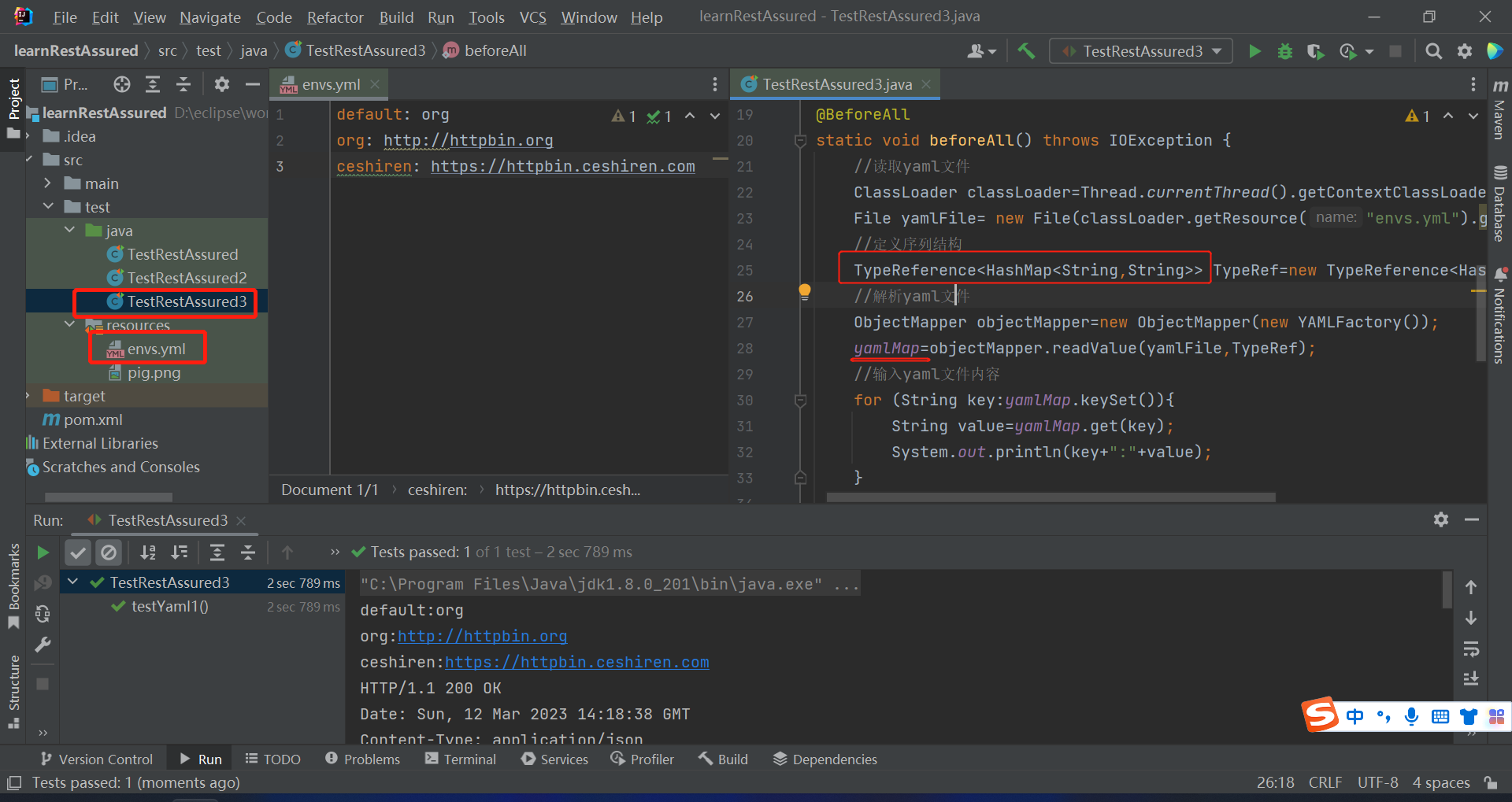
读取yaml文件
import com.fasterxml.jackson.core.type.TypeReference;
import com.fasterxml.jackson.databind.ObjectMapper;
import com.fasterxml.jackson.dataformat.yaml.YAMLFactory;

import io.restassured.RestAssured;
import org.junit.jupiter.api.BeforeAll;
import org.junit.jupiter.api.Test;

import java.io.File;
import java.io.IOException;
import java.util.HashMap;

import static io.restassured.RestAssured.given;

public class TestRestAssured3 {
    private static HashMap<String,String> yamlMap;

    @BeforeAll
    static void beforeAll() throws IOException {
        //读取yaml文件
        ClassLoader classLoader=Thread.currentThread().getContextClassLoader();
        File yamlFile= new File(classLoader.getResource("envs.yml").getFile());
        //定义序列结构
        TypeReference<HashMap<String,String>> TypeRef=new TypeReference<HashMap<String,String>>(){};
        //解析yaml文件
        ObjectMapper objectMapper=new ObjectMapper(new YAMLFactory());
        yamlMap=objectMapper.readValue(yamlFile,TypeRef);
        //输入yaml文件内容
        for (String key:yamlMap.keySet()){
            String value=yamlMap.get(key);
            System.out.println(key+":"+value);
        }
    }
    @Test
    void testYaml1(){
        RestAssured.baseURI = yamlMap.get(yamlMap.get("default"));

        given()
        .when()
                .get("/get")
        .then()
                .log().all()
                .statusCode(200);
    }

}

 浙公网安备 33010602011771号