
Vue 状态管理 Pinia 在UNI-APP下使用说明
状态管理 Pinia
此功能和VUEX类似,局有全站通用状态共享的特性。
在 HBuilder X 下不需要安装,直接使用即可,步骤如下:
第一步:在 main.js 中引入插件:
import { createSSRApp } from 'vue';
import * as Pinia from 'pinia';

export function createApp() {
    const app = createSSRApp(App);
    app.use(Pinia.createPinia());
    return {
        app,
        Pinia, // 此处必须将 Pinia 返回
    };
}
第二步:编写共享状态代码,模板如下:
// stores/counter.js
import { defineStore } from 'pinia';

// 这里的 counter 似乎没有作用,可以更换成任意名称。
export const useCounterStore = defineStore('counter', {
    // 定义要状态数据
    state: () => {
        return { count: 0 }; // 这里可以放入多个共享数据,比如: {count: 0, operator: '+'}
    },
    // 也可以这样定义
    // state: () => ({ count: 0 })
    // 定义方法
    actions: {
        increment() {
            this.count++;
        },
    },
});
第三步:在页面中调用共享数据:
import { useCounterStore } from '@/stores/counter';

export default {
    setup() {
        const counter = useCounterStore();
        // 它的赋值与取值比VUEX更方便,同时值也是响应式的
        counter.count++;
        // 或者使用方法修改数据 actions
        counter.increment();
    },
};
示例:
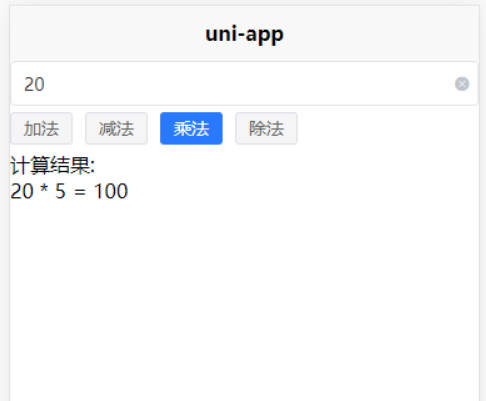
/stores/counter.js
import {
    defineStore
} from 'pinia';

export const useCounterStore = defineStore('counter', {
    // 定义要状态数据
    state: () => {
        return {
            count: 0,
            operator: '+'
        };
    },

    // 定义与状态数据相关的方法
    actions: {
        // 计算
        calculation(x){
            if(this.operator==='+')
                return this.add(x)
            if(this.operator==='-')
                return this.reduce(x)
            if(this.operator==='*')
                return this.ride(x)
            if(this.operator==='/')
                return this.division(x)
        },
        // 乘
        ride(x) {
            this.count *= x
            console.log(456);
        },
        // 除
        division(x){
            this.count /= x
        },
        // 加
        add(x) {
            this.count += x
        },
        // 减
        reduce(x) {
            this.count = this.count - x
        }
    },
});
index.vlue
<template>
    <uni-easyinput v-model="number" type="number" inputBorder placeholder="请输入数字">
    </uni-easyinput>

    <uni-data-checkbox v-model="counterStore.operator" :localdata="selectConfig" mode="tag">
    </uni-data-checkbox>

    <view>
        计算结果:{{js}}<br />
        {{number}} {{counterStore.operator}} 5 = {{counterStore.count}}
    </view>
</template>

<script setup>
    import {
        ref,
        computed
    } from 'vue'

    /// 一。它是响应式的
    import {
        useCounterStore
    } from '@/stores/counter.js'
    var counterStore = useCounterStore()

    const selectConfig = [{
        "value": "+",
        "text": "加法"
    }, {
        "value": "-",
        "text": "减法"
    }, {
        "value": "*",
        "text": "乘法"
    }, {
        "value": "/",
        "text": "除法"
    }]

    const number = ref(0)

    const js = computed(() => {
        counterStore.operator
        counterStore.count = parseFloat(number.value)
        counterStore.calculation(5)
    })
</script>

 浙公网安备 33010602011771号