5.15日报
今天上午体育课,我的是乒乓 上次组内排队侥幸走到了第三(七个人)今天重新打乱排名我得了第五名。说实话是不服的因为六局比赛我有三个对手都打了三局实在是太累 不过还好5号排名还属于B档,而且十六周比赛更好打一点
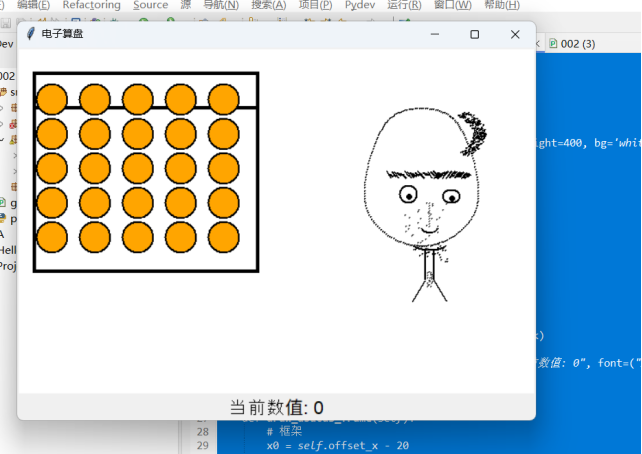
python课,主要学习了图像可视化。
`import tkinter as tk
class AbacusApp:
def init(self, root):
self.root = root
self.root.title("电子算盘")
self.canvas = tk.Canvas(root, width=600, height=400, bg='white')
self.canvas.pack()
# 珠子参数
self.rows = 5
self.cols = 5
self.bead_radius = 18
self.beads = [] # 保存珠子状态
self.bead_positions = []
self.offset_x = 40
self.offset_y = 60
self.col_gap = 50
self.row_gap = 40
self.draw_abacus_frame()
self.draw_beads()
self.canvas.bind('
self.draw_portrait()
self.value_label = tk.Label(root, text="当前数值: 0", font=("Arial", 16))
self.value_label.pack()
self.update_value()
def draw_abacus_frame(self):
# 框架
x0 = self.offset_x - 20
y0 = self.offset_y - 30
x1 = self.offset_x + self.col_gap * (self.cols-1) + 40
y1 = self.offset_y + self.row_gap * (self.rows-1) + 40
self.canvas.create_rectangle(x0, y0, x1, y1, width=4)
# 横梁
self.canvas.create_line(x0, y0+40, x1, y0+40, width=4)
def draw_beads(self):
self.beads = []
self.bead_positions = []
for row in range(self.rows):
bead_row = []
pos_row = []
for col in range(self.cols):
# 上面一排珠子
if row == 0:
x = self.offset_x + col * self.col_gap
y = self.offset_y
else:
x = self.offset_x + col * self.col_gap
y = self.offset_y + 40 + (row-1) * self.row_gap
bead = self.canvas.create_oval(x-self.bead_radius, y-self.bead_radius,
x+self.bead_radius, y+self.bead_radius,
fill='orange', outline='black', width=2)
bead_row.append(bead)
pos_row.append([x, y])
self.beads.append(bead_row)
self.bead_positions.append(pos_row)
def on_click(self, event):
# 检查是否点到珠子,点到则上下移动,不能移出框
for row in range(self.rows):
for col in range(self.cols):
bead = self.beads[row][col]
x, y = self.bead_positions[row][col]
if (event.x - x) ** 2 + (event.y - y) ** 2 <= self.bead_radius ** 2:
if row == 0:
# 上排珠子只能下移一次
if y == self.offset_y:
new_y = y + 40
self.canvas.move(bead, 0, 40)
self.bead_positions[row][col][1] = new_y
self.update_value()
else:
# 下排珠子只能上移一次
expected_y = self.offset_y + 40 + (row-1) * self.row_gap
if y == expected_y:
new_y = y - 40
self.canvas.move(bead, 0, -40)
self.bead_positions[row][col][1] = new_y
self.update_value()
return
def draw_portrait(self):
# 素描风格头像,点线结合
base_x = 340
base_y = 60
# 脸轮廓(用点模拟素描感)
for t in range(0, 360, 2):
import math
angle = math.radians(t)
r_x = 65 + 5 * math.sin(3angle)
r_y = 85 + 5 * math.cos(2angle)
x = base_x+130 + r_x * math.cos(angle)
y = base_y+90 + r_y * math.sin(angle)
self.canvas.create_oval(x, y, x+1, y+1, fill='black', outline='')
# 头发(顶部密集点)
import random
for i in range(300):
angle = random.uniform(-0.8, 0.8)
r = random.uniform(60, 75)
x = base_x+130 + r * math.cos(angle)
y = base_y+40 + r * math.sin(angle)0.5
self.canvas.create_oval(x, y, x+1, y+1, fill='black', outline='')
# 眉毛
for i in range(20):
self.canvas.create_line(base_x+90+i3, base_y+85+random.randint(-2,2), base_x+95+i3, base_y+90+random.randint(-2,2), width=2)
self.canvas.create_line(base_x+145+i2, base_y+90+random.randint(-2,2), base_x+150+i2, base_y+85+random.randint(-2,2), width=2)
# 眼睛
self.canvas.create_oval(base_x+105, base_y+100, base_x+125, base_y+120, outline='black', width=2)
self.canvas.create_oval(base_x+155, base_y+105, base_x+175, base_y+120, outline='black', width=2)
self.canvas.create_oval(base_x+113, base_y+110, base_x+119, base_y+116, fill='black')
self.canvas.create_oval(base_x+163, base_y+112, base_x+169, base_y+118, fill='black')
# 鼻梁
for i in range(10):
self.canvas.create_line(base_x+140, base_y+120+i3, base_x+138, base_y+122+i*3, width=1)
# 鼻头
self.canvas.create_arc(base_x+130, base_y+140, base_x+150, base_y+155, start=200, extent=140, style=tk.ARC, width=2)
# 嘴巴
self.canvas.create_arc(base_x+120, base_y+160, base_x+160, base_y+175, start=200, extent=140, style=tk.ARC, width=2)
# 胡须(点状)
for i in range(60):
x = base_x+120+random.randint(0,40)
y = base_y+170+random.randint(0,18)
if 130 < x < 170 or random.random() < 0.5:
self.canvas.create_oval(x, y, x+1, y+1, fill='black', outline='')
# 脸部阴影
for i in range(80):
x = base_x+110+random.randint(0,50)
y = base_y+120+random.randint(0,60)
if (x- (base_x+130))2/1600 + (y-(base_y+120))2/3600 > 1:
continue
if random.random() < 0.5:
self.canvas.create_oval(x, y, x+1, y+1, fill='#444', outline='')
# 脖子
self.canvas.create_line(base_x+135, base_y+175, base_x+135, base_y+210, width=2)
self.canvas.create_line(base_x+145, base_y+175, base_x+145, base_y+210, width=2)
# 衣领
self.canvas.create_line(base_x+135, base_y+210, base_x+120, base_y+235, width=2)
self.canvas.create_line(base_x+145, base_y+210, base_x+160, base_y+235, width=2)
# 颈部阴影
for i in range(20):
x = base_x+137+random.randint(0,6)
y = base_y+200+random.randint(0,20)
self.canvas.create_oval(x, y, x+1, y+1, fill='#444', outline='')
def update_value(self):
# 计算当前算盘的数值
value = 0
for col in range(self.cols):
col_value = 0
# 上珠:如果在下方(被拨下),算5
x, y = self.bead_positions[0][col]
if y > self.offset_y:
col_value += 5
# 下珠:每颗在上方(被拨上)算1
for row in range(1, self.rows):
x, y = self.bead_positions[row][col]
if y < self.offset_y + 40 + (row-1) * self.row_gap:
col_value += 1
# 每列权重:从右到左分别是1, 10, 100, ...
value += col_value * (10 ** (self.cols - col - 1))
self.value_label.config(text=f"当前数值: {value}")
if name == 'main':
root = tk.Tk()
app = AbacusApp(root)
root.mainloop()
`

 浙公网安备 33010602011771号