

Linux中du命令,tree命令和realpath学习
1,Linux下du命令详解
Du 是Disk Usage 的缩写,Linux上最受欢迎的命令之一,它是用来估算文件或目录占用磁盘空间,也是基础的命令。
1.1 du 命令及其语法
用法如下:
Usage: du [OPTION]... [FILE]...
       du [OPTION]... --files0-from=F
语法如下:
用法:du [选项]... [文件]...
 或:du [选项]... --files0-from=F
Summarize disk usage of the set of FILEs, recursively for directories.

必选参数对长短选项同时适用。
  -0, --null            end each output line with NUL, not newline
  -a, --all             write counts for all files, not just directories
      --apparent-size   print apparent sizes, rather than disk usage; although
                          the apparent size is usually smaller, it may be
                          larger due to holes in ('sparse') files, internal
                          fragmentation, indirect blocks, and the like
  -B, --block-size=SIZE  scale sizes by SIZE before printing them; e.g.,
                           '-BM' prints sizes in units of 1,048,576 bytes;
                           see SIZE format below
  -b, --bytes           equivalent to '--apparent-size --block-size=1'
  -c, --total           produce a grand total
  -D, --dereference-args  dereference only symlinks that are listed on the
                          command line
  -d, --max-depth=N     print the total for a directory (or file, with --all)
                          only if it is N or fewer levels below the command
                          line argument;  --max-depth=0 is the same as
                          --summarize
      --files0-from=F   summarize disk usage of the
                          NUL-terminated file names specified in file F;
                          if F is -, then read names from standard input
  -H                    equivalent to --dereference-args (-D)
  -h, --human-readable  print sizes in human readable format (e.g., 1K 234M 2G)
      --inodes          list inode usage information instead of block usage
  -k                    like --block-size=1K
  -L, --dereference     dereference all symbolic links
  -l, --count-links     count sizes many times if hard linked
  -m                    like --block-size=1M
  -P, --no-dereference  don't follow any symbolic links (this is the default)
  -S, --separate-dirs   for directories do not include size of subdirectories
      --si              like -h, but use powers of 1000 not 1024
  -s, --summarize       display only a total for each argument
  -t, --threshold=SIZE  exclude entries smaller than SIZE if positive,
                          or entries greater than SIZE if negative
      --time            show time of the last modification of any file in the
                          directory, or any of its subdirectories
      --time=WORD       show time as WORD instead of modification time:
                          atime, access, use, ctime or status
      --time-style=STYLE  show times using STYLE, which can be:
                            full-iso, long-iso, iso, or +FORMAT;
                            FORMAT is interpreted like in 'date'
  -X, --exclude-from=FILE  exclude files that match any pattern in FILE
      --exclude=PATTERN    exclude files that match PATTERN
  -x, --one-file-system    skip directories on different file systems
      --help            显示此帮助信息并退出
      --version         显示版本信息并退出
常用的选项如下:
-a: 显示目录中所有文件以及文件夹大小

-h: 以 Kb、Mb 、Gb 等易读的单位显示大小

--si: 类似 -h 选项,但是计算是用 1000 为基数而不是1024

-s: 显示目录总大小

-d: 是 --max-depth=N 选项的简写,表示深入到第几层目录,超过指定层数目录则忽略

-c: 除了显示目录大小外,额外一行显示总占用量

--time: 显示每一个目录下最近修改文件的时间

-t: 是 --threshold=SIZE 的简写,过滤掉小于 SIZE 大小的文件以及目录

--exclude=PATTERN:过滤与 PATTERN 匹配的文件名或者目录名
1.2 基础用法:获取目录总大小
如果只需要子目录及子目录下文件的大小,通过 -s 选项获取目录总大小。
2,Linux下tree命令详解
Linux tree命令用于以树状图列出目录的内容。执行tree指令,它会列出指定目录下的所有文件,包括子目录里的文件。
Tree -a
-a标志可以显示隐藏文件。
Tree -f
-f 标志列出每个子目录和文件的完整路径内容。
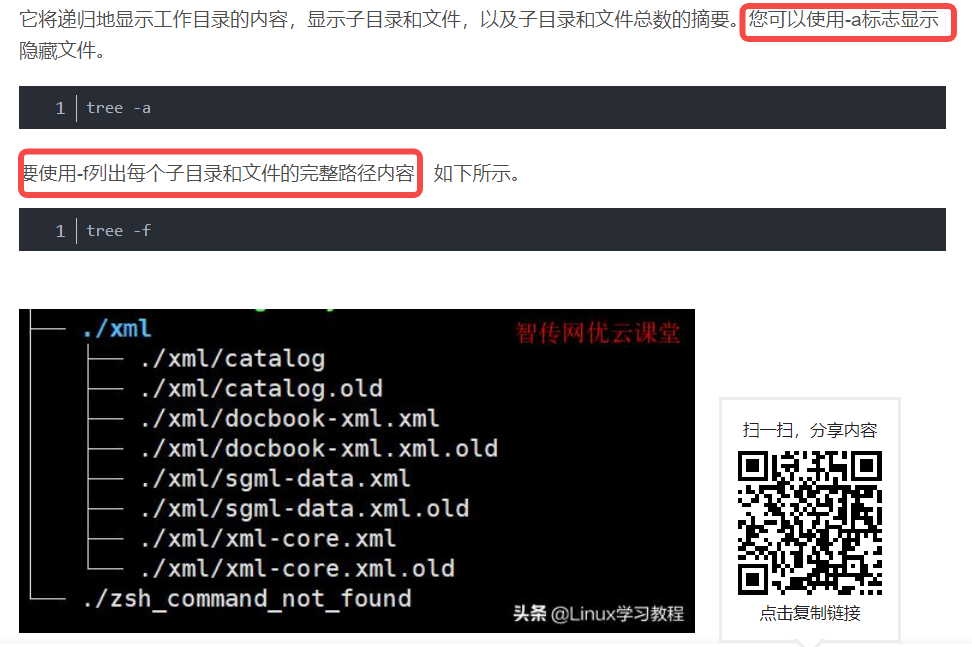
Tree -L
使用-L 选项指定目录树的最大显示深度。例如,希望深度为二,额可以运行以下命令:
tree -f -L 2
Tree -P
3,Linux下realpath命令详解
命令简介:realpath 用于获取指定目录或文件的绝对路径。
虽然编写Shell脚本中,通常会使用相对路径来指明文件,但有时候,我们需要绝对路径,这时候可以使用realpath来获取。
命令格式:
realpath [OPTIONS] FILES
不经一番彻骨寒 怎得梅花扑鼻香

 浙公网安备 33010602011771号