

excel数据转js级联数据格式方法
步骤:
一. 拿到的数据是excel数据,先用excel的下拉复制转成js数据,将js数据放到vscode中全局删除空格。
excel数据如下图:
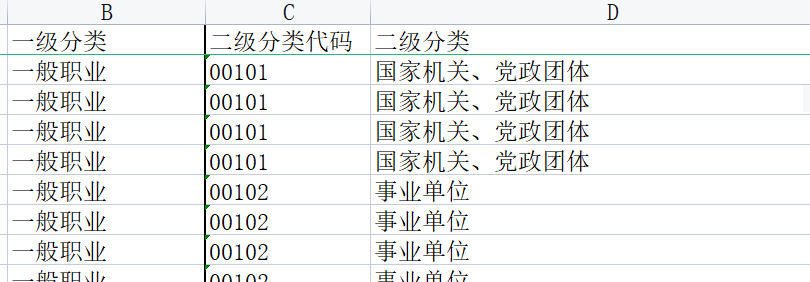
利用excel下拉功能,插入js代码(如下图)。插入完成之后,复制整个excel内容到js文件,然后全局删除空格。
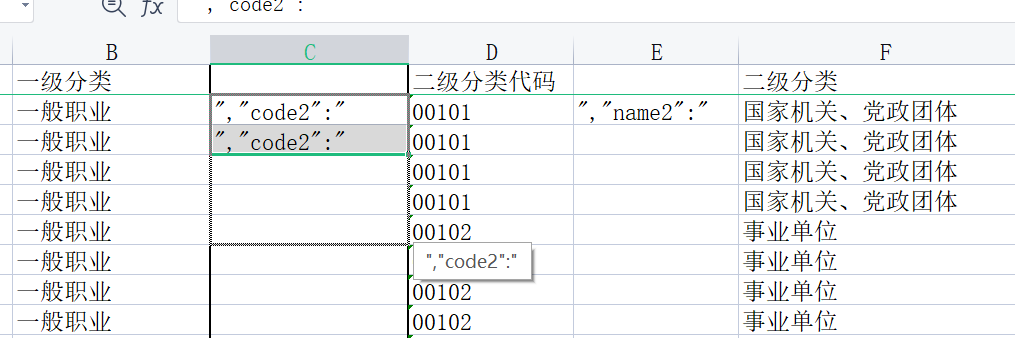
得到数据格式:
1 [{ "code1": "001", "name1": "一般职业", "code2": "00101", "name2": "国家机关、党政团体", "code3": "00101001", "name3": "国家机关、党政团体单位负责人(不从事风险工作)", "businessCode": "1" },
2 { "code1": "001", "name1": "一般职业", "code2": "00101", "name2": "国家机关、党政团体", "code3": "00101002", "name3": "国家机关、党政团体单位职员(内勤)", "businessCode": "1" },
3 { "code1": "001", "name1": "一般职业", "code2": "00101", "name2": "国家机关、党政团体", "code3": "00101003", "name3": "国家机关、党政团体单位职员(外勤)", "businessCode": "2" },
4 { "code1": "001", "name1": "一般职业", "code2": "00101", "name2": "国家机关、党政团体", "code3": "00101004", "name3": "国家机关、党政团体单位职员(司机或维修人员)", "businessCode": "3" },
5 { "code1": "001", "name1": "一般职业", "code2": "00102", "name2": "事业单位", "code3": "00102001", "name3": "事业单位负责人(不从事风险工作)", "businessCode": "1" },6 { "code1": "002", "name1": "农牧渔业", "code2": "00201", "name2": "农业生产人员", "code3": "00201002", "name3": "啤酒花生产工", "businessCode": "2" },
7 { "code1": "002", "name1": "农牧渔业", "code2": "00201", "name2": "农业生产人员", "code3": "00201003", "name3": "作物种子繁育工", "businessCode": "2" },]
二. 转级联数据的方法


gogogo() {
  // let aa = {};
  // let arr = rateTable;
  // for (var i = 0; i < arr.length; i++) {
  //   let num = ((Math.floor(i / 4) + 1) % 10) * 10 + "";
  //   if (!aa[num]) {
  //     aa[num] = {};
  //     if (arr[i].businessType == "1,2") {
  //       if (!aa[num][1 + ""]) {
  //         aa[num][1 + ""] = 0;
  //         aa[num][2 + ""] = 0;
  //       }
  //       aa[num][1 + ""] += parseInt(arr[i].amount);
  //       aa[num][2 + ""] += parseInt(arr[i].amount);
  //     } else {
  //       if (!aa[num][arr[i].businessType + ""]) {
  //         aa[num][arr[i].businessType + ""] = 0;
  //       }
  //       aa[num][arr[i].businessType + ""] += parseInt(arr[i].amount);
  //     }
  //   } else {
  //     if (arr[i].businessType == "1,2") {
  //       if (!aa[num][1 + ""]) {
  //         aa[num][1 + ""] = 0;
  //         aa[num][2 + ""] = 0;
  //       }
  //       aa[num][1 + ""] += parseInt(arr[i].amount);
  //       aa[num][2 + ""] += parseInt(arr[i].amount);
  //     } else {
  //       if (!aa[num][arr[i].businessType + ""]) {
  //         aa[num][arr[i].businessType + ""] = 0;
  //       }
  //       aa[num][arr[i].businessType + ""] += parseInt(arr[i].amount);
  //     }
  //   }
  // }
  let aa = [];
  let arr = business;
  for (var i = 0; i < arr.length; i++) {
    if (arr[i].businessCode === "6" || arr[i].businessCode === "7") {
      continue;
    }
    let find1 = aa.find((val) => {
      return val.code === arr[i].code1;
    });
    if (!find1) {
      // 加code1
      let obj1 = {
        name: arr[i].name1,
        code: arr[i].code1,
        items: [
          {
            name: arr[i].name2,
            code: arr[i].code2,
            items: [
              {
                name: arr[i].name3,
                code: arr[i].code3,
                businessCode: arr[i].businessCode,
              },
            ],
          },
        ],
      };
      aa.push(obj1);
      // 没有code1,那么肯定没有code2,code3,直接添加
    } else {
      // 有code1
      if (!find1.items) find1.items = [];
      let bb = find1.items;
      let find2 = bb.find((val) => {
        return val.code === arr[i].code2;
      });
      if (!find2) {
        // 没有找着对应的items,表示第一次有对应item,直接push完整
        bb.push({
          name: arr[i].name2,
          code: arr[i].code2,
          items: [
            {
              name: arr[i].name3,
              code: arr[i].code3,
              businessCode: arr[i].businessCode,
            },
          ],
        });
      } else {
        if (!find2.items) find2.items = [];
        let cc = find2.items;
        let find3 = cc.find((val) => {
          return val.code === arr[i].code3;
        });
        if (!find3) {
          cc.push({
            name: arr[i].name3,
            code: arr[i].code3,
            businessCode: arr[i].businessCode,
          });
        } else {
        }
      }
    }
  }

  console.log(JSON.stringify(aa));
  var saveAs =
    saveAs ||
    (function (view) {
      "use strict";
      // IE <10 is explicitly unsupported
      if (
        typeof view === "undefined" ||
        (typeof navigator !== "undefined" &&
          /MSIE [1-9]\./.test(navigator.userAgent))
      ) {
        return;
      }
      var doc = view.document,
        // only get URL when necessary in case Blob.js hasn't overridden it yet
        get_URL = function () {
          return view.URL || view.webkitURL || view;
        },
        save_link = doc.createElementNS(
          "http://www.w3.org/1999/xhtml",
          "a"
        ),
        can_use_save_link = "download" in save_link,
        click = function (node) {
          var event = new MouseEvent("click");
          node.dispatchEvent(event);
        },
        is_safari = /constructor/i.test(view.HTMLElement) || view.safari,
        is_chrome_ios = /CriOS\/[\d]+/.test(navigator.userAgent),
        throw_outside = function (ex) {
          (view.setImmediate || view.setTimeout)(function () {
            throw ex;
          }, 0);
        },
        force_saveable_type = "application/octet-stream",
        // the Blob API is fundamentally broken as there is no "downloadfinished" event to subscribe to
        arbitrary_revoke_timeout = 1000 * 40, // in ms
        revoke = function (file) {
          var revoker = function () {
            if (typeof file === "string") {
              // file is an object URL
              get_URL().revokeObjectURL(file);
            } else {
              // file is a File
              file.remove();
            }
          };
          setTimeout(revoker, arbitrary_revoke_timeout);
        },
        dispatch = function (filesaver, event_types, event) {
          event_types = [].concat(event_types);
          var i = event_types.length;
          while (i--) {
            var listener = filesaver["on" + event_types[i]];
            if (typeof listener === "function") {
              try {
                listener.call(filesaver, event || filesaver);
              } catch (ex) {
                throw_outside(ex);
              }
            }
          }
        },
        auto_bom = function (blob) {
          // prepend BOM for UTF-8 XML and text/* types (including HTML)
          // note: your browser will automatically convert UTF-16 U+FEFF to EF BB BF
          if (
            /^\s*(?:text\/\S*|application\/xml|\S*\/\S*\+xml)\s*;.*charset\s*=\s*utf-8/i.test(
              blob.type
            )
          ) {
            return new Blob([String.fromCharCode(0xfeff), blob], {
              type: blob.type,
            });
          }
          return blob;
        },
        FileSaver = function (blob, name, no_auto_bom) {
          if (!no_auto_bom) {
            blob = auto_bom(blob);
          }
          // First try a.download, then web filesystem, then object URLs
          var filesaver = this,
            type = blob.type,
            force = type === force_saveable_type,
            object_url,
            dispatch_all = function () {
              dispatch(
                filesaver,
                "writestart progress write writeend".split(" ")
              );
            },
            // on any filesys errors revert to saving with object URLs
            fs_error = function () {
              if (
                (is_chrome_ios || (force && is_safari)) &&
                view.FileReader
              ) {
                // Safari doesn't allow downloading of blob urls
                var reader = new FileReader();
                reader.onloadend = function () {
                  var url = is_chrome_ios
                    ? reader.result
                    : reader.result.replace(
                      /^data:[^;]*;/,
                      "data:attachment/file;"
                    );
                  var popup = view.open(url, "_blank");
                  if (!popup) view.location.href = url;
                  url = undefined; // release reference before dispatching
                  filesaver.readyState = filesaver.DONE;
                  dispatch_all();
                };
                reader.readAsDataURL(blob);
                filesaver.readyState = filesaver.INIT;
                return;
              }
              // don't create more object URLs than needed
              if (!object_url) {
                object_url = get_URL().createObjectURL(blob);
              }
              if (force) {
                view.location.href = object_url;
              } else {
                var opened = view.open(object_url, "_blank");
                if (!opened) {
                  // Apple does not allow window.open, see https://developer.apple.com/library/safari/documentation/Tools/Conceptual/SafariExtensionGuide/WorkingwithWindowsandTabs/WorkingwithWindowsandTabs.html
                  view.location.href = object_url;
                }
              }
              filesaver.readyState = filesaver.DONE;
              dispatch_all();
              revoke(object_url);
            };
          filesaver.readyState = filesaver.INIT;

          if (can_use_save_link) {
            object_url = get_URL().createObjectURL(blob);
            setTimeout(function () {
              save_link.href = object_url;
              save_link.download = name;
              click(save_link);
              dispatch_all();
              revoke(object_url);
              filesaver.readyState = filesaver.DONE;
            });
            return;
          }

          fs_error();
        },
        FS_proto = FileSaver.prototype,
        saveAs = function (blob, name, no_auto_bom) {
          return new FileSaver(
            blob,
            name || blob.name || "download",
            no_auto_bom
          );
        };
      // IE 10+ (native saveAs)
      if (typeof navigator !== "undefined" && navigator.msSaveOrOpenBlob) {
        return function (blob, name, no_auto_bom) {
          name = name || blob.name || "download";

          if (!no_auto_bom) {
            blob = auto_bom(blob);
          }
          return navigator.msSaveOrOpenBlob(blob, name);
        };
      }

      FS_proto.abort = function () { };
      FS_proto.readyState = FS_proto.INIT = 0;
      FS_proto.WRITING = 1;
      FS_proto.DONE = 2;

      FS_proto.error =
        FS_proto.onwritestart =
        FS_proto.onprogress =
        FS_proto.onwrite =
        FS_proto.onabort =
        FS_proto.onerror =
        FS_proto.onwriteend =
        null;

      return saveAs;
    })(
      (typeof self !== "undefined" && self) ||
      (typeof window !== "undefined" && window) ||
      this.content
    );
  var file = new File([JSON.stringify(aa)], "手机号.txt", {
    type: "text/plain;charset=utf-8",
  });
  saveAs(file);
  // fs.writeFile("./bu.js", JSON.stringify(aa), "utf-8");
},
三. 在html页面中调用 二 中的方法,可以下载级联数据到本地。
级联数据格式:
[
    {
        "name":"一般职业",
        "code":"001",
        "items":[
            {
                "name":"国家机关、党政团体",
                "code":"00101",
                "items":[
                    {
                        "name":"国家机关、党政团体单位负责人(不从事风险工作)",
                        "code":"00101001",
                        "businessCode":"1"
                    },
                    {
                        "name":"国家机关、党政团体单位职员(内勤)",
                        "code":"00101002",
                        "businessCode":"1"
                    }
                ]
            }
        ]
    },
    {
     ...
    }
]

 浙公网安备 33010602011771号