Protocol Buffers 是一种灵活,高效,自动化机制的结构数据序列化方法-可类比 XML,但是比 XML 更小(3 ~ 10倍)、更快(20 ~ 100倍)、更为简单
链接:https://pan.baidu.com/s/1lG4FCJj-wJokQs1W8Wl32A?pwd=ssdz
提取码:ssdz
第一步: 通过pom.xml引用核心包 引用JAVA核心包与引用生成工具 配置如下
 1 <?xml version="1.0" encoding="UTF-8"?>
 2 <project xmlns="http://maven.apache.org/POM/4.0.0"
 3          xmlns:xsi="http://www.w3.org/2001/XMLSchema-instance"
 4          xsi:schemaLocation="http://maven.apache.org/POM/4.0.0 http://maven.apache.org/xsd/maven-4.0.0.xsd">
 5     <modelVersion>4.0.0</modelVersion>
 6
 7     <groupId>com.example</groupId>
 8     <artifactId>ProtocolBuffers001</artifactId>
 9     <version>1.0-SNAPSHOT</version>
10
11
12     <properties>
13         <protobuf-java.version>3.19.2</protobuf-java.version>
14         <maven.compiler.source>8</maven.compiler.source>
15         <maven.compiler.target>8</maven.compiler.target>
16     </properties>
17     <dependencies>
18     </dependencies>
19     <!--添加protobuf-maven-plugin-->
20     <build>
21         <!--第一步 引用plugin包 核心包-->
22         <extensions>
23             <extension>
24                 <groupId>kr.motd.maven</groupId>
25                 <artifactId>os-maven-plugin</artifactId>
26                 <version>1.7.0</version>
27             </extension>
28         </extensions>
29
30 <!--第二步 配置plugins插件 生成工具-->
31         <plugins>
32             <plugin>
33
34                 <!-- 引用plugins生成工具 -->
35                 <groupId>org.xolstice.maven.plugins</groupId>
36                 <artifactId>protobuf-maven-plugin</artifactId>
37                 <version>0.5.0</version>
38                 <configuration>
39                     <!-- 工具版本 -->
40                     <protocArtifact>com.google.protobuf:protoc:${protobuf-java.version}:exe:${os.detected.classifier}
41                     </protocArtifact>
42                     <!--默认值,xxxxx.proto源文件路径-->
43                     <protoSourceRoot>${project.basedir}/src/main/resources</protoSourceRoot>
44                     <!--默认值,xxxxx.proto输出xxxx.java文件路径 -->
45                     <outputDirectory>${project.basedir}/src/main/java</outputDirectory>
46                     <!--设置是否在生成java文件之前清空outputDirectory的文件,默认值为true,设置为false时也会覆盖同名文件-->
47                     <clearOutputDirectory>false</clearOutputDirectory>
48                 </configuration>
49
50             </plugin>
51
52         </plugins>
53     </build>
54 </project>
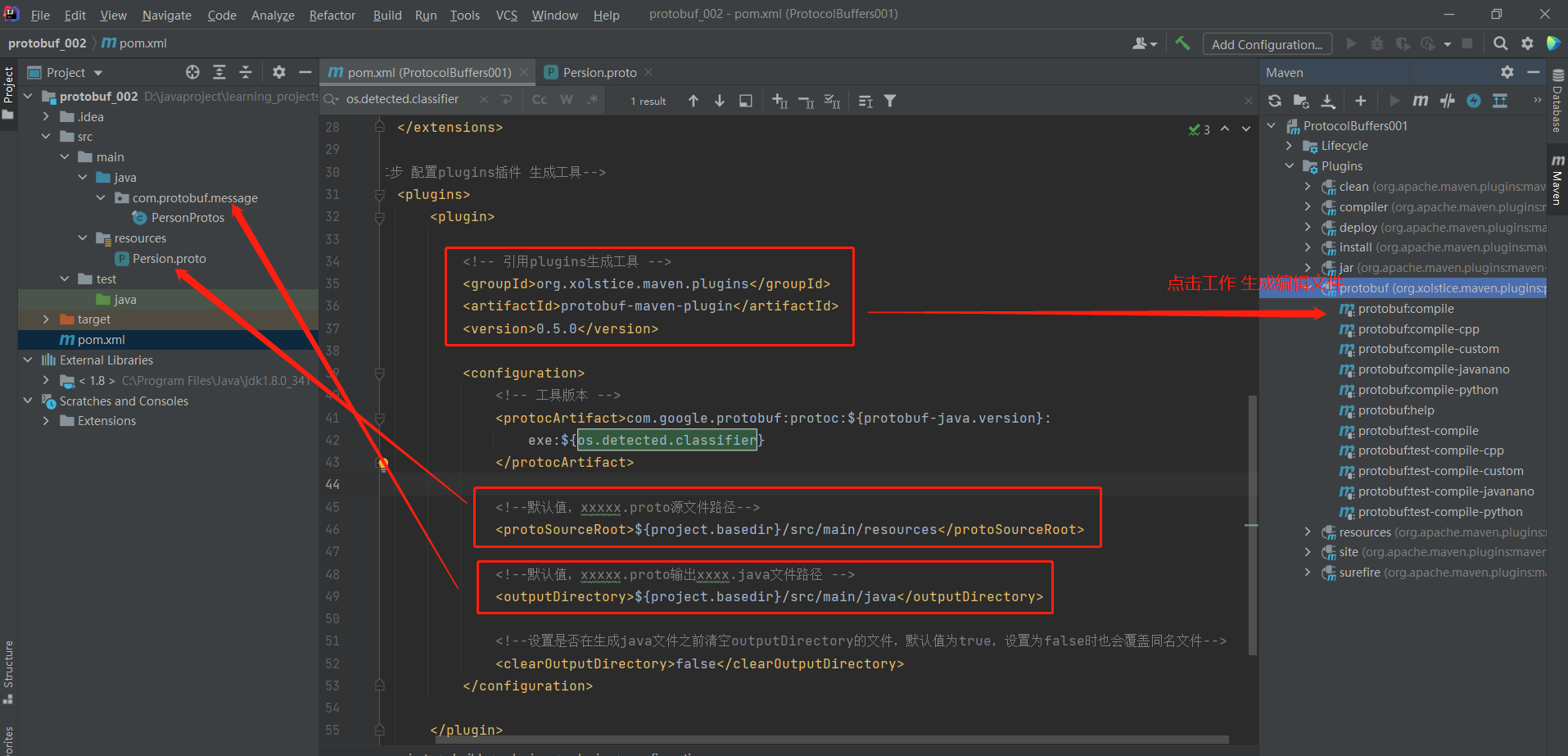
第二步:定义proto文件
 1 syntax = "proto3"; // 声明为protobuf 3定义文件
 2 package com.protobuf.message; // 声明生成消息类的java包路径
 3 option java_outer_classname = "PersonProtos";  // Person.proto 映身生成类名称  声明生成消息类的类名
 4
 5
 6 message Person {
 7   string name = 1;
 8   int32 id = 2;
 9   string email = 3;
10 }

import builder.User;
import com.protobuf.message.PersonProtos;

public class Test001 {

    public static void main(String[] args) {
        PersonProtos.Person person = PersonProtos.Person.newBuilder()
                .setId(678)
                .build();

        PersonProtos.Person.Builder builder = PersonProtos.Person.newBuilder();
        builder.setId(1234);
        PersonProtos.Person person2= builder.build();
        User.Builder ubuilder=new   User.Builder();
        ubuilder.setAge(12);
        ubuilder.setName("setName");
        User u=  ubuilder.build();


    }
}


 浙公网安备 33010602011771号