

用GDI+实现的改变窗体形状
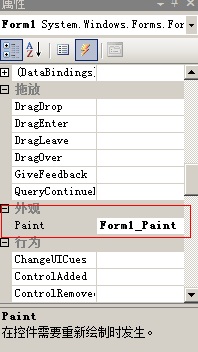
双击如上所示的事件,进入代码编辑窗口,输入如下代码:
using System;
using System.Collections.Generic;
using System.ComponentModel;
using System.Data;
using System.Drawing;
using System.Linq;
using System.Text;
using System.Windows.Forms;
using System.Drawing.Drawing2D; //首先要导入GDI+的命名空间
//********************************************************//
// 用GDI+实现的改变窗体形状 //
//*******************************************************//
namespace GDIwin
{
public partial class Form1 : Form
{
public Form1()
{
InitializeComponent();
}
private void Form1_Paint(object sender, PaintEventArgs e) //在控件要重绘时发时这个事件
{
GraphicsPath shape = new GraphicsPath(); // 构建形状对象
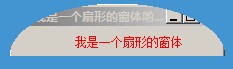
shape.AddPie(0,0,this.Width,this.Height,0,-180); //得到一个形状的类型(比如圆形,或扇形)
this.Region = new Region(shape); //将形状的类型给当前的窗体(或控件)
this.Text = "我是一个扇形的窗体哟。~";
this.label1.Text = "我是一个扇形的窗体";
this.label1.ForeColor = Color.Red;
}
}
}
运行后形状如图所示:

 浙公网安备 33010602011771号