


c#任务栏弹出提示窗体
1.新建窗体Form1,并设置界面好下:

Form1的代码如下:
using System;
using System.Collections.Generic;
using System.ComponentModel;
using System.Data;
using System.Drawing;
using System.Linq;
using System.Text;
using System.Windows.Forms;


namespace popWin
{
    public partial class Form1 : Form
    {
        public Form1()
        {
            InitializeComponent();
        }

        private void button1_Click(object sender, EventArgs e)
        {
          Form2 form=new Form2();  //构造弹出提示窗体
          form.HeightMax = 150;  //设置弹出提示窗体的最大高度
          form.WidthMax = 320; //设置弹出提示窗体的最大宽度
          form.ScrollShow();  //调用向上移动函数
        }

        private void Form1_Load(object sender, EventArgs e)
        {

        }
    }
}
1.新建窗体Form2,并设置界面好下:
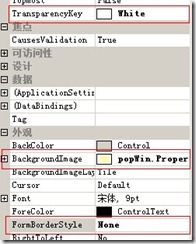

窗体设置完成界面如下:
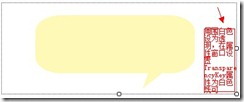

Form2的代码如下:
using System;
using System.Collections.Generic;
using System.ComponentModel;
using System.Data;
using System.Drawing;
using System.Linq;
using System.Text;
using System.Windows.Forms;

namespace popWin
{
    public partial class Form2 : Form
    {
        private int heightMax, widthMax;
        public int StayTime = 5000;
        public int HeightMax
        {
            set
            {
                heightMax = value;
            }
            get
            {
                return heightMax;
            }
        }
        public int WidthMax
        {
            set
            {
                widthMax = value;
            }
            get
            {
                return widthMax;
            }
        }


        public Form2()
        {
            InitializeComponent();
        }

        private void Form2_Load(object sender, EventArgs e)
        {
            Screen[] screens = Screen.AllScreens;     //得到所有显示器
            Screen screen = screens[0];                     //得到显示器对象
            this.Location=new Point(screen.WorkingArea.Width-widthMax,screen.WorkingArea.Height-this.Height);  //初始化当前的消息提示窗体的坐标位置
            this.timer2.Interval = StayTime;  //初始化第二个计时器 与第一个计时器的时间间隔
        }
        public void ScrollShow()    //向上移动显示函数
        {
            this.Height = 0;     //初始化当前移动窗体的高度
            this.Show();       //将其显示出来
            this.timer1.Enabled = true; //开始调用第一个计时器
        }

        private void timer1_Tick(object sender, EventArgs e)
        {
            ScrollUp();       //进入第一个计时器 ,调用向上移动函数。
        }

        private void ScrollUp()
        {

            if (this.Height < heightMax)  //判断当前的高度是不是小于最大高度,如果是的,就增加高度
            {
                this.Height = this.Height + 10;
                this.Location = new Point(this.Location.X, this.Location.Y - 10);  //设置当前窗体的坐标位置
            }
            else
            {
                this.timer1.Enabled = false;   //当前高度不小于最大高度时,就将计时器一禁用,启用计时器二
                this.timer2.Enabled = true;
            }
        }

        private void timer2_Tick(object sender, EventArgs e)
        {
            this.timer2.Enabled = false;        //禁用第二计时器,启用第三计时器
            this.timer3.Enabled = true;
        }

        private void timer3_Tick(object sender, EventArgs e)
        {
            ScrollDown();                           //计时器三调用向下移动窗体函数
        }

        private void ScrollDown()
        {
            if (this.Height > 3)        //当前的高度大于三以上时,就将当前的高度递减,小与三时,就将计时器三禁用,并关闭当前窗体
            {
                this.Height = this.Height - 10;
                this.Location = new Point(this.Location.X, this.Location.Y +10);   //得到当前的坐标位置
            }
            else
            {
                this.timer3.Enabled = false;
                this.Close();
            }
        }
    }
}
编译后运行结果如下:


 浙公网安备 33010602011771号