
一键排表!我的任务丸橙辣!
要求
1、可变动的:监考总人数、每人监考次数、科目、考场;
2、不可变的:每场2个人监考、每人能监考≤最大次数、每人每科目只有一场;
3、必须有的:生成一张表显示监考安排结果、生成一张表统计每位老师的每一科目监考情况和总数);
4、其他要求:尽量简化操作、尽量让每次使用需要的改动简单简短、程序可移动、可复制。
可能是一张效果图:

工具
- 软件:Excel(宏)
- 语言:VBA 7.1
- AI:通义 (代码模式用着就是香啊)
流程
1、要求描述
准确描述,从哪里“获取数据”,从哪里“搜索数据”,在哪里“生成数据”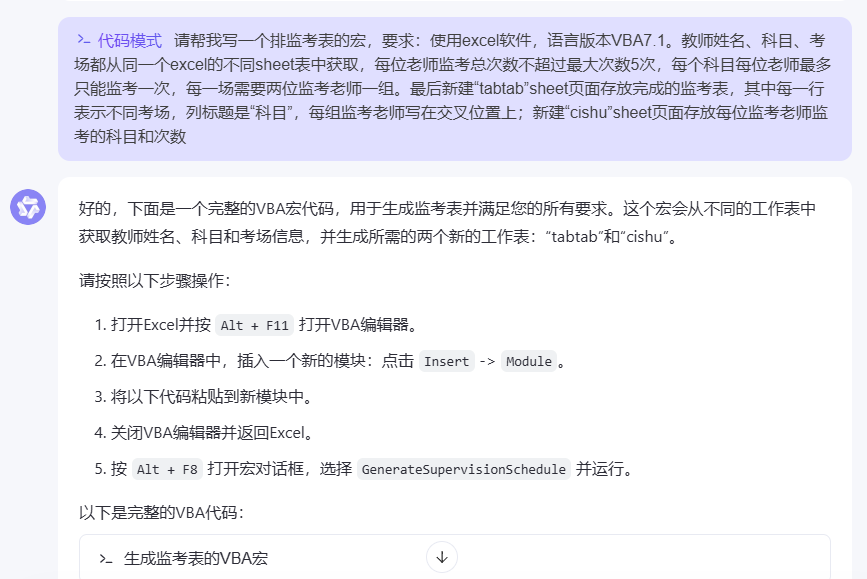
2、问题解决
这也是最重要的一点:当AI不知道怎么解决问题的时候,是需要人类告诉他怎么修改代码的😥
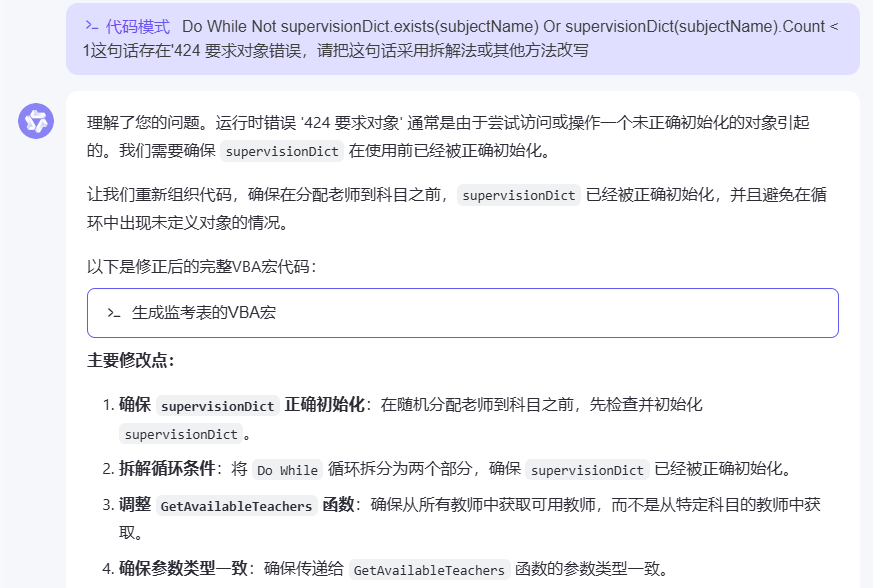
424要求对象错误
当 VBA 无法识别引用其属性或方法的对象时,它会显示“需要对象”错误。
简单来说,如果引用一个对象,但该对象的名称不正确(该对象不在VBA的对象层次结构中),则会显示错误424
❓ 可能的原因:打错对象名称、对象引用杂乱。
🌟 解决方法:参考百度回答找到了灵感,让通义用拆解法把长难句重写。
参考:
- 百度知道 https://zhidao.baidu.com/question/540872960.html
- Excel论坛 https://club.excelhome.net/thread-1569789-1-1.html
不支持Continue For
语句作用:立即将控制传递给循环的下一次迭代。
需要注意的是,虽然VB支持Continue For,但是VBA不支持。
🌟 解决方法:让通义重新写这部分循环。
参考:
- Microsoft Learn https://learn.microsoft.com/zh-cn/dotnet/visual-basic/language-reference/statements/continue-statement

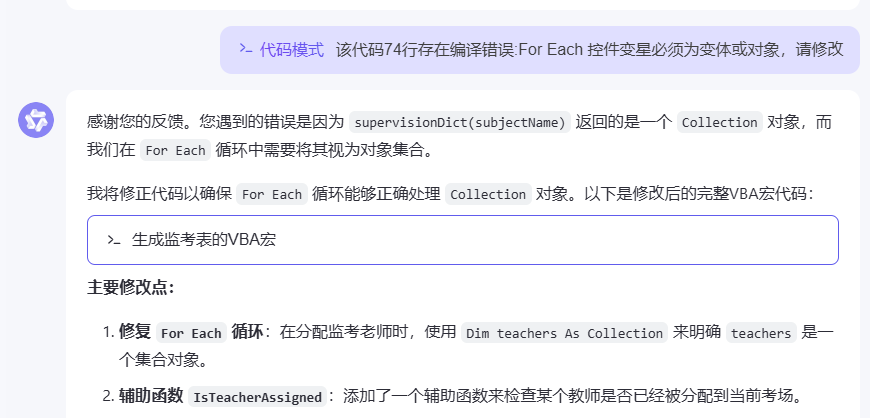
编译错误:For Each 控件
编译错误:For Each 控件变量必须为变体或对象:在VBA中,
For Each循环中的变量需要声明为Variant类型。
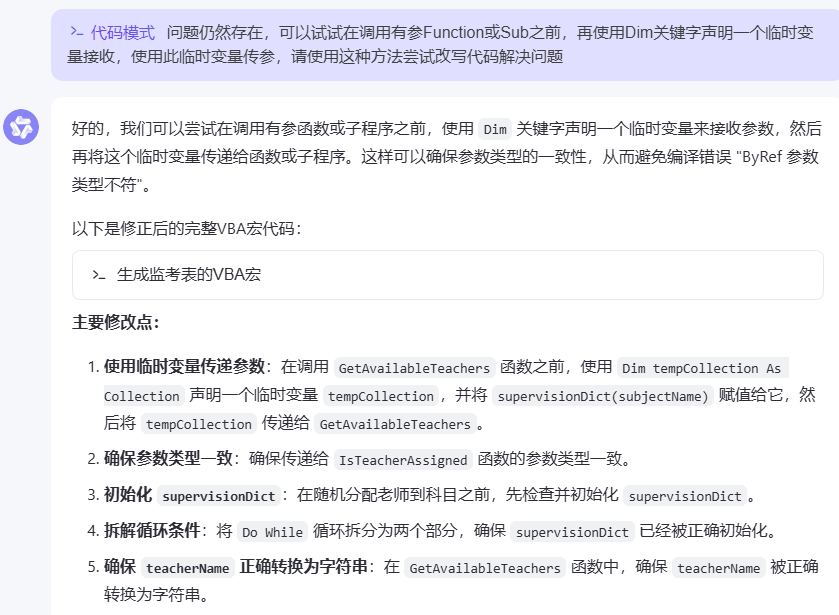
编译错误:ByRef参数类型不符
该错误通常是由于传递给函数或子过程的参数类型不匹配引起的,简单来说就是“类型不对”。
在VBA中写新函数时,除了形式参数本身在定义的时候就会
Dim一部分,另一部分前文出现过的变量仍然需要重新声明。
🌟 解决方法:找到新函数所使用的所有参数,重新Dim,然后编译,删除重复定义的参数。
参考:
- CSDN VBA·编译错误:ByRef参数类型不符 https://blog.csdn.net/qq_33391499/article/details/119792226
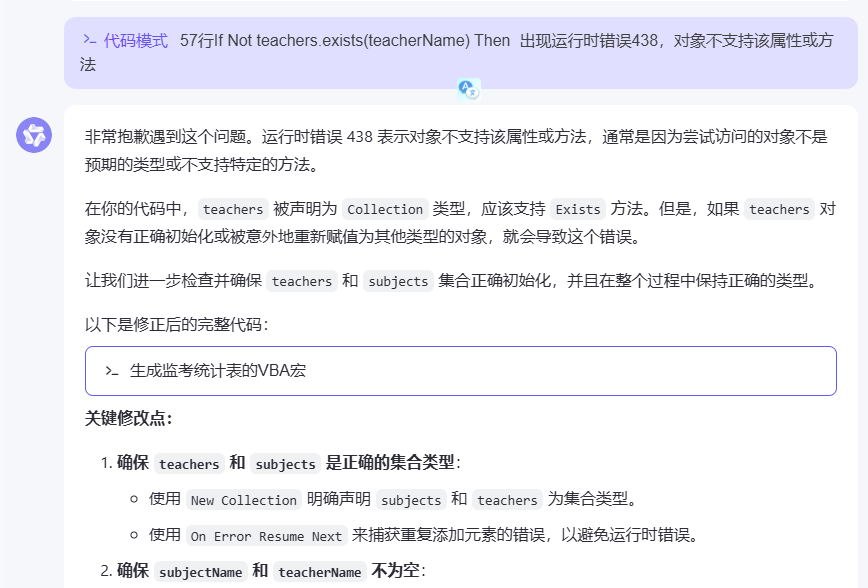
运行时错误438
运行时错误438,对象不支持该属性或方法。
可能是因为尝试访问的对象不是预期的类型或不支持特定的方法。通常是由于对象类型不正确或方法调用不当引起的。
🌟解决方法:重写。
3、代码附录
- 使用准备:新建一个启用宏的Excel工作表文件,这个文件中应该有3个sheet表。
- 在Teachers表格中填写两列,第一列是教师姓名NAME、第二列是最大监考次数maxExamCount;
- 在Subjects表格中填写一列科目名称;
- 在Classrooms表格中填写考场名称。
- 使用步骤:先执行第一个宏,生成一张监考表tabtab,然后执行第二个宏,对表中的内容进行计数,生成statisall
准备完成后,按照以下步骤将此代码粘贴到VBA编辑器中并运行:
- 打开Excel文件。
- 按 Alt + F11 打开VBA编辑器。
- 在VBA编辑器中,插入2个新的模块:点击 Insert -> Module。
- 将上述代码分别粘贴到新模块中。
- 关闭VBA编辑器。
- 返回Excel,按 Alt + F8 打开宏对话框,选择对应的宏并运行。
- 确保 Teachers、Classrooms 和 Subjects 工作表已经准备好并且格式正确。这样可以确保新的统计表能够正确地从这三个表中读取数据并生成所需的统计结果。
点击查看GenerateSupervisionSchedule(生成监考表)
Sub GenerateSupervisionSchedule()
    Dim wsTeachers As Worksheet, wsSubjects As Worksheet, wsClassrooms As Worksheet
    Dim wsTabtab As Worksheet
    Dim lastRowTeachers As Long, lastRowSubjects As Long, lastRowClassrooms As Long
    Dim i As Long, j As Long, k As Long, l As Long
    Dim teacherName As String, subjectName As String, classroomName As String
    Dim maxSupervisions As Integer
    Dim supervisionCount As Object
    Dim supervisionDict As Object
    Dim availableTeachers As Collection
    Dim randomIndex As Integer
    Dim assignedTeachers As Collection
    Dim allTeachers As Collection
    Dim subjects As Collection
    Dim teacherClassroomDict As Object
    Dim teacherGroupDict As Object

    ' 设置工作表
    On Error Resume Next
    Set wsTeachers = ThisWorkbook.Sheets("Teachers")
    Set wsSubjects = ThisWorkbook.Sheets("Subjects")
    Set wsClassrooms = ThisWorkbook.Sheets("Classrooms")
    On Error GoTo 0

    ' 检查工作表是否存在
    If wsTeachers Is Nothing Then
        MsgBox "工作表 'Teachers' 不存在!", vbCritical
        Exit Sub
    End If
    If wsSubjects Is Nothing Then
        MsgBox "工作表 'Subjects' 不存在!", vbCritical
        Exit Sub
    End If
    If wsClassrooms Is Nothing Then
        MsgBox "工作表 'Classrooms' 不存在!", vbCritical
        Exit Sub
    End If

    ' 创建或清除目标工作表
    On Error Resume Next
    Application.DisplayAlerts = False
    ThisWorkbook.Sheets("tabtab").Delete
    Application.DisplayAlerts = True
    On Error GoTo 0

    Set wsTabtab = ThisWorkbook.Sheets.Add(After:=ThisWorkbook.Sheets(ThisWorkbook.Sheets.Count))
    wsTabtab.Name = "tabtab"

    ' 初始化计数器
    Set supervisionCount = CreateObject("Scripting.Dictionary")
    Set supervisionDict = CreateObject("Scripting.Dictionary")
    Set teacherClassroomDict = CreateObject("Scripting.Dictionary")
    Set teacherGroupDict = CreateObject("Scripting.Dictionary")
    Set allTeachers = New Collection
    Set subjects = New Collection

    ' 获取最后一行
    lastRowTeachers = wsTeachers.Cells(wsTeachers.Rows.Count, "A").End(xlUp).Row
    lastRowSubjects = wsSubjects.Cells(wsSubjects.Rows.Count, "A").End(xlUp).Row
    lastRowClassrooms = wsClassrooms.Cells(wsClassrooms.Rows.Count, "A").End(xlUp).Row

    ' 填充监督次数字典和所有教师集合
    For i = 2 To lastRowTeachers
        teacherName = wsTeachers.Cells(i, 1).Value
        maxSupervisions = wsTeachers.Cells(i, 2).Value
        If Not supervisionCount.exists(teacherName) Then
            supervisionCount.Add teacherName, 0
        End If
        allTeachers.Add teacherName
    Next i

    ' 填充科目集合
    For i = 2 To lastRowSubjects
        subjectName = wsSubjects.Cells(i, 1).Value
        subjects.Add subjectName
    Next i

    ' 写入tabtab表头
    wsTabtab.Cells(1, 1).Value = "考场"
    For i = 1 To subjects.Count
        wsTabtab.Cells(1, i + 1).Value = subjects(i)
    Next i

    ' 分配监考老师
    Randomize
    For i = 2 To lastRowClassrooms
        classroomName = wsClassrooms.Cells(i, 1).Value
        wsTabtab.Cells(i, 1).Value = classroomName

        For j = 1 To subjects.Count
            subjectName = subjects(j)

            If Not supervisionDict.exists(subjectName) Then
                supervisionDict.Add subjectName, New Collection
            End If

            Set availableTeachers = GetAvailableTeachers(allTeachers, supervisionCount, teacherClassroomDict, teacherGroupDict, subjectName, wsClassrooms, wsTabtab, wsTeachers)

            If availableTeachers.Count >= 2 Then
                Set assignedTeachers = New Collection

                Do While assignedTeachers.Count < 2
                    randomIndex = Int((availableTeachers.Count * Rnd) + 1)
                    teacherName = CStr(availableTeachers(randomIndex))

                    If Not IsTeacherAssigned(assignedTeachers, teacherName) Then
                        assignedTeachers.Add teacherName
                        wsTabtab.Cells(i, j + 1).Value = wsTabtab.Cells(i, j + 1).Value & teacherName & ", "
                        supervisionCount(teacherName) = supervisionCount(teacherName) + 1

                        ' 更新教师考场字典
                        If Not teacherClassroomDict.exists(teacherName) Then
                            teacherClassroomDict.Add teacherName, New Collection
                        End If
                        teacherClassroomDict(teacherName).Add classroomName

                        ' 更新教师分组字典
                        If Not teacherGroupDict.exists(teacherName) Then
                            teacherGroupDict.Add teacherName, New Collection
                        End If
                        teacherGroupDict(teacherName).Add subjectName

                        ' 移除已分配的老师
                        availableTeachers.Remove randomIndex
                    End If
                Loop

                ' 移除多余的逗号
                If Right(wsTabtab.Cells(i, j + 1).Value, 2) = ", " Then
                    wsTabtab.Cells(i, j + 1).Value = Left(wsTabtab.Cells(i, j + 1).Value, Len(wsTabtab.Cells(i, j + 1).Value) - 2)
                End If
            Else
                MsgBox "无法为考场 " & classroomName & " 和科目 " & subjectName & " 分配足够的监考老师。", vbExclamation
            End If
        Next j
    Next i

    MsgBox "监考表已生成!"
End Sub

Function GetAvailableTeachers(teachers As Collection, supervisionCount As Object, teacherClassroomDict As Object, teacherGroupDict As Object, subjectName As String, wsClassrooms As Worksheet, wsTabtab As Worksheet, wsTeachers As Worksheet) As Collection
    Dim availableTeachers As New Collection
    Dim teacher As Variant
    Dim teacherName As String
    Dim wsSubjects As Worksheet

    For Each teacher In teachers
        teacherName = CStr(teacher)

        ' 获取最大监考次数
        Dim maxExamCount As Integer
        maxExamCount = GetMaxExamCount(teacherName, wsTeachers)

        If supervisionCount(teacherName) < maxExamCount And Not IsTeacherInSubjectGroups(teacherName, subjectName, teacherGroupDict) Then
            If Not teacherClassroomDict.exists(teacherName) Then
                availableTeachers.Add teacherName
            Else
                If IsTeacherAvailableForClassroom(teacherName, subjectName, teacherClassroomDict, wsTabtab) Then
                    availableTeachers.Add teacherName
                End If
            End If
        End If
    Next teacher

    Set GetAvailableTeachers = availableTeachers
End Function

Function GetMaxExamCount(teacherName As String, wsTeachers As Worksheet) As Integer
    Dim lastRow As Long
    Dim i As Long

    ' 确保 wsTeachers 不是 Nothing
    If wsTeachers Is Nothing Then
        GetMaxExamCount = 0
        Exit Function
    End If

    lastRow = wsTeachers.Cells(wsTeachers.Rows.Count, "A").End(xlUp).Row

    For i = 2 To lastRow
        If wsTeachers.Cells(i, 1).Value = teacherName Then
            GetMaxExamCount = wsTeachers.Cells(i, 2).Value
            Exit Function
        End If
    Next i

    GetMaxExamCount = 0
End Function

Function IsTeacherAssigned(teachers As Collection, teacherName As String) As Boolean
    Dim teacher As Variant
    For Each teacher In teachers
        If teacher = teacherName Then
            IsTeacherAssigned = True
            Exit Function
        End If
    Next teacher
    IsTeacherAssigned = False
End Function

Function IsTeacherInSubjectGroups(teacherName As String, subjectName As String, teacherGroupDict As Object) As Boolean
    If teacherGroupDict.exists(teacherName) Then
        Dim groups As Collection
        Set groups = teacherGroupDict(teacherName)

        Dim group As Variant
        For Each group In groups
            If group = subjectName Then
                IsTeacherInSubjectGroups = True
                Exit Function
            End If
        Next group
    End If

    IsTeacherInSubjectGroups = False
End Function

Function IsTeacherAvailableForClassroom(teacherName As String, subjectName As String, teacherClassroomDict As Object, wsTabtab As Worksheet) As Boolean
    Dim classrooms As Collection
    Dim classroom As Variant
    Dim cellValue As String
    Dim rowNumber As Long
    Dim colNumber As Long

    If teacherClassroomDict.exists(teacherName) Then
        Set classrooms = teacherClassroomDict(teacherName)

        For Each classroom In classrooms
            ' 查找考场对应的行号
            On Error Resume Next
            rowNumber = Application.Match(classroom, wsTabtab.Range("A:A"), 0)
            On Error GoTo 0
            If IsError(rowNumber) Then
                Debug.Print "考场 " & classroom & " 未找到"
                GoTo SkipLoopIteration
            End If

            ' 找到科目列的位置
            On Error Resume Next
            colNumber = Application.WorksheetFunction.Match(subjectName, wsTabtab.Rows(1), 0)
            On Error GoTo 0
            If IsError(colNumber) Then
                Debug.Print "科目 " & subjectName & " 未找到"
                GoTo SkipLoopIteration
            End If

            ' 获取单元格值
            cellValue = wsTabtab.Cells(rowNumber, colNumber).Value

            ' 检查教师是否已经在该考场中
            If InStr(cellValue, teacherName) > 0 Then
                IsTeacherAvailableForClassroom = False
                Exit Function
            End If

SkipLoopIteration:
        Next classroom
    End If

    IsTeacherAvailableForClassroom = True
End Function
点击查看GenerateSupervisionStatistics (统计人数)
Sub GenerateSupervisionStatistics()
    Dim wsTabtab As Worksheet
    Dim wsStatisall As Worksheet
    Dim wsTeachers As Worksheet
    Dim wsSubjects As Worksheet
    Dim lastRowTabtab As Long, lastColTabtab As Long
    Dim lastRowTeachers As Long
    Dim lastRowSubjects As Long
    Dim i As Long, j As Long, k As Long
    Dim teacherName As String
    Dim subjectName As String
    Dim classroomName As String
    Dim teachers As Object
    Dim subjects As Object
    Dim teacherSubjectDict As Object
    Dim teacherTotalCount As Object

    ' 设置工作表
    On Error Resume Next
    Set wsTabtab = ThisWorkbook.Sheets("tabtab")
    Set wsTeachers = ThisWorkbook.Sheets("Teachers")
    Set wsSubjects = ThisWorkbook.Sheets("Subjects")
    On Error GoTo 0

    ' 检查工作表是否存在
    If wsTabtab Is Nothing Then
        MsgBox "工作表 'tabtab' 不存在!", vbCritical
        Exit Sub
    End If

    If wsTeachers Is Nothing Then
        MsgBox "工作表 'Teachers' 不存在!", vbCritical
        Exit Sub
    End If

    If wsSubjects Is Nothing Then
        MsgBox "工作表 'Subjects' 不存在!", vbCritical
        Exit Sub
    End If

    ' 创建或清除目标工作表
    On Error Resume Next
    Application.DisplayAlerts = False
    ThisWorkbook.Sheets("statisall").Delete
    Application.DisplayAlerts = True
    On Error GoTo 0

    Set wsStatisall = ThisWorkbook.Sheets.Add(After:=ThisWorkbook.Sheets(ThisWorkbook.Sheets.Count))
    wsStatisall.Name = "statisall"

    ' 初始化集合和字典
    Set teachers = CreateObject("Scripting.Dictionary")
    Set subjects = CreateObject("Scripting.Dictionary")
    Set teacherSubjectDict = CreateObject("Scripting.Dictionary")
    Set teacherTotalCount = CreateObject("Scripting.Dictionary")

    ' 获取最后一行和最后一列
    lastRowTabtab = wsTabtab.Cells(wsTabtab.Rows.Count, "A").End(xlUp).Row
    lastColTabtab = wsTabtab.Cells(1, wsTabtab.Columns.Count).End(xlToLeft).Column

    ' 从 Teachers 表中获取教师姓名
    lastRowTeachers = wsTeachers.Cells(wsTeachers.Rows.Count, "A").End(xlUp).Row
    For i = 2 To lastRowTeachers
        teacherName = wsTeachers.Cells(i, 1).Value
        If Not teachers.exists(teacherName) Then
            teachers.Add teacherName, True
        End If
    Next i

    ' 从 Subjects 表中获取科目名称
    lastRowSubjects = wsSubjects.Cells(wsSubjects.Rows.Count, "A").End(xlUp).Row
    For i = 2 To lastRowSubjects
        subjectName = wsSubjects.Cells(i, 1).Value
        If Not subjects.exists(subjectName) Then
            subjects.Add subjectName, True
        End If
    Next i

    ' 填充教师科目字典和教师总计字典
    For i = 2 To lastRowTabtab
        classroomName = wsTabtab.Cells(i, 1).Value
        For j = 2 To lastColTabtab
            subjectName = wsTabtab.Cells(1, j).Value

            ' 确保科目名称不为空且存在于 subjects 字典中
            If subjectName <> "" And subjects.exists(subjectName) Then
                Dim teacherList As String
                teacherList = wsTabtab.Cells(i, j).Value

                If teacherList <> "" Then
                    Dim teacherArray() As String
                    teacherArray = Split(teacherList, ", ")

                    For k = LBound(teacherArray) To UBound(teacherArray)
                        teacherName = Trim(teacherArray(k))

                        If teacherName <> "" And teachers.exists(teacherName) Then
                            ' 更新教师科目字典
                            If Not teacherSubjectDict.exists(teacherName) Then
                                teacherSubjectDict.Add teacherName, CreateObject("Scripting.Dictionary")
                            End If

                            Dim teacherSubjects As Object
                            Set teacherSubjects = teacherSubjectDict(teacherName)

                            If Not teacherSubjects.exists(subjectName) Then
                                teacherSubjects.Add subjectName, 1
                            Else
                                teacherSubjects(subjectName) = teacherSubjects(subjectName) + 1
                            End If

                            ' 更新教师总计字典
                            If Not teacherTotalCount.exists(teacherName) Then
                                teacherTotalCount.Add teacherName, 1
                            Else
                                teacherTotalCount(teacherName) = teacherTotalCount(teacherName) + 1
                            End If
                        End If
                    Next k
                End If
            End If
        Next j
    Next i

    ' 写入statisall表头
    wsStatisall.Cells(1, 1).Value = "教师"
    For i = 1 To subjects.Count
        wsStatisall.Cells(1, i + 1).Value = subjects.Keys()(i - 1)
    Next i
    wsStatisall.Cells(1, subjects.Count + 2).Value = "总计"

    ' 写入教师数据
    Dim rowOffset As Integer
    rowOffset = 2

    Dim item As Variant

    For Each item In teachers.Keys
        teacherName = CStr(item)
        wsStatisall.Cells(rowOffset, 1).Value = teacherName

        Dim totalExams As Integer
        totalExams = 0

        For i = 1 To subjects.Count
            subjectName = subjects.Keys()(i - 1)

            If teacherSubjectDict.exists(teacherName) Then
                ' Dim teacherSubjects As Object
                Set teacherSubjects = teacherSubjectDict(teacherName)

                If teacherSubjects.exists(subjectName) Then
                    wsStatisall.Cells(rowOffset, i + 1).Value = 1
                    totalExams = totalExams + 1
                Else
                    wsStatisall.Cells(rowOffset, i + 1).Value = 0
                End If
            Else
                wsStatisall.Cells(rowOffset, i + 1).Value = 0
            End If
        Next i

        ' 写入总计
        wsStatisall.Cells(rowOffset, subjects.Count + 2).Value = totalExams

        rowOffset = rowOffset + 1
    Next item

    MsgBox "监考统计表已生成!"
End Sub
后记
和AI一起互相鼓励一起学习是一种很奇妙的感觉。。😇
“你太棒了!” “当然可以!”

虽然之前没有系统地学过VB,只在数据库相关的课程简单用过一点。
还好工作之后有过一点写宏的经验,还能勉强看懂。
内心OS:VBA比Python简单多了,早这么干不完事了吗💦(bushi)
用AI帮忙写东西是需要不断调试的,这一点是肯定的。最开始想让它用Python去写,既是自己会的语言(蜜汁自信),又好改写(自不量力)。
试了几次,发现需要好多好多额外的Excel文件,文件的读写也很麻烦(菜就多练)。后来想早晚都要放一起,不如直接在一个文件里面做。遂使用宏。
这个程序只用了两天就完成了,只能实现最简单的功能。有时间我会继续和通义一起修改它。欢迎评论区留言讨论。

 浙公网安备 33010602011771号