springboot学习 之 模板引擎 Thymeleaf
JSP、Velocity、Freemarker、Thymeleaf
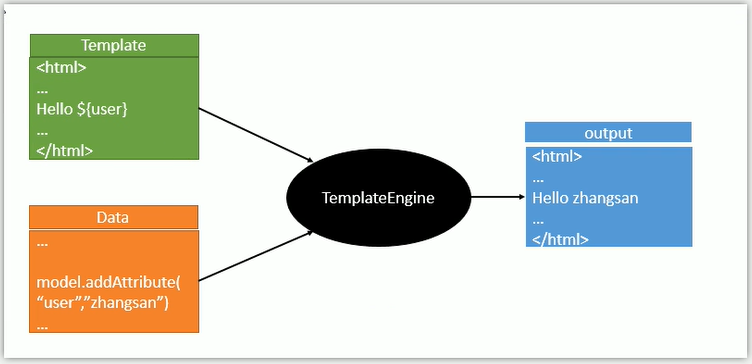
SpringBoot推荐的Thymeleaf
语法更简单,功能更强大
1、引入thymeleaf
官方文档:https://docs.spring.io/spring-boot/docs/1.5.10.RELEASE/reference/htmlsingle/
<!-- 引入thymeleaf --> <dependency> <groupId>org.springframework.boot</groupId> <artifactId>spring-boot-starter-thymeleaf</artifactId> </dependency> <!-- 切换thymeleaf版本 --> <properties> <thymeleaf.version>3.0.11.RELEASE</thymeleaf.version> <!--布局功能支持程序 thymeleaf3主程序 layout2以上版本--> <!-- thymeleaf2 layout1 --> <thymeleaf-layout-dialect.version>2.4.1</thymeleaf-layout-dialect.version> </properties>
2、Thymeleaf 使用 & 语法
@ConfigurationProperties(
    prefix = "spring.thymeleaf"
)
public class ThymeleafProperties {
    private static final Charset DEFAULT_ENCODING;
    public static final String DEFAULT_PREFIX = "classpath:/templates/";
    public static final String DEFAULT_SUFFIX = ".html";
    private boolean checkTemplate = true;
    private boolean checkTemplateLocation = true;
    private String prefix = "classpath:/templates/";
    private String suffix = ".html";
    // 只要我们把HTML页面放在classpath:/templates/, thymeleaf就能自动渲染
使用:
1、导入thymeleaf的名称空间
<html lang="en" xmlns:th="http://www.thymeleaf.org">
2、使用thymeleaf语法
<!DOCTYPE html>
<html lang="en" xmlns:th="http://www.thymeleaf.org">
<head>
    <meta charset="UTF-8">
    <title>Title</title>
</head>
<body>
<h1>成功!</h1>
<!-- th:text 将div里面文本内容设置为指定的值 -->
<P th:text="${hello}">这是显示欢迎信息</P>
</body>
</html>
3、语法规则
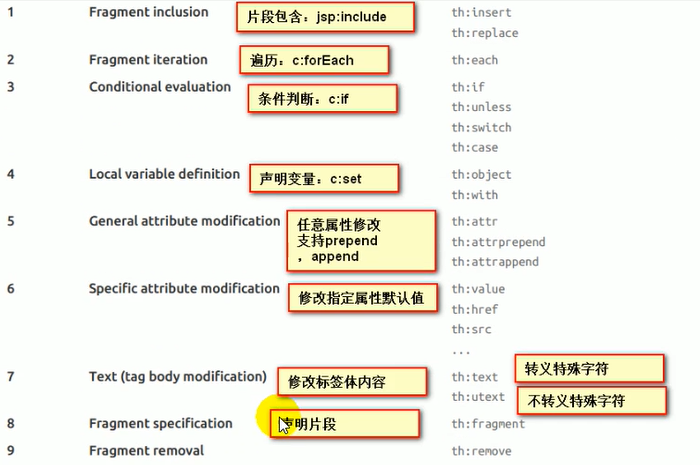
(1)th:text 覆盖当前元素里面的文本内容
th: 任意html属性 来替换原生属性的值
(2) 表达式
Simple expressions:(表达式语法) Variable Expressions: ${...} 获取变量值 OGNL 1)获取对象的属性、调用方法 2)使用内置的基本对象 #ctx : the context object. #vars: the context variables. #locale : the context locale. #request : (only in Web Contexts) the HttpServletRequest object. #response : (only in Web Contexts) the HttpServletResponse object. #session : (only in Web Contexts) the HttpSession object. #servletContext : (only in Web Contexts) the ServletContext object. ${session.foo} 3)内置的一些工具对象 #execInfo : information about the template being processed. #messages : methods for obtaining externalized messages inside variables expressions, in the same way as they would be obtained using #{…} syntax. #uris : methods for escaping parts of URLs/URIs Page 20 of 106 #conversions : methods for executing the configured conversion service (if any). #dates : methods for java.util.Date objects: formatting, component extraction, etc. #calendars : analogous to #dates , but for java.util.Calendar objects. #numbers : methods for formatting numeric objects. #strings : methods for String objects: contains, startsWith, prepending/appending, etc. #objects : methods for objects in general. #bools : methods for boolean evaluation. #arrays : methods for arrays. #lists : methods for lists. #sets : methods for sets. #maps : methods for maps. #aggregates : methods for creating aggregates on arrays or collections. #ids : methods for dealing with id attributes that might be repeated (for example, as a result of an iteration). Selection Variable Expressions: *{...} 选择表达式:和${}在功能上是一样 补充:配合 th:object="${session.user}" <div th:object="${session.user}"> <p>Name: <span th:text="*{firstName}">Sebastian</span>.</p> <p>Surname: <span th:text="*{lastName}">Pepper</span>.</p> <p>Nationality: <span th:text="*{nationality}">Saturn</span>.</p> </div> Message Expressions: #{...} 获取国际化内容 Link URL Expressions: @{...} 定义URL @{/order/process(execId=${execId},execType='FAST')} Fragment Expressions: ~{...} 片段引用表达式 <div th:insert="~{commons :: main}">...</div> Literals(字面量) Text literals: 'one text' , 'Another one!' ,… Number literals: 0 , 34 , 3.0 , 12.3 ,… Boolean literals: true , false Null literal: null Literal tokens: one , sometext , main ,… Text operations:(文本操作) String concatenation: + Literal substitutions: |The name is ${name}| Arithmetic operations:(数学运算) Binary operators: + , - , * , / , % Minus sign (unary operator): - Boolean operations:(布尔运算) Binary operators: and , or Boolean negation (unary operator): ! , not Comparisons and equality:(比较运算) Comparators: > , < , >= , <= ( gt , lt , ge , le ) Equality operators: == , != ( eq , ne ) Conditional operators:(条件运算-三元运算符) If-then: (if) ? (then) If-then-else: (if) ? (then) : (else) Default: (value) ?: (defaultvalue) Special tokens:(特殊操作) No-Operation: _
Windy心梦无痕


 浙公网安备 33010602011771号