
Asp.net证书配置
一、在asp.net中使用
app.UseHsts();
app.UseHttpsRedirection();
配置时,在生成环境提示重定向安全连接问题
HTTP redirection to HTTPS causes ERR_INVALID_REDIRECT on the CORS preflight request
参考:
Enforce HTTPS in ASP.NET Core
一般是要求使用https访问网站,需要配置证书
参考链接:
创建自签名证书
二、自签名证书
New-SelfSignedCertificate -DnsName "localhost" -CertStoreLocation "Cert:\LocalMachine\My"
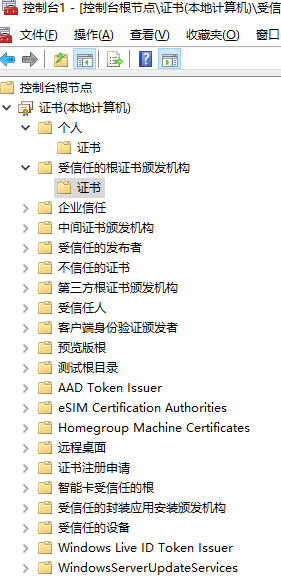
命令行->mmc 导出localhost.pfx (需要设置密码******)
$rootCert = New-SelfSignedCertificate -CertStoreLocation Cert:\CurrentUser\My -DnsName "RootCA" -TextExtension @("2.5.29.19={text}CA=true") -KeyUsage CertSign,CrlSign,DigitalSignature

$rootCertPassword = ConvertTo-SecureString -String "password" -Force -AsPlainText
$rootCertPath = Join-Path -Path 'cert:\CurrentUser\My\' -ChildPath "$($rootCert.Thumbprint)"
Export-PfxCertificate -Cert $rootCertPath -FilePath 'RootCA.pfx' -Password $rootCertPassword
Export-Certificate -Cert $rootCertPath -FilePath 'RootCA.crt'
三、解决方案
3.1、配置appsettings.json增加
  "Kestrel": {
   "Endpoints": {
     "Http": {
       "Url": "http://*:80"
     },
     "Https": {
       "Url": "https://*:443",
       "Certificate": {
         "Path": "cert/localhost.pfx",
         "Password": "123456"
       }
     }
   }
  }
3.2、代码方式
//builder.WebHost.ConfigureKestrel(options =>
//{
//    options.ListenAnyIP(5001); // HTTP端口
//    options.ListenAnyIP(7001, configure => configure.UseHttps()); // HTTPS端口
//});
builder.WebHost.ConfigureKestrel(options =>
{
    // 如果使用80端口不能使用 localhost/127.0.0.1进行访问
    options.ListenAnyIP(80); // HTTP端口
    options.ListenAnyIP(443, configure => configure.UseHttps()); // HTTPS端口
});
四、导入导出证书
通过命令行 mmc 进入证书管理界面

 浙公网安备 33010602011771号