
Java NIO之Buffer(缓冲区)入门
Java NIO中的缓存区(Buffer)用于和通道(Channel)进行交互。数据是从通道读入缓冲区,从缓冲区写入到通道中的。
缓冲区本质上是一块可以写入数据,然后可以从中读取数据的内存。这块内存被包装成NIO Buffer对象,并提供了一组方法,用来方便的访问该块内存。
Buffer底层使用数组实现。
1、NIO 数据读取基本操作示意
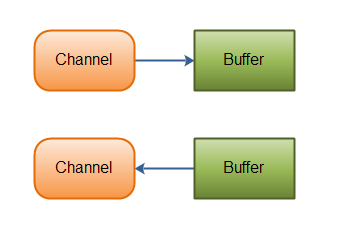
2、Java NIO中Buffer类型
Java NIO中,根据数据类型不同(boolean 除外),提供了相应类型的缓冲区:
- ByteBuffer
- MappedByteBuffer
- CharBuffer
- DoubleBuffer
- FloatBuffer
- IntBuffer
- LongBuffer
- ShortBuffer

3、Buffer的基本用法
使用Buffer读写数据一般遵循以下四个步骤:
写入数据到Buffer;
调用flip()方法;
从Buffer中读取数据;
调用clear()方法或者compact()方法;
当向buffer写入数据时,buffer会记录下写了多少数据。一旦要读取数据,需要通过flip()方法将Buffer从写模式切换到读模式。在读模式下,可以读取之前写入到buffer的所有数据。
一旦读完了所有的数据,就需要清空缓冲区,让它可以再次被写入。有两种方式能清空缓冲区:调用clear()或compact()方法。clear()方法会清空整个缓冲区。compact()方法只会清除已经读过的数据。任何未读的数据都被移到缓冲区的起始处,新写入的数据将放到缓冲区未读数据的后面。
String str = "charBuffer";
CharBuffer charBuffer = CharBuffer.allocate(1024);
charBuffer.put(str);
charBuffer.append("--");
charBuffer.append("hello world");

charBuffer.flip();

//单个读取buffer中的内容
/*while (charBuffer.hasRemaining()) {
    System.out.println(charBuffer.get());
}*/

//一次性读取buffer中的内容
char[] dst = new char[charBuffer.limit()];
charBuffer.get(dst);
System.out.println(new String(dst));
4、Buffer属性与方法详解
4.1、基本属性
public abstract class Buffer {
    // Invariants: mark <= position <= limit <= capacity
    private int mark = -1;//标记位置
    private int position = 0;//当前游标位置
    private int limit;//可读取数据大小
    private int capacity;//buffer容量大小
    ...
}
4.2、常用方法
4.2.1、mark()
标记当前位置,配合reset使用。
public final Buffer mark() {
    mark = position;
    return this;
}
4.2.2、reset()
重置游标为标记位。
public final Buffer reset() {
    int m = mark;
    if (m < 0)
        throw new InvalidMarkException();
    position = m;
    return this;
}
4.2.3、clear()
清除缓冲区,等待写入。
public final Buffer clear() {
    position = 0;
    limit = capacity;
    mark = -1;
    return this;
}
4.2.4、flip()
将缓冲区由写模式切换为读模式。
public final Buffer flip() {
    limit = position;
    position = 0;
    mark = -1;
    return this;
}
4.2.5、rewind()
重置buffer,等待写入。
public final Buffer rewind() {
    position = 0;
    mark = -1;
    return this;
}
4.2.6、remaining()
获取剩余可读元素个数。
public final int remaining() {
    return limit - position;
}
4.2.7、hasRemaining()
判断是否还有可读元素。
public final boolean hasRemaining() {
    return position < limit;
}
5、Demo
String str = "charBuffer";
CharBuffer charBuffer = CharBuffer.allocate(1024);
charBuffer.put(str);
charBuffer.mark();
System.out.println("-------------mark-------------");
charBuffer.append("--");
charBuffer.append("hello world");

System.out.println("position = " + charBuffer.position());
System.out.println("limit = " + charBuffer.limit());
System.out.println("capacity = " + charBuffer.capacity());

charBuffer.reset();
System.out.println("-------------reset-------------");
System.out.println("position = " + charBuffer.position());
System.out.println("limit = " + charBuffer.limit());
System.out.println("capacity = " + charBuffer.capacity());


charBuffer.flip();
System.out.println("-------------flip-------------");
System.out.println("position = " + charBuffer.position());
System.out.println("limit = " + charBuffer.limit());
System.out.println("capacity = " + charBuffer.capacity());
//单个读取buffer中的内容
/*while (charBuffer.hasRemaining()) {
            System.out.println(charBuffer.get());
        }*/

//一次性读取buffer中的内容
char[] dst = new char[charBuffer.limit()-3];
charBuffer.get(dst);
System.out.println("dst>>>>>>>>>" + new String(dst));

charBuffer.compact();
System.out.println("-------------compact-------------");
System.out.println("position = " + charBuffer.position());
System.out.println("limit = " + charBuffer.limit());
System.out.println("capacity = " + charBuffer.capacity());

charBuffer.append("--");
charBuffer.append("hello world");
charBuffer.append("--");
charBuffer.append("hello world");
charBuffer.append("--");
charBuffer.append("hello world");

charBuffer.flip();
char[] dst2 = new char[charBuffer.limit()];
charBuffer.get(dst2);
System.out.println(new String(dst2));

/*
-------------mark-------------
position = 23
limit = 1024
capacity = 1024
-------------reset-------------
position = 10
limit = 1024
capacity = 1024
-------------flip-------------
position = 0
limit = 10
capacity = 1024
dst>>>>>>>>>charBuf
-------------compact-------------
position = 3
limit = 1024
capacity = 1024
fer--hello world--hello world--hello world

Process finished with exit code 0
*/

 浙公网安备 33010602011771号