
SSH本地端口转发基于telnet服务
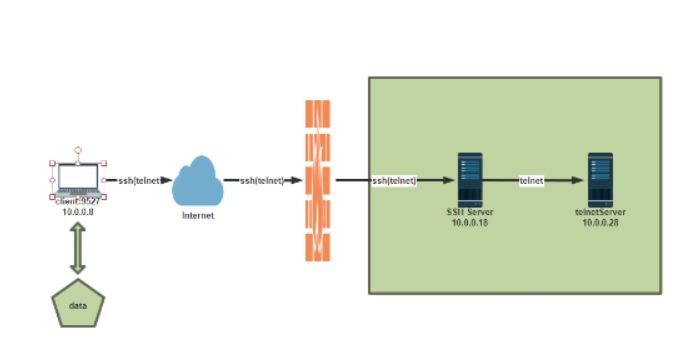
10.0.0.28机器上安装telnet服务
[root@CentOS8-8 ~]# yum -y install telnet-server
10.0.0.28机器上启动telnet服务
[root@CentOS8-8 ~]# systemctl enable --now telnet.socket
10.0.0.8机器上安装telnet服务
[root@centos7-7 ~]# yum -y install telnet
通道打通
[root@centos7-7 ~]# ssh -fNL 9527:10.0.0.8:23 10.0.17
查看端口是否打开
[root@centos7-7 ~]# ss -nt
State      Recv-Q Send-Q Local Address:Port               Peer Address:Port
ESTAB      0      36         10.0.0.7:22                     10.0.0.1:53704
ESTAB      0      0          10.0.0.7:22                     10.0.0.1:60078
ESTAB      0      0          10.0.0.7:50214                 10.0.0.17:22
[root@centos7-7 ~]# ss -ntl
State      Recv-Q Send-Q Local Address:Port               Peer Address:Port
LISTEN     0      128               *:111                           *:*
LISTEN     0      128               *:22                            *:*
LISTEN     0      128       127.0.0.1:9527                          *:*
LISTEN     0      10        127.0.0.1:25                            *:*
LISTEN     0      128            [::]:111                        [::]:*
LISTEN     0      128            [::]:22                         [::]:*
LISTEN     0      128           [::1]:9527                       [::]:*
[root@CentOS8-8 ~]# ss -ntl
State      Recv-Q     Send-Q           Local Address:Port           Peer Address:Port
LISTEN     0          128                    0.0.0.0:111                 0.0.0.0:*
LISTEN     0          128                    0.0.0.0:22                  0.0.0.0:*
LISTEN     0          128                          *:23                        *:*
LISTEN     0          128                       [::]:111                    [::]:*
LISTEN     0          128                       [::]:22                     [::]:*
连接10.0.0.28主机
[root@centos7-7 ~]# telnet 127.0.0.1 9527
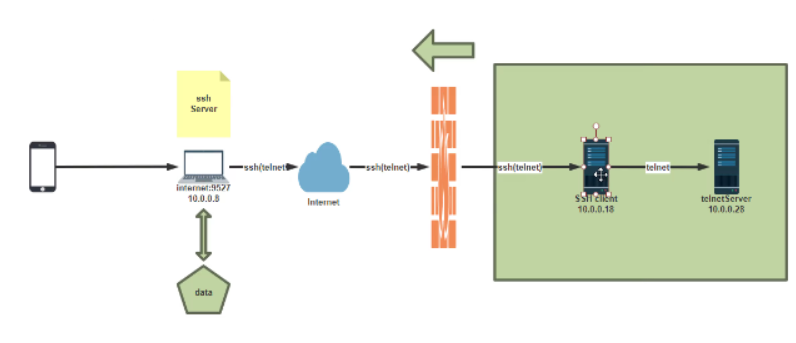
生产中有防火墙不允许打开22端口所以要实现从内向外打通
杀掉进程
[root@centos7-7 ~]# killall ssh
建立隧道
[root@centos7-17 ~]# ssh -fNR 9527:10.0.0.8:23 10.0.0.7
连接10.0.28主机
[root@centos7-7 ~]# telnet 127.0.0.1 9527
可以使用HTTP服务实现
[root@lan-server ~]#yum -y install httpd;systemctl start httpd;echo website On
10.0.0.28 > /var/www/html/index.html
#必须先打开gateway功能,否则无法打开所有IP对应的端口
root@ssh-server ~]#vim /etc/ssh/sshd_config
GatewayPorts yes
root@ssh-server ~]#systemctl restart sshd
[root@ssh-client ~]#ssh -fNR 9527:10.0.0.28:80 10.0.0.8
root@10.0.0.8's password:

[root@centos7-7 ~]# curl 127.0.0.1:9527

 浙公网安备 33010602011771号