NET中栈和堆的区别(比较)(4)
Even though with the .NET framework we don't have to actively worry about memory management and garbage collection (GC), we still have to keep memory management and GC in mind in order to optimize the performance of our applications. Also, having a basic understanding of how memory management works will help explain the behavior of the variables we work with in every program we write. In this article we'll look into Garbage Collection (GC) and some ways to keep our applications running efficiently by using static class members.
Smaller Feet == More Efficient Allocation.
To get a better understanding of why a smaller footprint will be more efficient will require us to delve a bit deeper into the anatomy of .NET memory allocation and Garbage Collection (GC).
Graphing
Let's look at this from the GC's point of view. If we are responsible for "taking out the trash" we need a plan to do this effectively. Obviously, we need to determine what is garbage and what is not (this might be a bit painful for the pack-rats out there).
In order to determine what needs to be kept, we'll first make the assumption that everything not being used is trash (those piles of old papers in the corner, the box of junk in the attic, everything in the closets, etc.) Imagine we live with our two good friends: Joseph Ivan Thomas (JIT) and Cindy Lorraine Richmond (CLR). Joe and Cindy keep track of what they are using and give us a list of things they need to keep. We'll call the initial list our "root" list because we are using it as a starting point. We'll be keeping a master list to graph where everything is in the house that we want to keep. Anything that is needed to make things on our list work will be added to the graph (if we're keeping the TV we don't throw out the remote control for the TV, so it will be added to the list. If we're keeping the computer the keyboard and monitor will be added to the "keep" list).
This is how the GC determines what to keep as well. It receives a list of "root" object references to keep from just-in-time (JIT) compiler and common language runtime (CLR) (Remember Joe and Claire?) and then recursively searches object references to build a graph of what should be kept.
Roots consist of:
- Global/Static pointers. One way to make sure our objects are not garbage collected by keeping a reference to them in a static variable.
- Pointers on the stack. We don't want to throw away what our application's threads still need in order to execute.
- CPU register pointers. Anything in the managed heap that is pointed to by a memory address in the CPU should be preserved (don't throw it out).
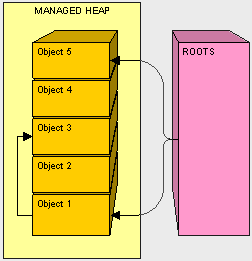
In the above diagram, objects 1, 3, and 5 in our managed heap are referenced from a root 1 and 5 are directly referenced and 3 is found during the recursive search. If we go back to our analogy and object 1 is our television, object 3 could be our remote control. After all objects are graphed we are ready to move on to the next step, compacting.
Compacting
Now that we have graphed what objects we will keep, we can just move the "keeper objects" around to pack things up.
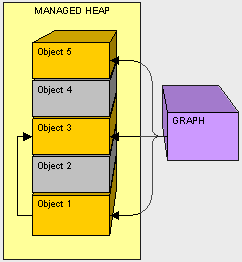
Fortunately, in our house we don't need to clean out the space before we put something else there. Since Object 2 is not needed, as the GC we'll move Object 3 down and fix the pointer in Object 1.
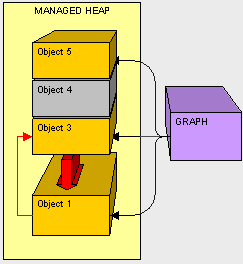
Next, as the GC, we'll copy Object 5 down
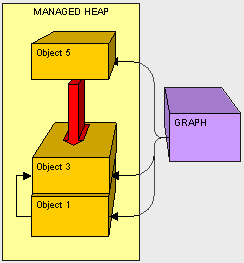
Now that everything is cleaned up we just need to write a sticky note and put it on the top of our compacted heap to let Claire know where to put new objects.
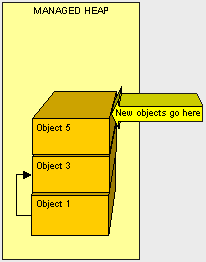
Knowing the nitty-gritty of CG helps in understanding that moving objects around can be very taxing. As you can see, it makes sense that if we can reduce the size of what we have to move, we'll improve the whole GC process because there will be less to copy.
What about things outside the managed heap?
As the person responsible for garbage collection, one problem we run into in cleaning house is how to handle objects in the car. When cleaning, we need to clean everything up. What if the laptop is in the house and the batteries are in the car?
There are situations where the GC needs to execute code to clean up non-managed resources such as files, database connections, network connections, etc. One possible way to handle this is through a finalizer.
class Sample
{
~Sample()
{
// FINALIZER: CLEAN UP HERE
}
}
During object creation, all objects with a finalizer are added to a finalization queue. Let's say objects 1, 4, and 5 have finalizers and are on the finalization queue. Let's look at what happens when objects 2 and 4 are no longer referenced by the application and ready for garbage collection.
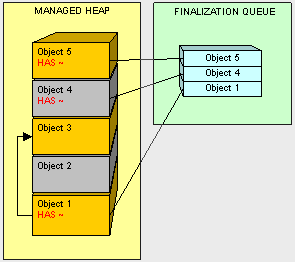
Object 2 is treated in the usual fashion. However, when we get to object 4, the GC sees that it is on the finalization queue and instead of reclaiming the memory object 4 owns, object 4 is moved and it's finalizer is added to a special queue named freachable.
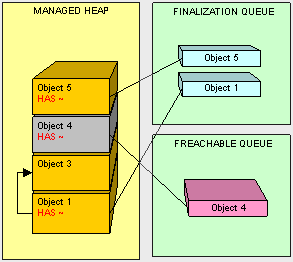
There is a dedicated thread for executing freachable queue items. Once the finalizer is executed by this thread on Object 4, it is removed from the freachable queue. Then and only then is Objet 4 ready for collection.
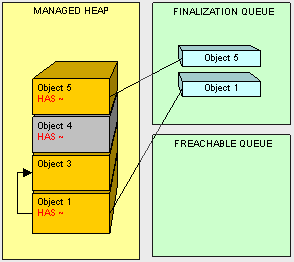
So Object 4 lives on until the next round of GC.
Because adding a finalizer to our classes creates additional work for GC it can be very expensive and adversely affect the performance garbage collection and thus our program. Only use finalizers when you are absolutely sure you need them.
A better practice is to be sure to clean up non-managed resources. As you can imagine, it is preferable to explicitly close connections and use the IDisposable interface for cleaning up instead of a finalizer where possible.
IDisposaible
Classes that implement IDisposable perform clean-up in the Dispose() method (which is the only signature of the interface). So if we have a ResouceUser class instead of using a finalizer as follows:
public class ResourceUser
{
~ResourceUser() // THIS IS A FINALIZER
{
// DO CLEANUP HERE
}
}
We can use IDisposable as a better way to implement the same functionality:
public class ResourceUser : IDisposable
{
#region IDisposable Members
public void Dispose()
{
// CLEAN UP HERE!!!
}
#endregion
}
IDisposable in integrated with the using keyword. At the end of the using block Dispose() is called on the object declared in using(). The object should not be referenced after the using block because it should be essentially considered "gone" and ready to be cleaned up by the GC.
public static void DoSomething()
{
ResourceUser rec = new ResourceUser();
using (rec)
{
// DO SOMETHING
} // DISPOSE CALLED HERE
// DON'T ACCESS rec HERE
}
I like putting the declaration for the object in the using block because it makes more sense visabally and rec is no longer available outside of the scope of the using block. Whis this pattern is more in line with the intention of the IDisposible interface, it is not required.
public static void DoSomething()
{
using (ResourceUser rec = new ResourceUser())
{
// DO SOMETHING
} // DISPOSE CALLED HERE
}
By using using() with classes that implement IDisposible we can perform our cleanup without putting additional overhead on the GC by forcing it to finalize our objects.
Static Methods
Static methods belong to the type, not the instance of our object. This enables us to create items that are shared by all our classes and "trim the fat" so to speak. Only pointers to our static method have to be moved around in memory (8 bytes). The static method itself will be loaded once, very early in the application lifecycle, instead of being contained in each instance of our class. Of course, the bigger the method the more efficiency we gain by making it static. If our methods are small (under 8 bytes) we will actually get worse performance out of making it static because the pointer would be larger than the method it points to.
Here's the details...
Let's say we have a class with a public method SayHello();
class Dude
{
private string _Name = "Don";
public void SayHello()
{
Console.WriteLine(this._Name + " says Hello");
}
}
With every instance of our Dude class we take up space in memory for the SayHello() method.
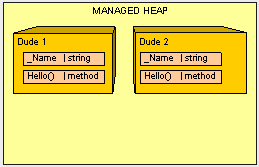
A (possibly) more efficient way is to make the method static so that we only have one "SayHello()" in memory no matter how many Dudes are around. Because static members are not instance members we can't use a reference to "this" and have to pass variables into the method to accomplish the same result.
class Dude
{
private string _Name = "Don";
public static void SayHello(string pName)
{
Console.WriteLine(pName + " says Hello");
}
}
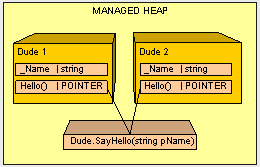
Keep in mind what happens on the stack when we pass variables (see part II of this series). We have to decide on a case-by-case basis whether using a static method gives us improved performance. For instance, if a static method requires too many parameters and does not have very much internal logic (a small footprint), it is entirely possible we would loose more efficiency in calling a static method that we would gain.
Static Variables: Watch Out!
There are a couple of things we want to watch out for with static variables. If we have a class with a static method that we want to return a unique number, the following implementation will be buggy:
class Counter
{
private static int s_Number = 0;
public static int GetNextNumber()
{
int newNumber = s_Number;
// DO SOME STUFF
s_Number = newNumber + 1;
return newNumber;
}
}
If two threads call GetNextNumber() at the same time and both are assigned the same value for newNumber before s_Number is incremented they will return the same result!
We need to explicitly lock the read/write memory operations to static variables in the method so only one thread at a time can execute them. Thread management is a very large topic and there are many ways to approach thread synchronization. Using the lock() keyword is one way to ensure only one thread can access a block of code at a time. As a best practice, you should lock as little code as possible because threads have to wait in a queue to execute the code in the lock() block and it can be inefficient.
class Counter
{
private static int s_Number = 0;
public static int GetNextNumber()
{
lock (typeof(Counter))
{
int newNumber = s_Number;
// DO SOME STUFF
newNumber += 1;
s_Number = newNumber;
return newNumber;
}
}
}
Static Variables: Watch Out... Number 2!
The next thing we have to watch out for objects referenced by static variables. Remember, how anything that is referenced by a "root" is not cleaned up. Here's one of the ugliest examples I can come up with:
class Olympics
{
public static Collection<Runner> TryoutRunners;
}
class Runner
{
private string _fileName;
private FileStream _fStream;
public void GetStats()
{
FileInfo fInfo = new FileInfo(_fileName);
_fStream = _fileName.OpenRead();
}
}
Because the Runner Collection is static for the Olympics class, not only will objects in the collection will not be released for garbage collection (they are all indirectly referenced through a root), but as you probably noticed, every time we run GetStats() the stream is opened to the file. Because it is not closed and never released by GC this code is effectively a disaster waiting to happen. Imagine we have 100,000 runners trying out for the Olympics. We would end up with that many non-collectable objects each with an open resource. Ouch! Talk about poor performance!
Singleton
One trick to keep things light is to keep only one instance of a class in memory at all times. To do this we can use the GOF Singleton Pattern.
public class Earth
{
private static Earth _instance = new Earth();
private Earth() { }
public static Earth GetInstance() { return _instance; }
}
We have a private constructor so only Earth can execute it's constructor and make an Earth. We have a static instance of Earth and a static method to get the instance. This particular implementation is thread safe because the CLR ensures thread safe creation of static variables. This is the most elegant way I have found to implement the singleton pattern in C#.
The 2.0 Static Class
In the .NET 2.0 Framework we can have a static class which is a class in which all the members must be static. This is useful for utility classes and will definitely save us memory space because this class will only exist in one place in memory and it can not be instantiated no matter what.
In Conclusion...
So to wrap up, some things we can do to improve GC performance are:
- Clean up. Don't leave resources open! Be sure to close all connections that are opened and clean up all non-managed objects as soon as possible. As a general rule when using non-managed objects, instantiate as late as possible and clean up as soon as possible.
- Don't overdo references. Be reasonable when using references objects. Remember, if our object is alive, all of it's referenced objects will not be collected (and so on, and so on). When we are done with something referenced by class, we can remove it by either setting the reference to null. One trick I like to do is setting unused references to a custom light weight NullObject to avoid getting null reference exceptions. The fewer references laying about when the GC kicks off, the less pressure the mapping process will be.
- Easy does it with finalizers. Finalizers are expensive during GC we should ONLY use them if we can justify it. If we can use IDisposible instead of a finalizer, it will be more efficient because our object can be cleaned up in one GC pass instead of two.
- Keep objects and their children together. It is easier on the GC to copy large chunks of memory together instead of having to essentially de-fragment the heap at each pass, so when we declare a object composed of many other objects, we should instantiate them as closely together as possible.
- And finally... keep objects lighter by making the methods static where appropriate.
Next time we'll look even more closely at the GC process and look into ways to check under the hood as your program executes to discover problems that may need to be cleaned up.
中文翻译:
可以参看该系列文章的前面部分内容:
Part I
http://agassi001.cnblogs.com/archive/2006/05/10/396574.html
Part II
http://agassi001.cnblogs.com/archive/2006/05/13/399080.html
Part III
http://www.cnblogs.com/agassi001/archive/2006/05/20/405018.html
尽管在.NET framework下我们并不需要担心内存管理和垃圾回收(Garbage Collection),但是我们还是应该了解它们,以优化我们的应用程序。同时,还需要具备一些基础的内存管理工作机制的知识,这样能够有助于解释我们日常程序编写中的变量的行为。在本文中我们将深入理解垃圾回收器,还有如何利用静态类成员来使我们的应用程序更高效。
* 更小的步伐 == 更高效的分配
为了更好地理解为什么更小的足迹会更高效,这需要我们对.NET的内存分配和垃圾回收专研得更深一些。
* 图解:
让我们来仔细看看GC。如果我们需要负责"清除垃圾",那么我们需要拟定一个高效的方案。很显然,我们需要决定哪些东西是垃圾而哪些不是。
为了决定哪些是需要保留的,我们首先假设所有的东西都不是垃圾(墙角里堆着的旧报纸,阁楼里贮藏的废物,壁橱里的所有东西,等等)。假设在我们的生活当中有两位朋友:Joseph Ivan Thomas(JIT)和Cindy Lorraine Richmond(CLR)。Joe和Cindy知道它们在使用什么,而且给了我们一张列表说明了我们需要需要些什么。我们将初始列表称之为"根"列表,因为我们将它用作起始点。我们需要保存一张主列表来记录出我们家中的必备物品。任何能够使必备物品正常工作或使用的东西也将被添加到列表中来(如果我们要看电视,那么就不能扔掉遥控器,所以遥控器将被添加到列表。如果我们要使用电脑,那么键盘和显示器就得添加到列表)。
这就是GC如何保存我们的物品的,它从即时编译器(JIT)和通用语言运行时(CLR)中获得"根"对象引用的列表,然后递归地搜索出其他对象引用来建立一张我们需要保存的物品的图表。
根包括:
全局/静态指针。为了使我们的对象不被垃圾回收掉的一种方式是将它们的引用保存在静态变量中。
栈上的指针。我们不想丢掉应用程序中需要执行的线程里的东西。
CPU寄存器指针。托管堆中哪些被CPU寄存器直接指向的内存地址上的东西必须得保留。
在以上图片中,托管堆中的对象1、3、5都被根所引用,其中1和5时直接被引用,而3时在递归查找时被发现的。像我们之前的假设一样,对象1是我们的电视机,对象3是我们的遥控器。在所有对象被递归查找出来之后我们将进入下一步--压缩。
* 压缩
我们现在已经绘制出哪些是我们需要保留的对象,那么我们就能够通过移动"保留对象"来对托管堆进行整理。
幸运的是,在我们的房间里没有必要为了放入别的东西而去清理空间。因为对象2已经不再需要了,所以GC会将对象3移下来,同时修复它指向对象1的指针。
然后,GC将对象5也向下移,
现在所有的东西都被清理干净了,我们只需要写一张便签贴到压缩后的堆上,让Claire(指CLR)知道在哪儿放入新的对象就行了。
理解GC的本质会让我们明白对象的移动是非常费力的。可以看出,假如我们能够减少需要移动的物品大小是非常有意义的,通过更少的拷贝动作能够使我们提升整个GC的处理性能。
*托管堆之外是怎样的情景呢?
作为负责垃圾回收的人员,有一个容易出现入的问题是在打扫房间时如何处理车里的东西,当我们打扫卫生时,我们需要将所有物品清理干净。那家里的台灯和车里的电池怎么办?
在一些情况下,GC需要执行代码来清理非托管资源(如文件,数据库连接,网络连接等),一种可能的方式是通过finalizer来进行处理。
复制C#代码保存代码class Sample
{
~Sample()
{
// FINALIZER: CLEAN UP HERE
}
}
在对象创建期间,所有带有finalizer的对象都将被添加到一个finalizer队列中。对象1、4、5都有finalizer,且都已在finalizer队列当中。让我们来看看当对象2和4在应用程序中不再被引用,且系统正准备进行垃圾回收时会发生些什么。
对象2会像通常情况下那样被垃圾回收器回收,但是当我们处理对象4时,GC发现它存在于finalizer队列中,那么GC就不会回收对象4的内存空间,而是将对象4的finalizer移到一个叫做"freachable"的特殊队列中。
有一个专门的线程来执行freachable队列中的项,对象4的finalizer一旦被该线程所处理,就将从freachable队列中被移除,然后对象4就等待被回收。
因此对象4将存活至下一轮的垃圾回收。
由于在类中添加一个finalizer会增加GC的工作量,这种工作是十分昂贵的,而且会影响垃圾回收的性能和我们的程序。最好只在你确认需要finalizer时才使用它。
在清理非托管资源时有一种更好的方法:在显式地关闭连接时,使用IDisposalbe接口来代替finalizer进行清理工作会更好些。
* IDisposable
实现IDisposable接口的类需要执行Dispose()方法来做清理工作(这个方法是IDisposable接口中唯一的签名)。因此假如我们使用如下的带有finalizer的ResourceUser类:
复制C#代码保存代码public class ResourceUser
{
~ResourceUser() // THIS IS A FINALIZER
{
// DO CLEANUP HERE
}
}
我们可以使用IDisposable来以更好的方式实现相同的功能
复制C#代码保存代码public class ResourceUser : IDisposable
{
#region IDisposable Members
public void Dispose()
{
// CLEAN UP HERE!!!
}
#endregion
}
IDisposable被集成在了using块当中。在using()方法中声明的对象在using块的结尾处将调用Dispose()方法,using块之外该对象将不再被引用,因为它已经被认为是需要进行垃圾回收的对象了。
复制C#代码保存代码public static void DoSomething()
{
ResourceUser rec = new ResourceUser();
using (rec)
{
// DO SOMETHING
} // DISPOSE CALLED HERE
// DON'T ACCESS rec HERE
}
我更喜欢将对象声明放到using块中,因为这样可视化很强,而且rec对象在using块的作用域之外将不再有效。这种模式的写法更符合IDisposable接口的初衷,但这并不是必须的。
复制C#代码保存代码public static void DoSomething()
{
using (ResourceUser rec = new ResourceUser())
{
// DO SOMETHING
} // DISPOSE CALLED HERE
}
在类中使用using()块来实现IDisposable接口,能够使我们在清理垃圾对象时不需要写额外的代码来强制GC回收我们的对象。
* 静态方法
静态方法属于一种类型,而不是对象的实例,它允许创建能够被类所共享的方法,且能够达到"减肥"的效果,因为只有静态方法的指针(8 bytes)在内存当中移动。静态方法实体仅在应用程序生命周期的早期被一次性加载,而不是在我们的类实例中生成。当然,方法越大那么将其作为静态就越高效。假如我们的方法很小(小于8 bytes),那么将其作为静态方法反而会影响性能,因为这时指针比它指向的方法所占的空间还大些。
接着来看看例子...
我们的类中有一个公共的方法SayHello():
复制C#代码保存代码class Dude
{
private string _Name = "Don";
public void SayHello()
{
Console.WriteLine(this._Name + " says Hello");
}
}
在每一个Dude类实例中SayHello()方法都会占用内存空间。
一种更高效的方式是采用静态方法,这样我们只需要在内存中放置唯一的SayHello()方法,而不论存在多少个Dude类实例。因为静态成员不是实例成员,我们不能使用this指针来进行方法的引用。
复制C#代码保存代码class Dude
{
private string _Name = "Don";
public static void SayHello(string pName)
{
Console.WriteLine(pName + " says Hello");
}
}
请注意我们在传递变量时栈上发生了些什么(可以参看<第二部分>)。我们需要通过例子的看看是否需要使用静态方法来提升性能。例如,一个静态方法需要很多参数而且没有什么复杂的逻辑,那么在使用静态方法时我们可能会降低性能。
* 静态变量:注意了!
对于静态变量,有两件事情我们需要注意。假如我们的类中有一个静态方法用于返回一个唯一值,而下面的实现会造成bug:
复制C#代码保存代码class Counter
{
private static int s_Number = 0;
public static int GetNextNumber()
{
int newNumber = s_Number;
// DO SOME STUFF
s_Number = newNumber + 1;
return newNumber;
}
}
假如有两个线程同时调用GetNextNumber()方法,而且它们在s_Number的值增加前都为newNumber分配了相同的值,那么它们将返回同样的结果!
我们需要显示地为方法中的静态变量锁住读/写内存的操作,以保证同一时刻只有一个线程能够执行它们。线程管理是一个非常大的主题,而且有很多途径可以解决线程同步的问题。使用lock关键字能让代码块在同一时刻仅能够被一个线程访问。一种好的习惯是,你应该尽量锁较短的代码,因为在程序执行lock代码块时所有线程都要进入等待队列,这是非常低效的。
复制C#代码保存代码class Counter
{
private static int s_Number = 0;
public static int GetNextNumber()
{
lock (typeof(Counter))
{
int newNumber = s_Number;
// DO SOME STUFF
newNumber += 1;
s_Number = newNumber;
return newNumber;
}
}
}
* 静态变量:再次注意了!
静态变量引用需要注意的另一件事情是:记住,被"root"引用的事物是不会被GC清理掉的。我遇到过的一个最烦人的例子:
复制C#代码保存代码class Olympics
{
public static Collection<Runner> TryoutRunners;
}
class Runner
{
private string _fileName;
private FileStream _fStream;
public void GetStats()
{
FileInfo fInfo = new FileInfo(_fileName);
_fStream = _fileName.OpenRead();
}
}
由于Runner集合在Olympics类中是静态的,不仅集合中的对象不会被GC释放(它们都直接被根所引用),而且你可能注意到了,每次执行GetStats()方法时都会为那个文件开放一个文件流,因为它没有被关闭所以也不会被GC释放,这个代码将会给系统造成很大的灾难。假如我们有100000个运动员来参加奥林匹克,那么会由于太多不可回收的对象而难以释放内存。天啦,多差劲的性能呀!
* Singleton
有一种方法可以保证一个类的实例在内存中始终保持唯一,我们可以采用Gof中的Singleton模式。(Gof:Gang of Four,一部非常具有代表性的设计模式书籍的作者别称,归纳了23种常用的设计模式)
复制C#代码保存代码public class Earth
{
private static Earth _instance = new Earth();
private Earth() { }
public static Earth GetInstance() { return _instance; }
}
我们的Earth类有一个私有构造器,所以Earth类能够执行它的构造器来创建一个Earth实例。我们有一个Earth类的静态实例,还有一个静态方法来获得这个实例。这种特殊的实现是线程安全的,因为CLR保证了静态变量的创建是线程安全的。这是我认为在C#中实现singleton模式最为明智的方式。
* .NET Framework 2.0中的静态类
在.NET 2.0 Framework中我们有一种静态类,此类中的所有成员都是静态的。这中特性对于工具类是非常有用的,而且能够节省内存空间,因为该类只存在于内存中的某个地方,不能在任何情况下被实例化。
* 总结一下...
总的来说,我们能够提升GC表现的方式有:
1. 清理工作。不要让资源一直打开!尽可能地保证关闭所有打开的连接,清除所有非托管的资源。当使用非托管对象时,初始化工作尽量完些,清理工作要尽量及时点。
2. 不要过度地引用。需要时才使用引用对象,记住,如果你的对象是活动着的,所有被它引用的对象都不会被垃圾回收。当我们想清理一些类所引用的事物,可以通过将这些引用设置为null来移除它们。我喜欢采用的一种方式是将未使用的引用指向一个轻量级的NullObject来避免产生null引用的异常。在GC进行垃圾回收时,更少的引用将减少映射处理的压力。
3. 少使用finalizer。Finalizer在垃圾回收时是非常昂贵的资源,我们应该只在必要时使用。如果我们使用IDisposable来代替finalizer会更高效些,因为我们的对象能够直接被GC回收而不是在第二次回收时进行。
4. 尽量保持对象和它们的子对象在一块儿。GC在复制大块内存数据来放到一起时是很容易的,而复制堆中的碎片是很费劲的,所以当我们声明一个包含许多其他对象的对象时,我们应该在初始化时尽量让他们在一块儿。
5. 最后,使用静态方法来保持对象的轻便也是可行的。
下一次,我们将更加深入GC的处理过程,看看在你的程序执行时GC是如何发现问题并清除它们的。


 浙公网安备 33010602011771号