
团队冲刺4

王皓扬
今天的任务:完成了个人作业中web端和android端的连接
代码如下package com.example.mywork;
import android.content.Intent;
import android.os.Bundle;
import android.widget.Button;
import android.widget.EditText;
import android.widget.Toast;
import androidx.appcompat.app.AppCompatActivity;
import com.example.mywork.pojo.User;
import com.example.mywork.service.UserService;
import retrofit2.Call;
import retrofit2.Callback;
import retrofit2.Response;
public class LoginActivity extends AppCompatActivity {
private EditText etUserId, etPassword;
private Button btnLogin, btnGoToRegister;
@Override
protected void onCreate(Bundle savedInstanceState) {
super.onCreate(savedInstanceState);
setContentView(R.layout.activity_login);
etUserId = findViewById(R.id.etUserId);
etPassword = findViewById(R.id.etPassword);
btnLogin = findViewById(R.id.btnLogin);
btnGoToRegister = findViewById(R.id.btnGoToRegister);
btnLogin.setOnClickListener(v -> loginUser());
btnGoToRegister.setOnClickListener(v -> {
Intent intent = new Intent(LoginActivity.this, RegisterActivity.class);
startActivity(intent);
});
}
private void loginUser() {
String userId = etUserId.getText().toString();
String password = etPassword.getText().toString();
UserService apiService = RetrofitClient.getUserService();
Call
call.enqueue(new Callback
@Override
public void onResponse(Call
if (response.isSuccessful()) {
User user = response.body();
if (user != null) {
String role = user.getUserRole();
Toast.makeText(LoginActivity.this, "登录成功,角色: " + role, Toast.LENGTH_SHORT).show();
// 根据角色跳转到不同页面
Intent intent;
switch (role) {
case "学生":
intent = new Intent(LoginActivity.this, StudentActivity.class);
break;
case "老师":
intent = new Intent(LoginActivity.this, TeacherActivity.class);
break;
default:
intent = new Intent(LoginActivity.this, LoginActivity.class);
break;
}
startActivity(intent);
} else {
Toast.makeText(LoginActivity.this, "用户信息为空", Toast.LENGTH_SHORT).show();
}
} else {
Toast.makeText(LoginActivity.this, "登录失败", Toast.LENGTH_SHORT).show();
}
}
@Override
public void onFailure(Call
Toast.makeText(LoginActivity.this, "网络错误: " + t.getMessage(), Toast.LENGTH_SHORT).show();
}
});
}
}package com.example.mywork;
import android.os.Bundle;
import androidx.activity.EdgeToEdge;
import androidx.appcompat.app.AppCompatActivity;
import androidx.core.graphics.Insets;
import androidx.core.view.ViewCompat;
import androidx.core.view.WindowInsetsCompat;
public class MainActivity extends AppCompatActivity {
@Override
protected void onCreate(Bundle savedInstanceState) {
super.onCreate(savedInstanceState);
EdgeToEdge.enable(this);
setContentView(R.layout.activity_main);
ViewCompat.setOnApplyWindowInsetsListener(findViewById(R.id.main), (v, insets) -> {
Insets systemBars = insets.getInsets(WindowInsetsCompat.Type.systemBars());
v.setPadding(systemBars.left, systemBars.top, systemBars.right, systemBars.bottom);
return insets;
});
}
}package com.example.mywork;
import android.os.Bundle;
import android.widget.TextView;
import androidx.appcompat.app.AppCompatActivity;
import com.example.mywork.pojo.DailyRecord;
import com.google.gson.Gson;
public class RecordDetailActivity extends AppCompatActivity {
private TextView tvPlanName, tvUserId, tvEstimatedTime, tvRequirementAnalysis, tvDesign, tvCoding, tvWorkload, tvSummary;
@Override
protected void onCreate(Bundle savedInstanceState) {
super.onCreate(savedInstanceState);
setContentView(R.layout.activity_record_detail);
tvPlanName = findViewById(R.id.tvPlanName);
tvUserId = findViewById(R.id.tvUserId);
tvEstimatedTime = findViewById(R.id.tvEstimatedTime);
tvRequirementAnalysis = findViewById(R.id.tvRequirementAnalysis);
tvDesign = findViewById(R.id.tvDesign);
tvCoding = findViewById(R.id.tvCoding);
tvWorkload = findViewById(R.id.tvWorkload);
tvSummary = findViewById(R.id.tvSummary);
// 获取传递的记录数据
String recordJson = getIntent().getStringExtra("record");
DailyRecord record = new Gson().fromJson(recordJson, DailyRecord.class);
// 显示记录详情
tvPlanName.setText(record.getPlanName());
tvUserId.setText(record.getUserId());
tvEstimatedTime.setText(record.getEstimatedTime());
tvRequirementAnalysis.setText(record.getRequirementAnalysis());
tvDesign.setText(record.getDesign());
tvCoding.setText(record.getCoding());
tvWorkload.setText(record.getWorkload());
tvSummary.setText(record.getSummary());
}
}package com.example.mywork;
import android.os.Bundle;
import android.widget.Button;
import android.widget.EditText;
import android.widget.Spinner;
import android.widget.Toast;
import androidx.appcompat.app.AppCompatActivity;
import com.example.mywork.pojo.User;
import com.example.mywork.service.UserService;
import retrofit2.Call;
import retrofit2.Callback;
import retrofit2.Response;
public class RegisterActivity extends AppCompatActivity {
private EditText etUserId, etUsername, etPhoneNumber, etUserUnit, etPassword;
private Spinner spUserRole;
private Button btnRegister;
@Override
protected void onCreate(Bundle savedInstanceState) {
super.onCreate(savedInstanceState);
setContentView(R.layout.activity_register);
etUserId = findViewById(R.id.etUserId);
etUsername = findViewById(R.id.etUsername);
etPhoneNumber = findViewById(R.id.etPhoneNumber);
etUserUnit = findViewById(R.id.etUserUnit);
spUserRole = findViewById(R.id.spUserRole);
etPassword = findViewById(R.id.etPassword);
btnRegister = findViewById(R.id.btnRegister);
btnRegister.setOnClickListener(v -> registerUser());
}
private void registerUser() {
String userId = etUserId.getText().toString();
String username = etUsername.getText().toString();
String phoneNumber = etPhoneNumber.getText().toString();
String userUnit = etUserUnit.getText().toString();
String userRole = spUserRole.getSelectedItem().toString();
String password = etPassword.getText().toString();
User user = new User(userId, username, phoneNumber, userUnit, userRole, password);
UserService apiService = RetrofitClient.getUserService();
Call
call.enqueue(new Callback
@Override
public void onResponse(Call
if (response.isSuccessful()) {
Toast.makeText(RegisterActivity.this, "注册成功", Toast.LENGTH_SHORT).show();
finish(); // 返回登录界面
} else {
Toast.makeText(RegisterActivity.this, "注册失败", Toast.LENGTH_SHORT).show();
}
}
@Override
public void onFailure(Call
Toast.makeText(RegisterActivity.this, "网络错误: " + t.getMessage(), Toast.LENGTH_SHORT).show();
}
});
}
}
以上为部分android端代码
遇到的困难:web端没遇到什么问题,android端连接到手机上时因为部分图片分辨率不支持导致手机上无法显示,更改分辨率后可以完成
熊磊昨天的成就:
完成了入职发展内的所有三个功能,包括新人入职,新人成长,转正申请。
新人入职:特定员工可以添加员工账号,可选部门,默认为初级员工。新人成长功能可以为新人寻找职级为2的导师。转正申请功能可以让已经有导师带领的新人发送转正的申请,同意后就能够成为职级为2的员工。
部分代码如下:
onboardingManagement.js:
// 动态加载入职发展内容
function loadOnboardingManagement(container) {
container.innerHTML = <div class="onboarding-management"> <h3 style="font-size: 1.5rem;">入职发展</h3> <div id="onboardingContent"></div> </div> ;
// 获取当前用户信息以判断是否显示入职功能
fetch('/api/user/current-user-info')
.then(response => {
if (!response.ok) {
throw new Error('网络响应失败');
}
return response.json();
})
.then(data => {
const onboardingContent = document.getElementById('onboardingContent');
const userId = data.userId;
const permissionLevel = data.permissionLevel;
const departmentId = data.departmentId;
// 判断用户职级并显示相应内容
if (permissionLevel === 1) {
// 职级为1的用户,显示导师信息或提示无导师
fetch('/api/user/current-mentorship-info')
.then(response => {
if (!response.ok) {
throw new Error('网络响应失败');
}
return response.json();
})
.then(data => {
if (data.mentor) {
onboardingContent.innerHTML = <p style="font-size: 1.2rem; margin-top: 10px;">您的导师是:员工ID ${data.mentor.id}</p> <button onclick="showPromotionRequestForm()" style="font-size: 1.1rem; padding: 10px 20px; background-color: #007bff; color: white; border: none; border-radius: 4px; cursor: pointer; margin-top: 20px;">请求转正</button> <div id="promotionRequestFormContainer" style="display: none; margin-top: 20px; padding: 20px; background-color: #f8f9fa; border-radius: 5px;"></div> ;
} else {
onboardingContent.innerHTML = <p style="font-size: 1.2rem; margin-top: 10px;">暂未分配导师,请等待</p> ;
}
})
.catch(error => {
console.error('获取导师信息出错:', error);
onboardingContent.innerHTML = '
获取导师信息失败,请重试
';});
} else if (permissionLevel === 2) {
// 职级为2的用户,显示带领的学员信息或提示无学员
fetch('/api/user/current-mentorship-info')
.then(response => {
if (!response.ok) {
throw new Error('网络响应失败');
}
return response.json();
})
.then(data => {
if (data.mentees && data.mentees.length > 0) {
let menteesHtml = '
- ';
data.mentees.forEach(mentee => {
menteesHtml +=
<li style="padding: 10px; border-bottom: 1px solid #eee; font-size: 1.1rem;"> 员工ID ${mentee.id},职位:${mentee.position} </li> ;});
menteesHtml += '
onboardingContent.innerHTML =
<p style="font-size: 1.2rem; margin-top: 10px;">您带领的学员:</p> ${menteesHtml} ;} else {
onboardingContent.innerHTML =
<p style="font-size: 1.2rem; margin-top: 10px;">暂未分配学员,请等待</p> ;}
})
.catch(error => {
console.error('获取学员信息出错:', error);
onboardingContent.innerHTML = '
获取学员信息失败,请重试
';});
} else if (permissionLevel === 3 && departmentId === 4) {
// 职级为3且部门为4的用户,显示新人入职、导师分配和查看请求功能
onboardingContent.innerHTML =
<button onclick="showNewHireForm()" style="font-size: 1.1rem; padding: 10px 20px; background-color: #007bff; color: white; border: none; border-radius: 4px; cursor: pointer; margin-bottom: 20px;">新人入职</button> <button onclick="showMentorshipForm()" style="font-size: 1.1rem; padding: 10px 20px; background-color: #007bff; color: white; border: none; border-radius: 4px; cursor: pointer; margin-bottom: 20px;">新人成长</button> <button onclick="showPromotionRequests()" style="font-size: 1.1rem; padding: 10px 20px; background-color: #007bff; color: white; border: none; border-radius: 4px; cursor: pointer; margin-bottom: 20px;">查看请求</button> <div id="newHireFormContainer" style="display: none; margin-top: 20px; padding: 20px; background-color: #f8f9fa; border-radius: 5px;"></div> <div id="mentorshipFormContainer" style="display: none; margin-top: 20px; padding: 20px; background-color: #f8f9fa; border-radius: 5px;"></div> <div id="newHireResult" style="margin-top: 20px;"></div> <div id="mentorshipInfoContainer" style="margin-top: 20px;"></div> <div id="promotionRequestsContainer" style="display: none; margin-top: 20px; padding: 20px; background-color: #f8f9fa; border-radius: 5px;"></div> ;
// 加载导师信息
loadMentorshipInfo();
} else {
// 其他用户显示无权限提示
onboardingContent.innerHTML = <p style="font-size: 1.2rem; color: #666;">您没有权限进行新人入职操作。</p> ;
}
})
.catch(error => {
console.error('获取当前用户信息出错:', error);
document.getElementById('onboardingContent').innerHTML = '
获取用户信息失败,请刷新重试
';});
}
// 显示转正请求表单
function showPromotionRequestForm() {
const promotionRequestFormContainer = document.getElementById('promotionRequestFormContainer');
promotionRequestFormContainer.style.display = 'block';
promotionRequestFormContainer.innerHTML =
<h4 style="margin-top: 0; font-size: 1.3rem;">请求转正</h4> <div style="margin-top: 15px;"> <label for="promotionReason" style="display: block; margin-bottom: 5px; font-size: 1.1rem;">申请原因:</label> <textarea id="promotionReason" placeholder="请输入申请原因" style="width: 100%; padding: 8px; font-size: 1rem; height: 100px;"></textarea> </div> <button onclick="submitPromotionRequest()" style="font-size: 1.1rem; padding: 10px 20px; background-color: #007bff; color: white; border: none; border-radius: 4px; cursor: pointer; margin-top: 10px;">提交请求</button> ;}
// 提交转正请求
function submitPromotionRequest() {
const promotionReason = document.getElementById('promotionReason').value;
if (!promotionReason.trim()) {
alert('请输入申请原因');
return;
}
fetch('/api/user/submit-promotion-request', {
method: 'POST',
headers: {
'Content-Type': 'application/json',
},
body: JSON.stringify({
content: promotionReason,
change_type: 1
})
})
.then(response => {
if (!response.ok) {
throw new Error('网络响应失败');
}
return response.json();
})
.then(data => {
alert('转正请求提交成功!');
// 刷新页面以显示新状态
location.reload();
})
.catch(error => {
console.error('提交转正请求出错:', error);
alert('提交转正请求失败,请重试');
});
}
// 显示转正请求列表
function showPromotionRequests() {
const promotionRequestsContainer = document.getElementById('promotionRequestsContainer');
promotionRequestsContainer.style.display = 'block';
fetch('/api/user/get-promotion-requests')
.then(response => {
if (!response.ok) {
throw new Error('网络响应失败');
}
return response.json();
})
.then(requests => {
if (requests.length === 0) {
promotionRequestsContainer.innerHTML = <p style="font-size: 1.2rem; margin-top: 10px;">暂无转正请求</p> ;
return;
}
let requestsHtml = '
- ';
requests.forEach(request => {
requestsHtml +=
<li style="padding: 15px; border-bottom: 1px solid #eee; font-size: 1.1rem;"> <p>申请人ID:${request.user_id}</p> <p>申请原因:${request.content}</p> <button onclick="approvePromotionRequest(${request.id})" style="font-size: 1rem; padding: 5px 10px; background-color: #28a745; color: white; border: none; border-radius: 4px; cursor: pointer; margin-right: 10px;">同意</button> <button onclick="rejectPromotionRequest(${request.id})" style="font-size: 1rem; padding: 5px 10px; background-color: #dc3545; color: white; border: none; border-radius: 4px; cursor: pointer;">拒绝</button> </li> ;});
requestsHtml += '
promotionRequestsContainer.innerHTML = requestsHtml;
})
.catch(error => {
console.error('获取转正请求出错:', error);
promotionRequestsContainer.innerHTML = '
获取转正请求失败,请重试
';});
}
// 同意转正请求
function approvePromotionRequest(requestId) {
fetch(/api/user/approve-promotion-request/${requestId}, {
method: 'POST',
headers: {
'Content-Type': 'application/json',
}
})
.then(response => {
if (!response.ok) {
throw new Error('网络响应失败');
}
return response.json();
})
.then(data => {
alert('已同意转正请求,用户职级已更新!');
// 刷新页面以显示新状态
location.reload();
})
.catch(error => {
console.error('同意转正请求出错:', error);
alert('同意转正请求失败,请重试');
});
}
// 拒绝转正请求
function rejectPromotionRequest(requestId) {
fetch(/api/user/reject-promotion-request/${requestId}, {
method: 'POST',
headers: {
'Content-Type': 'application/json',
}
})
.then(response => {
if (!response.ok) {
throw new Error('网络响应失败');
}
return response.json();
})
.then(data => {
alert('已拒绝转正请求');
// 刷新页面以显示新状态
location.reload();
})
.catch(error => {
console.error('拒绝转正请求出错:', error);
alert('拒绝转正请求失败,请重试');
});
}
// 显示新员工入职表单
function showNewHireForm() {
const newHireFormContainer = document.getElementById('newHireFormContainer');
newHireFormContainer.style.display = 'block';
newHireFormContainer.innerHTML = <h4 style="margin-top: 0; font-size: 1.3rem;">新人入职</h4> <div style="margin-top: 15px;"> <label for="passwordInput" style="display: block; margin-bottom: 5px; font-size: 1.1rem;">密码(明码):</label> <input type="password" id="passwordInput" placeholder="设置新员工密码" style="width: 100%; padding: 8px; font-size: 1rem;"> </div> <div style="margin-top: 15px;"> <label for="departmentSelect" style="display: block; margin-bottom: 5px; font-size: 1.1rem;">选择部门:</label> <select id="departmentSelect" style="width: 100%; padding: 8px; font-size: 1rem;"> <!-- 部门选项将通过AJAX动态加载 --> </select> </div> <button onclick="submitNewHire()" style="font-size: 1.1rem; padding: 10px 20px; background-color: #007bff; color: white; border: none; border-radius: 4px; cursor: pointer; margin-top: 10px;">确认入职</button> ;
// 动态加载部门选项
fetch('/api/department/all')
.then(response => {
if (!response.ok) {
throw new Error('网络响应失败');
}
return response.json();
})
.then(departments => {
const departmentSelect = document.getElementById('departmentSelect');
departmentSelect.innerHTML = '';
departments.forEach(dept => {
const option = document.createElement('option');
option.value = dept.departmentId;
option.textContent = dept.departmentName;
departmentSelect.appendChild(option);
});
})
.catch(error => {
console.error('加载部门数据出错:', error);
alert('加载部门数据失败,请重试');
});
}
// 提交新员工入职信息
function submitNewHire() {
const password = document.getElementById('passwordInput').value;
const departmentId = parseInt(document.getElementById('departmentSelect').value);
if (!password || isNaN(departmentId)) {
alert('请输入密码并选择部门');
return;
}
fetch('/api/department/' + departmentId + '/level1-position')
.then(response => {
if (!response.ok) {
throw new Error('网络响应失败');
}
return response.json();
})
.then(data => {
const position = data.level1_position;
const userInfo = {
password: password,
departmentId: departmentId,
position: position,
permissionLevel: 1
};
return fetch('/api/user/create-new-user', {
method: 'POST',
headers: {
'Content-Type': 'application/json',
},
body: JSON.stringify(userInfo)
});
})
.then(response => {
if (!response.ok) {
throw new Error('网络响应失败');
}
return response.json();
})
.then(data => {
const newHireResult = document.getElementById('newHireResult');
newHireResult.innerHTML = <div style="padding: 15px; background-color: #d4edda; border-color: #c3e6cb; color: #155724; border-radius: 5px;"> <h4 style="margin-top: 0; font-size: 1.3rem;">新员工入职成功</h4> <p style="margin: 10px 0; font-size: 1.1rem;">员工ID:${data.userId}</p> <p style="margin: 10px 0; font-size: 1.1rem;">密码:${data.password}</p> <p style="margin: 10px 0; font-size: 1.1rem;">部门:${data.departmentName}</p> <p style="margin: 10px 0; font-size: 1.1rem;">职级:1</p> <p style="margin: 10px 0; font-size: 1.1rem;">职位:${data.position}</p> </div> ;
document.getElementById('passwordInput').value = '';
})
.catch(error => {
console.error('提交新员工入职信息出错:', error);
alert('入职操作失败,请重试');
});
}
// 显示新人成长表单
function showMentorshipForm() {
const mentorshipFormContainer = document.getElementById('mentorshipFormContainer');
mentorshipFormContainer.style.display = 'block';
mentorshipFormContainer.innerHTML = <h4 style="margin-top: 0; font-size: 1.3rem;">新人成长</h4> <div id="level1UsersList"></div> ;
// 获取当前用户信息
fetch('/api/user/current-user-info')
.then(response => {
if (!response.ok) {
throw new Error('网络响应失败');
}
return response.json();
})
.then(data => {
const permissionLevel = data.permissionLevel;
const departmentId = data.departmentId;
// 如果是职级为1的员工
if (permissionLevel === 1) {
// 获取当前用户的导师信息
fetch('/api/user/current-mentorship-info')
.then(response => {
if (!response.ok) {
throw new Error('网络响应失败');
}
return response.json();
})
.then(data => {
const mentorshipInfoContainer = document.getElementById('level1UsersList');
if (data.mentor) {
mentorshipInfoContainer.innerHTML = <p style="font-size: 1.2rem; margin-top: 10px;">您的导师是:员工ID ${data.mentor.id}</p> ;
} else {
mentorshipInfoContainer.innerHTML = <p style="font-size: 1.2rem; margin-top: 10px;">暂未分配导师,请等待</p> ;
}
})
.catch(error => {
console.error('获取当前用户导师信息出错:', error);
document.getElementById('level1UsersList').innerHTML = '
获取导师信息失败,请重试
';});
} else if (departmentId === 4 && permissionLevel === 3) {
// 如果是职级为3的员工,显示所有没有导师的职级为1的员工
fetch('/api/user/get-all-level1-users')
.then(response => {
if (!response.ok) {
throw new Error('网络响应失败');
}
return response.json();
})
.then(level1Users => {
// 过滤掉已经有导师的员工
const usersWithoutMentor = level1Users.filter(user => !user.hasMentor);
// 渲染职级为1的员工列表
let usersHtml = '
- ';
if (usersWithoutMentor.length === 0) {
usersHtml +=
<li style="padding: 10px; color: #666; font-size: 1.1rem;"> 所有职级为1的员工都有导师了。 </li> ;} else {
usersWithoutMentor.forEach(user => {
usersHtml +=
<li style="padding: 10px; border-bottom: 1px solid #eee; font-size: 1.1rem;"> 员工ID ${user.id},职位:${user.position} <button onclick="showMentorList(${user.id})" style="font-size: 1rem; padding: 5px 10px; background-color: #007bff; color: white; border: none; border-radius: 4px; cursor: pointer; margin-left: 10px;">选择导师</button> </li> ;});
}
usersHtml += '
document.getElementById('level1UsersList').innerHTML = usersHtml;
})
.catch(error => {
console.error('获取职级为1的员工出错:', error);
document.getElementById('level1UsersList').innerHTML = '
获取职级为1的员工失败,请重试
';});
} else {
// 其他情况显示无权限
document.getElementById('level1UsersList').innerHTML =
<p style="font-size: 1.2rem; color: #666;">您没有权限进行此操作。</p> ;}
})
.catch(error => {
console.error('获取当前用户信息出错:', error);
document.getElementById('level1UsersList').innerHTML = '
获取用户信息失败,请重试
';});
}
// 显示指定新人所在部门里职级为2的员工
function showMentorList(menteeId) {
fetch(/api/user/get-level2-users-by-mentee/${menteeId})
.then(response => {
if (!response.ok) {
throw new Error('网络响应失败');
}
return response.json();
})
.then(level2Users => {
// 确保 DOM 元素存在
const mentorListContainer = document.getElementById('level2MentorsList');
if (!mentorListContainer) {
console.error('DOM 元素 level2MentorsList 不存在');
return;
}
// 渲染职级为2的员工列表
let mentorsHtml = '
- ';
if (level2Users.length === 0) {
mentorsHtml +=
<li style="padding: 10px; color: #666; font-size: 1.1rem;"> 当前没有职级为2的导师。 </li> ;} else {
level2Users.forEach(user => {
mentorsHtml +=
<li style="padding: 10px; border-bottom: 1px solid #eee; font-size: 1.1rem;"> 员工ID ${user.id},职位:${user.position} <button onclick="assignMentor(${menteeId}, ${user.id})" style="font-size: 1rem; padding: 5px 10px; background-color: #007bff; color: white; border: none; border-radius: 4px; cursor: pointer; margin-left: 10px;">选择</button> </li> ;});
} mentorsHtml += '
mentorListContainer.innerHTML = mentorsHtml;
})
.catch(error => {
console.error('获取职级为2的导师出错:', error);
const mentorListContainer = document.getElementById('level2MentorsList');
if (mentorListContainer) {
mentorListContainer.innerHTML = '
获取职级为2的导师失败,请重试
';}
});
}
// 分配导师给新人
function assignMentor(menteeId, mentorId) {
fetch('/api/mentorship/assign-mentor', {
method: 'POST',
headers: {
'Content-Type': 'application/json',
},
body: JSON.stringify({ menteeId, mentorId })
})
.then(response => {
if (!response.ok) {
throw new Error('网络响应失败');
}
return response.json();
})
.then(data => {
alert('导师分配成功!');
// 刷新页面以显示新数据
location.reload();
})
.catch(error => {
console.error('分配导师出错:', error);
alert('分配导师失败,请重试');
});
}
// 显示当前用户的新人成长信息
function loadMentorshipInfo() {
fetch('/api/user/current-user-info')
.then(response => {
if (!response.ok) {
throw new Error('网络响应失败');
}
return response.json();
})
.then(data => {
const mentorshipInfoContainer = document.getElementById('mentorshipInfoContainer');
const permissionLevel = data.permissionLevel;
const departmentId = data.departmentId;
// 清空容器
mentorshipInfoContainer.innerHTML = '';
if (departmentId === 4 && permissionLevel === 3) {
// 如果用户属于部门4且职级为3,则不显示职级不支持的信息
// 这里可以根据需要显示其他信息或保持为空
} else {
// 如果用户不属于部门4或职级不是3,则显示职级不支持的信息
mentorshipInfoContainer.innerHTML = <p style="font-size: 1.2rem;">您当前的职级或部门不支持查看新人成长信息</p> ;
return; // 退出函数,不继续执行后续逻辑
}
// 获取当前用户的新人成长信息
fetch('/api/user/current-mentorship-info')
.then(response => {
if (!response.ok) {
throw new Error('网络响应失败');
}
return response.json();
})
.then(data => {
if (data.isLevel1) {
if (data.mentor) {
mentorshipInfoContainer.innerHTML += <p style="font-size: 1.2rem; margin-top: 10px;">您的带队导师是:员工ID ${data.mentor.id},职位:${data.mentor.position}</p> ;
} else {
mentorshipInfoContainer.innerHTML += <p style="font-size: 1.2rem; margin-top: 10px;">您目前没有带队导师</p> ;
}
} else if (data.isLevel2) {
if (data.mentees && data.mentees.length > 0) {
let menteesHtml = '
- ';
data.mentees.forEach(mentee => {
menteesHtml +=
<li style="padding: 8px; border-bottom: 1px solid #eee;"> 员工ID ${mentee.id},职位:${mentee.position} </li> ;});
menteesHtml += '
mentorshipInfoContainer.innerHTML +=
<p style="font-size: 1.2rem; margin-top: 10px;">您带领的新人:</p> ${menteesHtml} ;} else {
mentorshipInfoContainer.innerHTML +=
<p style="font-size: 1.2rem; margin-top: 10px;">您目前没有带领的新人</p> ;}
}
})
.catch(error => {
console.error('获取当前用户新人成长信息出错:', error);
mentorshipInfoContainer.innerHTML += '
获取新人成长信息失败,请重试
';});
})
.catch(error => {
console.error('获取当前用户信息出错:', error);
document.getElementById('mentorshipInfoContainer').innerHTML = '
获取用户信息失败,请刷新重试
';});
}
遇到的困难:
在我初步创建这个模块一直无法正运行,同样在使用开发者工具,一步步排查后才发现错误点,比如:在我的 onboardingManagement.js 文件里,代码尝试设置 innerHTML 属性时出错,原因是 departmentSelect 元素为 null,最后发现错误竟然是我忘记写入
导致的,之后也有类似的问题。
今天的任务:本来昨天是想做完真个员工管理模块,但因为误判了入职发展的规模,导致只能完成这个模块。今天希望完成这个大模块剩下的内容。
王子炎
完成了组织架构模块中
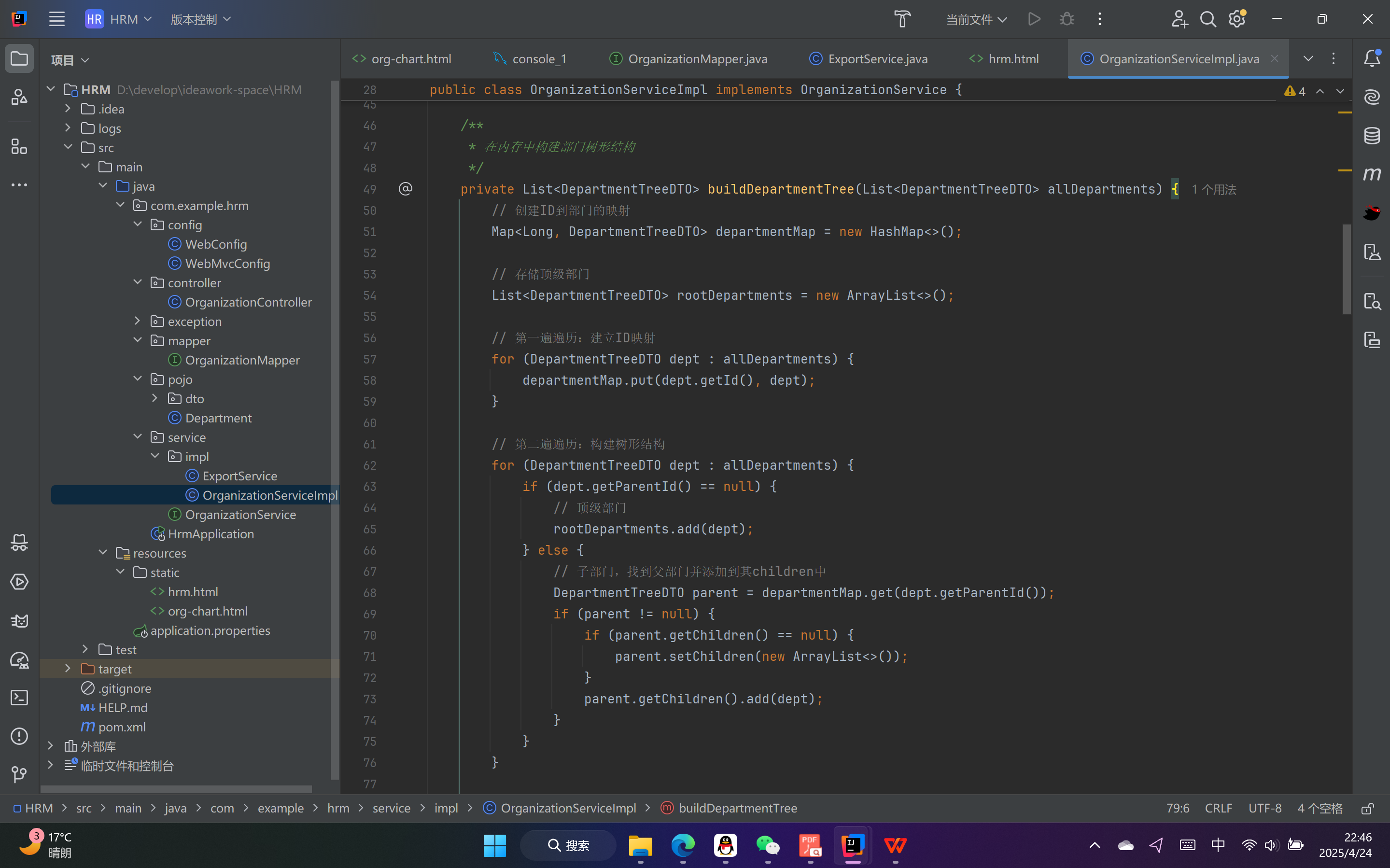
树形结构,继上次进度的成功展示树形结构后,添加了能够直接增删的功能,就是直接再树形结构的基础上直接点击新增,以及点击删除
另外,现在在尝试实现功能的融合,就是能够让最后导出图片的功能的效果与在初步展示树形结构的效果一样,现在还没有进一步的思路,
以下是我先有的代码: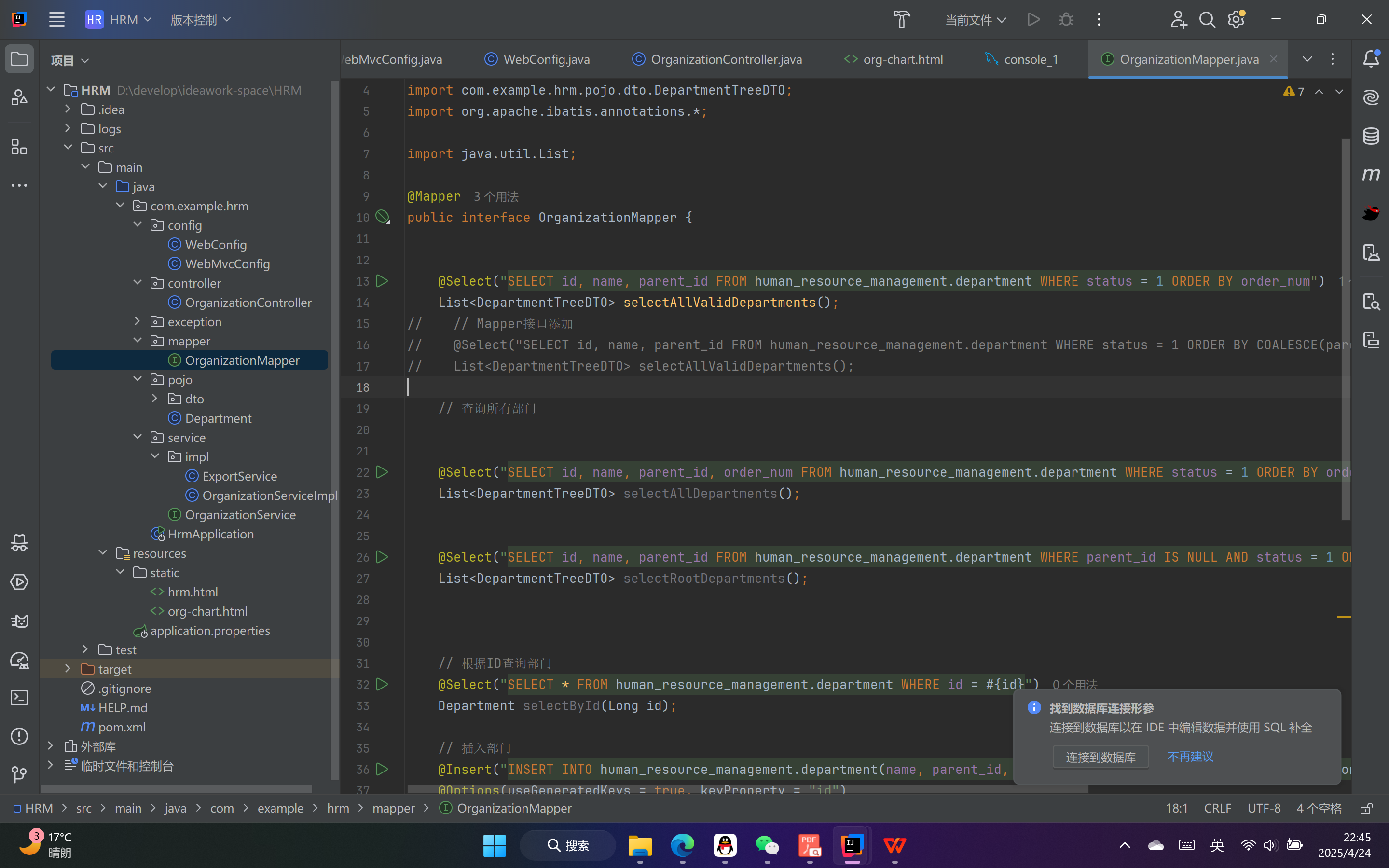

 浙公网安备 33010602011771号