
cisco---静态路由
目录
路由器的工作原理
1)一个帧到达路由,首先检查目标MAC地址是不是发给自己的,不是就丢弃,是的话,解封装,并将IP包送到路由器内部。
2)路由器检查IP包头中的目标IP,匹配路由表,匹配失败,就丢弃,并向源IP回馈错误信息;匹配成功,将IP包路由到出接口
3)封装帧,首先将出接口的MAC地址作为源MAC封装好,然后检查ARP缓存表,检查是否有下一跳的MAC地址,有的话,将其提取并作为目标MAC地址封装到帧中;没有的话,就发送ARP广播请求下一跳的MAC,并获取到对方的MAC地址,再记录缓存,并封装帧,最后将帧发出去
实验一------static route
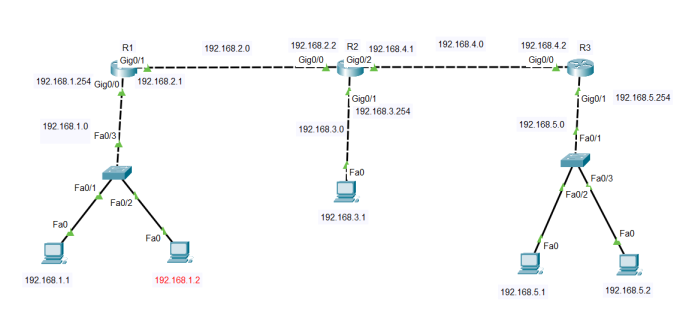
目的
- 使得全网互通
- 使用一台计算机可远程访问其他所有的路由器
步骤
- 配置IP地址,给每一台计算机配置IP地址
- 给每一个路由器的端口配置IP地址
- 计算机连接到路由器的哪个端口,那个端口的IP就作为计算机的网关
- 给每一个路由器配置静态路由
- 给每一个路由器打开远程登录(本地账户验证或者SSH)
- 使用计算机远程到每一个路由器
命令
配置R1路由器IP地址
R1>enable
R1# configure terminal
R1(config)#interface gigabitEthernet 0/0
R1(config-if)#ip address 192.168.1.254 255.255.255.0
R1(config-if)#interface gigabitEthernet 0/1
R1(config-if)#ip address 192.168.2.1 255.255.255.0
配置R2路由器IP地址
R2>enable
R2# configure terminal
R2(config)#interface gigabitEthernet 0/0
R2(config-if)#ip address 192.168.2.2  255.255.255.0
R2(config-if)#interface gigabitEthernet 0/1
R2(config-if)#ip address 192.168.3.254  255.255.255.0
R2(config-if)#interface gigabitEthernet 0/2
R2(config-if)#ip address 192.168.4.1  255.255.255.0
配置R3路由器IP地址
R3>enable
R3# configure terminal
R3(config)#interface gigabitEthernet 0/0
R3(config-if)#ip address 192.168.4.2  255.255.255.0
R3(config-if)#interface gigabitEthernet 0/1
R3(config-if)#ip address 192.168.5.254  255.255.255.0
配置R1路由器默认路由
R1(config)#ip route 0.0.0.0 0.0.0.0 192.168.2.2配置R2路由器静态路由
R2(config)#ip route 192.168.1.0  255.255.255.0  192.168.2.1
R2(config)#ip route 192.168.5.0  255.255.255.0  192.168.4.2
配置R3路由器静态路由
R3(config)#ip route 192.168.3.0  255.255.255.0  192.168.4.1
R3(config)#ip route 192.168.2.0  255.255.255.0  192.168.4.1
R3(config)#ip route 192.168.1.0  255.255.255.0  192.168.4.1
配置R1路由器的远程(本地账户)
R1(config)#line vty 0 4
R1(config-line)#login local
R1(config-line)#exit
R1(config)#username r1 password 123
配置R2路由器的远程(telnet)
R2(config)#line vty 0 4
R2(config-line)#password 456
R2(config-line)#login
R2(config-line)#exit
配置R3路由器的远程(SSH)
R2(config)#ip domain-name hh.com
R2(config)#enable password 123456
R2(config)#line vty 0 4
R2(config)# transport input ssh
R2(config-line)#password 123456
R2(config-line)#login
R2(config-line)#exit本文来自博客园,作者:whitehe,转载请注明原文链接:https://www.cnblogs.com/whitehe/p/18578445

 浙公网安备 33010602011771号