
详细介绍:Linux应用 文件属性和目录
文件类型
Linux系统中大致可以分为7种文件类型,分别是普通文件、目录文件、字符设备文件、块设备文件、符号链接文件、管道文件、套接字文件
可以通过stat 命令和ls命令来查看文件类型
普通文件
普通文件又分为文本文件和二进制文件,文本文件以ASCII码文件形式,常见的有**.c .h .sh .txt**文件
二进制文件以二进制数字的形式展现,常见的有**.o .bin**文件
目录文件
没错目录文件就是描述这个目录的文件,Linux中有专门的文件描述目录,我们看到的目录就是目录文件。Linux系统中有专门的系统调用来读写目录文件。
设备文件
设备文件对应的就是硬件设备,应用程序通过对设备文件的读写来操控、使用硬件设备。
设备文件分为字符设备文件和块设备文件。设备文件并不存在与磁盘中,其是文件系统虚拟出来的,一般由内存来维护,存放在Linux系统/dev/目录下
符号链接文件
link文件类型与window的快捷方式,它指向另一个文件路径,当对这个文件操作时,系统会根据情况将操作转移到它指向的文件。
链接文件分为硬链接文件和软链接文件
管道文件
用于两个进程间通信
套接字文件
用来实现不同主机上的进程间通讯,也就是网络通信。
文件相关函数
stat结构体
内核定义的一个结构体,在<sys/stat.h>文件中声明
三种文件描述的作用和区别
1、stat可以被认定为文件只读元数据的快照,记录了文件的一些信息
2、fd文件描述符,是用来找到inode节点的索引
3、FILE结构体是c语言库函数中的fd的进阶体,里面有一个fd,同时还存着缓冲区、读写指针、错误标志等等。
struct stat
{
dev_t st_dev; /* 文件所在设备的 ID */
ino_t st_ino; /* 文件对应 inode 节点编号 */
mode_t st_mode; /* 文件对应的模式 */
nlink_t st_nlink; /* 文件的链接数 */
uid_t st_uid; /* 文件所有者的用户 ID */
gid_t st_gid; /* 文件所有者的组 ID */
dev_t st_rdev; /* 设备号(指针对设备文件) */
off_t st_size; /* 文件大小(以字节为单位) */
blksize_t st_blksize; /* 文件内容存储的块大小 */
blkcnt_t st_blocks; /* 文件内容所占块数 */
struct timespec st_atim; /* 文件最后被访问的时间 */s
struct timespec st_mtim; /* 文件内容最后被修改的时间 */
struct timespec st_ctim; /* 文件状态最后被改变的时间 */
};
st_mode变量
一个32位无符号整形数据,记录了文件的类型和权限

可以通过这变量来验证文件的权限和类型,具体的文件类型和文件权限的宏定义可以自己搜索,建议还是自己多练习使用一下。
Linux系统中还有一些封装好的宏来判断文件类型。
struct timespec结构体
定义在<time.h>头文件中,是Linux有关时间的结构体。
struct timespec
{
time_t tv_sec;           //秒  time_t 就是 long int 类型
syscall_slong_t tv_nsec; //纳秒
}
time_t时间是一个时间段,是一个时间点到另一个时间点所经过的秒数
stat结构体最后的三个时间都是相对于一个基准时间点而言的。这个时间是基于unix时间戳,也就是从1970年1月1日00:00:00
对于timespec结构体,我们可以对其进行转换,转换成我们熟悉的时间表达
#include <time.h>
  #include <stdio.h>
    struct tm *localtime(const time_t *timer);          /* 经典接口,返回指向静态区的指针 */
    struct tm *localtime_r(const time_t *timer,         /* 可重入版本,结果写入用户提供的 tm */
    struct tm *result);
    //struct tm的定义
    struct tm {
    int tm_sec;   /* 秒 [0,60](允许闰秒) */
    int tm_min;   /* 分 [0,59] */
    int tm_hour;  /* 时 [0,23] */
    int tm_mday;  /* 日 [1,31] */
    int tm_mon;   /* 月 [0,11](0 代表 1 月) */
    int tm_year;  /* 年 - 1900 */
    int tm_wday;  /* 星期 [0,6](0 代表周日) */
    int tm_yday;  /* 年内天数 [0,365](0 代表 1 月 1 日) */
    int tm_isdst; /* 夏令时标志:>0 启用,0 未启用,<0 未知 */
    };
    //实际使用
    /*参数定义*/
    struct stat file_stat;
    struct tm file_tm;
    /* 打印文件状态最后改变的时间 */
    localtime_r(&file_stat.st_ctim.tv_sec, &file_tm);
    strftime(time_str, sizeof(time_str),
    "%Y-%m-%d %H:%M:%S", &file_tm);
    printf("time of last status change: %s\n", time_str);
stat函数
#include <sys/types.h>
  #include <sys/stat.h>
    #include <unistd.h>
      int stat(const char *pathname, struct stat *buf);
      //pathname 是文件的路径
      //buf 是用来接收文件信息的结构体指针
fstat函数
与stat函数不同的是fstat并不是通过文件路径获取的文件信息,它是通过fd文件描述符来获取的文件信息,也就是说使用它之前要通过open来打开文件获取文件描述符
#include <sys/types.h>
  #include <sys/stat.h>
    #include <unistd.h>
      int fstat(int fd, struct stat *buf);
      //fd:文件描述符
      //buf:存储信息的stat指针
lstat函数
stat和fstat在读取链接文件信息的时候,是会直接获取到链接文件指向的文件信息的,想要获取链接文件本身的信息,要使用lstat函数
#include <sys/types.h>
  #include <sys/stat.h>
    #include <unistd.h>
      int lstat(const char *pathname, struct stat *buf);
      //pathname :链接文件路径
      //buf:存储文件信息的stat指针
文件属主
调用open创建新文件时、执行程序的是谁,这个文件所有者就是谁。主要的表现形式是stat文件中的用户ID和所属组ID
chown函数
其可以用来改变文件的所有者和所属组
sudo chown root:root testApp.c    //将文件的所属者和所属组都改成root
#include <unistd.h>
  int chown(const char *pathname, uid_t owner, gid_t group);
  //pathname:文件路径
  //owner:文件所属者
  //group:文件所属组
  //在liunx系统中0用户指的就是root用户 0用户组就是指root用户组
获取当前进程的用户ID和所属组
#include <unistd.h>
  #include <sys/types.h>
    uid_t getuid(void);    //获取用户ID
    gid_t getgid(void);    //获取实际组ID
fchown函数
通过文件描述符改变用户ID和用户组ID
lchown函数
改变链接文件本身的用户ID和用户组ID
文件访问权限
所有的文件类型都有文件访问权限
通过对比文件ID和文件所有组ID和进程有效ID以及进程有效所有组ID可以判断进程对于文件属于什么角色,
特殊权限
S_ISUID set-user-ID位,如果文件权限的这个位被设置,那么进程在打开文件的时候就会将进程有效用户ID设置为文件用户ID,相当于是用文件所有者的权限去操作文件
S_ISGID set_group_ID位,同上,是设置进程有效用户组ID和文件用户zuID使用的。
S_ISVTX sticky bit
目录权限
目录的查看和访问,当前目录的文件和创建都是基于目录权限来的
目录的读权限:可列出(譬如:通过 ls 命令)目录之下的内容(即目录下有哪些文件)。
目录的写权限:可以在目录下创建文件、删除文件(同时需要有执行权限)。
目录的执行权限:可访问目录下的文件,譬如对目录下的文件进行读、写、执行、查看信息等操作
access系统调用
access可以用来检查文件的权限
#include <unistd.h>
  int access(const char *pathname, int mode);
  //pathname:文件路径
  //mode:要检查的内容 1 F_OK 是否存在 R_OK是否可读  W_OK是否可写 X_OK是否可执行
chomod系统调用
用来修改文件权限
#include <sys/stat.h>
  int chmod(const char *pathname, mode_t mode);
  //pathname :文件路径
  //mode:同文件权限值相同 用户、同组、其他
fchmod函数
使用fd文件描述符修改文件权限
#include <sys/stat.h>
  int fchmod(int fd, mode_t mode);
  //fd文件描述符
  //mode:要修改的权限
umask函数
umask是权限掩码,属于进程的一个属性,用来表示其进程在创建文件或者是目录的情况下要忽略哪些权限位
#include <sys/types.h>
  #include <sys/stat.h>
    mode_t umask(mode_t mask);
    //mask表示要修改的进程权限掩码
文件的时间属性
前面说过有三个属性
1、st_atim :文件最后被访问的时间、使用read读取文件会修改这个参数
2、st_mtim:文件最后被修改的时间、使用write写文件会修改这个参数
3、st_ctim :文明状态最后被修改的时间、状态更改指的是该文件的 inode 节点最后一次被修改的时间、更改文件权限,用户ID,链接等等
修改时间属性
utime()函数
#include <sys/types.h>
  #include <utime.h>
    int utime(const char *filename, const struct utimbuf *times);
    //filename:文件路径
    //times:将文件访问时间和修改时间改成这个值 times 是一个 struct utimbuf 结构体类型的指针
    struct utimbuf {
    time_t actime; /* 访问时间 */
    time_t modtime;  /* 内容修改时间 */
    };
utimes()函数
与utime如出一辙,但是它可以实现微妙级的时间改动
#include <sys/time.h>
  int utimes(const char *filename, const struct timeval times[2]);
  struct timeval {
  long tv_sec; /* 秒 */
  long tv_usec; /* 微秒 */
  };
futimens()和utimensat()
可以实现纳秒级的改变
可以单独修改修改时间和访问时间
可以单独设置修改时间和访问时间为当前时间
#include <fcntl.h>
  #include <sys/stat.h>
    int futimens(int fd, const struct timespec times[2]);
    //两个times,分别对应访问时间和修改时间
    int utimensat(int dirfd, const char *pathname, const struct timespec times[2], int flags);
    //flag 设置为0表示修改它链接指向文件的时间 设置AT_SYMLINK_NOFOLLOW表示修改它自身的时间
软链接和硬链接
Linux系统中可以使用ln 命令创建链接文件
ln 源文件 链接文件   //硬链接
ln -s 源文件 链接文件 //软链接
硬链接是创建一个新的文件,指向同一个inode,每一个inode结构体都记录着当前文件的硬链接数量,只有当硬链接数量为0时,才会删除这个文件
ls -li //查看硬链接数量软链接与源文件有不同的inode号,软链接类似于快捷方式。
创建链接文件
#include <unistd.h>
  int link(const char *oldpath, const char *newpath);			//创建硬链接文件
  int symlink(const char *target, const char *linkpath);		//创建软链接文件
读取软链接文件
open打开软链接文件时不能得到文件修饰符的,进而也就无法使用read去读文件
但是可以使用readlink去读取链接文件
#include <unistd.h>
  ssize_t readlink(const char *pathname, char *buf, size_t bufsiz);   //只能读软链接文件
目录
Linux系统中对于目录文件的操作是由专门的系统调用和c语言库函数的。
目录的存储形式
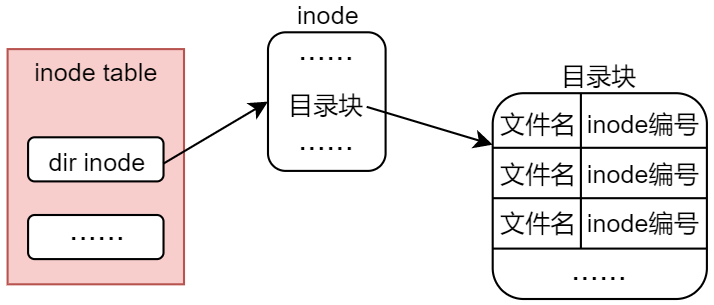
目录文件的作用是为了能够快捷的访问其目录下的其他文件,所以目录文件的存储形式是由inode节点和目录块组成的,内部记录了目录下各个文件的名称和inode编号
相关函数
mkdir函数
#include <sys/stat.h>
  #include <sys/types.h>
    int mkdir(const char *pathname, mode_t mode);
    //pathname:要创建的目录路径
    //mode	  :新目录的权限
rmdir函数
#include <unistd.h>
  int rmdir(const char *pathname);
  //pathname:要删除的目录路径
opendir函数
#include <sys/types.h>
  #include <dirent.h>
    DIR *opendir(const char *name);
    //name:要打开的路径名称
    //返回值是一个结构体,用来描述目录文件,作用类似于fd文件描述符
readdir函数
#include <dirent.h>
  struct dirent *readdir(DIR *dirp);
  //dirp:要访问的DIR结构体指针
  //返回值表示dirp目录流指向的下一个目录条目,也就是下一个读的文件
  struct dirent {
  ino_t d_ino; /* inode 编号 */
  off_t d_off; /* not an offset; see NOTES */
  unsigned short d_reclen; /* length of this record */
  unsigned char d_type; /* type of file; not supported by all filesystem types */
  char d_name[256]; /* 文件名 */
  };
rewinddir()函数
#include <sys/types.h>
  #include <dirent.h>
    void rewinddir(DIR *dirp);
    //将这个DIR对应的目录流重置为其目录起点
closedir函数
#include <sys/types.h>
  #include <dirent.h>
    int closedir(DIR *dirp);
    //关闭目录文件
进程当前的工作目录
Linux 下的每一个进程都有自己的当前工作目录(current working directory),当前工作目录是该进程解析、搜索相对路径名的起点(不是以" / "斜杆开头的绝对路径)
可通过一个函数获得
#include <unistd.h>
  char *getcwd(char *buf, size_t size);
  //将当前工作目录保存在buf中
也可以通过一个函数对其进行改变
#include <unistd.h>
  int chdir(const char *path);
  int fchdir(int fd);
删除文件
unlink()
#include <unistd.h>
  int unlink(const char *pathname);
  //删除软链接或者硬链接,删除软链接的时候不会对源文件产生任何影响
remove()
#include <stdio.h>
  int remove(const char *pathname);
  //是一个c语言库函数,用来移除一个文件或者是空目录
文件重命名
rename()
#include <stdio.h>
  int rename(const char *oldpath, const char *newpath);
  //oldpath:老文件路径
  //newpath:新文件路径
rename()只会操作目录文件,而不去操作文件本身的inode这些


 浙公网安备 33010602011771号