
LNMP 二、Nginx配置
二、Nginx配置
2.1 默认虚拟主机
2.1.1配置
首先修改配置文件
#vi /usr/local/nginx/conf/nginx.conf
在最后一个结束符号}前加一行配置:
include vhost/*.conf;
意思就是/usr/local/nginx/conf/host下面的所有以.conf结尾的文件都会被加载
#mkdir /usr/local/nginx/conf/vhost
#cd /usr/local/nginx/conf/vhost
#vim default.conf
server
{
listen 80 default_server;
server_name aaa.com;
index index.html index.htm index.php;
root /data/nginx/default;
}
#/usr/local/nginx/sbin/nginx -t
nginx: the configuration file /usr/local/nginx/conf/nginx.conf syntax is ok
nginx: configuration file /usr/local/nginx/conf/nginx.conf test is successful
#/usr/local/nginx/sbin/nginx -s reload
#echo "default_server" > /data/nginx/default/index.html
//创建索引页
2.1.2检验测试
#curl -x127.0.0.1:80 aaa.com
//访问aaa.com
default_server
#curl -x127.0.0.1:80 1212.com
//访问一个没有定义过的域名,也会访问aaa.com
default_server
2.1.3测试成功

2.2 用户认证
2.2.1配置
再来创建一个新的虚拟主机
#cd /usr/local/nginx/conf/vhost
#vi test.com.conf
server
{
listen 80;
server_name test.com;
index index.html index.htm index.php;
root /data/nginx/test.com;
location /
{
auth_basic "Auth";
//打开认证
auth_basic_user_file /ust/local/nginx/conf/htpasswd;
//指定用户密码文件
}
}
#yum install -y httpd
//安装httpd,也可以使用之前编译安装的Apache2.4
#htpasswd -c /usr/local/nginx/conf/htpasswd aming
new password:
re-type new password:
Adding password for user aming
#/usr/local/nginx/sbin/nginx -s reload
#mkdir /data/nginx/test.com
#echo "test.com" > /data/nginx/test.com/index.html
2.2.2 测试检测
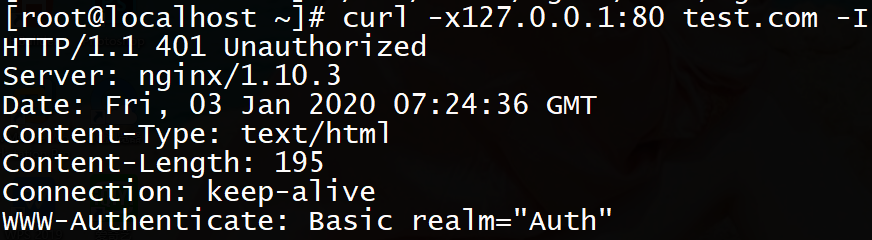
#curl -I -x127.0.0.1:80 test.com
状态码401
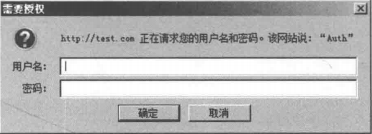
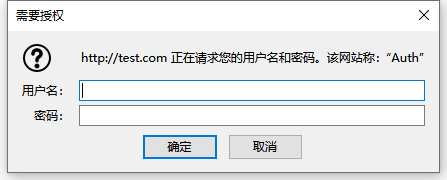
打开hosts文件,加上“你的IP test.com”
然后在浏览器访问test.com
2.2.3测试成功
2.2.4附属
如针对目录做用户认证则要修改location后面的路径:
location /admin/
{
auth_ basic "Auth" ;
auth_basic_user_file /usr/local/nginx/conf/htpasswd;
}
2.3 域名重定向
2.3.1配置
#vi /usr/local/nginx/conf/vhost/test.com.conf
server
{
listen 80;
server_name test.com test1.com test2.com
//是server_name后面可以跟多个域名
index index.html index.htm index.php;
root /data/nginx/test.com;
if ($host != 'test.com' ){
rewrite ^(.*)$ http://test.com/$1 permanent;
//permanent为永久重定向,相当于httpd的R=301
}
}
#/susr/local/nginx/sbin/nginx -t
nginx: the configuration file /usr/local/nginx/conf/nginx.conf syntax is ok
nginx: configuration file /usr/local/nginx/conf/nginx.conf test is successful
#/usr/local/nginx/sbin/nginx -s reload
2.3.2检验测试
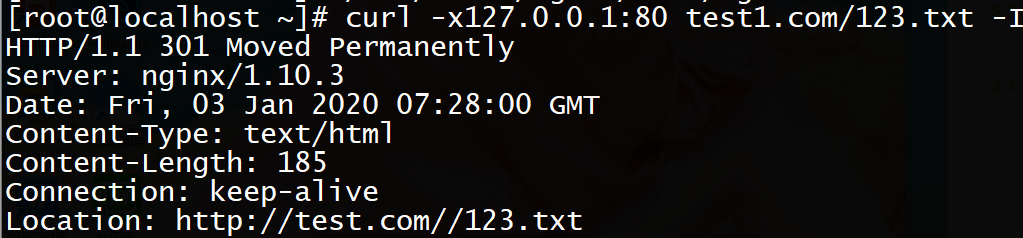
#curl -x127.0.0.1:80 test1.com/123.txt -I
状态码301
2.3.3测试成功
2.4 Nginx的访问日志
2.4.1配置
先来看看Nginx的日志格式
#grep -A2 log_format /usr/local/nginx/conf/nginx.conf
log_format combined_realip '$remote_addr $http_x_forwarded_for [$time_local]'
' $host "$request_uri" $status'
' "$http_referer" "$http_user_agent"';
//combined_realip为日志格式名字,$remote_addr为访问网站的用户的出口IP;
//$http_x_forwarded_for 为代理服务器的IP,如果使用了代理,则会记录IP
//$time_local为当前时间;$host为访问的主机名;$request_uri为访问的URL地址
//$status为状态码,$http_referer为referer地址,$http_user_agent为user_agent
修改配置文件
#vi /usr/local/nginx/conf/vhost/test.com.conf
server
{
listen 80;
server_name test.com;
index index.html index.htm index.php;
root /data/nginx/test.com;
if ($host != 'test.com' ){
access_log /tmp/1.log combined_realip;
}
}
//使用access_log来指定日志的存储路径,最后面为日志的格式名字
#/usr/local/nginx/sbin/nginx -t
nginx: the configuration file /usr/local/nginx/conf/nginx.conf syntax is ok
nginx: configuration file /usr/local/nginx/conf/nginx.conf test is successful
#/usr/local/nginx/sbin/nginx -s reload
2.4.2 检验测试
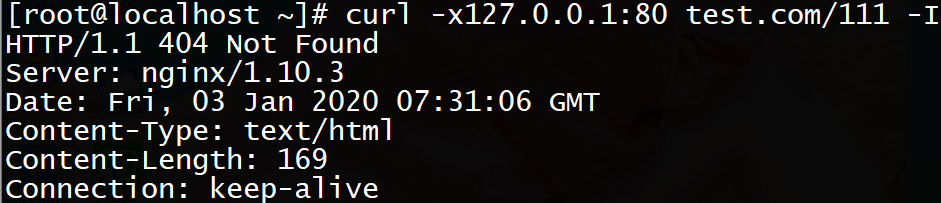
#curl -x127.0.0.1:80 test.com/111
状态码404
#cat /tmp/1.log
127.0.0.1 ~~~~~~~~~~~~~~~~~~~~~~~~~~~~~~~~~~~~~~~~~~~~~~~~
2.4.3检验成功

2.4.4附属
Nginx的日志很简单,不像httpd还带切割工具,在下面提供一个Nginx的日志切割脚本
#vim /usr/local/sbin/nginx_log_rotate.sh
#!/bin/bash
##假设nignx的日志存放路径为/data/logs/
d=`date -d "-1 day" +%Y%m%d`
logdir="/usr/local/nginx/logs"
nginx_pid="/usr/local/nginx/logs/nginx.pid"
cd $logdirfor log in `ls *.log`
do
mv $log $log-$d
done
/bin/kill -HUP `cat $nginx_pid`
2.5 配置静态文件不记录日志并添加过期时间
2.5.1配置
#vi /usr/local/nginx/conf/vhost/test.com.conf
server
{
listen 80;
server_name test.com test1.com test2.com;
index index.html index.htm index.php;
root /data/nginx/test.com;
if ($host != 'test.com' ) {
rewrite ^/(.*)$ http://test.com/$1 permanent;
}
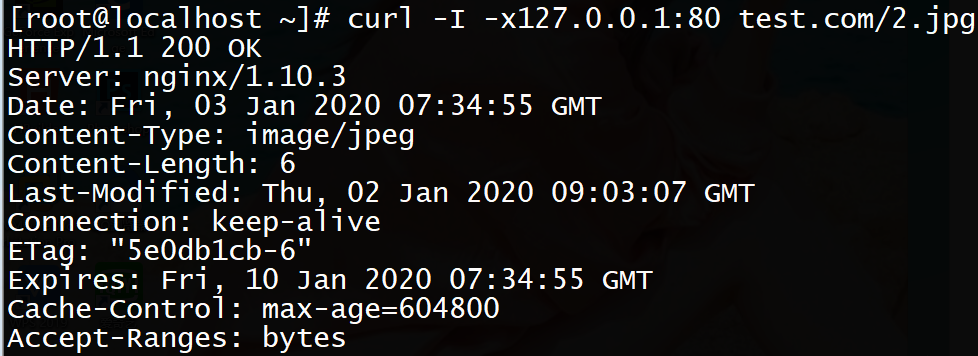
location ~ .*\.(gif|jpg|jpeg|png|bmp|swf)$
{
expires 7d;
access_log off;
}
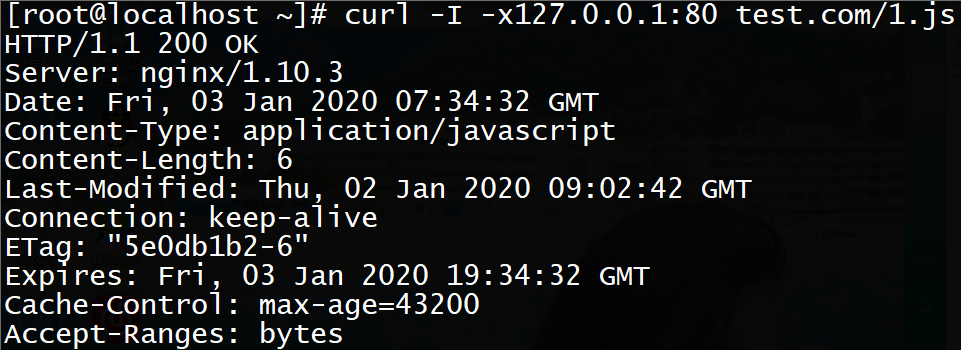
location ~ .*\.(js|css)$
{
expires 12h;
}
access_log /tmp/1.log combined_realip;
}
#/usr/local/nginx/sbin/nginx -t
nginx: the configuration file /usr/local/nginx/conf/nginx.conf syntax is ok
nginx: configuration file /usr/local/nginx/conf/nginx.conf test is successful
#echo "11111" > /data/nginx/test.com/1.js
//创建js文件
#echo "22222" > /data/nginx/test.com/2.jpg
//创建jpg文件
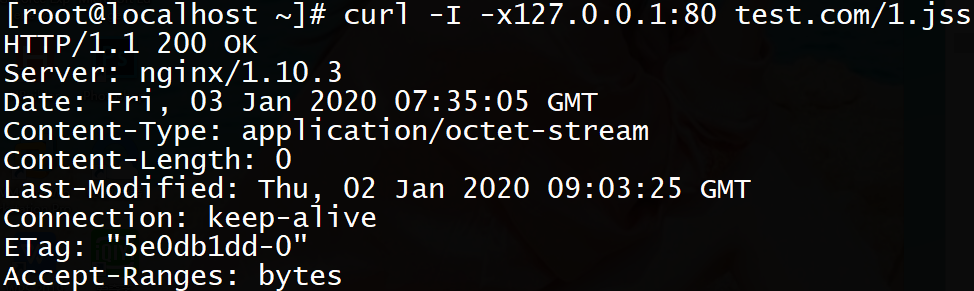
#touch /data/nginx/test.com/1.jss
//创建一个对比的文件
2.5.2检验测试
#curl -I -x127.0.0.1:80 test.com/1.js
状态码200
#curl -I -x127.0.0.1:80 test.com/2.jpg
状态码200
#curl -I -x127.0.0.1:80 test.com/1.jss
状态码200
#cat /tmp/1.log
查看日志
2.5.3测试成功
2.6 Nginx防盗链
2.6.1配置
#vi /usr/local/nginx/conf/vhost/test.com.conf
server
{
listen 80;
server_name test.com test1.com test2.com;
index index.html index.htm index.php;
root /data/nginx/test.com;
if ($host != 'test.com' ) {
rewrite ^/(.*)$ http://test.com/$1 permanent;
}
location ~* ^.+\.(gifljpglpng|swf|flv|rar|zipldoclpdf|gz|bz2ljpeglbmplxls)$
{
expires 7d;
valid_referers none blocked server_names *. test.com ;
if ($invalid_referer) {
return 403;
}
access_log off;
}
#/usr/local/nginx/sbin/nginx -t
nginx: the configuration file /usr/local/nginx/conf/nginx.conf syntax is ok
nginx: configuration file /usr/local/nginx/conf/nginx.conf test is successful
#/usr/local/nginx/sbin/nginx -s reload
2.6.2检验测试
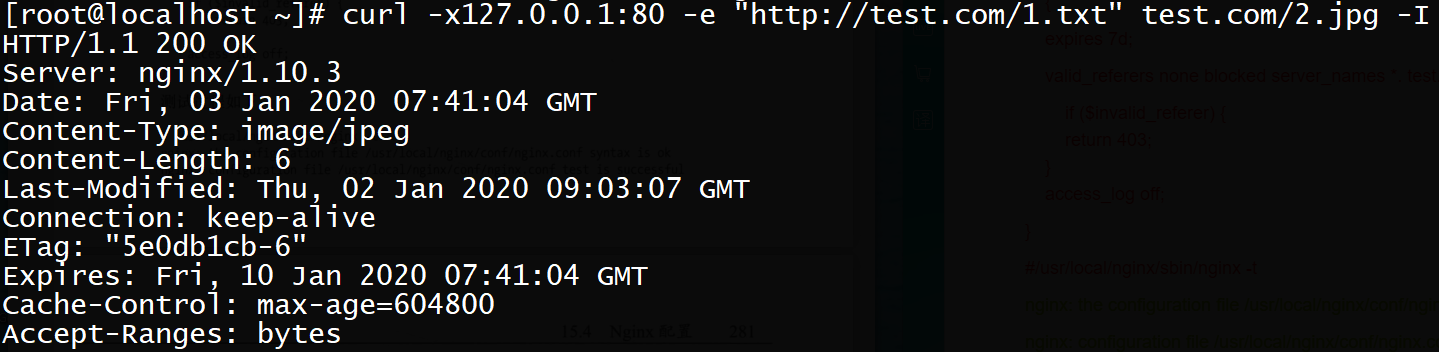
#curl -x127.0.0.1:80 -e "http://test.com/1.txt" test.com/2.jpg -I
状态码200
#curl -x127.0.0.1:80 -e "http://aaa.com/1.txt" test.com/2.jpg -I
状态码403
2.6.3测试成功

2.7 访问控制
2.7.1配置
#vi /usr/local/nginx/conf/vhost/test.com.conf
server
{
listen 80;
server_name test.com test1.com test2.com;
index index.html index.htm index.php;
root /data/nginx/test.com;
location /admin/
{
allow 192.168.188.1;
allow 127.0.0.1;
deny all;
}
}
//使访问admin目录下只允许192.168.188.1和127.0.0.1访问
#mkdir /data/nginx/test.com/admin
#echo "123" > /data/nginx/test.com/admin/1.html
2.7.2检验测试
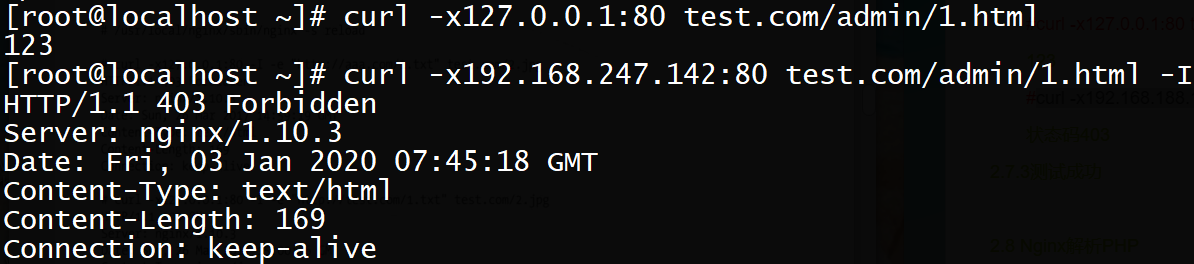
#curl -x127.0.0.1:80 test.com/admin/1.html
123
#curl -x192.168.188.128:80 test.com/admin/1.html
状态码403
2.7.3测试成功
2.8 Nginx解析PHP
2.8.1配置
#vi /usr/local/nginx/conf/vhost/test.com.conf
server
{
listen 80;
server_name test.com test1.com test2.com;
index index.html index.htm index.php;
root /data/nginx/test.com;
if ($host != 'test.com' ) {
rewrite ^/(.*)$ http://test.com/$1 permanent;
}
location ~ \. php$
{
include fastcgi_params;
fastcgi_pass unix:/tmp/php-fcgi.sock;
fastcgi_index index.php;
fastcgi_param SCRIPT_FILENAME /data/nginx/test.com$fastcgi_script_name;
}
access_log /tmp/1.log combined_realip;
}
//fastcgi_pass用来指定php-fpm的地址

 浙公网安备 33010602011771号