

根据实体生成对应的增删改查sql
心累,写个工具,别再写太多没用的代码了。
目的:根据实体对象,生成对应的sql。还在手写sql,不用orm的朋友,希望对你们有帮助。
说明:写的不是很严谨,自己根据实际需求去改。
1、先来2个特性
//TableNameAttribute:如果表名与类名不一致,则添加;
//PrimaryKyeAttribute:标志是主键字段,一定要有主键的;
    /// <summary>
    /// 数据库表名
    /// </summary>
    [AttributeUsage(AttributeTargets.Class)]
    public class TableNameAttribute : Attribute
    {
        public string DbTable { get; set; }
        public TableNameAttribute(string tableName)
        {
            this.DbTable = tableName;
        }
    }


    /// <summary>
    /// 表示主键字段
    /// </summary>
    [AttributeUsage(AttributeTargets.Property)]
    public class PrimaryKyeAttribute : Attribute
    {
    }
2、写工具类SqlString:
    public class SqlString
    {
        /// <summary>
        /// 获取查询语句
        /// </summary>
        /// <typeparam name="T"></typeparam>
        /// <param name="fields">要查询的字段,不写即全部</param>
        /// <returns></returns>
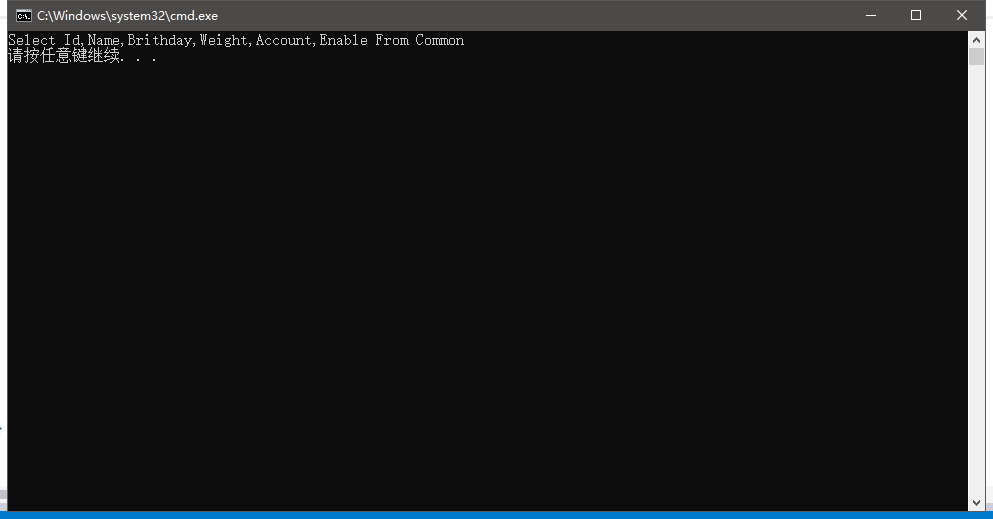
        public static string GetQuery<T>(params string[] fields) where T : class
        {
            var propes = typeof(T).GetProperties();
            string sqlSelect = string.Empty;
            string tableName = GetTableName(typeof(T));
            List<string> allField = GetAllFieldName(typeof(T), false);
            if (fields == null || fields.Length < 1)
            {

                sqlSelect = string.Format($"Select {string.Join(",", allField.ToArray())} From {GetTableName(typeof(T))}");

            }
            else
            {
                sqlSelect = string.Format($"Select {string.Join(",", fields)} From {GetTableName(typeof(T))}");
            }
            return sqlSelect;
        }
        public static string GetCount<T>()where T : class
        {
            string tbName = GetTableName(typeof(T));
            string result = string.Format($"Select count(1) from {tbName}");
            return result;
        }
        /// <summary>
        /// 获取插入语句
        /// </summary>
        /// <typeparam name="T"></typeparam>
        /// <param name="t"></param>
        /// <param name="fields"></param>
        /// <returns></returns>
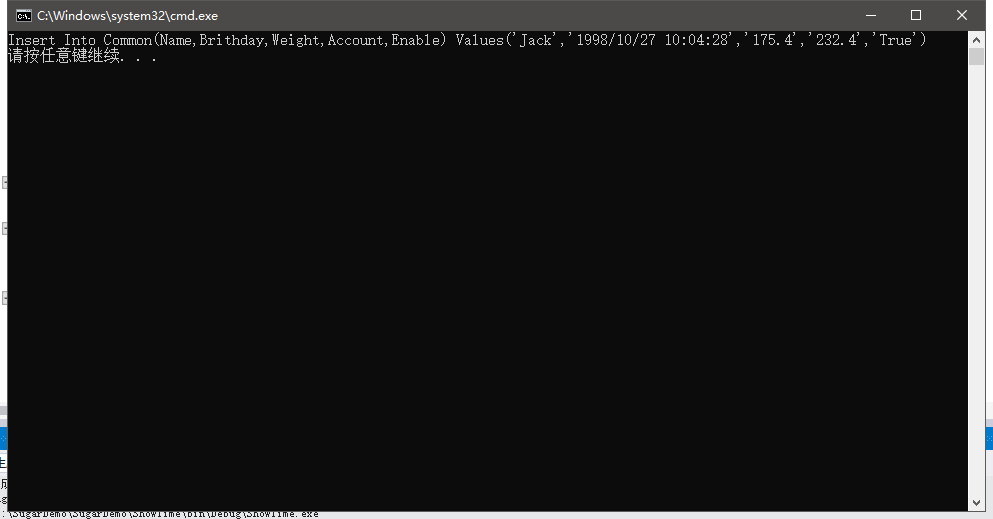
        public static string GetInsert<T>(T t) where T : class
        {
            string sqlInsert = string.Empty;
            string tbName = GetTableName(typeof(T));
            Dictionary<string, object> nameValue = GetNameValue<T>(t, true);
            string keys = string.Join(",", nameValue.Keys.ToArray());
            List<string> values = new List<string>();
            foreach (object value in nameValue.Values)
            {
                values.Add(string.Format($"'{value.ToString()}'"));
            }
            sqlInsert = string.Format($"Insert Into {tbName}({keys}) Values({string.Join(",", values.ToArray())})");
            return sqlInsert;
        }
        /// <summary>
        /// 获取删除语句
        /// </summary>
        /// <typeparam name="T"></typeparam>
        /// <param name="keys">主键字段值数值,即按主键删除条件</param>
        /// <returns></returns>
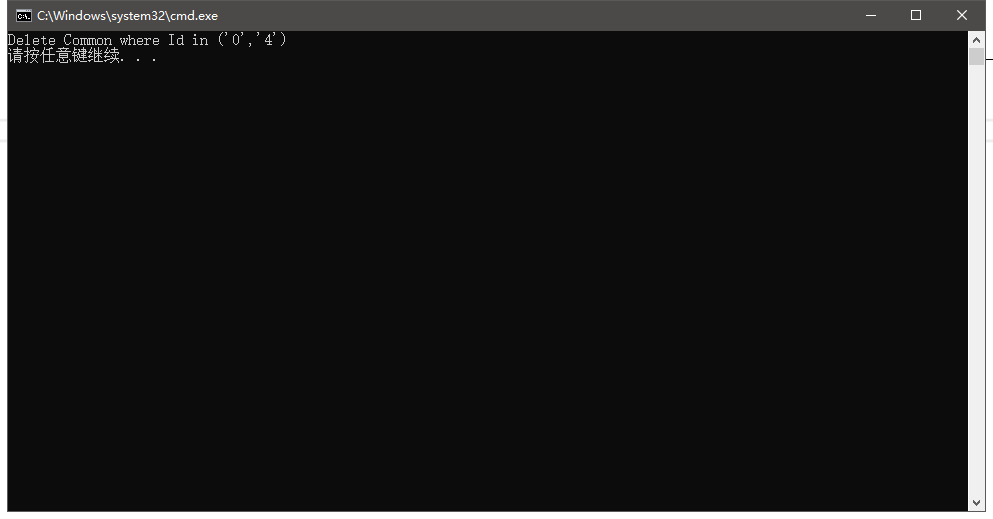
        public static string GetDelete<T>(string[] keys)
        {
            if (keys == null || keys.Length < 1)
            {
                throw new ArgumentException("参数不能为空");
            }
            string sqlDelete = string.Empty;
            string tbName = GetTableName(typeof(T));
            string keyField = GetKeyName(typeof(T));
            for (int i = 0; i < keys.Length; i++)
            {
                keys[i] = string.Format($"'{keys[i]}'");
            }
            sqlDelete = string.Format($"Delete {tbName} where {keyField} in ({string.Join(",", keys)})");
            return sqlDelete;

        }
        /// <summary>
        /// 获取更新语句
        /// </summary>
        /// <typeparam name="T"></typeparam>
        /// <param name="t"></param>
        /// <param name="fields"></param>
        /// <returns></returns>
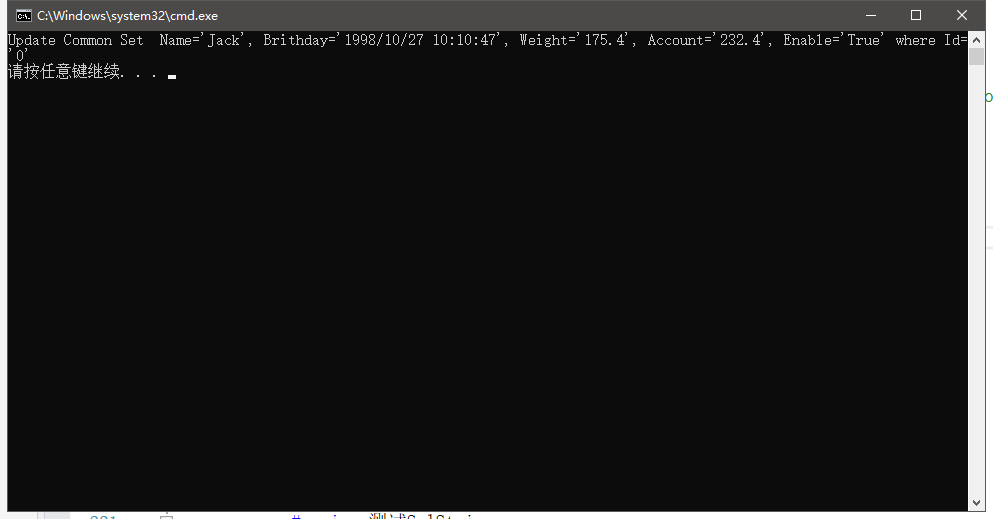
        public static string GetUpdate<T>(T t, params string[] fields) where T : class
        {
            //TODO:Working
            string sqlUpdate = string.Empty;

            string tbName = GetTableName(typeof(T));
            sqlUpdate += string.Format($"Update {tbName} Set ");
            Dictionary<string, object> nameValue = GetNameValue<T>(t, true);
            var keyItem = GetKeyItem<T>(t);
            if (fields == null || fields.Length < 1)
            {
                //全更新
                foreach (var item in nameValue)
                {
                    sqlUpdate += string.Format($" {item.Key}='{item.Value.ToString()}',");
                }
            }
            else
            {
                foreach (var value in fields)
                {
                    sqlUpdate += string.Format($" {value}='{nameValue[value].ToString()}',");
                }
            }
       sqlUpdate=sqlUpdate.Remove(sqlUpdate.Length - 1, 1);
            sqlUpdate += string.Format($" where {keyItem.First().Key}='{keyItem.First().Value.ToString()}' ");
            return sqlUpdate;
        }
        /// <summary>
        /// 获取对象的字段与值
        /// </summary>
        /// <typeparam name="T"></typeparam>
        /// <param name="t"></param>
        /// <param name="isFilterKey">是否过滤主键</param>
        /// <returns></returns>
        private static Dictionary<string, object> GetNameValue<T>(T t, bool isFilterKey) where T : class
        {
            Dictionary<string, object> result = new Dictionary<string, object>();
            var propes = typeof(T).GetProperties();
            foreach (PropertyInfo item in propes)
            {
                if (isFilterKey)
                {
                    var keyAttrs = item.GetCustomAttributes(typeof(PrimaryKyeAttribute), false);
                    if (keyAttrs != null && keyAttrs.Length > 0)
                    {
                        continue;
                    }
                }
                result.Add(item.Name, item.GetValue(t, null));
            }
            return result;
        }
        /// <summary>
        /// 获取表名
        /// </summary>
        /// <param name="type"></param>
        /// <returns></returns>
        private static string GetTableName(Type type)
        {
            string name = string.Empty;
            var attrs = type.GetCustomAttributes(typeof(TableNameAttribute), false);
            if (attrs != null && attrs.Length > 0)
            {
                name = (attrs[0] as TableNameAttribute).DbTable;
            }
            else { name = type.Name; }
            return name;
        }
        /// <summary>
        /// 是否过滤主键
        /// </summary>
        /// <param name="type"></param>
        /// <param name="IsFilterKey"></param>
        /// <returns></returns>
        private static List<string> GetAllFieldName(Type type, bool isFilterKey)
        {
            var propes = type.GetProperties();
            List<string> list = new List<string>();
            foreach (PropertyInfo item in propes)
            {
                if (isFilterKey)
                {
                    var keyAttrs = item.GetCustomAttributes(typeof(PrimaryKyeAttribute), false);
                    if (keyAttrs != null && keyAttrs.Length > 0)
                    {
                        continue;
                    }
                }
                list.Add(item.Name);
            }
            return list;
        }
        /// <summary>
        /// 获取类型的主键名
        /// </summary>
        /// <param name="type"></param>
        /// <returns></returns>
        private static string GetKeyName(Type type)
        {
            var propes = type.GetProperties();
            string result = string.Empty;
            foreach (PropertyInfo item in propes)
            {
                var keyAttrs = item.GetCustomAttributes(typeof(PrimaryKyeAttribute), false);
                if (keyAttrs != null && keyAttrs.Length > 0)
                {
                    result = item.Name;
                }
            }
            return result;
        }
        /// <summary>
        /// 获取对象的主键名与值
        /// </summary>
        /// <typeparam name="T"></typeparam>
        /// <param name="t"></param>
        /// <returns></returns>
        private static Dictionary<string, object> GetKeyItem<T>(T t) where T : class
        {
            Dictionary<string, object> result = new Dictionary<string, object>();
            var propes = typeof(T).GetProperties();
            foreach (PropertyInfo item in propes)
            {
                var keyAttrs = item.GetCustomAttributes(typeof(PrimaryKyeAttribute), false);
                if (keyAttrs != null && keyAttrs.Length > 0)
                {
                    result[item.Name] = item.GetValue(t, null);
                    break;
                }
            }
            return result;
        }
    }
3、完了,就是这么简单;
来个实体测试
 [TableName("Common")]
    public class GenBox
    {
        [PrimaryKye]
        public int Id { get; set; }
        public string Name { get; set; }
        public DateTime Brithday { get; set; }
        public double Weight { get; set; }
        public decimal Account { get; set; }
        public bool Enable { get; set; }

    }
再来个控制台走一遍
   #region 测试SqlString
            string sqlString = string.Empty;
            sqlString= SqlString.GetQuery<GenBox>();

            GenBox box = new GenBox {Id=0, Account=232.4m,Weight=175.4, Brithday=DateTime.Now.AddYears(-22), Enable=true, Name="Jack" };
            //sqlString= SqlString.GetInsert(box);

            //sqlString = SqlString.GetDelete<GenBox>(new string[]{"0","4" });
            //sqlString = SqlString.GetUpdate(box);
            //sqlString = SqlString.GetCount<GenBox>();
            Console.WriteLine(sqlString);

            #endregion
运行截图:

 浙公网安备 33010602011771号