
SignalR 入门 《一》
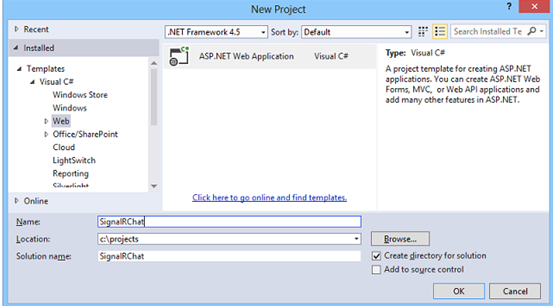
1.打开VS,创建一个ASP.NET Web Application。
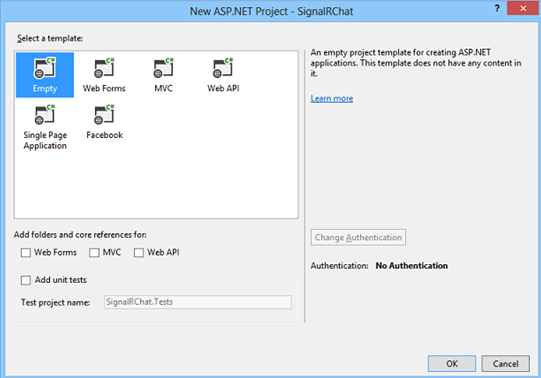
2.在新打开的窗口选择 “Empty”,然后创建项目
3.在解决方案窗口,右击刚新建的项目,为项目添加一个SignalR Hub Class (v2)集线器类,命名为ChatHub.cs。
注:在新建此类时,vs会添加SignalR必须的一些程序集和脚本文件,
假如没有添加程序集的话可以打开NuGet程序包管理器控制台,然后
输入install-package Microsoft.AspNet.SignalR来添加程序集。

4 修改刚新建的ChatHub.cs的内容为:
using Microsoft.AspNet.SignalR;
using System.Threading.Tasks;
using System.Diagnostics;

namespace HelloSignalR
{
    public class ChatHub : Hub
    {
        public void Send(string name, string massage)
        {
            //去调用所有连接上的客户端中SendMessage()方法
            //即SendMessage是定义在客户端的一个javascript方法
            Clients.All.SendMessage(name, massage);
        }

        /// <summary>
        /// 客户端连接上时,会进入到此方法中
        /// </summary>
        /// <returns></returns>
        public override Task OnConnected()
        {
            Trace.WriteLine("客户端连接成功");
            return base.OnConnected();
        }

        public override Task OnReconnected()
        {
            Trace.WriteLine("客户端重连中");
            return base.OnReconnected();
        }

        public override Task OnDisconnected(bool stopCalled)
        {
            return base.OnDisconnected(stopCalled);
        }
    }
}
5.为项目添加一个OWIN Startup Class,命名为Startup.cs,具体内容为:
using Microsoft.Owin;
using Owin;

//OWIN(Open Web Interface for .NET)是一套开放网站界面标准

[assembly:OwinStartup(typeof(HelloSignalR.Startup))]
namespace HelloSignalR
{
    public class Startup
    {
        public void Configuration(IAppBuilder app)
        {
            // Any connection or hub wire up and configuration should go here
            app.MapSignalR();
        }
    }
}
6 为项目添加一个html页面,命名为index.html,具体内容如下:
<!DOCTYPE html>
<html>
<head>
<title>SignalR Simple Chat</title>
<style type="text/css">
.container {
background-color: #99CCFF;
border: thick solid #808080;
padding: 20px;
margin: 20px;
}
</style>
</head>
<body>
<div class="container">
<input type="text" id="message" />
<input type="button" id="sendmessage" value="Send" />
<input type="hidden" id="displayname" />
<ul id="discussion"></ul>
</div>
<!--Script references. -->
<!--Reference the jQuery library. -->
<script src="Scripts/jquery-1.10.2.min.js"></script>
<!--Reference the SignalR library. -->
<script src="Scripts/jquery.signalR-2.1.2.js"></script>
<!--Reference the autogenerated SignalR hub script.it's necessary. -->
<script src="signalr/hubs"></script>
<!--Add script to update the page and send messages.-->
<script type="text/javascript">
$(function () {
// Declare a proxy to reference the hub.
var chat = $.connection.chatHub;
// Create a function that the hub can call to broadcast messages.
chat.client.SendMessage = function (name, message) {
// Html encode display name and message.
var encodedName = $('<div />').text(name).html();
var encodedMsg = $('<div />').text(message).html();
// Add the message to the page.
$('#discussion').append('<li><strong>' + encodedName
+ '</strong>: ' + encodedMsg + '</li>');
};
// Get the user name and store it to prepend to messages.
$('#displayname').val(prompt('Enter your name:', ''));
// Set initial focus to message input box.
$('#message').focus();
// Start the connection.
$.connection.hub.start().done(function () {
$('#sendmessage').click(function () {
// Call the Send method on the hub.
chat.server.send($('#displayname').val(), $('#message').val());
// Clear text box and reset focus for next comment.
$('#message').val('').focus();
});
});
document.onkeydown = function (event) {
var e = event || window.event || arguments.callee.caller.arguments[0];
if (e && e.keyCode == 13) { // enter 键
$('#sendmessage').click();
}
};
});
</script>
</body>
</html>
7 生成项目,然后运行网站,即可完成此Demo

 浙公网安备 33010602011771号