

首先,先上源代码:直接粘贴到idea就可以运行,记住需要将Idea的setting——Language——javascirpt设置为ECMAScript6.0
<!DOCTYPE html>
<html lang="en" xmlns:v-bind="http://www.w3.org/1999/xhtml">
<head>
    <meta charset="UTF-8">
    <title>Title</title>

</head>
<body>
<div id = "app">
    <todo>
        <todo-title slot="todo-title" :title="title"></todo-title>
        <todo-items slot="todo-items" v-for="(item,index) in items" :item="item" :index="index" v-on:remove="removeItems(index)"></todo-items>
    </todo>
</div>

<!--1.导入Vue.js-->
<script src="https://cdn.jsdelivr.net/npm/vue@2.5.16/dist/vue.js"></script>
<script>
    Vue.component("todo",{
        template:'<div>\
                        <slot name="todo-title"></slot>\
                        <ul>\
                            <slot name="todo-items"></slot>\
                        </ul>\
                    </div>\
        '
    });
    Vue.component("todo-title",{
        props:["title"],
        template:'<div>{{title}}</div>'
    });
    Vue.component("todo-items",{
        props:["item","index"],
        template:'<li>{{item}}<button @click="remove">删除</button></li>',
        methods:{
            remove:function (index) {
                this.$emit("remove",index)
            }
        }
    });
    var vm = new Vue({
        el:"#app",
        data:{
            title:"学科",
            items:["java","python"]
        },
        methods:{
            removeItems:function (index) {
                console.log("删除了"+this.items[index]+"OK");
                this.items.splice(index,1);

            }
        }
    });
</script>

</body>
</html>
看上去是比较乱的,我们现在来逐一进行分析。
首先我们希望显示的效果是这样的:
写一个列表名称,然后在<ul>标签下面插入一个<li>标签,标签里面是列表的选项值。如下代码所示
<body>
    <div>
        学科
        <ul>
            <li>java</li>
            <li>python</li>
        </ul>
    </div>
</body>
这个使我们想要的效果。但是我们需要“学科”和下面的选项“java”和“python”都是动态显示的。如何可以做到这点呢,那么我们就需要使用到<slot>这个标签。
首先我们要定义三个component组件。
先写一个名为todo的组件,可以看做是一个框架组件
Vue.component("todo",{
template:'<div>\
            <slot name="todo-title"></slot>\
            <ul>\
                <slot name="todo-items"></slot>\
            </ul>\
          </div>\
'
});
在上述组件中,我们可以看到。需要插入动态数据的地方,我们都用2个组件来代替了。
这2个组件,分别是todo-title和todo-items
todo-title组件,如下所示: 这里的props:["title"],在我看来相当于是形参,主要作用是在上面调用组件的地方,传入需要的动态参数。
Vue.component("todo-title",{
props:["title"],
template:'<div>{{title}}</div>'
});
todo-items组件,如下图所示
Vue.component("todo-items",{
props:["item"],
template:'<li>{{item}}</li>',
});
当三个需要用的组件都已经写好了之后,可以在上面调用这三个compoent组件。
<div id = "app">
    <todo>
        <todo-title slot="todo-title"></todo-title>
        <todo-items slot="todo-items"></todo-items>
    </todo>
</div>
此时,todo组件和todo-list、todo-items组件进行了插槽绑定,然后使用标签,对三个组件进行引用的时候,使用slot属性,定义了对应了的组件(slot="todo-title"和slot="todo-items")。这里slot为什么要进行三方绑定,具体还要查阅其他书籍,暂且先这么理解。
此时,还剩下动态的数据需要进行绑定。
在vm中,我们进行了如下的定义。
var vm = new Vue({
el:"#app",
data:{
title:"学科",
items:["java","python"]
}
});
可以看出title的值为“学科”,items的值为“java”、“python”,此时我们需要进行绑定,
那如何进行绑定呢,代码如下所示:
<div id = "app">
    <todo>
        <todo-title slot="todo-title" :title="title"></todo-title>
        <todo-items slot="todo-items" v-for="(item,index) in items" :item="item" :index="index" v-on:remove="removeItems(index)"></todo-items>
    </todo>
</div>
详细分析上述代码,在todo-title这个标签中
:title="title"
这里的“:”冒号,表示v-bind的缩写,也就是是“:title”和“v-bind:title”是等价的。前面的title代表的是在compoent组件中的参数,在上面提到过。后面的这个title代表的是在vm这个vue实例中的数据的值。这样一来,组件中的动态数据就和Vue实例中的动态数据进行了绑定。此时,在console中,改变vue实例vm中数据的值,则组件中的该处的值也会发生变动。
v-for="(item) in items" :item="item"
这里的v-for表示先使用for语句拿出在Vue实例中items中的值,然后分给item。后面的“:item”,和上面的类似,前面的item表示的是todo-items组件中的参数,后面的item(双引号里面的item)表示的是,本语句for循环出来的item值。
由此得出一个总结,类似于:title="title"这样的数据,前面的title表示的是参数,双引号里面的title表示的是Vue实例中传输过来的数据。
由此,组件——标签——Vue实例的数据,三者一一对应。形成了数据的绑定。
下面我们要进行自定义事件,动态的完成上述列表的删除操作。
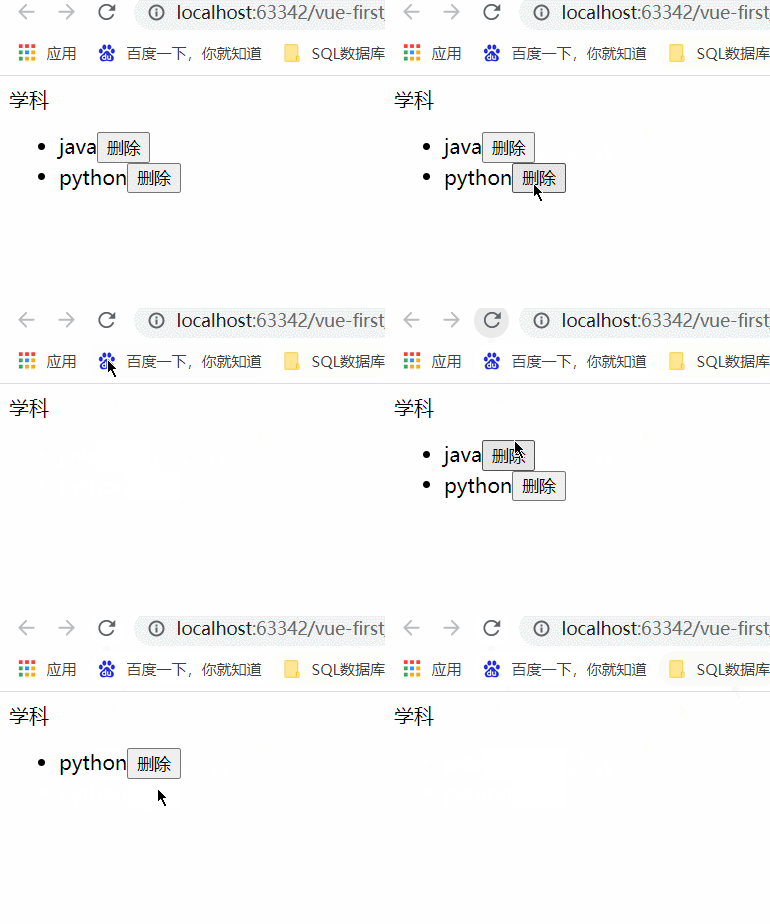
如何显示上述的效果呢?
首先,我们要在todo-items这个组件中加上一个button的按钮。(按钮要写在li标签里面,否则没效果)
Vue.component("todo-items",{
props:["item","index"],
template:'<li>{{item}}<button @click="remove">删除</button></li>',
methods:{
remove:function (index) {
this.$emit("remove",index)
   }
  }
});
然后在button上绑定一个事件,这里的“@click”是“v-on:click”的简写。触发了下面的remove方法。在这个remove方法中我们要使用如下代码:
this.$emit("remove",index)
这个就表示了自定义的事件分发。重点:
第一个参数 “remove”
上述代码中的双引号里面的remove和button中绑定的remove事件指的并不是同一个事件,这里要注意区分,这里的remove是要在HTML上面的标签中使用v-on:remove的方式进行指派。这里比较难以理解。可以把这个自定义的remove事件看成是一个参数。在HTML中进行调用。
第二个参数 index
这里的index也是参数,在上面HTML的标签中,需要给这个index传递一个值。
这里描述的很模糊继续往下走就明白了。
先看上面的HTML标签代码:
<div id = "app">
    <todo>
        <todo-title slot="todo-title" :title="title"></todo-title>
        <todo-items slot="todo-items" v-for="(item,index) in items" :item="item" :index="index" @remove="removeItems(index)"></todo-items>
    </todo>
</div>
首先,在todo-items这个标签中,属性v-for中,多添加了一个index,这里的index是为了获取到底是第几个item。在展示的时候方便查看。
解释:这里不明白的话我们对todo-items做如下操作:
    Vue.component("todo-items",{
        props:["item","index"],
        template:'<li>{{index}}--{{item}}<button @click="remove">删除</button></li>',
        methods:{
            remove:function (index) {
                this.$emit("remove",index)
            }
        }
    });
在props中多加一个参数index。在下面的template中多加入{{index}}。这时候显示的结果就如下所示:
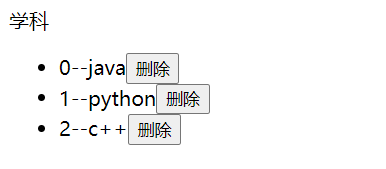
由上述可以得知。在todo-items这个标签中
“:index="index",
左边的index指的是todo-items组件中的props中的参数,右边的index指的是v-for属性中遍历出来的index(下标值)。
@remove="removeItems(index)"
@remove这里的remove代表的是todo-items组件中,自定义分发事件中的“this.$emit("remove",index)”中的remove。而双引号中的“"removeItems"表示的是Vue实例中的函数。removeItems执行的是真正的删除Vue实例中数据的操作。这里的index指的也是v-for中的那个index,也就是下标值。
具体的Vue实例中的methods方法如下图所示。
methods:{
    removeItems:function (index) {
    console.log("删除了"+this.items[index]+"OK");
    this.items.splice(index,1);
    }
}
至此。一整套流程结束掉了。
总结一下:
主要流程:
1.先在todo-items中写一个button按钮触发一个remove事件。
2.在该remove事件中,触发一个自定义分发事件,也就是this.$emit("remove",index)。
3.该自定义分发事件,通过HTML中<todo-items>标签中的@remove="removeItems(index)"。去调用Vue实例中methods的removeItems方法。
4.removeItems方法执行删除操作,删除指定下表的items列表中的数据。
注意:
组件中是无法调用Vue实例中的方法的。他只能调用自身的方法。通过组件调用自身的方法,在该方法中调用自定义的事件。该自定义事件,在HTML中触发Vue实例中的事件。
本代码参考狂神说Vue案例。感谢狂神!

 浙公网安备 33010602011771号