

ubuntu24.04 server版本 ssh_config配置文件无效
今天新部署的服务器客户反馈ssh无法远程登录,登录服务器终端执行system status ssh如下图
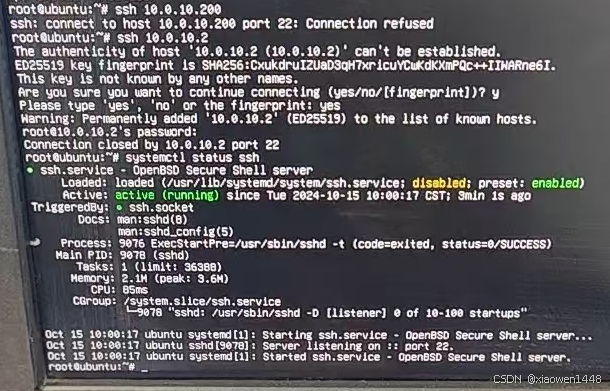
执行netstat -tunlp 发现22端口监听为tcp6,没有tcp的22端口
修改/etc/ssh/sshd_config 将端口修改为33,重启ssh服务,仍发现22开启中,
查询帖子发现sshd_config是没有生效的,原因是ssh.socket占用的22端口服务将其禁用重启ssh服务即可
原因参考如下帖子:
https://forum.ubuntu.com.cn/viewtopic.php?t=493946
修改步骤如下帖子:
https://forum.ubuntu.com.cn/viewtopic.php?t=493961
禁用ssh.socket,启用ssh.service 重启ssh.service执行如下命令
sudo systemctl daemon-reload
sudo systemctl disable ssh.socket
sudo systemctl stop ssh.socket
sudo systemctl enable ssh.service
sudo systemctl restart ssh.service
重启ssh服务后,查看端口状态
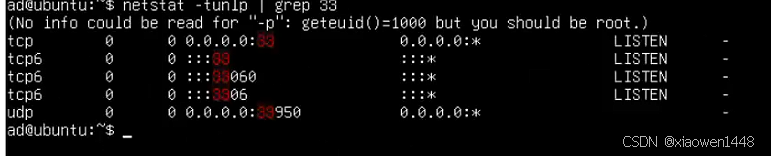
此时已经将端口修改为33,执行远程登录成功登录。
淘宝小店,欢迎你的光临,可定制你的需求

https://shop340822098.taobao.com/


 浙公网安备 33010602011771号