
使用java完成图形验证码
序
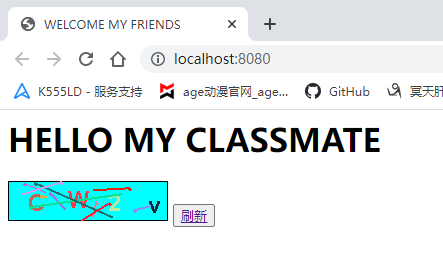
目标是使用Java生成验证码,传入前端。
一.实现思路
利用接口调用工具类,使用ajax反馈给前端
二.实现步骤
1.添加依赖
点击查看代码
2.编写接口类TestServlet
点击TestServlet的代码
package com.izhicheng;
import javax.servlet.ServletException;
import javax.servlet.annotation.WebServlet;
import javax.servlet.http.HttpServlet;
import javax.servlet.http.HttpServletRequest;
import javax.servlet.http.HttpServletResponse;
import java.io.IOException;
@WebServlet(urlPatterns = "/verify")
public class TestServlet extends HttpServlet {
@Override
protected void doPost(HttpServletRequest req, HttpServletResponse resp) throws ServletException, IOException {
// System.out.println(req.getParameter("name"));
resp.setContentType("application/json;charset=utf-8");
// resp.getWriter().write("{"name":"1"}");
// 写验证码
VerifyCode code=new VerifyCode();
System.out.println(code.getCode());
System.out.println(code.getImg());
resp.getWriter().write(code.getImg());
}
@Override
protected void doGet(HttpServletRequest req, HttpServletResponse resp) throws ServletException, IOException {
doPost(req,resp);
}
}
3.编写工具类代码
点击查看代码
package com.izhicheng;
import javax.imageio.ImageIO;
import java.awt.*;
import java.awt.image.BufferedImage;
import java.io.ByteArrayOutputStream;
import java.io.IOException;
import java.util.Base64;
import java.util.Random;
public class VerifyCode {
private final BufferedImage bufferedImage;
private String code= "";
public String getCode() {
return code;
}
public VerifyCode(){
int height = 40;
int width = 160;
bufferedImage=new BufferedImage(width, height,BufferedImage.TYPE_3BYTE_BGR);
Graphics2D g = bufferedImage.createGraphics();
// 背景色
g.setColor(Color.CYAN);
g.fillRect(0,0, width, height);
Font font = new Font("",Font.BOLD,23);
g.setFont(font);
g.setColor(Color.BLACK);
g.drawRect(0,0, width -1, height -1);
Random random=new Random();
for (int i=1;i<=4;i++){
String str = "qwertyuiopasdfghjklzxcvbnm1234567890QWERTYUIOPASDFGHJKLZMNXBCV";
char c = str.charAt(random.nextInt(str.length()));
//随机颜色
g.setColor(new Color(random.nextInt(256),random.nextInt(256),random.nextInt(256)));
g.drawString(c+"", width /4*i-(width /8),25+random.nextInt(11));
code += c;
}
//干扰线
for (int i=0;i<10;i++) {
g.setColor(new Color(random.nextInt(256), random.nextInt(256), random.nextInt(256)));
int x1 = random.nextInt(width);
int x2 = random.nextInt(width);
int y1 = random.nextInt(height);
int y2 = random.nextInt(height);
g.drawLine(x1, y1, x2, y2);
// 干扰噪点;
int num=20;
for (int c = 0; c < num; c++) {
g.setStroke(new BasicStroke(2F));
//设置噪点特征,1.5f噪点的宽度;
g.drawOval(x1, y1, 2, 2);
}
}
}
public String getImg() throws IOException {
ByteArrayOutputStream stream=new ByteArrayOutputStream();
ImageIO.write(bufferedImage,"png",stream);
String base64= Base64.getEncoder().encodeToString(stream.toByteArray());
stream.flush();
stream.close();
return "data:image/png;base64,"+ base64;
}
}
4.前端对应代码
点击查看代码
<%@ page contentType="text/html;charset=UTF-8" language="java" %>
HELLO MY CLASSMATE
三、最终效果

 浙公网安备 33010602011771号