
Vue——过滤案例
呈现效果:
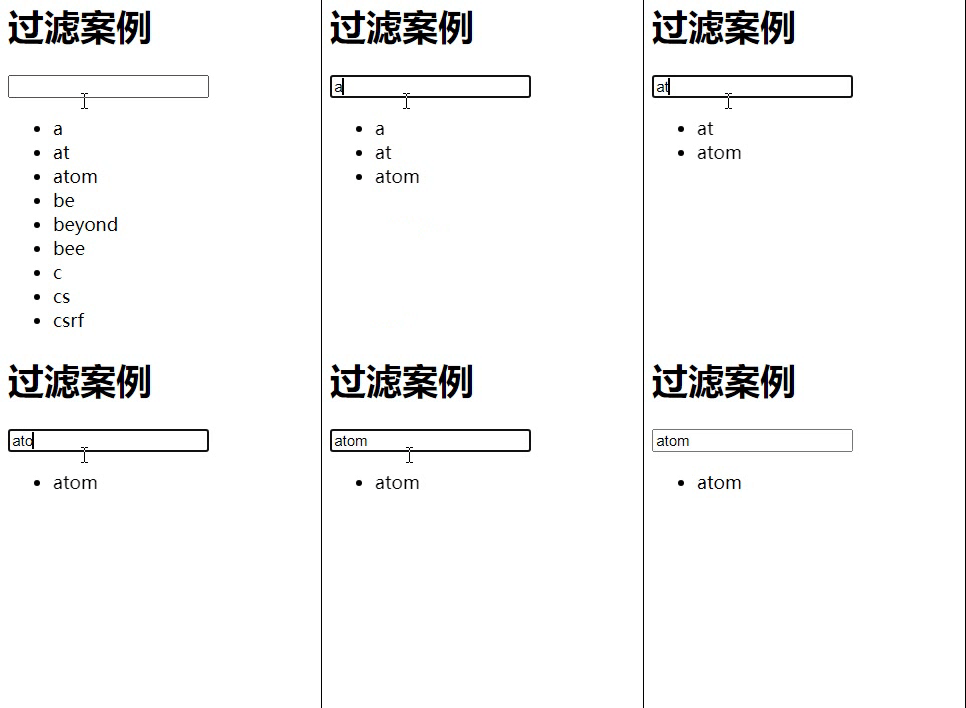
第一步:定义一个id为app的div
<div id="app">
    <h1>过滤案例</h1>
    // 绑定input事件、记录用户输入数据search
    <input type="text" v-model="search" @input="handleSearch">
    <ul>
        // 循环过滤后的列表,展示到前端页面
        <li v-for="item in newDataList">{{item}}</li>
    </ul>
</div>
第二步:书写<script>
有多种方案实现过滤
1.基础方案
<script>
    var vm = new Vue({
        el: '#app',
        data: {
            search: '',
            dataList: ['a', 'at', 'atom', 'be', 'beyond', 'bee', 'c', 'cs', 'csrf'],
            newDataList: ['a', 'at', 'atom', 'be', 'beyond', 'bee', 'c', 'cs', 'csrf'],
        },
        methods: {
            //1 笨办法实现过滤
            handleSearch() {
                console.log(this)  // this  是vue实例
                var _this = this
                // 过滤dataList 中每一个是否包含用户输入的 this.search
                this.newDataList = this.dataList.filter(function (item) {
                    console.log(_this) // this 是window对象
                    if (item.indexOf(_this.search) >= 0) {
                        return true
                    } else {
                        return false
                    }
                })

            }

        }

    })
</script>
——存在this指向问题 在外部,定义一个_this,内部用_this
2.改进方案,使用箭头函数
methods中重写:
// 2 使用箭头函数
handleSearch() {
    this.newDataList = this.dataList.filter(item => {
        if (item.indexOf(this.search) >= 0) {
            return true
        } else {
            return false
        }
     })
}
3.最终方案,优化方案2
methods中重写:
// 3 终极方案
handleSearch() {
    this.newDataList = this.dataList.filter(item => item.indexOf(this.search) >= 0)
}

 浙公网安备 33010602011771号