
django项目中使用nginx+fastdfs上传图片和使用图片的流程
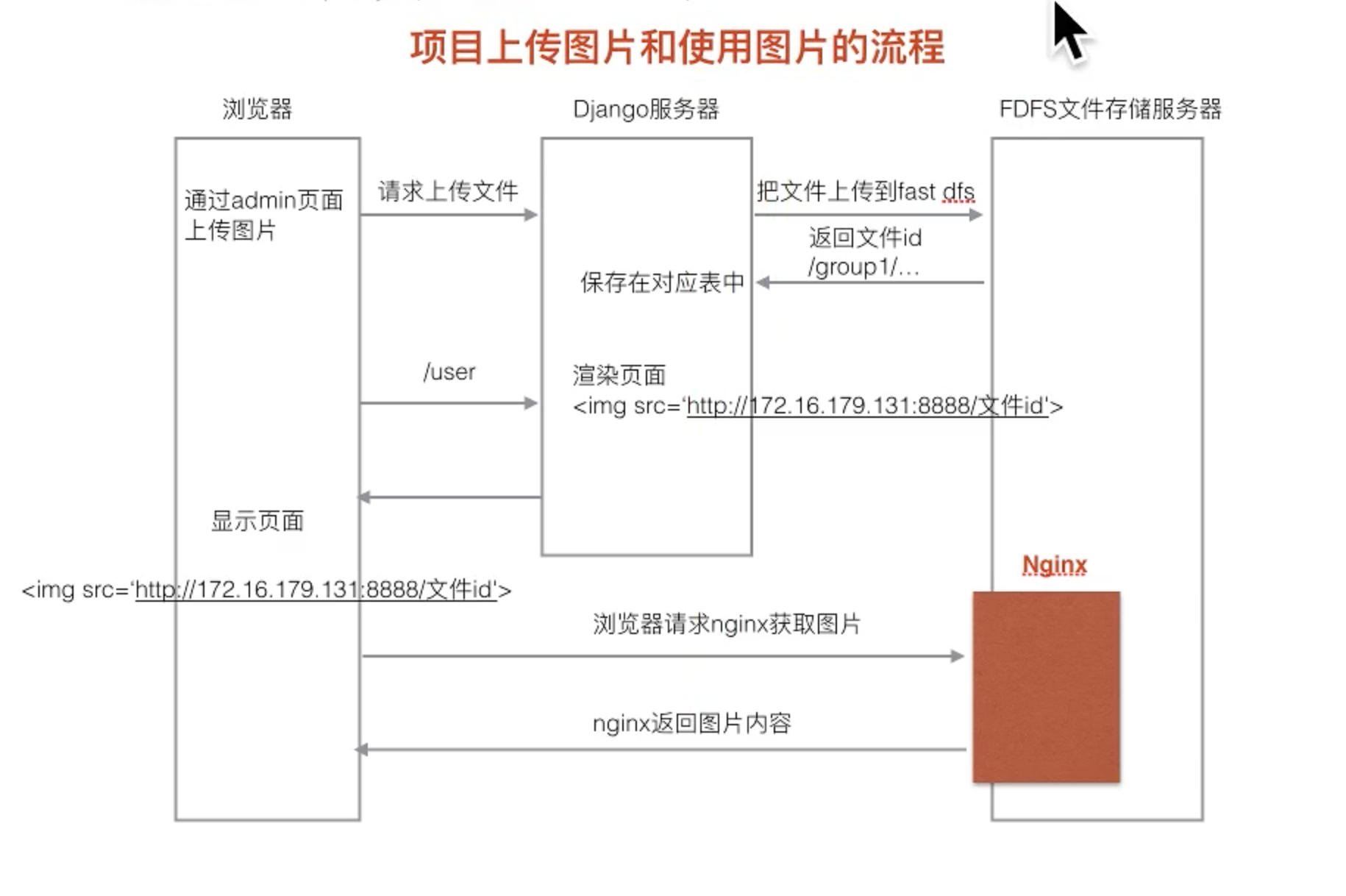
自定义文件存储类
1.先弄清楚django中默认的上传文件存储FileSystemStorage类
https://docs.djangoproject.com/zh-hans/2.2/ref/files/storage/#django.core.files.storage.FileSystemStorage
2.编写一个自定义存储系统
https://docs.djangoproject.com/zh-hans/2.2/howto/custom-file-storage/
django上自定义存储 类过程
- 1.在utils/fdfs/创建一个storage.py文件
- 2.编写内容
# 自定义文件存储类
from django.core.files.storage import Storage
from fdfs_client.client import Fdfs_client


class FDFSStorage(Storage):
    def __init__(self,  client_conf=None, base_url=None):
        """初始化传参"""
        if client_conf is None:
            client_conf = './utils/fdfs/client.conf'
        self.client_conf = client_conf

        if base_url is None:
            base_url = 'http://172.16.176.3:8888/'
        self.base_url = base_url

    """fast dfs文件存储类"""
    def _open(self, name, mode='rb'):
        """打开文件时 使用"""
        pass

    def _save(self, name, content):
        """
        保存文件时使用
        :param name: 你选择的上传文件名字
        :param content: 包含你上传文件内容的File对象
        :return: 返回字典格式
        """
        # 创建一个fdfs_client对象
        client = Fdfs_client(self.client_conf)

        # 上传文件到fast dfs系统中
        res = client.upload_by_buffer(content.read())
        """
        {
        'Group name'      : group_name,
        'Remote file_id'  : remote_file_id,
        'Status'          : 'Upload successed.',
        'Local file name' : '',
        'Uploaded size'   : upload_size,
        'Storage IP'      : storage_ip
        }
        """
        if res.get('Status') != 'Upload successed.':
            # 上传失败
            raise Exception('上传文件到fastdfs失败')
        # 获取返回的文件ID
        file_name = res.get('Remote file_id')

        return file_name

    def exists(self, name):
        """django判断文件名是否可用
        因为django这边无法判断文件名,所以我们直接返回False
        """
        return False

    def url(self, name):
        """返回访问文件url路径"""
        return self.base_url + name
- 3.将client.conf文件存放到utils/fdfs/目录下并修改内容
# connect timeout in seconds
# default value is 30s
connect_timeout=30

# network timeout in seconds
# default value is 30s
network_timeout=60

# the base path to store log files
base_path=/Users/mac/Desktop        #修改为你本地mac上可以存放日志的路径

# tracker_server can ocur more than once, and tracker_server format is
#  "host:port", host can be hostname or ip address
tracker_server=172.16.176.3:22122      #修改为你ubuntu虚拟机中ip地址

#standard log level as syslog, case insensitive, value list:
### emerg for emergency
### alert
### crit for critical
### error
### warn for warning
### notice
### info
### debug
log_level=info

# if use connection pool
# default value is false
# since V4.05
use_connection_pool = false

# connections whose the idle time exceeds this time will be closed
# unit: second
# default value is 3600
# since V4.05
connection_pool_max_idle_time = 3600

# if load FastDFS parameters from tracker server
# since V4.05
# default value is false
load_fdfs_parameters_from_tracker=false

# if use storage ID instead of IP address
# same as tracker.conf
# valid only when load_fdfs_parameters_from_tracker is false
# default value is false
# since V4.05
use_storage_id = false

# specify storage ids filename, can use relative or absolute path
# same as tracker.conf
# valid only when load_fdfs_parameters_from_tracker is false
# since V4.05
storage_ids_filename = storage_ids.conf


#HTTP settings
http.tracker_server_port=80

#use "#include" directive to include HTTP other settiongs
##include http.conf
在settings.py文件中指定使用我们自定义的 文件 存储类
# 指定使用我们自定义的上传文件存储类
DEFAULT_FILE_STORAGE='utils.fdfs.storage.FDFSStorage'
使用admin后台管理 测试一下
# 1.找到有图片上传的模型类,然后在admin注册下
from django.contrib import admin
from .models import GoodsType
admin.site.register(GoodsType)

# 2.创建超级 用户
python  manage.py  cratesuperuser

# 3.上传中出现的问题解决方法
#报错No module named mutagen
pip  install   mutagen
#报错 No module named 'mutagen._compat'
进入到/Users/mac/.virtualenvs/django_2.2/lib/python3.8/site-packages/fdfs_client/utils.py
修改导包路径 from mutagen._senf._compat import StringIO
# 报错报错 No module named requests
pip install requests

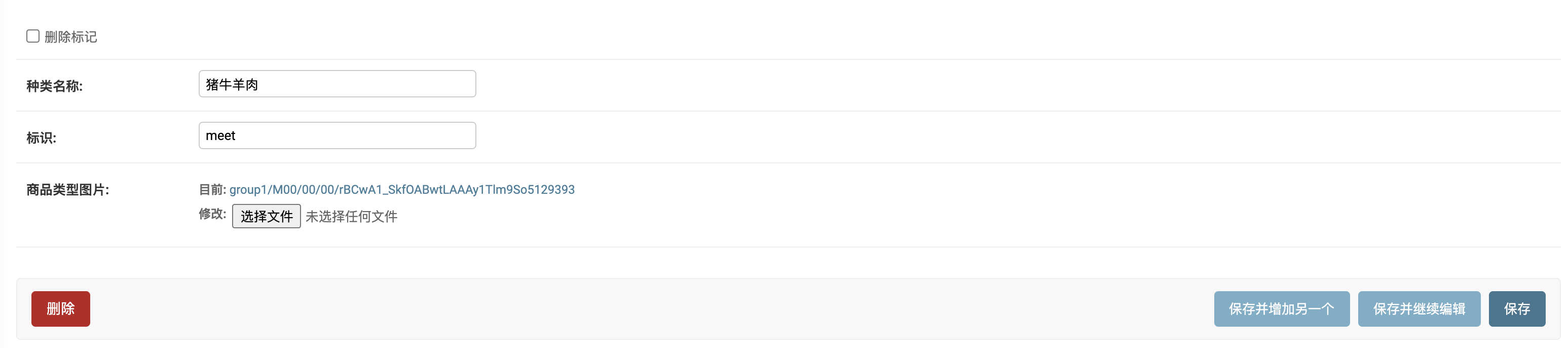
#  4.成功上传后的显示内容 如下图
-------------------------------------------
个性签名:代码过万,键盘敲烂!!!
如果觉得这篇文章对你有小小的帮助的话,记得在右下角点个“推荐”哦,博主在此感谢!

 浙公网安备 33010602011771号