
Jenkins部署java项目实例02
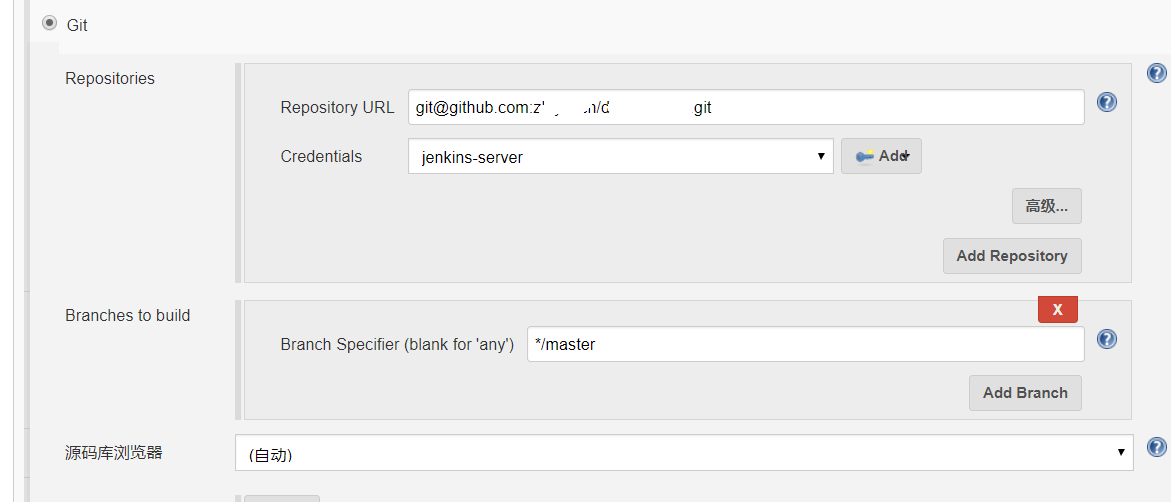
源码管理
选择 “git”, Repository URL填写你的git地址,并配置对应的key,大家最好事前先在jenkins这台机器上能够直接远程git操作私有仓库
构建触发器、构建环境、Pre Steps保持默认
Build
“Root POM”为pom.xml, Goals and options 填写 clean install -D maven.test.skip=true
Post Steps、构建设置保持默认


构建 执行 shell
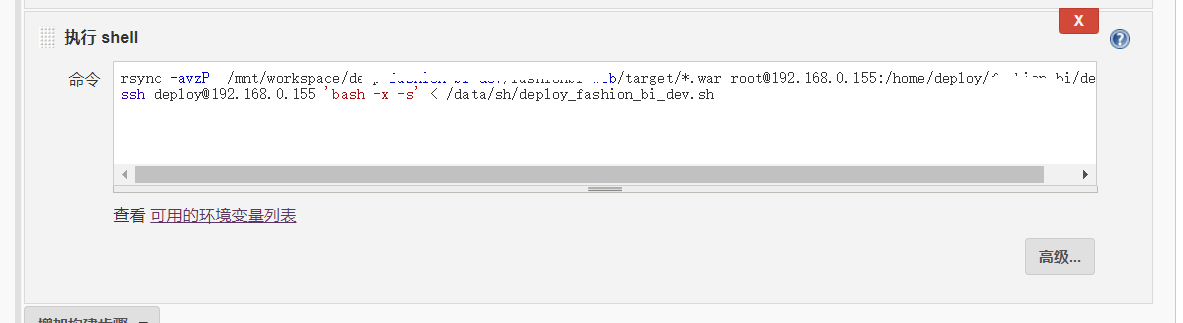
jenkins 上 分发脚本内容
[root@jenkins-ansible-jumpserver sh]# cat deploy_weifeng_dev.sh
#!/bin/bash


# kill tomcat进程
tomcat_fashion_bi_dev_pid=`ps aux|grep weifeng|grep -v "grep"|awk '{print $2}'`

if [ "$tomcat_fashion_bi_dev_pid" ];then
    ps aux|grep weifeng|grep -v "grep"|awk '{print $2}'|xargs kill -9
    echo "old tomcat weifeng dev  process  is killed"
fi


rm -rf  /home/deploy/weifeng/dev/deploy_files/*

echo "delete old  project files /home/deploy/weifeng/dev/deploy_files"


#解压war包到 代码执行地方

cd /home/deploy/weifeng/dev/
unzip -oq deepfashion-fashionbi.war -d /home/deploy/weifeng/dev/deploy_files/


#重启tomcat
cd /home/deploy/tomcat_weifeng_dev/bin
sh startup.sh

sleep 5
tomcatport=` netstat -lntp|grep "8080"|awk '{print $4}'|awk -F":" '{print $2}'`
echo $tomcatport

if [ "$tomcatport" ];then
          echo -e "\033[32m[ tomcat weifeng started success on dev env !  ]\033[0m"
fi

 浙公网安备 33010602011771号