
How to access Kubernetes Dashboard
Deploying the Dashboard UI
The Dashboard UI is not deployed by default. To deploy it, run the following command:
kubectl apply -f https://raw.githubusercontent.com/kubernetes/dashboard/v2.0.0-beta8/aio/deploy/recommended.yaml
Command line proxy
You can access Dashboard using the kubectl command-line tool by running the following command:
kubectl proxy
Kubectl will make Dashboard available at http://localhost:8001/api/v1/namespaces/kubernetes-dashboard/services/https:kubernetes-dashboard:/proxy/.
Kubernetes Dashboard Authentication
Above link asks for authentication. Use below commands to get token
Create the dashboard service account
kubectl create serviceaccount dashboard-admin-sa
This will create a service account named dashboard-admin-sa in the default namespace
Get Naresh Kancharla’s stories in your inbox
Join Medium for free to get updates from this writer.
Remember me for faster sign in
Next bind the dashboard-admin-service-account service account to the cluster-admin role
kubectl create clusterrolebinding dashboard-admin-sa
--clusterrole=cluster-admin --serviceaccount=default:dashboard-admin-sa
When we created the dashboard-admin-sa service account Kubernetes also created a secret for it.
List secrets using:
kubectl get secrets

Get Token
Use kubectl describe to get the access token:
kubectl describe secret dashboard-admin-sa-token-t5g67
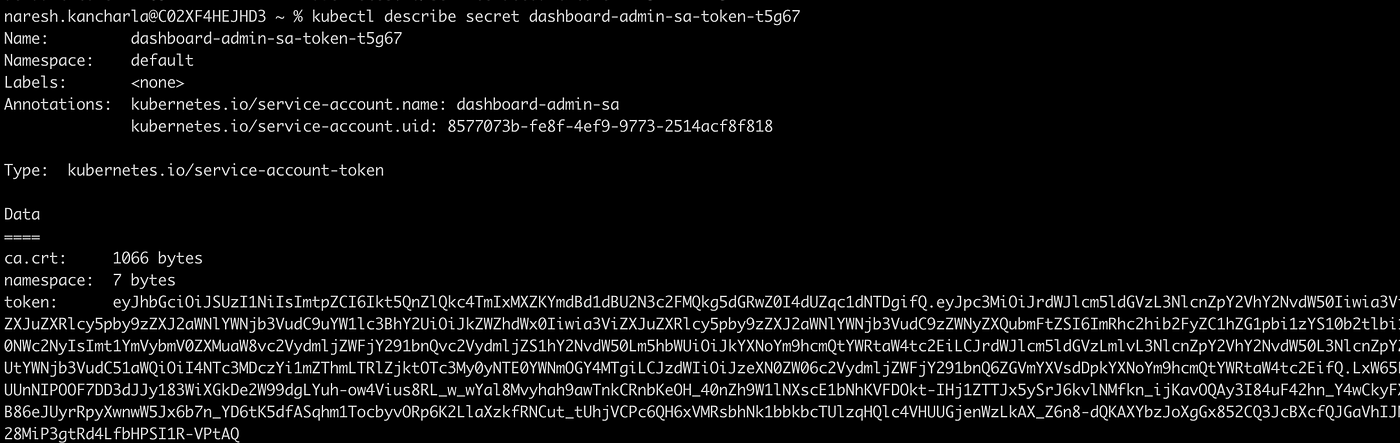
Copy the token and enter it into the token field on the Kubernetes dashboard login page.

 浙公网安备 33010602011771号