
第三周
第三周学习内容
1、爬取薄荷网热量为大创app数据计算添加数据库数据;
youmian.py


from youGet import youGet
if __name__ == '__main__':
    data = youGet()
    data.get_date()
    data.parse_date()
import youdaosql
youdaosql.du_sql()
youGet.py
爬取所有食物需要更改url和每个next的数字就可以;
import json

import lxml.html
import requests

etree = lxml.html.etree
import time
from requests.adapters import HTTPAdapter

heatss = []
class youGet():
    def get_date(self):
        url = "http://www.boohee.com/food/view_menu"
        headers = {
            'User-Agent': 'Mozilla/5.0 (Windows NT 10.0; Win64; x64) AppleWebKit/537.36 (KHTML, like Gecko) '
                          'Chrome/80.0.3987.149 Safari/537.36 '
        }
        response = requests.get(url, headers=headers)
        with open('htmlyou.txt', 'w', encoding="utf-8") as file:
            file.write(response.text)
        response.close()

    def parse_date(self):
        with open('htmlyou.txt', 'r', encoding='utf-8') as file:
            text = file.read()
        html = etree.HTML(text)
        # hrefpage = html.xpath('//a[@class="next_page"]/@href')
        page = html.xpath('//div[@class="pagination"]/@limit_page')[0]
        a = 2
        try:
            if page!=0:
                heats = html.xpath('//ul[@class="food-list"]/li/div/p/text()')
                if len(heats)!=0:
                    names = html.xpath('//ul[@class="food-list"]/li/div/h4/a/@title')
                    hrefs = html.xpath('//ul[@class="food-list"]/li/div/h4/a/@href')
                    heat = html.xpath('//ul[@class="food-list"]/li/div/p/text()')
                    num = 0
                    for index in names:
                        info = {}
                        info["name"] = index
                        info["href"] = hrefs[num]
                        info["heat"] = heat[num]
                        heatss.append(info)
                        num += 1
                    # next =  html.xpath('//div[@class="pagination"]/a[@class="next_page"]/@herf')
                    next ="http://www.boohee.com/food/view_menu?page="+str(a)
                    while(len(next)!=0):
                        if a==int(page)+1:
                            break
                        a+=1
                        headers = {
                            'User-Agent': 'Mozilla/5.0 (Windows NT 10.0; Win64; x64) AppleWebKit/537.36 (KHTML, like Gecko) '
                                          'Chrome/80.0.3987.149 Safari/537.36 '
                        }
                        response = requests.get(next, headers=headers)
                        html1 = etree.HTML(response.text)
                        heats2 = html1.xpath('//ul[@class="food-list"]/li/div/p/text()')
                        if len(heats2)!=0:
                            names = html1.xpath('//ul[@class="food-list"]/li/div/h4/a/@title')
                            hrefs = html1.xpath('//ul[@class="food-list"]/li/div/h4/a/@href')
                            heat = html1.xpath('//ul[@class="food-list"]/li/div/p/text()')
                            num = 0
                            for index in names:
                                info = {}
                                info["name"] = index
                                info["href"] = hrefs[num]
                                info["heat"] = heat[num]
                                heatss.append(info)
                                num += 1
                            next ="http://www.boohee.com/food/view_menu?page="+str(a)

                        response.close()
                result = json.dumps(heatss, sort_keys=True, indent=2)
                with open('./data5.json', 'w', encoding='utf-8') as file:
                    for i in result:
                        file.write(i)

        except requests.exceptions.ConnectionError:
            result = json.dumps(heatss, sort_keys=True, indent=2)
            with open('./data4.json', 'w', encoding='utf-8') as file:
                for i in result:
                    file.write(i)
            with open('./htmlhref1.txt', 'w', encoding="utf-8") as file:
                for i in heatss:
                    file.write(i)
youdaosql.py
import mysql.connector
import json
with open('./data5.json', 'r') as file:
    data = file.read()
    data = json.loads(data)

def du_sql():
    mydb = mysql.connector.connect(
        host="localhost",
        user="root",
        password="password",
        database="test1",
        auth_plugin="mysql_native_password"
    )
    dbpath = mydb.cursor()
    savaDataSql(dbpath)
    print("ok")
    mydb.commit()

def savaDataSql(dbpath):
    cur = dbpath
    for each in data:
        name = each['name']
        href = each['href']
        heat = each['heat']
        sql = "INSERT INTO heats (name,href,heat) values (%s,%s,%s)"
        var = (name,href,heat)
        cur.execute(sql,var)
2、学习oracle的使用
安装oracle19c——地址就是官网就可以下载 https://www.oracle.com/database/technologies/oracle-database-software-downloads.html
安装详细 https://blog.csdn.net/weixin_44841225/article/details/100782269
下载完后需要建立数据库,然后打开sql plus进行oracle数据库操作,具体可视化软件还没用
首次打开sql plus 需要登入 账号可以为 sys as sysdba 密码为自己设置的
登入后可以创建用户 create user 用户名 identified by 密码;
给用户修改密码 alter user 用户名 identified by 新密码;
删除用户 drop user 用户名 [cascade]可选参数 cascade
**给用户赋权限**
grant 权限/角色 to 用户名;
其中权力有
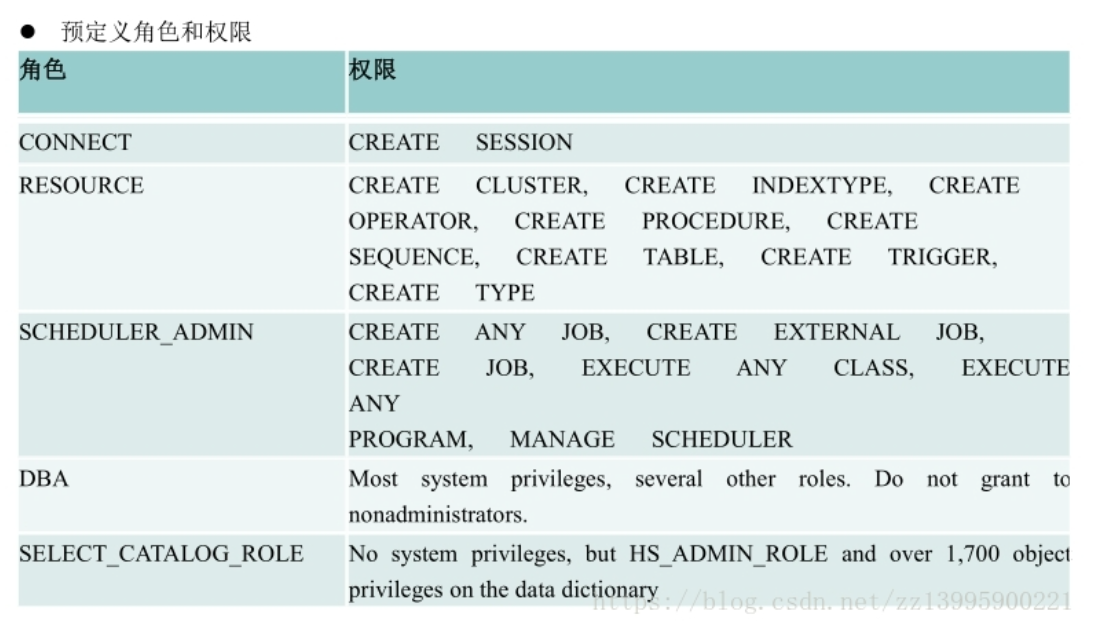
具体的权限使用可以单独查询,
但赋权需要使用管理员 可以使用conn /as sysdba进行切换
切换回去就是 conn 用户名/密码
创建表、序列、触发器、视图、以及查找、添加、修改、删除操作都和mysql一样;

 浙公网安备 33010602011771号