![]()
import {
  Component,
  OnInit,
  Input,
  Output,
  EventEmitter,
  SimpleChanges,
  OnChanges,
  AfterContentInit,
  AfterContentChecked,
  AfterViewChecked,
  AfterViewInit
} from '@angular/core';

export interface TopMenu {
  title: string;
  link: string;
}

@Component({
  selector: 'app-scroll-table-tab',
  templateUrl: './scroll-table-tab.component.html',
  styleUrls: ['./scroll-table-tab.component.css']
})
export class ScrollTableTabComponent
  implements
    OnInit,
    OnChanges,
    AfterContentInit,
    AfterContentChecked,
    AfterViewInit,
    AfterViewChecked {
  selectedIndex = -1;
  @Input() menus: TopMenu[] = [];
  @Input() backgroundColor = '#fff';
  @Input() titleColor = 'red';
  @Input() titleActiveColor = 'red';
  @Input() bottomBorderColor = 'yellow';
  @Output() tabSelected = new EventEmitter();
  /*
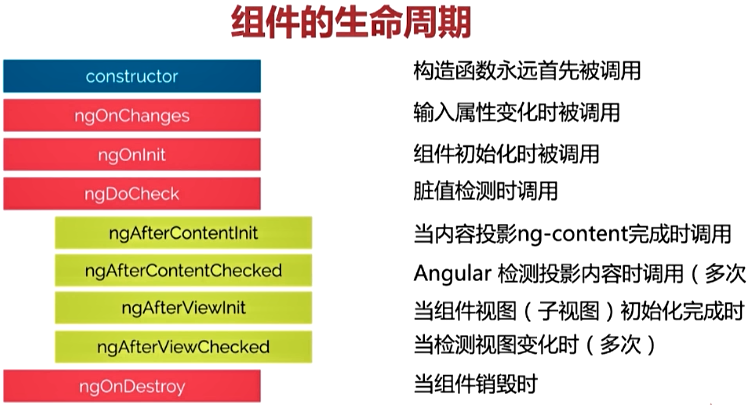
   *构造函数永远首先被调用
   */
  constructor() {
    console.log('组件构造调用');
  }
  /**
   * 在组件的 `@Input` 属性发生变化的时候调用
   * @param changes 索引对象,key 是属性的名字,value是 SimpleChange
   */
  ngOnChanges(changes: SimpleChanges): void {
    console.log('组件输入属性改变', changes);
  }
  /*
   *组件初始化完成,在这个函数中,我们可以安全的使用
   */
  ngOnInit() {
    console.log('组件初始化');
  }
  /**
   * 组件内容初始化
   */
  ngAfterContentInit(): void {
    console.log('组件内容初始化');
  }
  /**
   * 组件内容脏值检测
   */
  ngAfterContentChecked(): void {
    console.log('组件的内容脏值检测');
  }
  /**
   * 组件的视图初始化
   */
  ngAfterViewInit(): void {
    console.log('组件的视图初始化');
  }
  /**
   * 组件视图脏值检测
   */
  ngAfterViewChecked(): void {
    console.log('组件视图脏值检测')
  }
  /**
   * 需要做一些清理工作
   */
  ngOnDestroy(): void {
    console.log('组件销毁')
  }
![]()




 浙公网安备 33010602011771号