
WTL-A basic WTL application
一个基本的WTL程序:
一.实现代码
1.包含常用头文件和宏定义,用于简化WTL程序编写的自定义头文件:WTLHelper.h
//WTLHelper.h#pragma once#define WINVER 0x0601 //win7#define _WIN32_WINNT 0x0601 //win7#define _WIN32_IE 0x0800 //IE 8.0#define _RICHEDIT_VER 0x0300#define _WTL_USE_CSTRING //use CString class in WTL//ATL header files#include <atlbase.h>#include <atlapp.h>//WTL header files#include <atlwin.h> //CWindowImpl#include <atlcrack.h> //BEGIN_MSG_MAP_EX, message crack#include <atlmisc.h> //CString, CRect, CSize#ifndef WTLHELPER_NOT_USE_COMMON_CONTROL_STYLE#if defined _M_IX86#pragma comment(linker, "/manifestdependency:\"type='win32' name='Microsoft.Windows.Common-Controls' version='6.0.0.0' processorArchitecture='x86' publicKeyToken='6595b64144ccf1df' language='*'\"")#elif defined _M_IA64#pragma comment(linker, "/manifestdependency:\"type='win32' name='Microsoft.Windows.Common-Controls' version='6.0.0.0' processorArchitecture='ia64' publicKeyToken='6595b64144ccf1df' language='*'\"")#elif defined _M_X64#pragma comment(linker, "/manifestdependency:\"type='win32' name='Microsoft.Windows.Common-Controls' version='6.0.0.0' processorArchitecture='amd64' publicKeyToken='6595b64144ccf1df' language='*'\"")#else#pragma comment(linker, "/manifestdependency:\"type='win32' name='Microsoft.Windows.Common-Controls' version='6.0.0.0' processorArchitecture='*' publicKeyToken='6595b64144ccf1df' language='*'\"")#endif#endif // WTL_NOT_ADD_COMMON_CONTROL_MENIFEST#ifndef ATLASSERTHR#define ATLASSERTHR(hr) ATLASSERT(SUCCEEDED((hr)))#endif // ATLASSERTHR
2.预编译头文件:stdafx.h
//stdafx.h#pragma once#include "WTLHelper.h"extern CAppModule g_AppModule;
3.主窗口定义:MainWindow.h
//MainWindow.h#pragma once#include "stdafx.h"typedef CWinTraits<WS_OVERLAPPEDWINDOW> CMainWinTraits;class CMainWindow :public CWindowImpl<CMainWindow,CWindow,CMainWinTraits>{public:DECLARE_WND_CLASS(_T("Basic_Main_Window"))BEGIN_MSG_MAP_EX(CMainWindow)MSG_WM_CREATE(OnCreate)MSG_WM_DESTROY(OnDestroy)MSG_WM_PAINT(OnPaint)MSG_WM_LBUTTONDOWN(OnLButtonDown)END_MSG_MAP()public:CMainWindow(){CWndClassInfo& wci = GetWndClassInfo();if (!wci.m_atom) //The window class has not been registered yet{//Set the background brush of window classwci.m_wc.hbrBackground = AtlGetStockBrush(GRAY_BRUSH);}}int OnCreate(LPCREATESTRUCT /*lpCreateStruct*/){//Create font to draw text in the client windowCLogFont logFont;TCHAR fontName[] = _T("Arial");wcscpy_s(logFont.lfFaceName,fontName);logFont.lfHeight = 60;logFont.lfItalic = TRUE;logFont.lfWeight = FW_BOLD;logFont.lfStrikeOut = TRUE;m_FontText.CreateFontIndirect(&logFont);return 0;}void OnDestroy(){PostQuitMessage(0);}void OnPaint(CDCHandle){CPaintDC dc(m_hWnd);//Do painting work here...CRect rc;GetClientRect(&rc);dc.SaveDC();dc.SelectFont(m_FontText);LPCTSTR text = _T("A basic WTL application.");dc.DrawText(text,-1,&rc,DT_CENTER|DT_VCENTER|DT_SINGLELINE);dc.RestoreDC(-1);}void OnLButtonDown(UINT /*nFlags*/, CPoint /*point*/){MessageBox(_T("Left button down!"),_T("Main window message"),MB_OK|MB_ICONINFORMATION);}private:CFont m_FontText;};
4.主程序文件:BasicApp.cpp
//BasicApp.cpp#include "stdafx.h"#include "MainWindow.h"CAppModule g_AppModule;int Run(int nShowCmd){CMessageLoop msgLoop;g_AppModule.AddMessageLoop(&msgLoop);//Create and show main windowCMainWindow mainWnd;mainWnd.Create(NULL,NULL,_T("WTL main window"));mainWnd.ShowWindow(nShowCmd);mainWnd.CenterWindow();//Start message loopint result = msgLoop.Run();g_AppModule.RemoveMessageLoop();return result;}int WINAPI _tWinMain(HINSTANCE hInstance, HINSTANCE, LPTSTR /*lpCmdLine*/,int nShowCmd){HRESULT hr = g_AppModule.Init(NULL,hInstance);ATLASSERTHR(hr);int result = Run(nShowCmd);g_AppModule.Term();return result;}
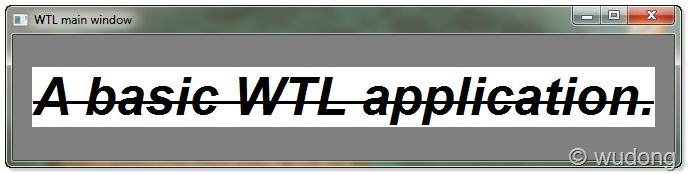
5.运行效果
二.小技巧
1.消息映射的添加:
WTL的消息映射中,任何一个标准windows消息WM_XXX都直接对于于MESSAGE_MAP中的一项MSG_WM_XXX,比如WM_PAINT消息所对应的消息映射项为MSG_WM_PAINT。
如果是手动添加消息映射,可以先在MESSAGE_MAP中添加”MSG_WM_PAINT()”,然后按F12,VS会跳转到此消息映射的定义中,即跳转到atlcrack.h的如下代码处:
//atlcrack.h// void OnPaint(CDCHandle dc)#define MSG_WM_PAINT(func) \if (uMsg == WM_PAINT) \{ \SetMsgHandled(TRUE); \func((HDC)wParam); \lResult = 0; \if(IsMsgHandled()) \return TRUE; \}
在代码的注释中可以找到MSG_WM_PAINT()所对应的消息响应函数的原型,于是,可以手动的添加此消息的响应函数:
void OnPaint(CDCHandle){CPaintDC dc(m_hWnd);//Do painting work here...//...}
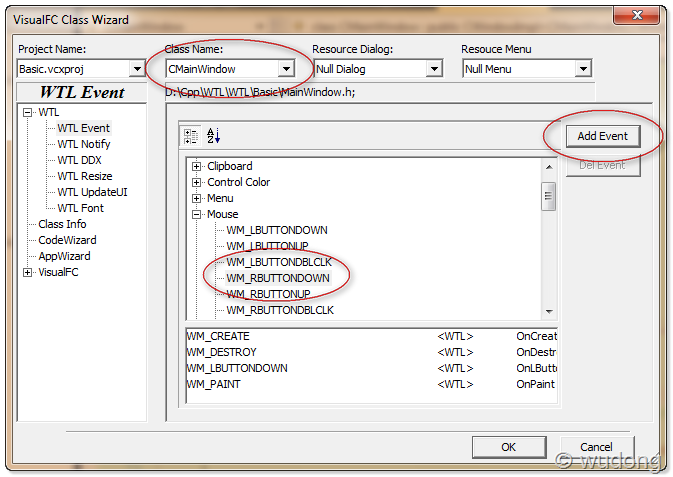
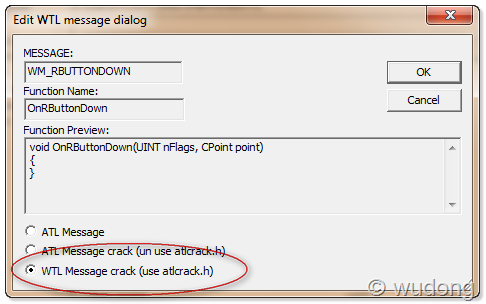
也可以使用一个开源的小工具VisualFC帮助添加消息映射(安装方法见其说明文档):
2.修改WNDCLASSEX结构的默认值:
Win32在注册窗口类时所用到的WNDCLASSEX结构有很多字段,用于设置窗口类的行为特征,比如hbrBackground字段用于设置窗口背景画刷。
在WTL中,若要修改默认WNDCLASSEX的设置,可以在窗口类注册前(比如在窗口类的构造函数中)调用GetWndClassInfo()修改窗口类结构:
CWndClassInfo& wci = GetWndClassInfo();if (!wci.m_atom) //The window class has not been registered yet{//Set the background brush of window classwci.m_wc.hbrBackground = AtlGetStockBrush(GRAY_BRUSH);}



 浙公网安备 33010602011771号