🥇概述
# 1.0 系统环境:windows10
# 2.0 mysql版本:mysql8.0.2
# 3.0 可视化软件:jetbrains datagrip 2022
🥇1.0 表的创建
# 产品(商品)分类功能

# 分类表
create table category(
  id int2 auto_increment primary key comment '主键',
  parent_id int2 comment '父id',
  `name` varchar(20) comment '分类名称',
  create_at timestamp default current_timestamp comment '创建时间',
  update_at timestamp on update current_timestamp comment '修改时间'
)comment '商品分类表';
🥇2.0 主分类
🥈2.1 数据添加与查询
# 第一层分类
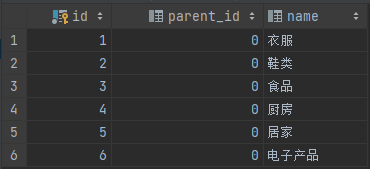
insert into category(parent_id, name) values (0,'衣服'),(0,'鞋类'),(0,'食品'),(0,'厨房'),(0,'居家'),(0,'电子产品');

# 查询所有第一次分类
select id,parent_id,name from category where parent_id = 0;
![image]()
🥇3.0 子分类
🥈3.1 数据添加
# 第二层分类

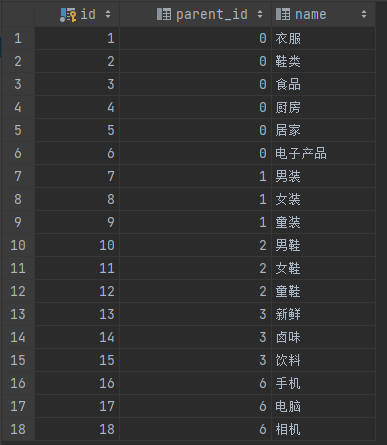
insert into category(parent_id, name) values (1,'男装'),(1,'女装'),(1,'童装');
insert into category(parent_id, name) values (2,'男鞋'),(2,'女鞋'),(2,'童鞋');
insert into category(parent_id, name) values (3,'新鲜'),(3,'卤味'),(3,'饮料');
insert into category(parent_id, name) values (6,'手机'),(6,'电脑'),(6,'相机');
🥈3.2 数据查询
# 查询所有数据
select id,parent_id,name from category;
![image]()
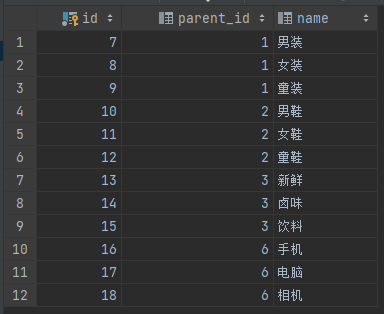
# 查询所有子分类数据
select id,parent_id,name from category where parent_id <> 0;
![image]()
🥈3.3查询某个大分类的所有子分类
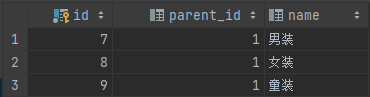
# 查询某个大分类的子分类
select id,parent_id,name from category where parent_id = (select id from category where name = '衣服');

# 如果能直接知道 某个大分类的id,比如 name = '衣服' 的id,则可以这样
select id,parent_id,name from category where parent_id = 1;
![image]()
后续可能会更新。🥇🥈🥉🏅🎖


 浙公网安备 33010602011771号