
k8s-6 ingress-nginx-0.45调优
ingress-nginx-0.45调优
参考:https://www.cnblogs.com/mycloudedu/p/15251575.html
| # 环境说明 |
|---|
| > 官方说明: |
> 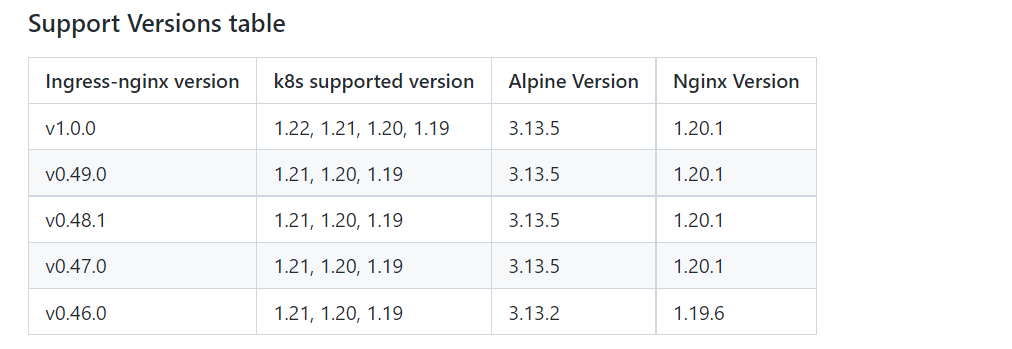 |
| # 下载所需的 yaml 文件 |
| ```shell |
| mkdir ~/ingress && cd ~/ingress |
| wget https://raw.githubusercontent.com/kubernetes/ingress-nginx/controller-v0.45.0/deploy/static/provider/baremetal/deploy.yaml |
| ``` |
| # 修改配置文件 |
| 这里演示的是高可用的 nginx-ingress-controller 服务。 |
| ```shell |
| # 在 ingress-nginx-controller 容器的 deploy.spec 添加 replicas: 2 |
| spec: |
| replicas: 2 |
| ``` |
| 将原本的 nodeport 修改成 clusterIP |
| ```shell |
| # 在 ingress-nginx-controller service的 svc.spec 注释掉 type: NodePort |
| spec: |
| # type: NodePort |
| ``` |
| 将容器端口映射到宿主机 |
| ```shell |
| # 在 ingress-nginx-controller 容器的 deploy.spec.template.spec 添加 hostNetwork: true |
| spec: |
| hostNetwork: true |
| # 在 ingress-nginx-controller 容器的 deploy.spec.template.spec.containers.ports 添加 hostPost 字段 |
| ports: |
| - name: http |
| containerPort: 80 # 添加的字段 |
| hostPort: 80 |
| protocol: TCP |
| - name: https |
| containerPort: 443 # 添加的字段 |
| hostPort: 443 |
| protocol: TCP |
| - name: webhook |
| containerPort: 8443 |
| protocol: TCP |
| ``` |
| 修改DNS的策略 |
| ```shell |
| # 在 ingress-nginx-controller 容器的 deploy.spec.template.spec 修改 dnsPolicy |
| spec: |
| dnsPolicy: ClusterFirstWithHostNet |
| ``` |
| 修改下载镜像路径 |
| ```shell |
| # 在 ingress-nginx-controller 容器的 deploy.spec.template.spec.containers 修改 image 字段 |
| containers: |
| - name: controller |
| image: registry.cn-hangzhou.aliyuncs.com/google_containers/nginx-ingress-controller:v0.45.0 |
| ``` |
| 指定 pod 调度特定节点 |
| ```shell |
| # 节点添加标签 |
| kubectl label node k8s-node02 kubernetes.io/ingress=nginx |
| kubectl label node k8s-node03 kubernetes.io/ingress=nginx |
| # 在 ingress-nginx-controller 容器的 deploy.spec.template.spec 修改 nodeSelector |
| nodeSelector: |
| kubernetes.io/ingress: nginx |
| # 在 ingress-nginx-controller 容器的 deploy.spec.template.spec 添加 affinity |
| affinity: |
| podAntiAffinity: |
| preferredDuringSchedulingIgnoredDuringExecution: |
| - weight: 100 |
| podAffinityTerm: |
| labelSelector: |
| matchLabels: |
| app.kubernetes.io/name: ingress-nginx |
| topologyKey: kubernetes.io/hostname |
| ``` |
| # 启动服务 |
| ```shell |
| $ kubectl apply -f deploy.yaml |
| namespace/ingress-nginx created |
| serviceaccount/ingress-nginx created |
| configmap/ingress-nginx-controller created |
| clusterrole.rbac.authorization.k8s.io/ingress-nginx created |
| clusterrolebinding.rbac.authorization.k8s.io/ingress-nginx created |
| role.rbac.authorization.k8s.io/ingress-nginx created |
| rolebinding.rbac.authorization.k8s.io/ingress-nginx created |
| service/ingress-nginx-controller-admission created |
| service/ingress-nginx-controller created |
| deployment.apps/ingress-nginx-controller created |
| validatingwebhookconfiguration.admissionregistration.k8s.io/ingress-nginx-admission created |
| serviceaccount/ingress-nginx-admission created |
| clusterrole.rbac.authorization.k8s.io/ingress-nginx-admission created |
| clusterrolebinding.rbac.authorization.k8s.io/ingress-nginx-admission created |
| role.rbac.authorization.k8s.io/ingress-nginx-admission created |
| rolebinding.rbac.authorization.k8s.io/ingress-nginx-admission created |
| job.batch/ingress-nginx-admission-create created |
| job.batch/ingress-nginx-admission-patch created |
| $ kubectl -n ingress-nginx get pod -owide |
| NAME READY STATUS RESTARTS AGE IP NODE NOMINATED NODE READINESS GATES |
| ingress-nginx-admission-create-tm6hb 0/1 Completed 0 21s 20.0.85.198 k8s-node01 |
| ingress-nginx-admission-patch-64bgc 0/1 Completed 1 21s 20.0.32.136 k8s-master01 |
| ingress-nginx-controller-656cf6c7fd-lw9dx 1/1 Running 0 21s 192.168.32.138 k8s-node03 |
| ingress-nginx-controller-656cf6c7fd-ncsrz 1/1 Running 0 21s 192.168.32.137 k8s-node02 |
| ``` |
| # 验证 |
| 创建nginx应用 |
| ```shell |
| cat > nginx.yaml <<-EOF |
| apiVersion: apps/v1 |
| kind: Deployment |
| metadata: |
| name: my-nginx |
| spec: |
| selector: |
| matchLabels: |
| app: my-nginx |
| template: |
| metadata: |
| labels: |
| app: my-nginx |
| spec: |
| containers: |
| - name: my-nginx |
| image: nginx |
| resources: |
| limits: |
| memory: "200Mi" |
| cpu: "500m" |
| requests: |
| memory: "100Mi" |
| cpu: "100m" |
| ports: |
| - name: web |
| containerPort: 80 |
| --- |
| apiVersion: v1 |
| kind: Service |
| metadata: |
| name: nginx-service |
| spec: |
| selector: |
| app: my-nginx |
| ports: |
| - port: 80 |
| targetPort: web |
| EOF |
| $ kubectl apply -f nginx.yaml |
| deployment.apps/my-nginx created |
| service/nginx-service created |
| $ kubectl get pod -owide |
| NAME READY STATUS RESTARTS AGE IP NODE NOMINATED NODE READINESS GATES |
| my-nginx-759cf4d696-vkj4q 1/1 Running 0 4m10s 20.0.85.199 k8s-node01 |
| ``` |
| 创建ingress资源 |
| ```shell |
| $ cat > nginx-ingress.yaml <<-EOF |
| apiVersion: extensions/v1beta1 |
| kind: Ingress |
| metadata: |
| name: nginx-ingress |
| labels: |
| name: nginx-ingress |
| spec: |
| backend: |
| serviceName: nginx-service |
| servicePort: 80 |
| rules: |
| - host: www.ecloud.com |
| http: |
| paths: |
| - path: / |
| backend: |
| serviceName: nginx-service |
| servicePort: 80 |
| EOF |
| $ kubectl apply -f nginx-ingress.yaml |
| ingress.extensions/nginx-ingress created |
| $ kubectl get ingress |
| NAME CLASS HOSTS ADDRESS PORTS AGE |
| nginx-ingress |
| ``` |
| 使用域名访问 |
| ```shell |
| $ echo '192.168.32.137 www.ecloud.com' >> /etc/hosts |
| $ curl www.ecloud.com |
Welcome to nginx! |
If you see this page, the nginx web server is successfully installed and |
| working. Further configuration is required. |
For online documentation and support please refer to |
| nginx.org. |
| Commercial support is available at |
| nginx.com. |
Thank you for using nginx. |
| ``` |
> 可以通过 keepalived + LVS 高可用,使用 VIP 做域名解析。这里就不实现了。 |
| # sysctl 调优 |
| ```shell |
| # 临时临时 |
| kubectl patch deployment -n ingress-nginx nginx-ingress-controller \ |
| --patch="$(curl https://raw.githubusercontent.com/kubernetes/ingress-nginx/main/docs/examples/customization/sysctl/patch.json)" |
| # 永久生效 |
| # 在 ingress-nginx-controller 容器的 deploy.spec.template.spec 添加 initContainers |
| initContainers: |
| - name: sysctl |
| image: alpine:3.13 |
| securityContext: |
| privileged: true |
| command: ["sh", "-c", "sysctl -w net.core.somaxconn=32768; sysctl -w net.ipv4.ip_local_port_range='32768 65535'"] |
| ``` |
| 变化: |
| - 积压队列设置net.core.somaxconn从128到32768 |
| - 临时端口设置net.ipv4.ip_local_port_range从32768 60999到32768 65535(符合端口规划) |
| # 附加iptables规则 |
| ```shell |
| iptables -t filter -I INPUT -p tcp -m multiport --dport 80,443,8443 -m comment --comment "nginx ingress controller ports" -j ACCEPT |
| ``` |
| 环境说明下载所需的 yaml 文件修改配置文件启动服务验证sysctl 调优附加iptables规则 |
珊瑚海

 浙公网安备 33010602011771号