Vue: node-sass 无法为当前环境找到绑定, Windows64-bit, 重新安装node-sass失败
照两位大神的文章总结:
参考1:
解决Node Sass could not find a binding for your current environment: Windows 64-bit with Node.js 14.x-CSDN博客
参考2:
前端开发环境搭建踩坑笔记——npm install node-sass安装失败的解决方案-CSDN博客
总结:
管理员运行
先卸载node-sass:
npm uninstall node-sass
安装pyhone环境(可以安装成功就不需要安装环境):
npm install --global --production windows-build-tools
再安装node-sass:
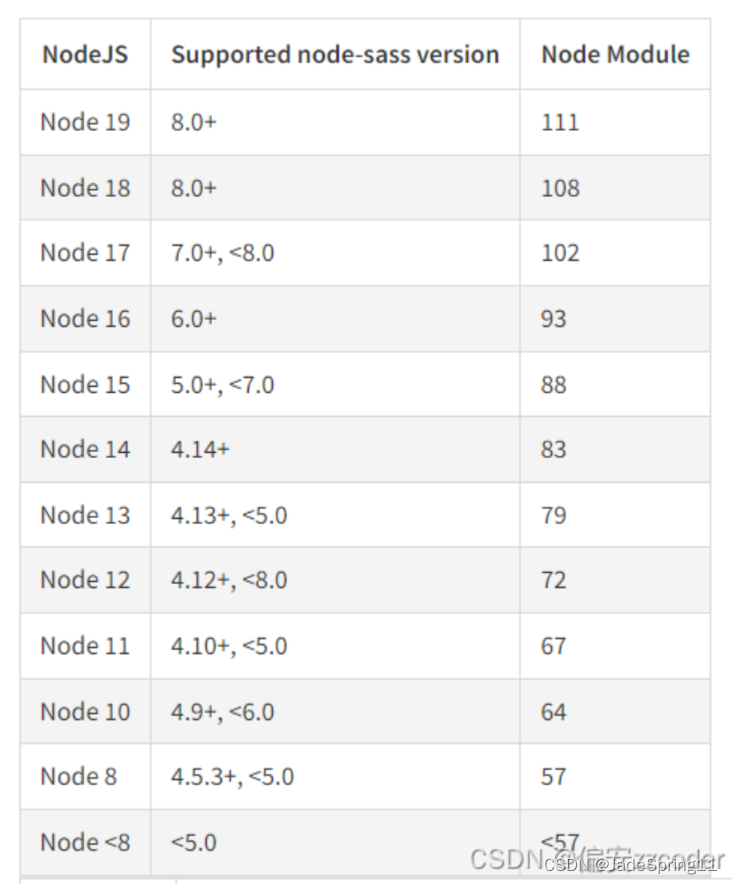
npm install node-sass@[本地node所对应的node-sass版本] --registry=https://registry.npm.taobao.org --sass_binary_site=https://npm.taobao.org/mirrors/node-sass/
安装和卸载不能有报错, 并且时间会有点长, 耐心等待, 而且其他地方(模块)不能有错误
————————————————
版权声明:本文为博主原创文章,遵循 CC 4.0 BY-SA 版权协议,转载请附上原文出处链接和本声明。
原文链接:https://blog.csdn.net/2201_75971147/article/details/135088056

 浙公网安备 33010602011771号