Linux 系统 logroate日志管理
1.简介
Logrotate是基于CRON来运行的,其脚本是「/etc/cron.daily/logrotate」
#!/bin/sh

/usr/sbin/logrotate -s /var/lib/logrotate/logrotate.status /etc/logrotate.conf
EXITVALUE=$?
if [ $EXITVALUE != 0 ]; then
/usr/bin/logger -t logrotate "ALERT exited abnormally with [$EXITVALUE]"
fi
exit 0
实际运行时,Logrotate会调用配置文件「/etc/logrotate.conf」
weekly
rotate 4
create
dateext
compress
include /etc/logrotate.d
/var/log/wtmp {
monthly
create 0664 root utmp
minsize 1M
rotate 1
}

/var/log/btmp {
missingok
monthly
create 0600 root utmp
rotate 1
}
2.日志切割
2.1.Nginx
/usr/local/openresty/nginx/logs/*.log {
  daily
  rotate 5
  missingok
  dateext
  compress
  notifempty
  sharedscripts
  postrotate
    [ -e /usr/local/openresty/nginx/logs/nginx.pid ] && kill -USR1 `cat /usr/local/openresty/nginx/logs/ngi
nx.pid`
  endscript
}
测试并验证是否正常
logrotate -f /etc/logrotate.d/nginx
logrotate -d -f /etc/logrotate.d/nginx
2.2.kong
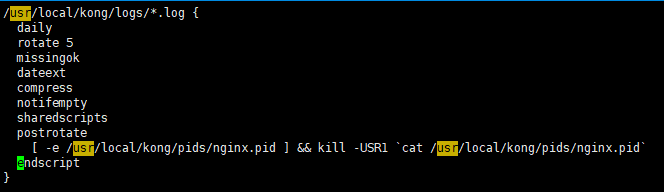
/usr/local/kong/logs/*.log {
    daily
    rotate 5
    missingok
    dateext
    compress
    notifempty
    sharedscripts
    postrotate
        [ -e /usr/local/kong/pids/nginx.pid ] && kill -USR1 `cat /usr/local/kong/pids/nginx.pid`
    endscript
}

2.3.java 日志
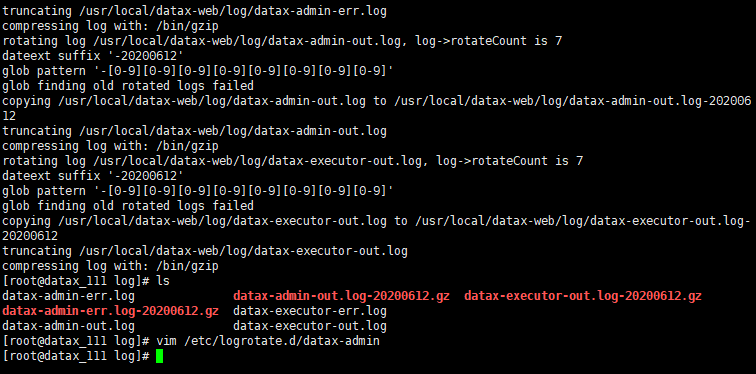
/usr/local/datax-web/log/*.log {
    daily
    rotate 7
    missingok
    dateext
    compress
    notifempty
    copytruncate
}
3.原理说明
3.1.sharedscripts
haredscripts的作用是在所有的日志文件都轮转完毕后统一执行一次脚本(匹配*通配符)。如果没有配置这条指令,那么每个日志文件轮转完毕后都会执行一次脚本。
3.2.日志时间
Logrotate是基于CRON运行的,所以这个时间是由anacrontab控制的(CentOS 6是crontab),具体可以查询CRON的配置文件「/etc/crontab」,可以手动改成如23:59等时间
# /etc/anacrontab: configuration file for anacron

# See anacron(8) and anacrontab(5) for details.

SHELL=/bin/sh
PATH=/sbin:/bin:/usr/sbin:/usr/bin
MAILTO=root
# the maximal random delay added to the base delay of the jobs
RANDOM_DELAY=45
# the jobs will be started during the following hours only
START_HOURS_RANGE=3-22

#period in days   delay in minutes   job-identifier   command
1       5       cron.daily              nice run-parts /etc/cron.daily
7       25      cron.weekly             nice run-parts /etc/cron.weekly
@monthly 45     cron.monthly            nice run-parts /etc/cron.monthly
3.3.功能说明
|
参数 |
说明 |
|---|---|
|
compress |
启用压缩,指的是轮替后的旧日志,默认用的是gzip压缩 |
|
daily |
每天轮替 |
|
dateext |
使用当期日期作为命名格式 |
|
dateformat .%s |
配合dateext使用,紧跟在下一行出现,定义文件切割后的文件名,必须配合dateext使用,只支持 %Y %m %d %s 这四个参数 |
|
ifempty |
即使日志文件是空的也轮替 |
|
|
将轮替后的文件发送到指定E-mail地址 |
|
copytruncate |
用于还在打开中的日志文件,把当前日志备份并截断,是先拷贝再清空的方式,拷贝和清空之间有一个时间差,可能会丢失部分日志数据。 |
|
monthly |
一个月轮替一次 |
|
nocompress |
如果在logrotate.conf中启用了压缩,这里是做不用压缩的参数 |
|
nomail |
不发送邮件到任何地址 |
|
notifempty |
如果日志是空的就不轮替(也就是空日志不切割) |
|
olddir + 目录 |
轮替后日志文件放入指定的目录,必须和当前日志文件在同一个文件系统 |
|
rotate +次数 |
轮替最多保留之前的数据几次,超出的将被删除或邮件接收,设为0则不保存 |
|
size size |
当日志增长到指定大小的时候开始轮替 |
|
weekly |
如果当前的星期几比上次轮替的星期几少,或者过了一个多星期,就会发生轮替通常是在每周的第一天轮替,如果logrotate不是每天运行的,会在第一次有机会时进行轮替 |
|
yearly |
如果当前年份不同于上次轮替的年份,则进行日志轮替 |
|
Missingok |
如果日志丢失,不报错继续滚动下一个日志 |
作者:虚拟的现实
出处:https://waringid.cnblogs.com
如果您觉得阅读本文对您有帮助,请点击一下右下方的推荐按钮,您的推荐将是我写作的最大动力!
版权声明:本文为博主原创或转载文章,欢迎转载,但转载文章之后必须在文章页面明显位置注明出处,否则保留追究法律责任的权利。
出处:https://waringid.cnblogs.com
如果您觉得阅读本文对您有帮助,请点击一下右下方的推荐按钮,您的推荐将是我写作的最大动力!
版权声明:本文为博主原创或转载文章,欢迎转载,但转载文章之后必须在文章页面明显位置注明出处,否则保留追究法律责任的权利。

 浙公网安备 33010602011771号