
如何使用 Tailwind CSS 和 JavaScript 构建懒加载图片库
发布于 2024 年 9 月 20 日,作者:Michael Andreuzza
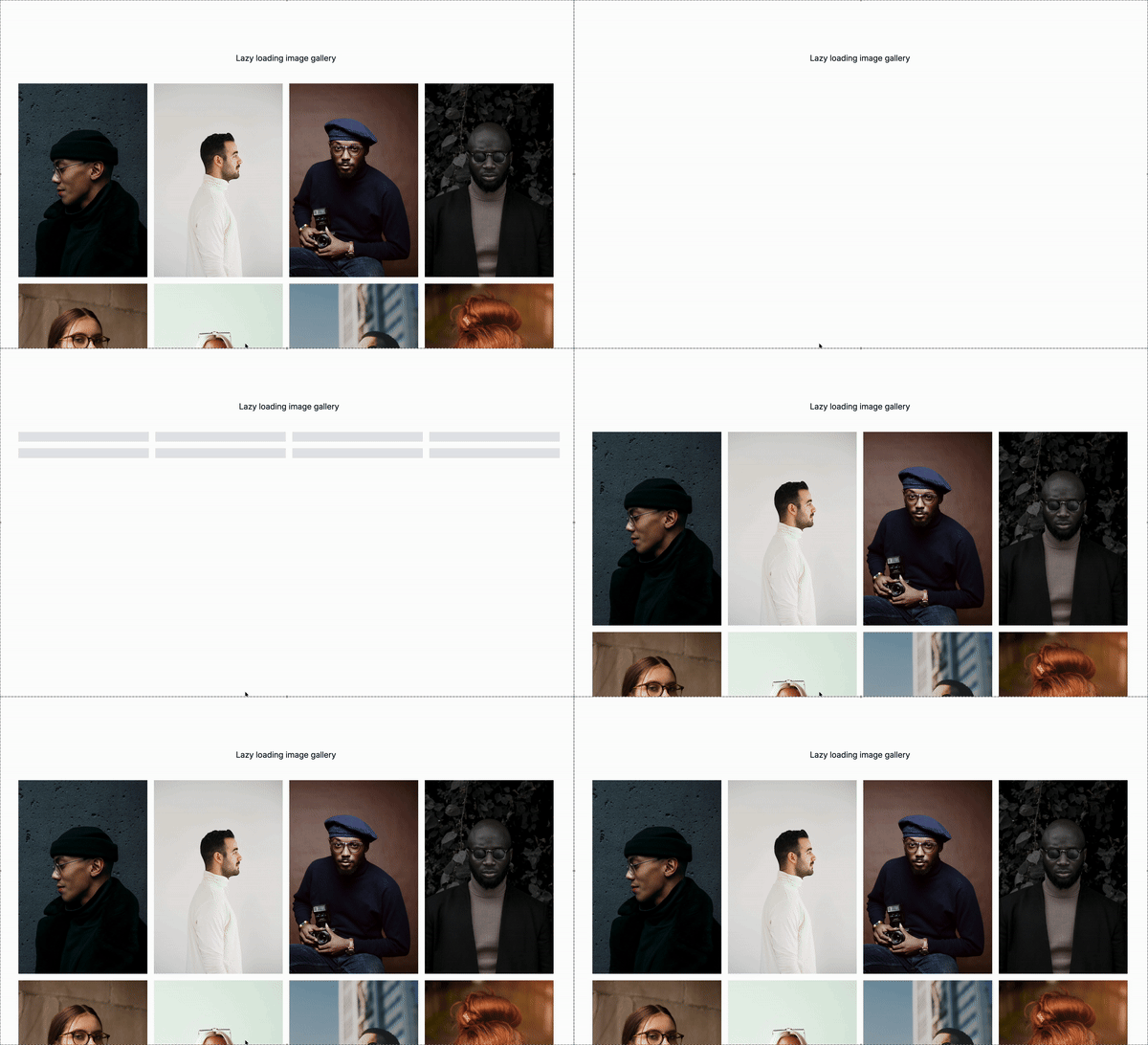
终于到周五了!我们又带来了一个关于如何使用 Tailwind CSS 和 JavaScript 构建懒加载图片库的教程。
什么是懒加载?
懒加载是一种性能优化技术,仅在图像或其他媒体进入视口(或即将进入时)加载这些内容。通过不在页面加载时一次性加载所有图像,懒加载可以减少初始加载时间,因为只加载必要的内容。这使得页面性能更快,并且在图像较多的网站上提供更流畅的用户体验。
懒加载图片的使用场景
懒加载在以下情况下特别有用:
-
图片库:当展示大量图像时,懒加载确保只有在视图中的图像被加载,防止长时间的加载并节省带宽。
-
长页面:在内容丰富的页面(例如博客或电商产品列表)上,懒加载可以通过在用户滚动时加载图像来保持页面加载时间较低。
-
移动优化:对于在较慢网络或移动设备上的用户,懒加载确保他们仅下载必要内容,节省数据并改善浏览体验。
-
渐进式Web应用(PWA):懒加载有助于维持 PWA 的性能,确保其保持快速和响应灵敏。
在本教程中,我们将介绍如何使用 Tailwind CSS 进行样式设计,并使用一些 JavaScript 实现懒加载功能来设置懒加载图片库。
编写标记
ID
gallery是将包含图像的容器元素的 ID。这是我们将动态生成的图像元素附加到的位置。
类
grid是一个实用类,允许我们为图像创建网格布局。grid-cols-1将列数设置为 1,创建单列布局。sm:grid-cols-2在宽度小于等于 768px 的屏幕上将列数设置为 2。md:grid-cols-3在宽度在 768px 到 1024px 的屏幕上将列数设置为 3。lg:grid-cols-4在宽度大于等于 1024px 的屏幕上将列数设置为 4。gap-4在图像之间添加 4 像素的间距。
<div id="gallery" class="grid grid-cols-1 sm:grid-cols-2 md:grid-cols-3 lg:grid-cols-4 gap-4">
   <!-- Images will be dynamically inserted here -->
</div>
编写 JavaScript
创建图像元素
我们将使用 createImageElement 函数动态创建图像元素。
const div = document.createElement("div");创建一个新的div元素。我们将使用该元素来包装图像和占位符。const imagesUrls = [.... ];是一个图像 URL 数组。我们将使用此数组来创建图像元素。
const gallery = document.getElementById("gallery");
const imageUrls = [
   "https://images.unsplash.com/photo-1543610892-0b1f7e6d8ac1?q=80&w=1856&auto=format&fit=crop&ixlib=rb-4.0.3&ixid=M3wxMjA3fDB8MHxwaG90by1wYWdlfHx8fGVufDB8fHx8fA%3D%3D",
   "https://images.unsplash.com/photo-1516914943479-89db7d9ae7f2?q=80&w=2732&auto=format&fit=crop&ixlib=rb-4.0.3&ixid=M3wxMjA3fDB8MHxwaG90by1wYWdlfHx8fGVufDB8fHx8fA%3D%3D",
   // 其他图像链接...
];
createImageElement 函数
该函数接受两个参数:图像的 URL 和图像在数组中的索引。它返回一个新的 div 元素,包含图像和在图像加载时显示的 placeholder 元素。
function createImageElement(url, index) {: 这个函数接受两个参数:图像的 URL 和图像在数组中的索引。const div = document.createElement("div");: 创建一个新的div元素。div.className = "relative overflow-hidden aspect-w-16 aspect-h-9";: 将div元素的类名设置为“relative overflow-hidden aspect-w-16 aspect-h-9”。该类将元素设置为相对容器,溢出隐藏,并具有 16:9 的宽高比。const img = document.createElement("img");: 创建一个新的img元素。img.className = "lazy-image w-full h-full object-cover transition-opacity duration-300 opacity-0";: 将img元素的类名设置为“lazy-image w-full h-full object-cover transition-opacity duration-300 opacity-0”。img.dataset.src = url;: 将img元素的src属性设置为图像的 URL。img.alt =Image ${index + 1};: 将img元素的alt属性设置为“Image 1”,“Image 2”等。const placeholder = document.createElement("div");: 创建一个新的div元素。placeholder.className = "absolute inset-0 bg-gray-200 animate-pulse w-full h-full";: 将placeholder元素的类名设置为“absolute inset-0 bg-gray-200 animate-pulse w-full h-full”。div.appendChild(placeholder);: 将placeholder元素附加到div元素。div.appendChild(img);: 将img元素附加到div元素。return div;: 返回div元素。
function createImageElement(url, index) {
   const div = document.createElement("div");
   div.className = "relative overflow-hidden aspect-w-16 aspect-h-9";
   const img = document.createElement("img");
   img.className = "lazy-image w-full h-full object-cover transition-opacity duration-300 opacity-0";
   img.dataset.src = url;
   img.alt = `Image ${index + 1}`;
   const placeholder = document.createElement("div");
   placeholder.className = "absolute inset-0 bg-gray-200 animate-pulse w-full h-full";
   div.appendChild(placeholder);
   div.appendChild(img);
   return div;
}
创建图像元素的函数
这个函数用于创建一个图像元素,并设置其相关属性和样式。具体代码如下:
function createImageElement(url, index) {
   const div = document.createElement("div");
   div.className = "relative overflow-hidden aspect-w-16 aspect-h-9";

   const img = document.createElement("img");
   img.className = "lazy-image w-full h-full object-cover transition-opacity duration-300 opacity-0";
   img.dataset.src = url;
   img.alt = `Image ${index + 1}`;

   const placeholder = document.createElement("div");
   placeholder.className = "absolute inset-0 bg-gray-200 animate-pulse w-full h-full";

   div.appendChild(placeholder);
   div.appendChild(img);
   return div;
}
lazyLoad 函数
这个函数使用 IntersectionObserver API 来观察具有 lazy-image 类的 img 元素。当带有 lazy-image 类的元素与视口相交时,元素的 src 属性会被设置为 dataset.src 属性的值,并触发 onload 事件。
function lazyLoad() {
   const images = document.querySelectorAll("img.lazy-image");
   const options = {
      root: null,
      rootMargin: "0px",
      threshold: 0.1,
   };

   const imageObserver = new IntersectionObserver((entries, observer) => {
      entries.forEach((entry) => {
         if (entry.isIntersecting) {
            const img = entry.target;
            img.src = img.dataset.src;
            img.onload = () => {
               img.classList.remove("opacity-0");
               img.previousElementSibling.remove(); // 移除占位符
            };
            observer.unobserve(img);
         }
      });
   }, options);

   images.forEach((img) => imageObserver.observe(img));
}
创建和添加图像元素
我们将使用 createImageElement 函数创建并添加图像元素到画廊,同时通过调用 lazyLoad 函数初始化懒加载。
// 创建并添加图像元素
imageUrls.forEach((url, index) => {
   const imageElement = createImageElement(url, index);
   gallery.appendChild(imageElement);
});

// 初始化懒加载
lazyLoad();
以上代码实现了图像的动态加载和懒加载,确保在用户滚动到相应位置时才加载图像,从而提高页面性能。
完整脚本
const gallery = document.getElementById("gallery");
const imageUrls = [
   "https://images.unsplash.com/photo-1543610892-0b1f7e6d8ac1?q=80&w=1856&auto=format&fit=crop&ixlib=rb-4.0.3&ixid=M3wxMjA3fDB8MHxwaG90by1wYWdlfHx8fGVufDB8fHx8fA%3D%3D",
   "https://images.unsplash.com/photo-1516914943479-89db7d9ae7f2?q=80&w=2732&auto=format&fit=crop&ixlib=rb-4.0.3&ixid=M3wxMjA3fDB8MHxwaG90by1wYWdlfHx8fGVufDB8fHx8fA%3D%3D",
   "https://images.unsplash.com/photo-1531384698654-7f6e477ca221?q=80&w=2800&auto=format&fit=crop&ixlib=rb-4.0.3&ixid=M3wxMjA3fDB8MHxwaG90by1wYWdlfHx8fGVufDB8fHx8fA%3D%3D",
   "https://images.unsplash.com/photo-1531901599143-df5010ab9438?q=80&w=2787&auto=format&fit=crop&ixlib=rb-4.0.3&ixid=M3wxMjA3fDB8MHxwaG90by1wYWdlfHx8fGVufDB8fHx8fA%3D%3D",
   "https://images.unsplash.com/photo-1524255684952-d7185b509571?q=80&w=2787&auto=format&fit=crop&ixlib=rb-4.0.3&ixid=M3wxMjA3fDB8MHxwaG90by1wYWdlfHx8fGVufDB8fHx8fA%3D%3D",
   "https://images.unsplash.com/photo-1588175996685-a40693ee1087?q=80&w=2864&auto=format&fit=crop&ixlib=rb-4.0.3&ixid=M3wxMjA3fDB8MHxwaG90by1wYWdlfHx8fGVufDB8fHx8fA%3D%3D",
   "https://images.unsplash.com/photo-1624561172888-ac93c696e10c?q=80&w=2592&auto=format&fit=crop&ixlib=rb-4.0.3&ixid=M3wxMjA3fDB8MHxwaG90by1wYWdlfHx8fGVufDB8fHx8fA%3D%3D",
   "https://images.unsplash.com/photo-1489424731084-a5d8b219a5bb?q=80&w=2787&auto=format&fit=crop&ixlib=rb-4.0.3&ixid=M3wxMjA3fDB8MHxwaG90by1wYWdlfHx8fGVufDB8fHx8fA%3D%3D",
];

function createImageElement(url, index) {
   const div = document.createElement("div");
   div.className = "relative overflow-hidden aspect-w-16 aspect-h-9";
   const img = document.createElement("img");
   img.className = "lazy-image w-full h-full object-cover transition-opacity duration-300 opacity-0";
   img.dataset.src = url;
   img.alt = `Image ${index + 1}`;
   const placeholder = document.createElement("div");
   placeholder.className = "absolute inset-0 bg-gray-200 animate-pulse w-full h-full";
   div.appendChild(placeholder);
   div.appendChild(img);
   return div;
}

function lazyLoad() {
   const images = document.querySelectorAll("img.lazy-image");
   const options = {
      root: null,
      rootMargin: "0px",
      threshold: 0.1,
   };
   const imageObserver = new IntersectionObserver((entries, observer) => {
      entries.forEach((entry) => {
         if (entry.isIntersecting) {
            const img = entry.target;
            img.src = img.dataset.src;
            img.onload = () => {
               img.classList.remove("opacity-0");
               img.previousElementSibling.remove(); // 移除占位符
            };
            observer.unobserve(img);
         }
      });
   }, options);
   images.forEach((img) => imageObserver.observe(img));
}

// 创建并添加图像元素
imageUrls.forEach((url, index) => {
   const imageElement = createImageElement(url, index);
   gallery.appendChild(imageElement);
});

// 初始化懒加载
lazyLoad();
结论
在本教程中,我们学习了如何使用 Tailwind CSS 和 JavaScript 创建一个懒加载图像库。我们涵盖了创建懒加载图像库、处理图像加载和实现懒加载功能等主题。
希望你喜欢这个教程,祝你有个美好的一天!

 浙公网安备 33010602011771号