


C#解析文件---文件的读取,重写,SQLserver的插入和选择,如何将一个List列表转换成DataTable类型,(导出文件可以直接拷贝代码,不需要任何修改)
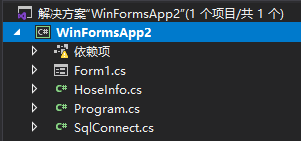
1.项目文件:
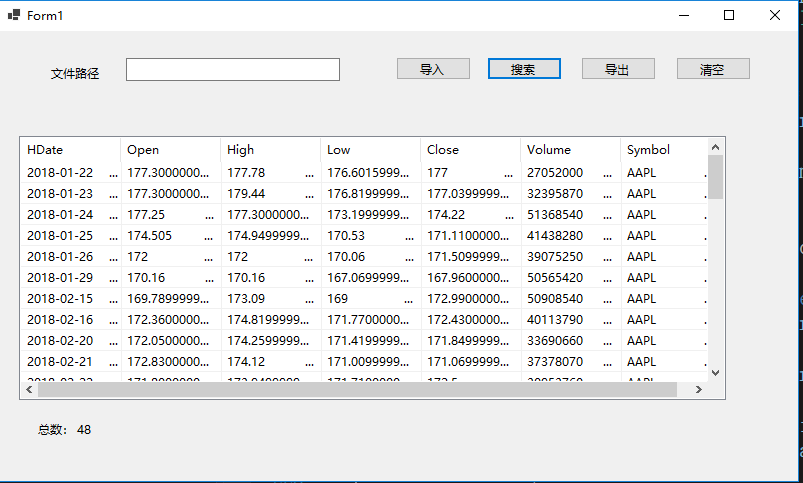
2. 最终效果:
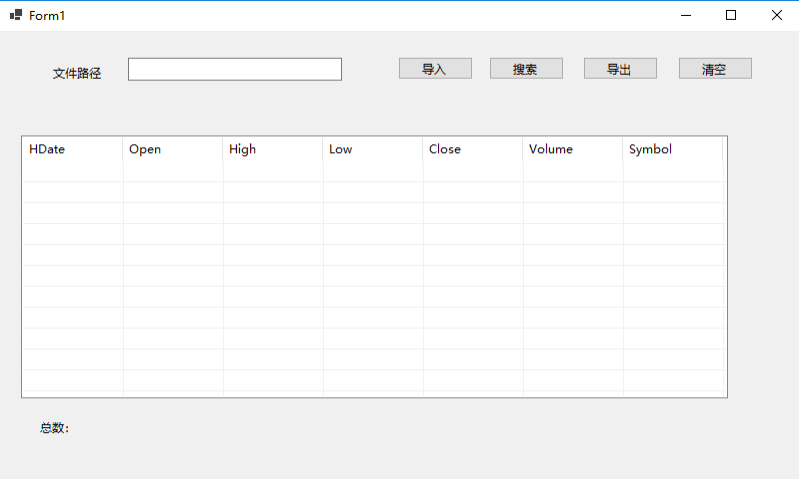
3.读取文件:
private void button1_Click(object sender, EventArgs e)
        {
            //F:\NASDAQ_DATA.csv
            string path = textBox1.Text;
            int i=0;
            if (path.Length<1)
            {
                MessageBox.Show("填写路径");
                return;
            }
            FileInfo file = new FileInfo(path);
            FileStream fs = new FileStream(path, FileMode.Open, FileAccess.Read, FileShare.ReadWrite);
            StreamReader reader = new StreamReader(fs, System.Text.Encoding.Default);
            string line = reader.ReadToEnd();
            if (file.Name != null)
            {
                string[] all = Regex.Split(line, "\r\n");
                SqlConnect sql = new SqlConnect();
                i=sql.SqlExecute(all);

            }
            reader.Close();
            fs.Close();
            if (i == 1)
            {
                MessageBox.Show("导入成功");
            }
            else
            {
                MessageBox.Show("导入失败");
            }

        }
4.插入到数据库中,
将读取的文件编写成列表
public int SqlExecute(string[] Arr)//
        {
            SqlConnect sqlConnect = new SqlConnect();
            string constr = @"Server = DESKTOP-2PH6MOC\SQLEXPRESS; Integrated security = SSPI; Initial Catalog = wsl";
            SqlConnection sqlConn = new SqlConnection(constr);
            int i = 0;
            try
            {
                sqlConn.Open();
                for (int j = 1; j < Arr.Length-1; j++)
                {
                  string[] k = Arr[j].Split(',');

                    string sql = "insert into SB(HDate,Ope,High,Low,Clos,Volume,Symbol) values(@HDate,@Ope,@High,@Low,@Clos,@Volume,@Symbol)";
                    SqlCommand cmd = new SqlCommand(sql, sqlConn);
                    cmd.Parameters.Add(new SqlParameter("@HDate", k[0]));
                    cmd.Parameters.Add(new SqlParameter("@Ope", k[1]));
                    cmd.Parameters.Add(new SqlParameter("@High", k[2]));
                    cmd.Parameters.Add(new SqlParameter("@Low", k[3]));
                    cmd.Parameters.Add(new SqlParameter("@Clos", k[4]));
                    cmd.Parameters.Add(new SqlParameter("@Volume", k[5]));
                    cmd.Parameters.Add(new SqlParameter("@Symbol", k[6]));
                    i = cmd.ExecuteNonQuery();

                }
            }
            catch (Exception exp)
            {
                throw new Exception();
            }
            finally
            {
                sqlConn.Close();
            }
            return i;
        }
5.编写SQL语言,筛选需要的数据
private void button2_Click(object sender, EventArgs e)
        {
            SqlConnect sql = new SqlConnect();
            List<HoseInfo> h=sql.SelectExecute();
            listView1.Items.Clear();
            for (int i = 0; i < h.Count; i++)
            {
                ListViewItem item = new ListViewItem();
                item.Text = h[i].HDate;
                item.SubItems.Add(h[i].Ope);
                item.SubItems.Add(h[i].High);
                item.SubItems.Add(h[i].Low);
                item.SubItems.Add(h[i].Clos);
                item.SubItems.Add(h[i].Volume);
                item.SubItems.Add(h[i].Symbol);
                listView1.Items.Add(item);

            }
            label2.Text = h.Count.ToString();
        }
Select语言用函数封装起来,然后然后一个HoseInfo类型的列表
 public List<HoseInfo> SelectExecute()
        {
            SqlConnect sqlConnect = new SqlConnect();
            int i = 0;
            string constr = @"Server = DESKTOP-2PH6MOC\SQLEXPRESS; Integrated security = SSPI; Initial Catalog = wsl";
            SqlConnection sqlConn = new SqlConnection(constr);
            sqlConn.Open();
            string sql = "select * from SB where High<200.00 and High >170.00";
            SqlCommand cmd = new SqlCommand(sql, sqlConn);
            SqlDataReader dr;
            dr = cmd.ExecuteReader();
            dr.GetDataTypeName(1);
            object[] vs = new object[dr.FieldCount];
            List<HoseInfo> hoseinfo = new List<HoseInfo>();
            //HoseInfo hose = new HoseInfo();
            while (dr.Read())
            {
                dr.GetValues(vs);
                HoseInfo hose = new HoseInfo();
                hose.HDate = vs[0].ToString();
                hose.Ope = vs[1].ToString();
                hose.High = vs[2].ToString();
                hose.Low = vs[3].ToString();
                hose.Clos = vs[4].ToString();
                hose.Volume = vs[5].ToString();
                hose.Symbol = vs[6].ToString();
                hoseinfo.Add(hose);
            }
            dr.Close();
            return hoseinfo;
        }
HoseInfo的定义
class HoseInfo
    {

        public string HDate {
            get;set;

             }
        public string Ope { get; set; }
        public string High { get; set; }
        public string Low { get; set; }
        public string Clos { get; set; }
        public string Volume { get; set; }
        public string Symbol { get; set; }
    }
6.将筛选的数据导出成csv文件,
private void button4_Click(object sender, EventArgs e)
        {
            SqlConnect sql = new SqlConnect();
            string[] tableheader = { "HDate", "Ope", "High", "Low", "Clos", "Volume", "Symbol" };//HDate,Open,High,Low,Close,Volume,Symbol
            List<HoseInfo> h = sql.SelectExecute();
            DataTable data =sql.ToDataTable<HoseInfo>(h,tableheader);
            sql.ExportCSV(data, @"F:\","info");
            MessageBox.Show("导出成功");
        }
注意:如何将一个List列表转换成DataTable类型
/// <summary>
        /// 将泛型集合类转换成DataTable,返回的DataTable所有列的数据类型为string型,且列顺序与字符串提供的字段顺序一致
        /// </summary>
        /// <typeparam name="T">集合项类型</typeparam>
        /// <param name="list">集合</param>
        /// <param name="propertyName">需要返回的列的列名,可控制列顺序</param>
        /// <returns>数据集(表) 所有列为string类型</returns>
        public DataTable ToDataTable<T>(IList<T> list, params string[] propertyName)
        {
            List<string> propertyNameList = new List<string>();
            if (propertyName != null)
                propertyNameList.AddRange(propertyName);
            DataTable result = new DataTable();
            if (list.Count > 0)
            {
                PropertyInfo[] propertys = list[0].GetType().GetProperties();
                foreach (var item in propertyNameList)
                {
                    result.Columns.Add(item, "".GetType());
                }

                for (int i = 0; i < list.Count; i++)
                {
                    ArrayList tempList = new ArrayList();
                    foreach (var item in propertyNameList)
                    {
                        tempList.Add(propertys.First(p => p.Name == item).GetValue(list[i], null));//查找List里面的值
                    }
                    object[] array = tempList.ToArray();
                    result.LoadDataRow(array, true);
                }
            }
            return result;
        }
将Datatable解析导出文件:
 /// 导出CSV
        /// </summary>
        /// <param name="dataGridView">表格控件</param>
        /// <param name="dataView">数据表格</param>
        /// <param name="directory">目录</param>
        /// <param name="fileName">文件名</param>
        public  void ExportCSV(System.Data.DataTable table, string directory, string fileName)
        {
            // 开始忙了

            string directoryName = directory;
            if (!Directory.Exists(directoryName))
            {
                Directory.CreateDirectory(directoryName);
            }
            string file = directory + fileName;
            // if (!this.FileExist(file))
            // {
            ExportCSV(table, file);
            //Process.Start(file);
            //  }
            // 已经忙完了

        }
 #region public static void ExportCSV(DataTable dataTable, string fileName) 导出CSV格式文件
        /// <summary>
        /// 导出CSV格式文件
        /// </summary>
        /// <param name="dataTable">数据表</param>
        /// <param name="fileName">文件名</param>
        public static void ExportCSV(DataTable dataTable, string fileName)
        {
            StreamWriter StreamWriter = new StreamWriter(fileName, false, System.Text.Encoding.GetEncoding("gb2312"));
            StreamWriter.WriteLine(GetCSVFormatData(dataTable).ToString());
            StreamWriter.Flush();
            StreamWriter.Close();
        }
        #endregion
        #region public static StringBuilder GetCSVFormatData(DataTable dataTable) 通过DataTable获得CSV格式数据
        /// <summary>
        /// 通过DataTable获得CSV格式数据
        /// </summary>
        /// <param name="dataTable">数据表</param>
        /// <returns>CSV字符串数据</returns>
        public static StringBuilder GetCSVFormatData(DataTable dataTable)
        {
            StringBuilder StringBuilder = new StringBuilder();
            // 写出表头

            StringBuilder.Append("HDate,Open,High,Low,Close,Volume,Symbol ");
            StringBuilder.Append("\n");
            // 写出数据
            int count = 0;
            foreach (DataRowView dataRowView in dataTable.DefaultView)
            {
                count++;
                foreach (DataColumn DataColumn in dataTable.Columns)
                {
                    string field = dataRowView[DataColumn.ColumnName].ToString();

                    if (field.IndexOf('"') >= 0)
                    {
                        field = field.Replace("\"", "\"\"");
                    }
                    field = field.Replace("  ", " ");
                    if (field.IndexOf(',') >= 0 || field.IndexOf('"') >= 0 || field.IndexOf('<') >= 0 || field.IndexOf('>') >= 0 || field.IndexOf("'") >= 0)
                    {
                        field = "\"" + field + "\"";
                    }
                    StringBuilder.Append(field + ",");
                    field = string.Empty;
                }
                if (count != dataTable.Rows.Count)
                {
                    StringBuilder.Append("\n");
                }
            }
            return StringBuilder;
        }
7.清空页面内容
private void button4_Click(object sender, EventArgs e)
        {
            SqlConnect sql = new SqlConnect();
            string[] tableheader = { "HDate", "Ope", "High", "Low", "Clos", "Volume", "Symbol" };//HDate,Open,High,Low,Close,Volume,Symbol
            List<HoseInfo> h = sql.SelectExecute();
            DataTable data =sql.ToDataTable<HoseInfo>(h,tableheader);
            sql.ExportCSV(data, @"F:\","info");
            MessageBox.Show("导出成功");
        }

 浙公网安备 33010602011771号