#!/usr/bin/python
# -*- coding:utf-8 -*-

from PyQt5.QtWidgets import QWidget, QApplication, QPushButton, QTextEdit, QFileDialog, QDialog
from PyQt5.QtPrintSupport import QPageSetupDialog, QPrintDialog, QPrinter
import sys


class PrintDialog(QWidget):
    def __init__(self):
        super(PrintDialog, self).__init__()
        self.printer = QPrinter()
        self.initUI()

    def initUI(self):
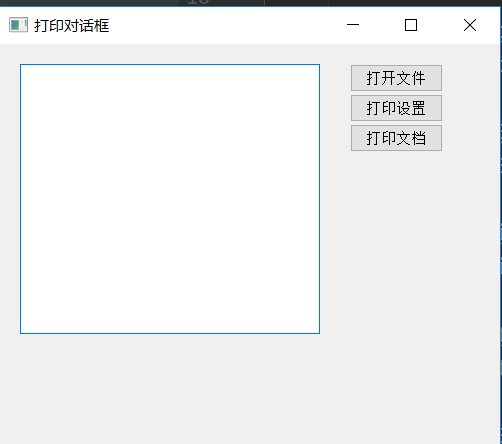
        self.setGeometry(300, 300, 500, 400)
        self.setWindowTitle('打印对话框')

        self.editor = QTextEdit(self)
        self.editor.setGeometry(20, 20, 300, 270)

        self.openButton = QPushButton("打开文件", self)
        self.openButton.move(350, 20)

        self.settingsButton = QPushButton("打印设置", self)
        self.settingsButton.move(350, 50)

        self.printButton = QPushButton("打印文档", self)
        self.printButton.move(350, 80)

        self.openButton.clicked.connect(self.openFile)
        self.settingsButton.clicked.connect(self.showSettingsDialog)
        self.printButton.clicked.connect(self.showPrintDialog)

    # 打开文件
    def openFile(self):
        fname = QFileDialog.getOpenFileName(self, "打开文本文件", "./")
        if fname[0]:
            with open(fname[0], "r", encoding="utf-8", errors="ignore") as f:
                self.editor.setText(f.read())

    # 显示打印设置对话框
    def showSettingsDialog(self):
        printDialog = QPageSetupDialog(self.printer, self)
        printDialog.exec()

    # 显示打印对话框
    def showPrintDialog(self):
        printdialog = QPrintDialog(self.printer, self)
        if QDialog.Accepted == printdialog.exec():
            self.editor.print(self.printer)

if __name__ == '__main__':
    app = QApplication(sys.argv)
    gui = PrintDialog()
    gui.show()
    sys.exit(app.exec_())


 浙公网安备 33010602011771号