vue项目中使用element插件中的upload上传文件的踩坑记录
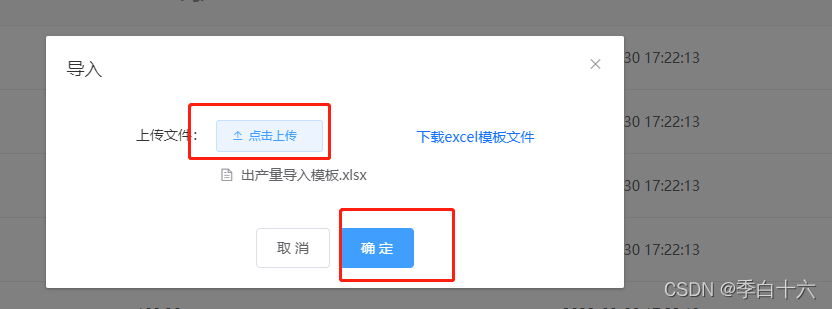
一、项目需求在上传状态中原插件点击直接上传到服务器 本项目中的需求是 点击上传到本地 点击确定按钮之后进行网络请求上传到服务器上
二、解决办法
(1)标签
 <span>上传文件:</span>
        <el-upload
          ref="uploadFile"
          class="upload-demo"
          :action="actionUrl"
          :on-change="handleChange"
          :file-list="fileList"
          :show-file-list="true"
          :before-upload="beforeUpload"
          :on-success="successUpdate"
          :auto-upload="false"

        >
          <el-button size="small" icon="el-icon-upload2">点击上传</el-button>
        </el-upload>
(2)js行为
(1)本地上传
beforeUpload(file) {
      console.log(file);

      let fileName = file.name;
      // let uid = file.uid
      let pos = fileName.lastIndexOf(".");
      let lastName = fileName.substring(pos, fileName.length);
      console.log(lastName, lastName.toLowerCase());
      if (
        lastName.toLowerCase() !== ".xls" &&
        lastName.toLowerCase() !== ".xlsx"
      ) {
        this.$message.error("文件必须为 .xls .xlsx类型");

        return false;
      }
      return false;
    },
(2)点击网络请求上传服务器
transferToManager() {
      console.log('post',this.$refs.uploadFile.$children[0])
      this.$refs.uploadFile.$children[0].post(
        this.$refs.uploadFile.fileList[0].raw
      )
      this.managerStatus = false;
    },
(3)捕获请求结果
 successUpdate(response) {
      console.log('successUpdate',response);
      if (response.code == 200) {
        this.$message(response.msg);
      }else{
         this.$message.warning(response.msg);
      }
      this.getAmountList()
    },
三、原因分析
为什么不能直接调用submit呢?因为在befroeupload函数调用时若状态改为false,则会导致submit失效
posted on 2022-03-31 20:44 樱桃小王子yummy 阅读(1227) 评论(0) 收藏 举报

 浙公网安备 33010602011771号