
Python【day3】:Python入门(set集合、colllecitions系列-计数器、有序字典、默认字典、可命名元组、队列、深浅拷贝、函数、内置函数、文件读写等介绍)
pycharm小技巧:
1、自定义模板(如自动添加编码申明,主函数申明等)
在pycharm里面,setting,editor,file and code templates,选择python script,修改即可(例如:#-*- coding:utf-8 -*-)。
2、2.7和3.5版本切换
setting--project pycharmproject--project interpreter
3、显示行号:
永久设置
1、通过“ctrl+alt+s”或者菜单栏是'File'->'Settings...'打开设置窗口;
2、在设置窗口的搜索量输入‘Appearance’找到Editor ->General->Appearance单击;
3、在显示出的页面中找到“Show line numbers”勾选上,然后点击“Apply”然后点击“OK”确认;
4、重启PyCharm,对所有文件生效了;
4、代码字体设置
在setting->Editor->colors&fonts->font处将darcula另外save as一个,之后此处就会编程copy版本了,也就能编辑了。
5、版本控制
打开file,选择settings,找到Version Contorl,打开
找到GitHub ,HOST填github.com,用户名,密码,test,稍等一会,会提示成功
设置好后选择git,这里是输入你的git.exe的,下面是我的git.exe的位置:
--安装github客户端-在线包下载安装较慢,建议下载离线包较快
C:\Users\Administrator\AppData\Local\GitHub\PortableGit_fed20eba68b3e238e49a47cdfed0a45783d93651\bin\git.exe
set集合
__author__ = 'Administrator'
#-*- coding:utf-8 -*-

# set是一个无序且不重复的元素集合

#1创建set集合的方式有2种
#方法1:
s0={1,2}  #用大括号表示set集合--1小括号元组、2中括号列表、3大括号键值对字典
print(s0) #{1, 2}

#方法2:通过set类来创建,将列表、元组、字典、字符串转化成set集合
s1 = set() #set() #创建空的set集合  通过set类创建
s2 = set([1,2,2])   #{1, 2}  #创建set集合,集合的元素是去重的,入参是列表,会将列表的元素存在大括号中
s3 = set((1,2,2))  #{1, 2}   入参是元组,会将列表的元素存在大括号中
s4 = set({"k1":"v1"})  #{'k1'}  入参是字典,会将字典的key存在大括号中
s5 = set("122")  #{'1', '2'}   入参是字符串,会将字符串的单个字符作为元素存在大括号中
# s6 = set(123)  #报错,参数必须是可迭代类型的 TypeError: 'int' object is not iterable
s7 = set("a") #{'a'}  单个字符也是字符串
print(s1)
print(s2)
print(s3)
print(s4)
print(s5)
# print(s6)
print(s7)
"""     set() -> new empty set object
        set(iterable) -> new set object
        Build an unordered collection of unique elements.
        # (copied from class doc)
"""
print(type(s1))  #<class 'set'>
print(dir(set))  #打印set类中的方法
['__and__', '__class__', '__cmp__', '__contains__', '__delattr__', '__doc__', '__eq__',
 '__format__', '__ge__', '__getattribute__', '__gt__', '__hash__', '__iand__', '__init__',
 '__ior__', '__isub__', '__iter__', '__ixor__', '__le__', '__len__', '__lt__', '__ne__',
 '__new__', '__or__', '__rand__', '__reduce__', '__reduce_ex__', '__repr__', '__ror__',
 '__rsub__', '__rxor__', '__setattr__', '__sizeof__', '__str__', '__sub__', '__subclasshook__',
 '__xor__',
 'add', 'clear', 'copy', 'difference', 'difference_update', 'discard',
 'intersection', 'intersection_update', 'isdisjoint', 'issubset', 'issuperset', 'pop',
 'remove', 'symmetric_difference', 'symmetric_difference_update', 'union', 'update']

#1添加
s2 = {1,2,2}   #{1, 2}  #创建set集合,集合的元素是去重的
print(s2.add(*[3])) #None  注意:入参-列表前面需要加上一个星号*,不加或者加2个星号,会报错
print(s2)  #{1, 2, 3}
print(s2.add(4)) #None
print(s2)  #{1, 2, 3,4} 往set集合中添加数字
print(s2.add("a")) #None
print(s2)  #{'a', 1, 2, 3, 4} 往set集合中添加字符串
print(s2.add(*{"k2":"v2"})) #None  注意:字典前面需要加上一个星号*,不加或者加2个星号,会报错
print(s2)  #{1, 2, 3, 4, 'a', 'k2'} 将入参-字典的key加入到set集合

s1=set()  #创建一个空的set集合
print(s1.add(3))
print(s1)  #{3} 往空的set集合中添加一个数字3

#1合并一个集合到另外一个集合,原集合变了
s1 = {1,2}
s2 = {3,4}
print(s1.update(s2))  #None 原集合变了  合并集合s2到集合s1中
print("update",s1)  #{1, 2, 3, 4}


#2清空
s2 = {1,2}
print(s2.clear())
print(s2)  #set() 将set集合中的元素清空

#2-1删除元素
s2 = {1,2}
print(s2.discard(1))
print("===discord",s2)  #{2} 删除集合中的元素2
# Remove an element from a set if it is a member.
#         If the element is not a member, do nothing.

#2-2删除元素--pop随机删除并返回
s2 = {1,2}
print(s2.pop()) #{2}
print("===pop",s2)  #{1} 随机删除集合中的元素2,并且返回{2}
 # Remove and return an arbitrary set element.
 #        Raises KeyError if the set is empty.

# s2 = set()
# print(s2.pop()) #报错 KeyError: 'pop from an empty set'

#2-3删除元素--指定删除
s2 = {1,2}
print(s2.remove(1)) #None
print("===remove",s2)  #{2} 指定删除集合中的元素1
# Remove an element from a set; it must be a member.
#         If the element is not a member, raise a KeyError.

# s2 = {1,2}
# print(s2.remove(3)) #报错 KeyError: 3
# print("===remove",s2)  #

#3取差集--原集合不变,新创建一个集合(存放差集)
s1 = {1,2}
s2 = {2,3}
print(s1.difference(s2)) #{1}  在set集合s1中,但是不在set集合s2中
print(s1) #{1, 2}  原集合不变
print(s2.difference(s1)) #{3}  在set集合s2中,但是不在set集合s1中
print(s2) #{2, 3}
# (i.e. all elements that are in this set but not the others.)

#3-2取差集--原集合s1变了
s1 = {1,2}
s2 = {2,3}
print(s1.difference_update(s2)) #None
print(s1)  #{1}   在set集合s1中,但是不在set集合s2中,原集合改变了
# Return the difference of two or more sets as a new set.
#         (i.e. all elements that are in this set but not the others.)

#3-3取差集--原集合s2变了
s1 = {1,2}
s2 = {2,3}
print(s2.difference_update(s1)) #{3}
print(s2) #{3}  在set集合s2中,但是不在set集合s1中,原集合s2变了
print(s1)  #{1, 2}
# Return the difference of two or more sets as a new set.
#         (i.e. all elements that are in this set but not the others.)

#4-1取对称差集--原集合不变,新创建一个集合(存放差集)
s1 = {1,2}
s2 = {2,3}
print(s1.symmetric_difference(s2)) #{1, 3}  在set集合s1中,但是不在set集合s2中或者在set集合s2中,但是不在set集合s1中
print(s1) #{1, 2}  原集合不变,新创建了一个集合,该集合的元素只属于s1或者只属于s2
print(s2.symmetric_difference(s1)) #{1, 3}  原集合不变,新创建了一个集合,该集合的元素只属于s1或者只属于s2
print(s2) #{2, 3}
# Return the symmetric difference of two sets as a new set.
#         (i.e. all elements that are in exactly one of the sets.)

#4-2取对称差集--原集合s1变了
s1 = {1,2}
s2 = {2,3}
print(s1.symmetric_difference_update(s2)) #None  原集合变了
print(s1) #{1, 3}  原集合变了,变成该集合的元素只属于s1或者只属于s2
# Return the symmetric difference of two sets as a new set.
#         (i.e. all elements that are in exactly one of the sets.)

#4-3取对称差集--原集合s2变了
s1 = {1,2}
s2 = {2,3}
print(s2.symmetric_difference_update(s1)) #None  原集合变了
print(s2) #{1, 3}  原集合s2变了,变成该集合的元素只属于s1或者只属于s2
# Return the symmetric difference of two sets as a new set.
#         (i.e. all elements that are in exactly one of the sets.)

#5-1取交集-原集合不变,新创建一个集合(存放交集)
s1 = {1,2}
s2 = {2,3}
print(s1.intersection(s2)) #{2}  新创建一个集合(存放s1 s2的交集)
print(s1) #{1, 2} 原集合不变
print(s2.intersection(s1)) #{2}  新创建一个集合(存放s1 s2的交集)
print(s2) #{2,3} 原集合不变

#5-2取交集-原集合变了,改变后的集合存放交集
s1 = {1,2}
s2 = {2,3}
print(s1.intersection_update(s2)) #None
print(s1) #{2} 原集合s1变了,改变后的集合存放交集
print(s2.intersection_update(s1)) #None
print(s2) #{2} 原集合s2变了,改变后的集合存放交集

#5-3判断是否没有交集
s1 = {1,2}
s2 = {2,3}
print(s1.isdisjoint(s2)) #False(没有交集-True;有交集-False)
""" Return True if two sets have a null intersection. """

#5-4判断是否是子集
s1 = {1,2}
s2 = {2,3}
s3 = {1}
print(s1.issubset(s2)) #False s1不是s2的子集
print(s3.issubset(s1)) #True  s3是s1的子集-True,否则,False
""" Report whether another set contains this set. """

#5-5判断是否是超集
s1 = {1,2}
s2 = {2,3}
s3 = {1}
print(s1.issuperset(s2)) #False s1不是s2的超级集
print(s1.issuperset(s3)) #True  s1是s3的超集-True,否则,False
""" Report whether this set contains another set. """

#6取并集--原集合不变,新创建一个集合存放s1 s2并集
s1 = {1,2}
s2 = {2,3}
print(s1.union(s2)) #{1, 2, 3}
print(s1) #{1, 2}
# Return the union of sets as a new set.
#         (i.e. all elements that are in either set.)

#7包含
#方式1
s1 = {1,2,3}
s2 = {2,3}
# s3 = {1,2,{2,3}}  #报错,集合不能嵌套集合 TypeError: unhashable type: 'set'
print(s1.__contains__(s2)) #False  集合不能包含集合
print(s1.__contains__(1))  #True  集合包含数字1
print(s1.__contains__("1")) #False  集合不包含字符串1
""" x.__contains__(y) <==> y in x. """

#方式2
print(s2 in s1) #False  集合不能包含集合
print(1 in s1)  #True  集合包含数字1
print("1" in s1) #False  集合不包含字符串1

#8长度
s1 = {1,2,3}
s2 = {2,3}
print(len(s1)) #3 集合一共3个元素
set集合练习
__author__ = 'Administrator'
#-*- coding:utf-8 -*-

# 数据库中原有
# old_dict = {
#     "#1":{ 'hostname':"c1", 'cpu_count': 2, 'mem_capicity': 80 },
#     "#2":{ 'hostname':"c1", 'cpu_count': 2, 'mem_capicity': 80 },
#     "#3":{ 'hostname':"c1", 'cpu_count': 2, 'mem_capicity': 80 }
# }
#
# # cmdb 新汇报的数据
# new_dict = {
#     "#1":{ 'hostname':"c1", 'cpu_count': 2, 'mem_capicity': 800 },
#     "#3":{ 'hostname':"c1", 'cpu_count': 2, 'mem_capicity': 80 },
#     "#4":{ 'hostname':"c2", 'cpu_count': 2, 'mem_capicity': 80 }
# }

# 需要删除:?
# 需要新建:?
# 需要更新:? 注意:无需考虑内部元素是否改变,只要原来存在,新汇报也存在,就是需要更新

#整体思路
#1定义2个字典,先得到3个列表:需要更新的--交集,需要删除的--差集,需要新建的--差集
#  字典的key是列表,列表转换成set集合后,求交集和差集,然后再从set集合转换成列表
#2根据这3个列表,修改老字典,变成新的字典

# 数据库中原有
old_dict = {
    "#1":{ 'hostname':"c1", 'cpu_count': 2, 'mem_capicity': 80 },
    "#2":{ 'hostname':"c1", 'cpu_count': 2, 'mem_capicity': 80 },
    "#3":{ 'hostname':"c1", 'cpu_count': 2, 'mem_capicity': 80 }
}

# cmdb 新汇报的数据
new_dict = {
    "#1":{ 'hostname':"c1", 'cpu_count': 2, 'mem_capicity': 800 },
    "#3":{ 'hostname':"c1", 'cpu_count': 2, 'mem_capicity': 80 },
    "#4":{ 'hostname':"c2", 'cpu_count': 2, 'mem_capicity': 80 }
}

def update_dict():#定义函数(不带参数),作用是更新字典
    old_set = set(old_dict.keys()) #字典的key是列表,列表转换成set集合后,求交集和差集,然后再从set集合转换成列表
    new_set = set(new_dict.keys())

    update_list = list(old_set.intersection(new_set))
    new_list = list(new_set.difference(old_set))
    delete_list = list(old_set.difference(new_set))

    for i in update_list:  #修改13成最新的
        old_dict[i] = new_dict.get(i) #取新字典的value
    # print(old_dict)
    # #{'#2': {'hostname': 'c1', 'cpu_count': 2, 'mem_capicity': 80},
    #  '#3': {'hostname': 'c1', 'cpu_count': 2, 'mem_capicity': 80},
    #  '#1': {'hostname': 'c1', 'cpu_count': 2, 'mem_capicity': 800}}
    for i in delete_list:#删除2
        old_dict.pop(i)
    # print(old_dict)
    # #{'#3': {'hostname': 'c1', 'cpu_count': 2, 'mem_capicity': 80},
    #   '#1': {'hostname': 'c1', 'cpu_count': 2, 'mem_capicity': 800}}
    for i in new_list:
        old_dict[i] = new_dict.get(i)
    print(old_dict) #这里就是讲老字典修改成了新字典--内存中
    #{'#3': {'hostname': 'c1', 'mem_capicity': 80, 'cpu_count': 2},
    #  '#4': {'hostname': 'c2', 'mem_capicity': 80, 'cpu_count': 2},
    #  '#1': {'hostname': 'c1', 'mem_capicity': 800, 'cpu_count': 2}}
update_dict() #调用函数
# {'#4': {'hostname': 'c2', 'mem_capicity': 80, 'cpu_count': 2},
#  '#1': {'hostname': 'c1', 'mem_capicity': 800, 'cpu_count': 2},
#  '#3': {'hostname': 'c1', 'mem_capicity': 80, 'cpu_count': 2}}
collections系列
计数器
__author__ = 'Administrator'
#-*- coding:utf-8 -*-
import collections  #导入模块

# 计数器(counter)
# Counter是对字典类型的补充,用于追踪值的出现次数。#
# ps:具备字典的所有功能 + 自己的功能
# Elements are stored as dictionary keys and their counts
#     are stored as dictionary values.

#统计字符串中每个字符出现的次数
print(collections.Counter('gallahad')) #Counter({'a': 3, 'l': 2, 'h': 1, 'g': 1, 'd': 1})
#统计列表中每个元素出现的次数
print(collections.Counter([11,22,44,33,22,11])) #Counter({11: 2, 22: 2, 33: 1, 44: 1})

'''Create a new, empty Counter object.  And if given, count elements
        from an input iterable.  Or, initialize the count from another mapping
        of elements to their counts.
        >>> c = Counter()                           # a new, empty counter
        >>> c = Counter('gallahad')                 # a new counter from an iterable
        >>> c = Counter({'a': 4, 'b': 2})           # a new counter from a mapping
        >>> c = Counter(a=4, b=2)                   # a new counter from keyword args        '''
        # if not args:
        #     raise TypeError("descriptor '__init__' of 'Counter' object "
        #                     "needs an argument")
        # self, *args = args
        # if len(args) > 1:
        #     raise TypeError('expected at most 1 arguments, got %d' % len(args))

print(dir(collections.Counter))
['__add__', '__and__', '__class__', '__contains__', '__delattr__', '__delitem__',
 '__dict__', '__dir__', '__doc__', '__eq__', '__format__', '__ge__', '__getattribute__',
 '__getitem__', '__gt__', '__hash__', '__iadd__', '__iand__', '__init__', '__ior__',
 '__isub__', '__iter__', '__le__', '__len__', '__lt__', '__missing__', '__module__',
 '__ne__', '__neg__', '__new__', '__or__', '__pos__', '__reduce__', '__reduce_ex__',
 '__repr__', '__setattr__', '__setitem__', '__sizeof__', '__str__', '__sub__',
 '__subclasshook__', '__weakref__', '_keep_positive',
 'clear', 'copy', 'elements', 'fromkeys',  'get', 'items', 'keys', 'most_common', 'pop',
 'popitem', 'setdefault', 'subtract', 'update',  'values']

#1清空
print(collections.Counter('gallahad'))
obj = collections.Counter('gallahad')
print(obj.clear()) #None
print(obj) #Counter()   将计数器清空
""" D.clear() -> None.  Remove all items from D. """

#2删除指定的key
obj = collections.Counter('gallahad')
print(obj.pop("l"))  #删除key是l的键值对,并返回2  2
print("===pop",obj) #Counter({'a': 3, 'g': 1, 'd': 1, 'h': 1})
 # D.pop(k[,d]) -> v, remove specified key and return the corresponding value.
 #        If key is not found, d is returned if given, otherwise KeyError is raised

#2-2删除指定的key,如果key不存在,给出提示
obj = collections.Counter('gallahad')
print(obj.pop("ab","该值不存在"))  #该值不存在
print("===pop",obj) #Counter({'a': 3, 'l': 2, 'd': 1, 'g': 1, 'h': 1})
 # D.pop(k[,d]) -> v, remove specified key and return the corresponding value.
 #        If key is not found, d is returned if given, otherwise KeyError is raised

#2-3删除--随机删除键值对病返回
obj = collections.Counter('gallahad')
print(obj.popitem())  #('h', 1) 随机删除键值对,并返回键值对
print("===pop",obj) #Counter({'a': 3, 'l': 2, 'd': 1, 'g': 1})


#2遍历入参和计数器的key
obj = collections.Counter('gall')
print(obj)  #Counter({'l': 2, 'g': 1, 'a': 1})
for i in obj.elements():  #遍历输出gall-----遍历入参
    print(i)
for i in obj:  #遍历计数器字典的key
    print(i)
for i in obj.keys():  #遍历计数器字典的key
    print(i)
for i in obj.values():  #遍历计数器字典的value
    print(i)
for i in obj.items():  #遍历计数器字典的key value
    print(i)

#3取值
print(obj.get("a")) #1  取计数器字典的key对应的value

#4取计数器中计数最多的几个
obj = collections.Counter('gallahad')
print(obj.most_common(2)) #[('a', 3), ('l', 2)]  参数是2,就是取前2个
print(obj.most_common()) #[('a', 3), ('l', 2), ('d', 1), ('h', 1), ('g', 1)]  参数是0,就是取所有的
'''List the n most common elements and their counts from the most
        common to the least.  If n is None, then list all element counts.
        >>> Counter('abcdeabcdabcaba').most_common(3)
        [('a', 5), ('b', 4), ('c', 3)]'''

#4增加计数器计数
obj = collections.Counter('gallahad')
print(obj.update("aa")) #None   #元素"a"的个数增加2个,一共是5个
print(obj)  #Counter({'a': 5, 'l': 2, 'd': 1, 'g': 1, 'h': 1})
'''Like dict.update() but add counts instead of replacing them.
        Source can be an iterable, a dictionary, or another Counter instance.
        >>> c = Counter('which')
        >>> c.update('witch')           # add elements from another iterable
        >>> d = Counter('watch')
        >>> c.update(d)                 # add elements from another counter
        >>> c['h']                      # four 'h' in which, witch, and watch'''

#5减少计数器计数
obj = collections.Counter('gallahad')
print(obj.subtract("aa")) #None   #元素"a"的个数减少2个,目前一共是3-2=1个
print(obj)  #Counter({'l': 2, 'h': 1, 'a': 1, 'd': 1, 'g': 1})
'''Like dict.update() but subtracts counts instead of replacing them.
        Counts can be reduced below zero.  Both the inputs and outputs are
        allowed to contain zero and negative counts.
        Source can be an iterable, a dictionary, or another Counter instance.
        >>> c = Counter('which')
        >>> c.subtract('witch')             # subtract elements from another iterable
        >>> c.subtract(Counter('watch'))    # subtract elements from another counter
        >>> c['h']                          # 2 in which, minus 1 in witch, minus 1 in watch
        0
        >>> c['w']                          # 1 in which, minus 1 in witch, minus 1 in watch'''

#6取计数器字典的key的value,key存在,就取出value;key不存在,就返回自定义提示(或者自定义值)
obj = collections.Counter('gallahad')
print(obj.setdefault("aa"))  #None
print(obj.setdefault("a","该key不存在"))  #3
print(obj.setdefault("ab","该key不存在")) #该key不存在
""" D.setdefault(k[,d]) -> D.get(k,d), also set D[k]=d if k not in D """

#7包含
obj = collections.Counter('gallahad')
print(obj.__contains__("aa"))  #False  判断计数器字典的key中是否包含"aa"
print(obj.__contains__("a"))  #True
print(obj.__contains__(3))  #True

print("aa" in obj)  #False  判断"aa"是否在计算器字典的key中
print("a" in obj)  #True

#8计数器常用方法
'''Dict subclass for counting hashable items.  Sometimes called a bag
    or multiset.  Elements are stored as dictionary keys and their counts
    are stored as dictionary values.
    >>> c = Counter('abcdeabcdabcaba')  # count elements from a string
    >>> c.most_common(3)                # three most common elements
    [('a', 5), ('b', 4), ('c', 3)]
    >>> sorted(c)                       # list all unique elements
    ['a', 'b', 'c', 'd', 'e']
    >>> ''.join(sorted(c.elements()))   # list elements with repetitions
    'aaaaabbbbcccdde'
    >>> sum(c.values())                 # total of all counts
    15
    >>> c['a']                          # count of letter 'a'
    5
    >>> for elem in 'shazam':           # update counts from an iterable
    ...     c[elem] += 1                # by adding 1 to each element's count
    >>> c['a']                          # now there are seven 'a'
    7
    >>> del c['b']                      # remove all 'b'
    >>> c['b']                          # now there are zero 'b'
    0
    >>> d = Counter('simsalabim')       # make another counter
    >>> c.update(d)                     # add in the second counter
    >>> c['a']                          # now there are nine 'a'
    9
    >>> c.clear()                       # empty the counter
    >>> c
    Counter()

    Note:  If a count is set to zero or reduced to zero, it will remain
    in the counter until the entry is deleted or the counter is cleared:

    >>> c = Counter('aaabbc')
    >>> c['b'] -= 2                     # reduce the count of 'b' by two
    >>> c.most_common()                 # 'b' is still in, but its count is zero
    [('a', 3), ('c', 1), ('b', 0)]
    '''
有序字典
__author__ = 'Administrator'
#-*- coding:utf-8 -*-
import collections


# 有序字典(OrderedDict )--首字母O是大写
# OrderdDict是对字典类型的补充,他记住了字典元素添加的顺序

#有序字典--字典的子类(按照键值对插入顺序排序)
dic1 = {"k1":"v1","k2":"v2","k10":"v10"}  #普通字典
print(dic1)  #{'k2': 'v2', 'k1': 'v1', 'k10': 'v10'}

#1创建有序字典--(按照键值对插入顺序排序)
dic =collections.OrderedDict()  #有序字典 Dictionary that remembers insertion order
dic["k1"] = "v1"
dic["k3"] = "v3"
dic["k2"] = "v2"
print(dic)  #OrderedDict([('k1', 'v1'), ('k3', 'v3'), ('k2', 'v2')])

print(dir(dic))
['_OrderedDict__map', '_OrderedDict__marker', '_OrderedDict__root', '_OrderedDict__update',
 '__class__', '__cmp__', '__contains__', '__delattr__', '__delitem__', '__dict__', '__doc__',
 '__eq__', '__format__', '__ge__', '__getattribute__', '__getitem__', '__gt__', '__hash__',
 '__init__', '__iter__', '__le__', '__len__', '__lt__', '__module__', '__ne__', '__new__',
 '__reduce__', '__reduce_ex__', '__repr__', '__reversed__', '__setattr__', '__setitem__',
 '__sizeof__', '__str__', '__subclasshook__', '__weakref__',
 'clear', 'copy', 'fromkeys', 'get', 'has_key', 'items', 'iteritems', 'iterkeys',
 'itervalues', 'keys', 'pop', 'popitem', 'setdefault', 'update', 'values', 'viewitems',
 'viewkeys', 'viewvalues']

#1move_to_end
dic =collections.OrderedDict()  #有序字典 Dictionary that remembers insertion order
dic["k1"] = "v1"
dic["k3"] = "v3"
dic["k2"] = "v2"
print(dic) #OrderedDict([('k1', 'v1'), ('k3', 'v3'), ('k2', 'v2')])
print(dic.move_to_end("k3"))  #None 将key是k3的键值对移动到有序字典的最后
print(dic)  #OrderedDict([('k1', 'v1'), ('k2', 'v2'), ('k3', 'v3')])

#2清空
dic =collections.OrderedDict()  #有序字典 Dictionary that remembers insertion order
dic["k1"] = "v1"
dic["k3"] = "v3"
dic["k2"] = "v2"
print(dic) #OrderedDict([('k1', 'v1'), ('k3', 'v3'), ('k2', 'v2')])
dic.clear()  #将有序字典清空
print(dic)  #OrderedDict()

#2-2删除--删除指定的元素
dic =collections.OrderedDict()  #有序字典 Dictionary that remembers insertion order
dic["k1"] = "v1"
dic["k3"] = "v3"
dic["k2"] = "v2"
print(dic) #OrderedDict([('k1', 'v1'), ('k3', 'v3'), ('k2', 'v2')])
print(dic.pop("k3")) #v3  删除k3键值对并返回v3
print(dic)  #OrderedDict([('k1', 'v1'), ('k2', 'v2')])
# od.pop(k[,d]) -> v, remove specified key and return the corresponding
#                 value.  If key is not found, d is returned if given, otherwise KeyError
#                 is raised.

#2-3删除--删除指定的元素(key不存在的情况)
dic =collections.OrderedDict()  #有序字典 Dictionary that remembers insertion order
dic["k1"] = "v1"
dic["k3"] = "v3"
dic["k2"] = "v2"
print(dic) #OrderedDict([('k1', 'v1'), ('k3', 'v3'), ('k2', 'v2')])
# print(dic.pop("k4")) #报错 键不存在 KeyError: 'k4'
print(dic.pop("k4","key不存在"))  #key不存在 第二个参数定义不存在后的返回提示或者值
print(dic)  #OrderedDict([('k1', 'v1'), ('k3', 'v3'), ('k2', 'v2')])
# od.pop(k[,d]) -> v, remove specified key and return the corresponding
#                 value.  If key is not found, d is returned if given, otherwise KeyError
#                 is raised.

#2-4删除有序字典最后一个添加的键值对
dic =collections.OrderedDict()  #有序字典 Dictionary that remembers insertion order
dic["k1"] = "v1"
dic["k3"] = "v3"
dic["k2"] = "v2"
print(dic) #OrderedDict([('k1', 'v1'), ('k3', 'v3'), ('k2', 'v2')])
print(dic.popitem())  #('k2', 'v2')  删除并返回
print(dic)  #OrderedDict([('k1', 'v1'), ('k3', 'v3')])
# od.popitem() -> (k, v), return and remove a (key, value) pair.
#                 Pairs are returned in LIFO order if last is true or FIFO order if false.

#3遍历
dic =collections.OrderedDict()  #有序字典 Dictionary that remembers insertion order
dic["k1"] = "v1"
dic["k3"] = "v3"
dic["k2"] = "v2"
print(dic)
for i in dic:  #默认遍历有序字典的key
    print(i)
for i in dic.keys():
    print(i)
for i in dic.values():
    print(i)
for i in dic.items():#遍历键值对
    print(i)  #('k2', 'v2')
for k,v in dic.items():#遍历键值对
    print(k,v)  #k2 v2

#4取值(根据key取value)
dic =collections.OrderedDict()  #有序字典 Dictionary that remembers insertion order
dic["k1"] = "v1"
dic["k3"] = "v3"
dic["k2"] = "v2"
print(dic)
print(dic.get("k1"))  #v1
print(dic.get("k4"))  #None
print(dic.get("k4","k4不存在")) #k4不存在
""" D.get(k[,d]) -> D[k] if k in D, else d.  d defaults to None. """

#5设置默认值
dic =collections.OrderedDict()  #有序字典 Dictionary that remembers insertion order
dic["k1"] = "v1"
dic["k3"] = "v3"
dic["k2"] = "v2"
print(dic)
print(dic.setdefault("k1"))  #v1
print(dic.setdefault("k4"))  #None
print(dic.setdefault("k5","k5不存在")) #k5不存在
print(dic) #OrderedDict([('k1', 'v1'), ('k3', 'v3'), ('k2', 'v2'), ('k4', None), ('k5', 'k5不存在')])
""" od.setdefault(k[,d]) -> od.get(k,d), also set od[k]=d if k not in od """

#6合并2个有序字典
dic =collections.OrderedDict()  #有序字典 Dictionary that remembers insertion order
dic["k1"] = "v1"
dic["k3"] = "v3"
dic["k2"] = "v2"
print(dic) #OrderedDict([('k1', 'v1'), ('k3', 'v3'), ('k2', 'v2')])

dic2 =collections.OrderedDict()  #有序字典 Dictionary that remembers insertion order
dic2["k4"] = "v4"
dic2["k6"] = "v6"
dic2["k5"] = "v5"
print(dic2) #OrderedDict([('k4', 'v4'), ('k6', 'v6'), ('k5', 'v5')])

print(dic.update(dic2)) #None
print(dic) #OrderedDict([('k1', 'v1'), ('k3', 'v3'), ('k2', 'v2'), ('k4', 'v4'), ('k6', 'v6'), ('k5', 'v5')])
默认字典
__author__ = 'Administrator'
#-*- coding:utf-8 -*-
import collections
from collections import defaultdict

# 默认字典(defaultdict)
# defaultdict是对字典的类型的补充,他默认给字典的值设置了一个类型。


#默认字典,指定字典的value的类型
import collections
dic = collections.defaultdict(list)  #创建字典,字典的value默认是list列表类型
print(dic)  #defaultdict(<class 'list'>, {})
dic["k1"].append("alex")  #defaultdict(<class 'list'>, {'k1': ['alex']})
print(dic)  #{'k1': ['alex']})

#普通字典
dic1 = {}
# dic1["k1"].append("jack")  #报错,KeyError: 'k1' 这里append是list的方法
print(dic1)

# 有如下值集合 [11,22,33,44,55,66,77,88,99,90...],将所有大于 66 的值保存至字典的第一个key中,
# 将小于 66 的值保存至第二个key的值中。
# 即: {'k1': 大于66 , 'k2': 小于66}

#方办法1:defaultdict默认字典解决方法(对数进行分类,大于66的放在k1,小于等于66的放在k2)
from collections import defaultdict
values = [11, 22, 33,44,55,66,77,88,99,90]
my_dict = defaultdict(list)  #默认字典指定value是列表
for value in  values:  #遍历列表
    if value>66:
        my_dict['k1'].append(value)  #列表才有append方法
    else:
        my_dict['k2'].append(value)
print(my_dict) #defaultdict(<class 'list'>,
# {'k2': [11, 22, 33, 44, 55, 66], 'k1': [77, 88, 99, 90]})

#办法2:原生字典解决方法
values = [11, 22, 33,44,55,66,77,88,99,90]
my_dict = {}
for value in  values:
    if value>66:
        if my_dict.has_key('k1'):
            my_dict['k1'].append(value)  #列表才有append方法
        else:
            my_dict['k1'] = [value] #创建一个键值对,value是一个列表
    else:
        if my_dict.has_key('k2'):
            my_dict['k2'].append(value)
        else:
            my_dict['k2'] = [value]

print(dir(dic))
['__class__', '__contains__', '__copy__', '__delattr__', '__delitem__', '__dir__', '__doc__',
 '__eq__', '__format__', '__ge__', '__getattribute__', '__getitem__', '__gt__', '__hash__',
 '__init__', '__iter__', '__le__', '__len__', '__lt__', '__missing__', '__ne__', '__new__',
 '__reduce__', '__reduce_ex__', '__repr__', '__setattr__', '__setitem__', '__sizeof__',
 '__str__', '__subclasshook__',
 'clear', 'copy', 'default_factory', 'fromkeys', 'get', 'items',
 'keys', 'pop', 'popitem', 'setdefault', 'update', 'values']
可命名元组
__author__ = 'Administrator'
#-*- coding:utf-8 -*-

import collections
#默认字典和有序字典都是一个类,可命名元组需要创建类
# 根据nametuple可以创建一个包含tuple所有功能以及其他功能的类型。

import collections
#主要使用场景:坐标

MytupleClass = collections.namedtuple('Mytuple',['x', 'y', 'z'])  #创建类
obj = MytupleClass(11,22,33)  #创建对象
print(obj.x)
print(obj.y)
print(obj.z)

#元组之前都是索引号取值,这次换成别名取值

print(dir(obj))
['__add__', '__class__', '__contains__', '__delattr__', '__dir__', '__doc__', '__eq__',
 '__format__', '__ge__', '__getattribute__', '__getitem__', '__getnewargs__', '__gt__',
 '__hash__', '__init__', '__iter__', '__le__', '__len__', '__lt__', '__module__', '__mul__',
 '__ne__', '__new__', '__reduce__', '__reduce_ex__', '__repr__', '__rmul__', '__setattr__',
 '__sizeof__', '__slots__', '__str__', '__subclasshook__', '_asdict', '_fields', '_make',
 '_replace', '_source',
 'count', 'index', 'x', 'y', 'z']
双向队列
__author__ = 'Administrator'
#-*- coding:utf-8 -*-
import collections
from collections import deque

#队列:先进先出--单向队列
#堆栈:后进先出

import collections
#1创建双向队列
d = collections.deque()   #创建空的双向队列
d.append("1")
d.appendleft("10")
d.appendleft("1")
print(d)
print(d.count("1"))

#2创建双向队列
d1 = collections.deque("a")
# d2 = collections.deque(1)  #报错 必须是可迭代类型 TypeError: 'int' object is not iterable
d3 = collections.deque(["a","b"])
d4 = collections.deque(("a","b"))
d5 = collections.deque({"a","b"})
d6 = collections.deque({"k1":"v1","k2":"v2"})
d7 = collections.deque(["a","b","c"],1)  #第二个参数定义队列的长度
print(d1)  #deque(['a', 'b'])
# print(d2)
print(d3)  #deque(['a', 'b'])
print(d4)  #deque(['a', 'b'])
print(d5)  #deque(['a', 'b'])
print(d6)  #deque(['k2', 'k1'])  将字典的key存入双向队列
print(d7)  #deque(['c'], maxlen=1)  #
# deque([iterable[, maxlen]]) --> deque object
#         A list-like sequence optimized for data accesses near its endpoints.


print(dir(d))
['__add__', '__bool__', '__class__', '__contains__', '__copy__', '__delattr__', '__delitem__',
 '__dir__', '__doc__', '__eq__', '__format__', '__ge__', '__getattribute__', '__getitem__',
 '__gt__', '__hash__', '__iadd__', '__imul__', '__init__', '__iter__', '__le__', '__len__',
 '__lt__', '__mul__', '__ne__', '__new__', '__reduce__', '__reduce_ex__', '__repr__',
 '__reversed__', '__rmul__', '__setattr__', '__setitem__', '__sizeof__', '__str__',
 '__subclasshook__',
 'append', 'appendleft', 'clear', 'copy', 'count', 'extend', 'extendleft', 'index', 'insert',
 'maxlen', 'pop', 'popleft', 'remove', 'reverse', 'rotate']

#1添加值到双向队列---加到最右边
d = collections.deque()
d1 = collections.deque(["a","b"])
print(d.append("a"))  #None
print(d.append("b"))  #None
print(d)  #deque(['a', 'b'])
print(d1.append("b"))
print(d1)  #deque(['a', 'b', 'b'])
""" Add an element to the right side of the deque. """

#2添加值到双向队列---加到最左边
d = collections.deque(["a","b"])
print(d.appendleft("c"))  #None
print(d.appendleft("d"))  #None
print(d)  #deque(['d', 'c', 'a', 'b'])

#2-2插入新元素到双向队列
d = collections.deque(["a","b"])
print(d.insert(1,"c"))  #None
print("===insert",d)  #deque(['a', 'c', 'b'])
""" D.insert(index, object) -- insert object before index """

#3合并--合并到最右边
d = collections.deque(["a","b"])
d1 = collections.deque(["c",4])
print(d.extend(d1))  #None
print(d)  #deque(['a', 'b', 'c', 4])

#3-2合并--合并到最左边
d = collections.deque(["a","b"])
d1 = collections.deque(["c",4])
print(d.extendleft(d1))  #None
print(d)  #deque([4, 'c', 'a', 'b'])

#4-1删除--删除最右边并返回
d = collections.deque(["a","b"])
print(d.pop())  #b   删除并返回
print(d)  #deque(['a'])
""" Remove and return the rightmost element. """

#4-2删除--删除最左边并返回
d = collections.deque(["a","b"])
print(d.popleft())  #a   删除并返回
print(d)  #deque(['b'])
""" Remove and return the leftmost element. """

#4-3删除--删除指定的元素,如果有相同的,删除左边第一次出现的
d = collections.deque(["a","b","a","b"])
print(d.remove("a"))  #None
print(d)  #deque(['b', 'a', 'b'])
""" D.remove(value) -- remove first occurrence of value. """

#4-4清空
d = collections.deque(["a","b"])
print(d.clear())  #None
print(d)  #deque([])
""" Remove all elements from the deque. """

# 'append', 'appendleft', 'clear', 'copy', 'count', 'extend', 'extendleft', 'index', 'insert',
#  'maxlen', 'pop', 'popleft', 'remove', 'reverse', 'rotate'

#5计数
d = collections.deque(["a","b","a","b","a","b"])
print(d.count("a"))  #3
""" D.count(value) -> integer -- return number of occurrences of value """

#6索引号
d = collections.deque(["a","b","a","b","a","b"])
print(d.index("b"))  #1
# print(d.index("c"))  #报错 ValueError: 'c' is not in deque
# D.index(value, [start, [stop]]) -> integer -- return first index of value.
#         Raises ValueError if the value is not present.

#7反转
d = collections.deque(["a","b","a","b","a","b"])
print(d.reverse()) #None
print(d)  #deque(['b', 'a', 'b', 'a', 'b', 'a'])

#8把双向队列左边第一个移动最后
d = collections.deque(["a","b","c","a","b","a","b"])
print(d.rotate(1)) #None
print(d)  #deque(['b', 'a', 'b', 'c', 'a', 'b', 'a'])
""" Rotate the deque n steps to the right (default n=1).  If n is negative, rotates left. """
单向队列
__author__ = 'Administrator'
#-*- coding:utf-8 -*-
import queue  #导入队列模块  (单向队列在queue模块,双向队列在collections模块)
from queue import Queue

 #创建单向队列,先进先出
q = queue.Queue()
q.put("123")  #
q.put("678")
print(q._qsize())
print(q.get())

print(dir(q))
['__class__', '__delattr__', '__dict__', '__dir__', '__doc__', '__eq__', '__format__', '__ge__',
 '__getattribute__', '__gt__', '__hash__', '__init__', '__le__', '__lt__', '__module__', '__ne__', '__new__',
 '__reduce__', '__reduce_ex__', '__repr__', '__setattr__', '__sizeof__', '__str__', '__subclasshook__',
 '__weakref__', '_get', '_init', '_put', '_qsize',
 'all_tasks_done', 'empty', 'full', 'get', 'get_nowait', 'join', 'maxsize', 'mutex', 'not_empty', 'not_full',
 'put', 'put_nowait', 'qsize', 'queue', 'task_done',  'unfinished_tasks']

#1添加
q = queue.Queue()
q.put("123")  #
q.put("678")
print(q._qsize())  #2  单向队列的长度
print(q.get())  #123  先进先出,取得时候,从第一个开始取,取出的同时,原单向队列就这个元素就删除了
# print(q.get())  #678
print(q)  #<queue.Queue object at 0x0000000000B52898>
# print(len(q))  #报错 TypeError: object of type 'Queue' has no len()
print(q._qsize())  #1  单向队列的长度

# def _qsize(self):
#         return len(self.queue)#

# # Put a new item in the queue
# def _put(self, item):
#     self.queue.append(item)#

# # Get an item from the queue
# def _get(self):
#     return self.queue.popleft()

# 此包中的常用方法(q = Queue.Queue()):
# q.qsize() 返回队列的大小
# q.empty() 如果队列为空,返回True,反之False
# q.full() 如果队列满了,返回True,反之False
# q.full 与 maxsize 大小对应
# q.get([block[, timeout]]) 获取队列,timeout等待时间
# q.get_nowait() 相当q.get(False)
# 非阻塞 q.put(item) 写入队列,timeout等待时间
# q.put_nowait(item) 相当q.put(item, False)
# q.task_done() 在完成一项工作之后,q.task_done() 函数向任务已经完成的队列发送一个信号
# q.join() 实际上意味着等到队列为空,再执行别的操作
深浅拷贝
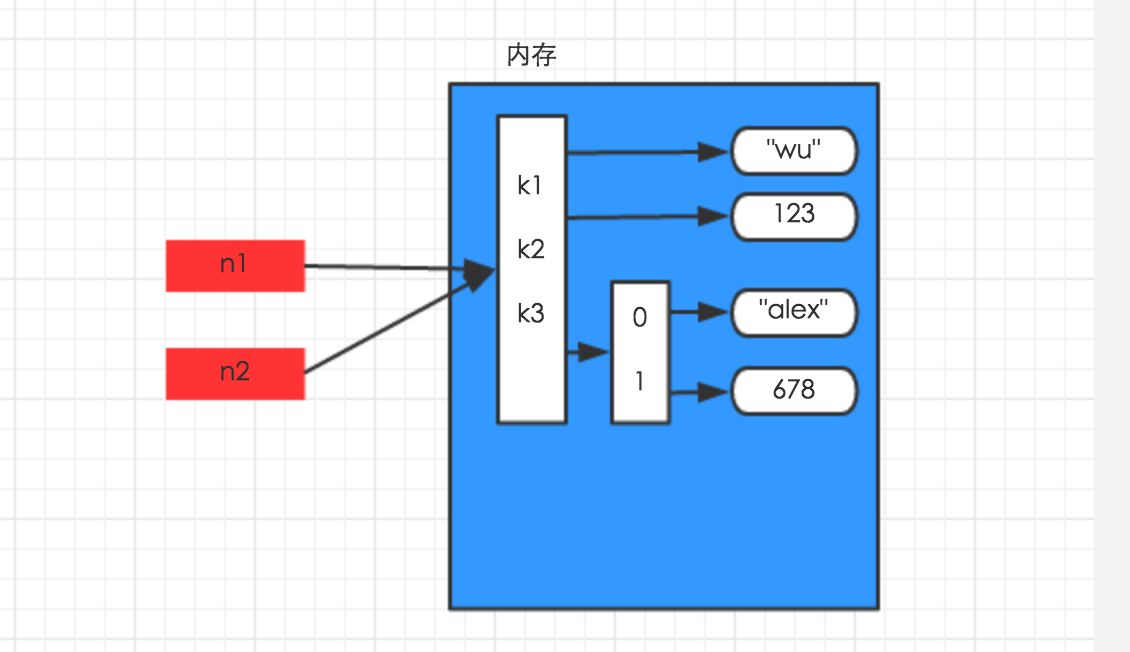
一、赋值内存示意图
n1 = {"k1": "wu", "k2": 123, "k3": ["alex", 456]}
n2 = n1
二、浅拷贝内存示意图
import copy
n1 = {"k1": "wu", "k2": 123, "k3": ["alex", 456]}
n3 = copy.copy(n1)

三、深拷贝内存示意图
import copy
n1 = {"k1": "wu", "k2": 123, "k3": ["alex", 456]}
n4 = copy.deepcopy(n1)

__author__ = 'Administrator'
#-*- coding:utf-8 -*-

import copy  #导入模块
# copy.copy()  #浅拷贝--只拷贝第一层
# copy.deepcopy()  #深拷贝--除了最后一层(数字、字符串外),其余各层都拷贝
# 赋值  a=b 引用指向同一个内存地址

# 一、对于 数字 和 字符串 而言,赋值、浅拷贝和深拷贝无意义,因为其永远指向同一个内存地址。
#1字符串,数字--赋值、浅拷贝和深拷贝
# 1数字--赋值、浅拷贝和深拷贝
a1 = 123123
a2 = a1  #赋值
print(id(a1))  #5722064
print(id(a2)) #5722064

a3 = copy.copy(a1)  #浅拷贝
print(id(a3)) #5722064

a4 = copy.deepcopy(a1)  #深拷贝
print(id(a4)) #5722064

# 1字符串--赋值、浅拷贝和深拷贝
a1 = "jack"
a2 = a1
print(id(a1)) #11769144
print(id(a2)) #11769144

a3 = copy.copy(a1)
print(id(a3))  #11769144

a4 = copy.deepcopy(a1)
print(id(a4))  #11769144

# 二、对于字典、元祖、列表 而言,进行赋值、浅拷贝和深拷贝时,其内存地址的变化是不同的。
#列表 元组 字典--赋值、深浅拷贝
# 1、赋值,只是创建一个变量,该变量指向原来内存地址,如:
n1 = {"k1": "wu", "k2": 123, "k3": ["alex", 456]} #字典赋值,元组、列表赋值是一样的
n2 = n1   #赋值
print(id(n1)) #6751816
print(id(n2)) #6751816

#2 浅拷贝----只拷贝第一层(key是第一层,列表是第二层,value和列表元素是第三层)
n1 = {"k1": "wu", "k2": 123, "k3": ["alex", 456]}
n2 = copy.copy(n1) #浅拷贝
print(id(n1)) #6489800  两个字典内存地址不一样
print(id(n2)) #11903944

print(id(n1.keys())) #6489800--key(拷贝第一层,内存地址变了)
print(id(n2.keys())) #11903944

print(id(n1["k3"])) #14239944  --list(还是指向原来地址,这个内存地址每次执行都会动态变化)--第二层
print(id(n2["k3"])) #14239944

print(id(n1["k1"])) #7049320  --value(还是指向原来地址)--第三层
print(id(n2["k1"])) #7049320

print(id(n1["k3"][0])) #7328016  --list的元素(还是指向原来地址,这个内存地址每次执行都会动态变化)--第三层
print(id(n2["k3"][0])) #7328016

#3 深拷贝----除了最后一层(数字、字符串)不拷贝,还是指向原来地址,其余各层都拷贝了(内存地址变了)
n3 = {"k1": "wu", "k2": 123, "k3": ["alex", 456]}
n4 = copy.deepcopy(n1)  #深拷贝
print(id(n3)) #6555208  两个字典内存地址不一样
print(id(n4)) #8037320

print(id(n3.keys())) #6489800--key(第一层拷贝了,内存地址变了)
print(id(n4.keys())) #11903944

print(id(n3["k3"])) #12341192--list(第二层拷贝了,这个内存地址每次执行都会动态变化)--第二层
print(id(n4["k3"])) #12339912

print(id(n3["k1"])) #14061840--value(还是指向原来地址)--第三层
print(id(n4["k1"])) #14061840

print(id(n3["k3"][0])) #14062008  --list的元素(还是指向原来地址,这个内存地址每次执行都会动态变化)--第三层
print(id(n4["k3"][0])) #14062008

# 赋值,只是创建一个变量,该变量指向原来内存地址,如:
# 浅拷贝,在内存中只额外创建第一层数据(key新创建一份)
# 深拷贝,在内存中将所有的数据额外重新创建一份(排除最后一层,即:python内部对字符串和数字的优化)
# (key和列表都新创建一份)


#深浅拷贝的应用场景:资源监控,余额变动---例子
dic = {
    "cpu":[80,],
    "mem":[80,],
    "disk":[80,]
}
print("before",dic)  #{'mem': [80], 'disk': [80], 'cpu': [80]}
new_dic = copy.copy(dic)  #浅拷贝(前后50台没有分开) 因为只拷贝了第一层key,第二层列表还是指向原来地址
new_dic["cpu"][0] = 50 #浅拷贝,列表改了,前后50台都改了,
print("after",dic)     #{'mem': [80], 'disk': [80], 'cpu': [50]}  #50台机器
print("after",new_dic)  #{'mem': [80], 'disk': [80], 'cpu': [50]}  #后50台机器

dic = {
    "cpu":[80,],
    "mem":[80,],
    "disk":[80,]
}
print("before",dic)  #{'mem': [80], 'disk': [80], 'cpu': [80]}
new_dic = copy.deepcopy(dic)  #深拷贝(前后50台分开) 因为第一层key 第二层列表都拷贝了,只是第三层列表的元素没有拷贝
new_dic["cpu"][0] = 50 #深拷贝,第二层列表改了,原来的50台不改变,后面的50台改变
print("after",dic)  #{'mem': [80], 'disk': [80], 'cpu': [80]}
print("after",new_dic)  #{'mem': [80], 'disk': [80], 'cpu': [50]}

#深浅拷贝都需要2,3层,1层的话,深浅拷贝是一样的  浅拷贝--一刀切  深拷贝--多样化(不同的模板)
函数
函数基本定义


__author__ = 'Administrator'
#-*- coding:utf-8 -*-
#定义和调用函数
def mail(): #定义放内存
    n =123
    n+=1
    print(n)
f= mail #mail这个函数名:指向函数的内存地址
f()  ##调用函数 打印124
mail()  #调用函数 打印124
print(f)  #<function mail at 0x0000000000B4BC80>

#定义和调用函数
def mail1(): #定义放内存
    n =123
    n+=1
    print(n)   #函数打印
    return 123  #函数的返回值
ret = mail1()    #打印124   调用函数后,会打印出124,但是函数的返回值是123
print(ret) #打印返回值 #123  函数的返回值是123
函数发邮件-不带参数
__author__ = 'Administrator'
#-*- coding:utf-8 -*-
import smtplib
from email.mime.text import MIMEText
from email.utils import formataddr

def mail(): #定义函数,不带参数
    ret = True #定义标识
    try: #正常代码
        msg = MIMEText('邮件内容', 'plain', 'utf-8')  #邮件正文
        msg['From'] = formataddr(["发件人",'petterzhang@126.com'])  #发件人
        msg['To'] = formataddr(["收件人昵称",'583240427@qq.com'])     #收件人
        msg['Subject'] = "主题"   #邮件标题

        server = smtplib.SMTP("smtp.126.com", 25) #发送邮件服务器地址和端口
        server.login("petterzhang@126.com", "登录密码")  #用户名密码登录发送邮件服务器  "登录密码"替换成实际邮箱登录密码即可
        server.sendmail('petterzhang@126.com', ['583240427@qq.com',], msg.as_string())
        #前者是发件地址,后者是接受邮件的地址
        server.quit()
    except: #捕捉异常
        ret = False
    return ret  #函数调用后的返回值

# if __name__ == '__main__':
#     foo()
#     f = foo
# f()
if mail():#判断函数返回值是true
    print('发送成功')
else: #如果函数返回值是true
    print('发送失败')
函数发邮件-带普通参数
__author__ = 'Administrator'
#-*- coding:utf-8 -*-

#带参数,就可以给不同的人发邮件--一个参数
# user = '583240427@qq.com'
def mail(user):#形式参数
    import smtplib
    from email.mime.text import MIMEText
    from email.utils import formataddr
    ret = True
    try:
        msg = MIMEText('邮件内容', 'plain', 'utf-8')
        msg['From'] = formataddr(["发件人昵称",'petterzhang@126.com'])
        msg['To'] = formataddr(["收件人昵称",'61411916@qq.com'])
        msg['Subject'] = "主题"

        server = smtplib.SMTP("smtp.126.com", 25)
        server.login("petterzhang@126.com", "登录密码")
        # server.sendmail('petterzhang@126.com', ['583240427@qq.com',], msg.as_string())
        server.sendmail('petterzhang@126.com', [user,], msg.as_string())  #这里user后也可以写2个或者多个参数
        server.quit()
    except:
        ret = False
    return ret

# if __name__ == '__main__':
#     foo()
#     f = foo
# f()
ret = mail('583240427@qq.com')  #给第一个收件人发送  (调函数第一次) '583240427@qq.com'是指实际参数
ret = mail('1410326497@qq.com')  #给第二个收件人发送 (调函数第二次)
if ret:  #
    print('发送成功')
else:
    print('发送失败')
函数发邮件-带动态参数-列表
__author__ = 'Administrator'
#-*- coding:utf-8 -*-

#带参数,就可以给不同的人发邮件--一个参数
# user = '583240427@qq.com'
def mail(*user):#形式参数  传入的是列表,带上1个星号
    import smtplib
    from email.mime.text import MIMEText
    from email.utils import formataddr
    ret = True
    try:
        msg = MIMEText('邮件内容', 'plain', 'utf-8')
        msg['From'] = formataddr(["发件人昵称",'petterzhang@126.com'])
        msg['To'] = formataddr(["收件人昵称",'61411916@qq.com'])
        msg['Subject'] = "主题"

        server = smtplib.SMTP("smtp.126.com", 25)
        server.login("petterzhang@126.com", "登录密码")
        # server.sendmail('petterzhang@126.com', ['583240427@qq.com',], msg.as_string())
        # server.sendmail('petterzhang@126.com', [user,], msg.as_string())  #这里user后也可以写2个或者多个参数
        server.sendmail('petterzhang@126.com', user, msg.as_string())  #这里user就相当于[user1,user2],就是一个收件人列表
        # print(user) #('583240427@qq.com', '1410326497@qq.com')
        server.quit()
    except:
        ret = False
    return ret

# if __name__ == '__main__':
#     foo()
#     f = foo
# f()

li = ['583240427@qq.com','1410326497@qq.com']
ret = mail(*li)  #实际参数,带上星号,相当于一次把列表的2个元素或者多个元素都传入了
# ret = mail('583240427@qq.com')  #给第一个收件人发送  (调函数第一次) '583240427@qq.com'是指实际参数
# ret = mail('1410326497@qq.com')  #给第二个收件人发送 (调函数第二次)
if ret:  #
    print('发送成功')
else:
    print('发送失败')
函数-返回值
__author__ = 'Administrator'
#-*- coding:utf-8 -*-

#return
#1返回值 2终止函数
def show():
    print("a")
    if 1==1:
        return [11,22]
    print("b")   #不会打印这行,函数一旦返回,就终止了
ret = show() #调用函数,打印 a
print(ret) #[11, 22]  函数的返回值是[11, 22]

#断点调试
函数-动态参数
__author__ = 'Administrator'
#-*- coding:utf-8 -*-

#无参数
#show():      show()

#普通参数
#1个参数
def show(arg):
    print(arg)
show("kkk")

#2个参数
def show(arg,xxx):
    print(arg,xxx)
show("kkk",777)

#多个参数类推

#3默认参数
def show(a1,a2=999): #默认参数必须在最后一个,否则报错,可以多个默认参数
    print(a1,a2)
show(111)  #(111, 999) #显示默认参数

def show(a1,a2=999):
    print(a1,a2)
show(111,222) #(111, 222)

#4指定参数
def show(a1,a2): #默认参数必须在最后一个,否则报错,可以多个默认参数
    print(a1,a2)
show(a2=123,a1=999)  #(999, 123) #显示指定参数,不用按顺序

#5动态参数-序列,参数必须是一个序列--列表
def func(*args):#传入一个列表,实际是把列表的每个元素一起传入了,列表是可变的,所以传入的参数个数是动态的,不是固定的
    print(args)
# 执行方式一
func(11,33,4,4454,5)  #(11, 33, 4, 4454, 5)
# 执行方式二
li = [11,2,2,3,3,4,54]  #(11, 2, 2, 3, 3, 4, 54)
func(li)  #实参是列表的时候,必须带上一个星号,否则输出不同  ([11, 2, 2, 3, 3, 4, 54],)
func(*li) #(11, 2, 2, 3, 3, 4, 54) 相当于虽然传入的是一个列表,但是实际入参是列表中的7个元素,相当于一次传了7个参数

# def func(args):
#     print(args)
# # 执行方式一
# # func(11,33,4,4454,5)  #不带星号,报错,TypeError: func() takes 1 positional argument but 5 were given
# # 执行方式二
# li = [11,2,2,3,3,4,54]  #(11, 2, 2, 3, 3, 4, 54)
# func(li)  #实参是列表的时候,列表作为一个参数传入 [11, 2, 2, 3, 3, 4, 54]
# func(*li) #报错 TypeError: func() takes 1 positional argument but 7 were given

#6动态参数-字典
def func(**kwargs):#形式参数,必须前面加上2个星号。
    print(kwargs) #传入一个字典,实际是把字典的每个键值对一起传入了,字典元素个数是可变的,所以传入的参数个数是动态的,不是固定的

# 执行方式一
# func(name='wupeiqi',age=18)

# 执行方式二
dic = {'name':'wupeiqi', "age":18, 'gender':'male'}
func(**dic) #实际参数  #{'gender': 'male', 'age': 18, 'name': 'wupeiqi'}

# def func(kwargs):#形式参数,必须前面加上2个星号,不加的话,相当于把字典作为整体传入了,而不是字典的元素
#     print(kwargs)
#
# # 执行方式一
# # func(name='wupeiqi',age=18)
#
# # 执行方式二
# dic = {'name':'wupeiqi', "age":18, 'gender':'male'}
# func(dic) #实际参数  #{'gender': 'male', 'age': 18, 'name': 'wupeiqi'}

#1传入列表
def show(arg):  #一个参数,列表作为整体传入
    print(arg,type(arg))
n = [11,22]
show(n)  #[11, 22] <class 'list'>

#2动态参数--一个星号 把传入的所有参数变成元组,等于一次传入了元组的3个元素
def show(*arg):
    print(arg,type(arg))
show(1,22,33)  #((1, 22, 33), <type 'tuple'>)

def show(*arg):  #把传入的列表作为一个整体变成元组
    print(arg,type(arg))
show([1,22,33]) #实参前面没有带星号  #(([1, 22, 33],), <type 'tuple'>)

def show(*arg):  #把传入的字典作为一个整体变成元组传入
    print(arg,type(arg))
show({"k1":"v1"}) #实参前面没有带星号  #(({'k1': 'v1'},), <type 'tuple'>)

#3动态参数--2个星号  把传入的所有参数变成字典(而不是元组)
def show(**arg):
    print(arg,type(arg))
show(n1=78,n2=99)  #({'n1': 78, 'n2': 99}, <type 'dict'>)   n1是key 78是value 参数

#4动态参数--
def show(*args,**kwargs):#1个星的放前面,2个星的放后面,否则会报错
    print(args,type(args))  #((11, 22, 33), <type 'tuple'>)
    print(kwargs,type(kwargs)) #({'age': 18, 'name': 'jack'}, <type 'dict'>)
show(11,22,33,name="jack",age=18) #传参数的时候,name="jack",age=18需要放在11,22,33后面

#5动态参数--
def show(*args,**kwargs):#1个星的放前面,2个星的放后面,否则会报错
    print(args,type(args))  #((11, 22, 33), <type 'tuple'>)
    print(kwargs,type(kwargs)) #({'age': 18, 'name': 'jack'}, <type 'dict'>)
show(11,22,33,name="jack",age=18) #传参数的时候,name="jack",age=18需要放在11,22,33后面

#6综合参数  普通 默认 动态参数
def show(arg1,arg2=18,*args,**kwargs):#1个星的放前面,2个星的放后面,否则会报错
    print(arg1) #11
    print(arg2) #22
    print(args,type(args))  #((33,), <type 'tuple'>)
    print(kwargs,type(kwargs)) #({'age': 18, 'name': 'jack'}, <type 'dict'>)
show(11,22,33,name="jack",age=18) #传参数的时候,name="jack",age=18需要放在11,22,33后面

#7实际参数带上1星,2星   适用场景
def show(*args,**kwargs):#1个星的放前面,2个星的放后面,否则会报错
    print(args,type(args))  #((11, 22, 33), <type 'tuple'>)
    print(kwargs,type(kwargs)) #({'age': 18, 'name': 'jack'}, <type 'dict'>)
# show(11,22,33,name="jack",age=18) #传参数的时候,name="jack",age=18需要放在11,22,33后面
l = [11,22,33,44]
d = {"n1":88,"alex":"sb"}
show(l,d)  #(([11, 22, 33, 44], {'n1': 88, 'alex': 'sb'}), <type 'tuple'>)   ({}, <type 'dict'>)
#将列表和字典作为2个元素形成元组,传入参数1,参数2是空字典
show(*l,**d)  # ((11, 22, 33, 44), <type 'tuple'>)  ({'n1': 88, 'alex': 'sb'}, <type 'dict'>)
#想要列表作为参数1,字典作为参数2,传入的话,实际参数需要带上1,2星才行

#8格式化
s1 = "{0} is {1}"
s1.format("alex","2b")
print(s1)  #{0} is {1}   s1没有变
print(s1.format("alex","2b"))  #alex is 2b
# S.format(*args, **kwargs) -> string

#8-2字符串格式化--1星 ,将列表作为参数传入,实际参数前需要加1个星号
s1 = "{0} is {1}"
l = ["alex","sb"]
# s1.format("alex","2b")
# print(s1)  #{0} is {1}   s1没有变
print(s1.format(*l))  #alex is 2b   相当于将列表的2个元素作为2个参数分别传入,对号入座
# S.format(*args, **kwargs) -> string

#8-3字符串格式化
s1 = "{name} is {actor}"
print(s1.format(name="jack",actor = "18"))  #jack is 18

#8-4字符串格式化2星,将字典作为参数传入,实际参数前需要加2个星号
s1 = "{name} is {actor}"
d={"name":"jack","actor":"123"}
print(s1.format(**d)) #jack is 123 相当于将字典的2个key对应的value作为2个参数分别传入,对号入座
函数-lambda表达式
#1 lambda表达式--用于简单的函数的表达方式 lambda存在意义就是对简单函数的简洁表示--1行
func = lambda a:a+1  #定义lambda表达式  这里a表示入参,a+1表示返回
#形式参数a
#函数内容  a+1 并把结果返回
print(func(10))  #11  打印函数执行结果

#2普通函数表示法--3行
def func(a):
    b = a+1
    return b
print(func(10))  #11
文件读写操作
# f = open("test.log","r+",encoding="utf-8")   #加上 encoding="utf-8"

# open函数,该函数用于文件处理
#
# 操作文件时,一般需要经历如下步骤:
#
# 打开文件
# 操作文件
# 一、打开文件
#
# 1
# 文件句柄 = open('文件路径', '模式')
# 打开文件时,需要指定文件路径和以何等方式打开文件,打开后,即可获取该文件句柄,日后通过此文件句柄对该文件操作。
#
# 打开文件的模式有:
#
# r,只读模式(默认)。
# w,只写模式。【不可读;不存在则创建;存在则删除内容;】
# a,追加模式。【可读;   不存在则创建;存在则只追加内容;】
# "+" 表示可以同时读写某个文件
#
# r+,可读写文件。【可读;可写;可追加】
# w+,写读
# a+,同a
# "U"表示在读取时,可以将 \r \n \r\n自动转换成 \n (与 r 或 r+ 模式同使用)
#
# rU
# r+U
# "b"表示处理二进制文件(如:FTP发送上传ISO镜像文件,linux可忽略,windows处理二进制文件时需标注)
#
# rb
# wb
# ab

#操作:读写追加、移动seek、tell truncate
#新建文件
f =open("test.txt","w")   #写模式,新建一个文件对象
f.write("the first line\n")  #写入一行
f.write("the second line\n")
f.write("the third line\n")
f.flush() # 刷新文件内部缓冲区
f.close()  #关闭文件对象

#读写模式打开,读一行,移动
f = open("test.txt","rb+")  #因为74行,强烈建议使用rb代替r
print(f.readline().strip()) #仅读取第一行内容,去掉换行符,否则多一个空行
print(f.tell())  #16  光标位置
print(f.readline().strip())  #读取第一行内容
print(f.tell())  #33  光标位置
# f.seek(0,0)  #光标位置移到原点(文件最开始)
f.seek(0) #1  #如果不是rb模式打开文件,就会报错io.UnsupportedOperation: can't do nonzero end-relative seeks
f.truncate(20)  #用读写模式打开rb+,truncate表示只保留前20个字节(字符、字母),如果是只读模式,会报错
# Truncate the file to at most size bytes and return the truncated size.
#         Size defaults to the current file position, as returned by tell().
#         The current file position is changed to the value of size.
print(f.tell())  #0 光标位置

# seek():移动文件读取指针到指定位置#
# tell():返回文件读取指针的位置#
# seek()的三种模式:#
#     (1)f.seek(p,0)  移动当文件第p个字节处,绝对位置,这里p不能是负数,否则报错  OSError: [Errno 22] Invalid argument
#     (2)f.seek(p,1)  移动到相对于当前位置之后的p个字节,这里p可以是负数
#     (3)f.seek(p,2)  移动到相对文章尾之后的p个字节,这里p可以是负数

# 原因:在文本文件中,如果没有使用b模式选项打开的文件,如果只允许从文件头开始计算相对位置,从文件尾计算seek时就会引发异常。

#写的功能
f = open("test.txt","a")   #往现有的文件中追加内容
# f.write(["aa\n","bb"])  #报错 TypeError: write() argument must be str, not list
f.write("\nthe last line\n")  #write写入的必须是字符串,不能是列表
f.writelines(["aa\n","bb\n"]) #writelines写入的可以是字符串,也可以是列表、字典等迭代器
f.writelines({"k1":"v1","k2":"v2"}) #k1k2  把字典的key作为字符串写入写入
f.writelines("\n")   #写入换行符
f.writelines(["aa","bb"])  #aabb  把列表的元素作为字符串写入
f.writelines("\nthe last") #the last
f.close()


#读(全部读,读指定字节)
f = open("test.txt","r")
print(f.read())  #一次读取文件所有内容  注意:一次全部读取后,不能重复读取了
print(f.read(3)) #只读取文件的前3个字节(字符、字母)
print(f.read(3)) #再读取文件的前3个字节(字符、字母)
f.close()

#遍历
f = open("test.txt","r")
# for i in f:  #直接遍历文件
#     print(i.strip())   #去掉换行,遍历每一行
print(f.readlines())  #['the first line\n', 'the \n', 'the last line\n']
#把文件的每一行包含换行符作为一个元素,添加到列表值
#Read and return a list of lines from the stream.
# for i in f.readlines(): # 遍历列表,列表的每个元素分别是文件的每行
#     print(i.strip())   #去掉换行,遍历每一行
内置函数
__author__ = 'Administrator'
#-*- coding:utf-8 -*-

# abs()
# all()
# any()

# class Foo:
#     def __repr__(self):
#         return "bbbb"
# f = Foo()
# ret = ascii(f)
# print(ret)

# import random
# print(random.randint(1,99))
# print(chr(41)) #数字转换成
#
# li =["jack","tom","bob"]
# for k,v in enumerate(li,10):
#     print(k,v)

#1取绝对值
n1 = -98
print(abs(n1))
""" Return the absolute value of the argument. """

#2全部为真,才是true
n2 = all((0,1))
print(n2)  #False
print(bool(0)) #False  数字0是假 2空字符串 3空列表 4空字典 5空元组 6空set集合都是假
print(bool("")) #False
print(bool([])) #False
print(bool({})) #False
print(bool(())) #False
print(bool(set())) #False

print(bool(" ")) #True
print(bool("\n")) #True  #Returns True when the argument x is true, False otherwise.
# Return True if bool(x) is True for all values x in the iterable.
#     If the iterable is empty, return True.

#3只要其中一个为真,就是True
n2 = any((0,1))   #0是false,其余数字都是真
print(n2)  #True
# Return True if bool(x) is True for any x in the iterable.
#     If the iterable is empty, return False.

#4 转换成2进制
n3 = 10
print(bin(10)) #0b1010  0b代表二进制
# Return the binary representation of an integer.

#5 把数字转换成ascii字符
print(chr(65)) #A  把数字转换成ascii字符
print(chr(97)) #a  把数字转换成ascii字符
# Return a Unicode string of one character

#6 把ascii字符转换成数字
print(ord("B")) #66  把ascii字符转换成数字
print(ord("b")) #98  把ascii字符转换成数字
# Return the Unicode code point for a one-character string.

#7  divmod
print(divmod(10,3))  #(3, 1)  商是3,余数是1  --用于分页

#8 输出元素的序号
li =[11,22,33]
for i,j in enumerate(li):  #遍历输出列表元素和元素序号
    print(i,j)

dic = {"k1":"v1","k2":"v2"}
for i,j in enumerate(dic):  #遍历输出字典key和key序号
    print(i,j)
# (0, seq[0]), (1, seq[1]), (2, seq[2]), ...

#9 计算
print(eval("3+4*5/3"))  #9.666666666666668
# print(eval(3+4*5/3))  #报错 TypeError: eval() arg 1 must be a string, bytes or code object
# The source may be a string representing a Python expression

#10 map()--批量修改
li = [11,22,33]
new_dic =map(lambda x:x+100,li)   #返回值是map对象  列表中每个元素加100
print(new_dic) #<map object at 0x0000000000D50278>
l = list(new_dic)
print(l)  #[111, 122, 133]

#11 filter--过滤
li = [11,22,33,44]   #[44]
def func(x):
    if x>33:
        return True
    else:
        return False
print(list(filter(func,li)))  #[44]
print(filter(func,li))  #<filter object at 0x00000000007002B0>
# filter(function or None, sequence) -> list, tuple, or string
#     Return those items of sequence for which function(item) is true.  If
#     function is None, return the items that are true.  If sequence is a tuple
#     or string, return the same type, else return a list.
# filter(function or None, iterable) --> filter object
#     Return an iterator yielding those items of iterable for which function(item)
#     is true. If function is None, return the items that are true.

#12 输入函数
# input1 = input("请输入:")  #相当于2.7中的raw_input
# print(input1)
# Read a string from standard input.  The trailing newline is stripped.
#  The prompt string, if given, is printed to standard output without a
#     trailing newline before reading input.
#     If the user hits EOF (*nix: Ctrl-D, Windows: Ctrl-Z+Return), raise EOFError.
#     On *nix systems, readline is used if available.

#13  最大
print(max({"a":"1","b":"2"})) ##b
print(max([11,22]))  #22
print(max(11,23))  #23
print(max("11","24")) #24
print(max("a","b"))  #b  ascii排序
# max(iterable, *[, default=obj, key=func]) -> value
#     max(arg1, arg2, *args, *[, key=func]) -> value
#
#     With a single iterable argument, return its biggest item. The
#     default keyword-only argument specifies an object to return if
#     the provided iterable is empty.
#     With two or more arguments, return the largest argument.

#14  最小
print(min({"a":"1","b":"2"})) ##a
print(min([11,22]))  #11
print(min(11,23))  #11
print(min("11","24")) #11
print(min("a","b"))  #a  ascii排序
    # min(iterable, *[, default=obj, key=func]) -> value
    # min(arg1, arg2, *args, *[, key=func]) -> value
    #
    # With a single iterable argument, return its smallest item. The
    # default keyword-only argument specifies an object to return if
    # the provided iterable is empty.
    # With two or more arguments, return the smallest argument.

#15 计算幂
print(pow(2,3)) #8  2的3次方 次幂
print(2**3) #8

#16 range
for i in range(4):
    print(i)
# range(stop) -> range object
#     range(start, stop[, step]) -> range object

#17  反转--迭代器
li = [11,22,33,44,23]
for i in reversed(li):  #注意:reversed(li)只是一个迭代器,必须遍历,才能反转输出值
    print(i)
print(reversed(li))  #<list_reverseiterator object at 0x0000000000D52400>
print(li)  #[11, 22, 33, 44, 23]
# reversed(sequence) -> reverse iterator over values of the sequence
#     Return a reverse iterator

#18 四舍五入
print(round(4.6)) #5
print(round(4.1)) #4
print(round(4.5))  #4  特例

#19  排序
li = [11,22,33,44,23]
print(sorted(li)) #[11, 22, 23, 33, 44]  源列表不变,新产生了一个新的列表
print(li)  #[11, 22, 33, 44, 23]
  # Return a new list containing all items from the iterable in ascending order.
  #   A custom key function can be supplied to customise the sort order, and the
  #   reverse flag can be set to request the result in descending order.

#20  求和,入参需要时迭代类型
print(sum([2,3])) #5
print(sum([]))  #0
# print(sum(2,3))  #报错 TypeError: 'int' object is not iterable
  # Return the sum of a 'start' value (default: 0) plus an iterable of numbers
  #   When the iterable is empty, return the start value.
  #   This function is intended specifically for use with numeric values and may
  #   reject non-numeric types.

#21  zip
x = [1, 2, 3]
y = [4, 5, 6]
z = [7, 8, 9]
xyz = zip(x, y, z) #zip(x, y, z)是迭代类型
print(xyz)  #<zip object at 0x00000000006C6488>
for i in xyz:
    print(i)
# (1, 4, 7)
# (2, 5, 8)
# (3, 6, 9)

#22 vars
print(dir(list))
print(vars(list))
# dir()和vars()的区别就是
# dir()只打印属性(属性,属性......)
# 而vars()则打印属性与属性的值(属性:属性值......)

 浙公网安备 33010602011771号