
十九、动画-补间动画
一、补间动画
1. alpha 透明度 2. rotate 旋转
3. scale 缩放 4. translate 平移
二、创建文件夹 anim
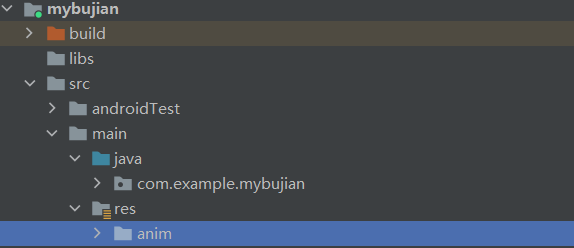
三、创建主页视图显示
<?xml version="1.0" encoding="utf-8"?>
<RelativeLayout android:layout_width="match_parent"
    android:layout_height="match_parent"
    android:orientation="vertical"
    xmlns:android="http://schemas.android.com/apk/res/android">

    <ImageView
        android:id="@+id/iv"
        android:layout_width="wrap_content"
        android:layout_height="wrap_content"
        android:layout_centerInParent="true"
        android:adjustViewBounds="true"
        android:maxWidth="300dp"
        android:maxHeight="300dp"
        android:src="@drawable/image"
        />

</RelativeLayout>
四、动画xml文件
4.1 alpha 透明度
<?xml version="1.0" encoding="utf-8"?>
<set xmlns:android="http://schemas.android.com/apk/res/android">
    <!--透明度  -->
    <!--duration 设置时长-->
    <alpha
        android:fromAlpha="0"
        android:toAlpha="1"
        android:duration="2000" />
</set>
4.2 rotate 旋转
<?xml version="1.0" encoding="utf-8"?>
<set xmlns:android="http://schemas.android.com/apk/res/android">
    <!--旋转-->
    <!--pivotX pivotY 设置角度-->
    <rotate
        android:fromDegrees="0"
        android:toDegrees="360"
        android:pivotX="50%"
        android:pivotY="50%"
        android:duration="2000"
        />
</set>
4.3 scale 缩放
<?xml version="1.0" encoding="utf-8"?>
<set xmlns:android="http://schemas.android.com/apk/res/android">
    <!--缩放-->
    <scale
        android:fromXScale="1"
        android:fromYScale="1"
        android:toXScale="0.5"
        android:toYScale="0.5"

        android:pivotX="50%"
        android:pivotY="50%"
        android:duration="2000"
        />
</set>
4.4 translate 平移
<?xml version="1.0" encoding="utf-8"?>
<set xmlns:android="http://schemas.android.com/apk/res/android">
    <!--平移-->
    <translate
        android:fromXDelta="0"
        android:fromYDelta="0"
        android:toXDelta="400"
        android:toYDelta="400"
        android:duration="2000"
        />
</set>
五、后台启用动画
package com.example.mybujian;

import androidx.appcompat.app.AppCompatActivity;

import android.os.Bundle;
import android.view.View;
import android.view.animation.Animation;
import android.view.animation.AnimationUtils;
import android.widget.ImageView;

public class MainActivity extends AppCompatActivity {

    @Override
    protected void onCreate(Bundle savedInstanceState) {
        super.onCreate(savedInstanceState);
        setContentView(R.layout.activity_main);

        ImageView imageview = findViewById(R.id.iv);
        imageview.setOnClickListener(new View.OnClickListener() {
            @Override
            public void onClick(View view) {

                //通过加载xml动画设置文件创建一个 Animation 对象
                //透明度
                /* Animation animation = AnimationUtils.loadAnimation
                      (MainActivity.this,R.anim.alpha);*/
                //旋转
                /* Animation animation = AnimationUtils.loadAnimation
                        (MainActivity.this,R.anim.rotate);*/
                //缩放
                /*Animation animation = AnimationUtils.loadAnimation
                        (MainActivity.this,R.anim.scale);*/
                //平移
                Animation animation = AnimationUtils.loadAnimation
                        (MainActivity.this,R.anim.translate);
                //通过ImageView启动
                imageview.startAnimation(animation);
            }
        });
    }
}

 浙公网安备 33010602011771号