

iOS学习之Map,定位,标记位置的使用
iOS上使用地图比Android要方便,只需要新建一个MKMapView,addSubView即可。这次要实现的效果如下:
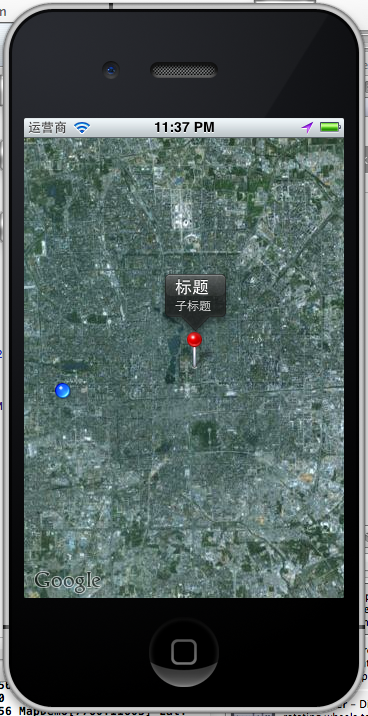
有标注(大头针),定位,地图。
1、添加地图
1.1 新一个Single View app ,选择默认项,创建后,在ViewController.h
1 CLLocationCoordinate2D coords = CLLocationCoordinate2DMake(39.915352,116.397105);
2
3     float zoomLevel = 0.02;
4     MKCoordinateRegion region = MKCoordinateRegionMake(coords, MKCoordinateSpanMake(zoomLevel, zoomLevel));
5     [map setRegion:[map regionThatFits:region] animated:YES];
6
1.2在ViewController.m中添加
 1 - (void)viewDidLoad
 2 {
 3     map = [[MKMapView alloc] initWithFrame:[self.view bounds]];
 4     map.showsUserLocation = YES;
 5     map.mapType = MKMapTypeSatellite;
 6     [self.view addSubview:map];
 7
 8
 9     [super viewDidLoad];
10     // Do any additional setup after loading the view, typically from a nib.
11 }
运行:
OMG,看到的是世界地图。怎么定位到指定的位置呢?比如定位回来伟大的祖国首都?
这里map.mapType =MKMapTypeSatellite;我用到是卫星地图,可以使用标准的地图,
map.mapType =MKMapTypeStandard;

注意,如果此时你编译有错误,请拉到博客最后查看 :5、 遇到的问题
2、定位到指定经纬度
1 CLLocationCoordinate2D coords = CLLocationCoordinate2DMake(39.915352,116.397105);
2
3     float zoomLevel = 0.02;
4     MKCoordinateRegion region = MKCoordinateRegionMake(coords, MKCoordinateSpanMake(zoomLevel, zoomLevel));
5     [map setRegion:[map regionThatFits:region] animated:YES];
6
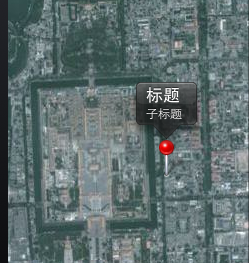
这样,就我们就定位的了故宫了。

3、添加标注大头针
3.1 新建一个标注类:CustomAnnotation
按Command+N,继承NSObject。在CustomAnnotation.h 和CustomAnnotation.m文件添加如下代码:
 1 #import <Foundation/Foundation.h>
 2 #import <MapKit/MapKit.h>
 3
 4 @interface CustomAnnotation : NSObject
 5 <MKAnnotation>
 6 {
 7     CLLocationCoordinate2D coordinate;
 8     NSString *title;
 9     NSString *subtitle;
10 }
11 -(id) initWithCoordinate:(CLLocationCoordinate2D) coords;
12
13 @property (nonatomic, readonly) CLLocationCoordinate2D coordinate;
14 @property (nonatomic, retain) NSString *title;
15 @property (nonatomic, retain) NSString *subtitle;
16
17 @end
 1 #import "CustomAnnotation.h"
 2
 3 @implementation CustomAnnotation
 4 @synthesize coordinate, title, subtitle;
 5
 6 -(id) initWithCoordinate:(CLLocationCoordinate2D) coords
 7 {
 8     if (self = [super init]) {
 9         coordinate = coords;
10     }
11     return self;
12 }
13 @end
3.1 使用大头针,
新建个方法添加大头针的
1 -(void)createAnnotationWithCoords:(CLLocationCoordinate2D) coords {
2     CustomAnnotation *annotation = [[CustomAnnotation alloc] initWithCoordinate:
3                                     coords];
4     annotation.title = @"标题";
5     annotation.subtitle = @"子标题";
6     [map addAnnotation:annotation];
7 }
调用
1 CLLocationCoordinate2D coords = CLLocationCoordinate2DMake(39.915352,116.397105);
2
3     float zoomLevel = 0.02;
4     MKCoordinateRegion region = MKCoordinateRegionMake(coords, MKCoordinateSpanMake(zoomLevel, zoomLevel));
5     [map setRegion:[map regionThatFits:region] animated:YES];
6
7
8     [self createAnnotationWithCoords:coords];
这样我们就把大头针定位在故宫了
4、定位到当前位置并获取当前经纬度
前面我们已经添加了locationManager,现在在DidViewLoad里直接调用
1 locationManager = [[CLLocationManager alloc] init];
2 locationManager.delegate = self;
3 [locationManager startUpdatingLocation];
实现协议方法收到定位成功后的经纬度
 1 - (void)locationManager:(CLLocationManager *)manager didUpdateToLocation:(CLLocation *)newLocation fromLocation:(CLLocation *)oldLocation {
 2     [locationManager stopUpdatingLocation];
 3
 4     NSString *strLat = [NSString stringWithFormat:@"%.4f",newLocation.coordinate.latitude];
 5     NSString *strLng = [NSString stringWithFormat:@"%.4f",newLocation.coordinate.longitude];
 6     NSLog(@"Lat: %@  Lng: %@", strLat, strLng);
 7
 8 }
 9
10 - (void)locationManager:(CLLocationManager *)manager didFailWithError:(NSError *)error {
11     NSLog(@"locError:%@", error);
12
13 }

运行,允许获取当前位置,打印log
如果不允许:打印出错误日志
2012-06-28 23:25:03.109 MapDemo[7531:11603] locError:Error Domain=kCLErrorDomain Code=1 "The operation couldn’t be completed. (kCLErrorDomain error 1.)"
定位后,移动到当前位置:
 1 - (void)locationManager:(CLLocationManager *)manager didUpdateToLocation:(CLLocation *)newLocation fromLocation:(CLLocation *)oldLocation {
 2     [locationManager stopUpdatingLocation];
 3
 4     NSString *strLat = [NSString stringWithFormat:@"%.4f",newLocation.coordinate.latitude];
 5     NSString *strLng = [NSString stringWithFormat:@"%.4f",newLocation.coordinate.longitude];
 6     NSLog(@"Lat: %@  Lng: %@", strLat, strLng);
 7
 8     CLLocationCoordinate2D coords = CLLocationCoordinate2DMake(newLocation.coordinate.latitude,newLocation.coordinate.longitude);
 9     float zoomLevel = 0.02;
10     MKCoordinateRegion region = MKCoordinateRegionMake(coords,MKCoordinateSpanMake(zoomLevel, zoomLevel));
11     [map setRegion:[map regionThatFits:region] animated:YES];
12 }
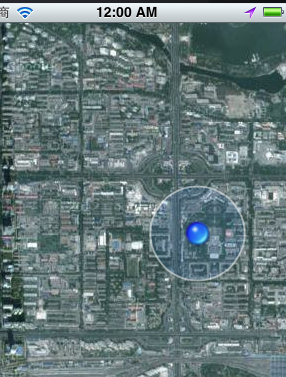
定位到了当前位置。
5、会遇到的问题:
运行是发现了编译错误:
Undefined symbols for architecture i386:
"_CLLocationCoordinate2DMake", referenced from:
-[ViewController viewDidLoad] in ViewController.o
-[ViewController locationManager:didUpdateToLocation:fromLocation:] in ViewController.o
"_OBJC_CLASS_$_MKMapView", referenced from:
objc-class-ref in ViewController.o
"_OBJC_CLASS_$_CLLocationManager", referenced from:
objc-class-ref in ViewController.o
ld: symbol(s) not found for architecture i386
clang: error: linker command failed with exit code 1 (use -v to see invocation)
这是为什么呢?没有添加对应的FrameWork。我使用的是4.3.2版本的XCode,添加方法如下:
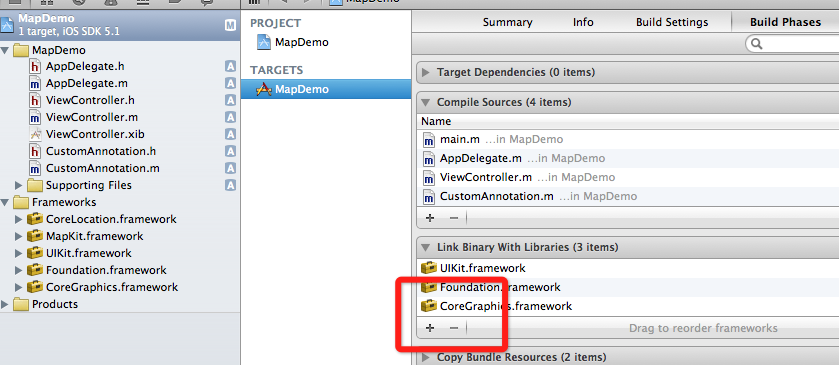
选择项目,TARGETS ,点加号,添加两个framework
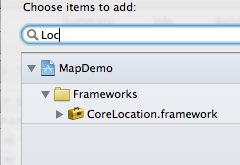
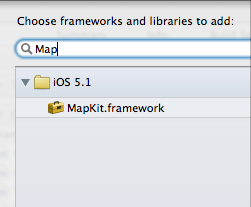
就好了。
如何发送IOS模拟器经纬度?
5.0以上的模拟器才能用这个功能,打开模拟:
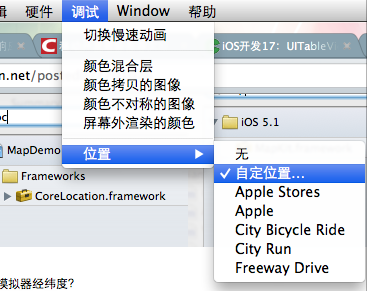
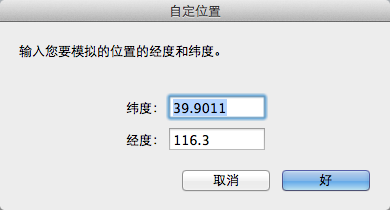
这样就能发送模拟的当前位置了。
例子代码:http://download.csdn.net/detail/totogo2010/4400001点击打开链接
https://github.com/schelling/YcDemo/tree/master/MapDemo
著作权声明:本文由http://blog.csdn.net/totogo2010/原创,欢迎转载分享。请尊重作者劳动,转载时保留该声明和作者博客链接,谢谢!

 浙公网安备 33010602011771号