

第四次作业
设计题1:
设计一个本月份日历,输出格式如下:
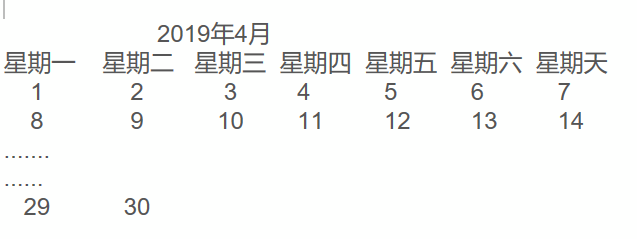
要求:
1.初始化start_day,end_day两个日期
from datetime import datetime
start_day=datetime(2019,4,1)
end_day=datetime(2019,4,30)
其它时间数据生成要用datetime或date模块的方法编程实现
2.不能使用calendar模块生成
1.1
#!/usr/bin/python
# coding=utf-8
 def is_leap_year(year):
      if year % 4 == 0 and year % 100 != 0 or year % 400 == 0:
           return True
      else:
           return False
def get_num_of_days_in_month(year, month):
      if month in (1, 3, 5, 7, 8, 10, 12):
            return 31
      elif month in (4, 6, 9, 11):
           return 30
      elif is_leap_year(year):
          return 29
      else:
            return 28
def get_total_num_of_day(year, month):
      days = 0
      for y in range(1, year):
            if is_leap_year(y):
                days += 366
            else:
                days += 365
       for m in range(1, month):
             days += get_num_of_days_in_month(year, m)
       return days
def get_start_day(year, month):
       return 1+get_total_num_of_day(year, month) % 7
month_dict = {1: '1月', 2: '2月', 3: '3月', 4: '4月', 5: '5月', 6: '6月',

                        7: '7月', 8: '8月', 9: '9月', 10: '10月', 11: '11月', 12: '12月'}
def get_month_name(month):
       return month_dict[month]
def print_month_title(year, month):
       print '         ', get_month_name(月), '   ', 年, '          '
       print '-------------------------------------'
       print '  星期一 星期二 星期三 星期四 星期五 星期六 星期天  '
def print_month_body(年, 月):
       i = get_start_day(年, 月)
       if i != 7:
           print ' ',
           print '    ' * i,
       for j in range(1, get_num_of_days_in_month(年, 月)+1):
           print '%4d' %j, 4+1=5
           i += 1
           if i % 7 == 0:
               print ' '
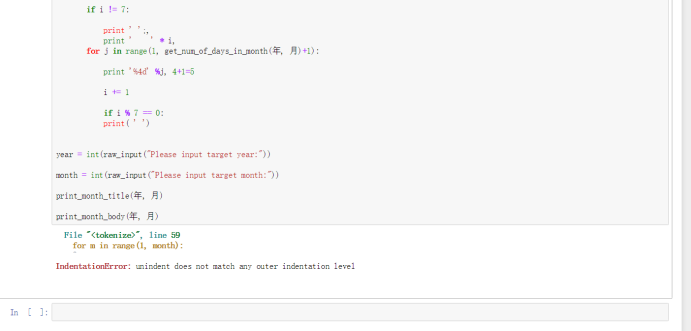
year = int(raw_input("Please input target year:"))
month = int(raw_input("Please input target month:"))
print_month_title(年, 月)
print_month_body(年, 月)
设计题2:

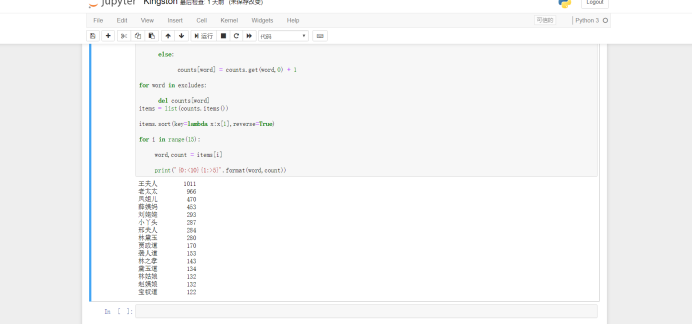
1.参考“三国演义”词频统计程序,实现对红楼梦出场人物的频次统计。
2.1
import jieba
path = 'D:\\Python\\红楼梦.txt'
txt = open(path,'r',encoding = 'utf-8').read()
words = jieba.lcut(txt)
excludes = ['这会子','怎么样','为什么','周瑞家',
                   '贾母笑','悄悄的','大学生','小说网','电子书']
counts = {}
for word in words:
      if len(word) == 1 or len(word) == 2:
          continue
      else:
          counts[word] = counts.get(word,0) + 1
for word in excludes:
      del counts[word]
items = list(counts.items())
items.sort(key=lambda x:x[1],reverse=True)
for i in range(15):
     word,count = items[i]
     print('{0:<10}{1:>5}'.format(word,count))
2.(可选)
将红楼梦出场人物的频次统计结果用词云显示。
2.2
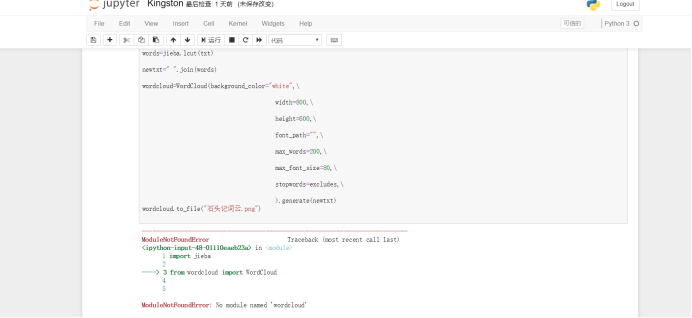
import jieba
from wordcloud import WordCloud
excludes={"什么","一个","我们","那里","你们","如今",\
                 "说道","知道","老太太","起来","姑娘",\
                 "这里","出来","他们","众人","自己","一面",\
                 "太太","只见","怎么","奶奶","两个","没有",\
                 "不是","不知","这个","听见"}
f=open("红楼梦.txt","r",encoding="utf-8")
txt=f.read()
f.close()
words=jieba.lcut(txt)
newtxt=" ".join(words)
wordcloud=WordCloud(background_color="white",\
                                       width=800,\
                                       height=600,\
                                       font_path="C:\Windows\Fonts\STHUPO.TTF",\
                                       max_words=200,\
                                       max_font_size=80,\
                                       stopwords=excludes,\
                                       ).generate(newtxt)
wordcloud.to_file("石头记词云.png")

 浙公网安备 33010602011771号