Python 使用爬虫获取新冠疫情历史数据
前言:
2019年底,一场突如其来的新冠疫情打破了人们准备欢度春节的节奏,许多人因为疫情无法过个好年,而接下来的疫情发展超出了所有人的预料...截至2021年6月,全球确诊已达1亿7000余万,在这次疫情中死去的人数三百余万...
我们每天都可以在各个新闻报道或者网站上看到疫情的实时数据,但这些数据大多是零碎的,我们无法直观的感受这次疫情在全球范围内的影响。
在学习了爬虫以后,我们可以利用爬虫获取各个时间和各个地区的疫情情况,然后将这些数据可视化,可以让我们一目了然疫情动态,还可以加深我们对python的掌握和运用。
数据来源:
丁香医生:https://ncov.dxy.cn/ncovh5/view/pneumonia
页面分析:
要爬取网页数据,首先要了解网页结构和网页的数据流,F12查看网页源代码:
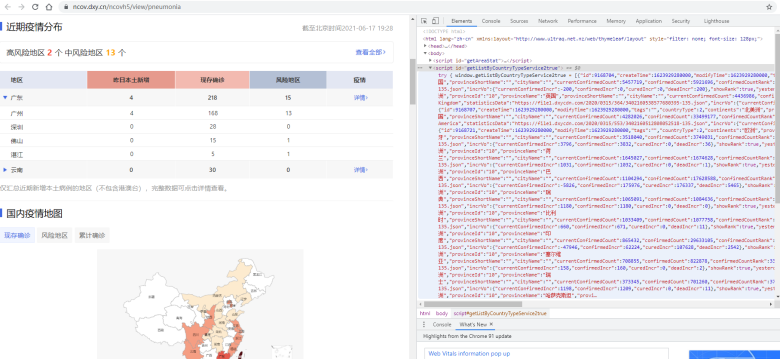
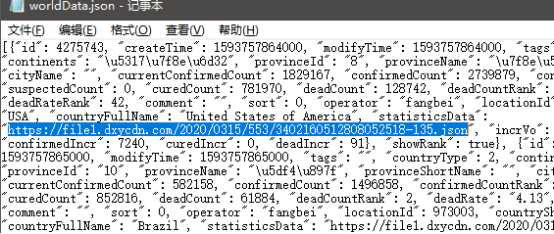
可以发现<script id="getListByCountryTypeService2true">这里对应着每一个国家的相关数据,其中发现有一个属性statisticsData,指向的是json数据链接:

随便下载一个打开看看:
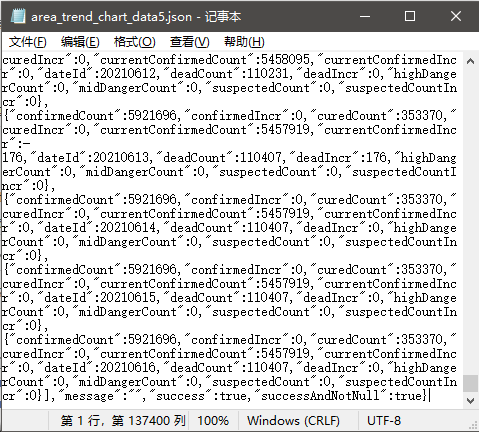
Data中包含的字段:
confirmedCount\confirmedIncr\curedCount\curedIncr\curentConfirmedCount\currentConfirmedIncr\dateId\deadCount\deadIncr\suspectedCount\suspectedCountIncr
页面下方还有国内各个省市的数据:
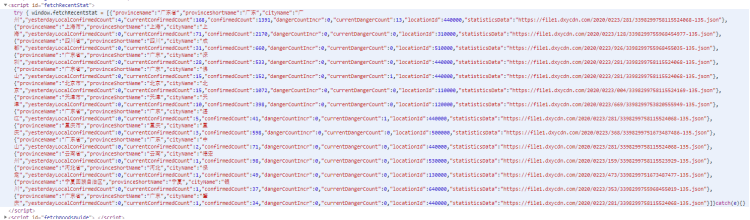
同样,这些数据后面statisticsData也指向一个json数据链接,查看里面的数据字段。数据非常的全面,由此通过分析页面我们找到了中国和世界的疫情详细历史数据。
下面开始爬取:
第一步
 1 # 获取网页中包含数据链接的列表信息
 2 import requests
 3 import re
 4 import json
 5 from bs4 import BeautifulSoup
 6 def getOriHtmlText(url,code='utf-8'):
 7     try:
 8         headers = {
 9             'User-Agent': 'Mozilla/5.0 (Windows NT 10.0; Win64; x64) AppleWebKit/537.36 (KHTML, like Gecko) Chrome/91.0.4472.106 Safari/537.36'
10         }
11         r=requests.get(url,timeout=30,headers=headers)
12         r.raise_for_status()
13         r.encoding=code
14         return r.text
15     except:
16         return "There are some errors when get the original html!"
17 def getTheList(url):
18     html=getOriHtmlText(url)
19     soup=BeautifulSoup(html,'html.parser')
20     htmlBodyText=soup.body.text
21     # 获取国家数据
22     worldDataText=htmlBodyText[htmlBodyText.find('window.getListByCountryTypeService2true = '):]
23     worldDataStr = worldDataText[worldDataText.find('[{'):worldDataText.find('}catch')]
24     worldDataJson=json.loads(worldDataStr)
25     with open("../data/worldData.json","w") as f:
26         json.dump(worldDataJson,f)
27         print("写入国家数据文件成功!")
28     # 获取各省份数据
29     provinceDataText = htmlBodyText[htmlBodyText.find('window.getAreaStat = '):]
30     provinceDataStr = provinceDataText[provinceDataText.find('[{'):provinceDataText.find('}catch')]
31     provinceDataJson=json.loads(provinceDataStr)
32     with open("../data/provinceData.json","w") as f:
33         json.dump(provinceDataJson,f)
34         print("写入省份数据文件成功!")
35 getTheList("https://ncov.dxy.cn/ncovh5/view/pneumonia")

获得两个包含数据链接的.json文件:
第二步
清洗数据获得链接真实所对应的数据
 1 # 处理所获得的含链接的列表,获取真实所对应的数据
 2 import json
 3 import requests
 4 import time
 5 def deal_worlddatalist():
 6     with open("../data/worldData.json",'r') as f:
 7         worldDataJson=json.load(f)
 8     for i in range(0,len(worldDataJson)):
 9         print(worldDataJson[i]['provinceName']+" "+worldDataJson[i]['countryShortCode']+" "+worldDataJson[i]['countryFullName']+" "+worldDataJson[i]['statisticsData'])
10     return worldDataJson
11 def get_the_world_data():
12     # 获取每个国家对应的json
13     worldDataJson=deal_worlddatalist()
14     # 记录错误数量
15     errorNum=0
16     for i in range(0,len(worldDataJson)):
17         provinceName=worldDataJson[i]['provinceName']
18         try:
19             headers = {
20                 'User-Agent': 'Mozilla/5.0 (Windows NT 10.0; Win64; x64) AppleWebKit/537.36 (KHTML, like Gecko) Chrome/91.0.4472.106 Safari/537.36'
21             }
22             r = requests.get(worldDataJson[i]['statisticsData'], timeout=30, headers=headers)
23             r.raise_for_status()
24             r.encoding = 'utf-8'
25             everCountryDataJson = json.loads(r.text)
26             toWriteFilePath="../data/worldData/"+provinceName+".json"
27             with open(toWriteFilePath,'w') as file:
28                 json.dump(everCountryDataJson, file)
29             print(provinceName + " 数据得到!")
30             time.sleep(10)
31         except:
32             errorNum+=1
33             print("在获取 "+provinceName+" 数据时出错!")
34     print("各国数据获取完成!")
35     print("错误数据量为:"+str(errorNum))
36
37 # 处理各省数据列表
38 def deal_provincedatalist():
39     with open("../data/provinceData.json",'r') as f:
40         provinceDataJson=json.load(f)
41     for i in range(0,len(provinceDataJson)):
42         print(provinceDataJson[i]['provinceName']+" "+provinceDataJson[i]['provinceShortName']+" "+provinceDataJson[i]['statisticsData'])
43     return provinceDataJson
44 # 获取各个省份对应的json
45 def get_the_province_data():
46     provinceDataJson=deal_provincedatalist()
47     # 统计出现爬取错误的数据数量
48     errorNum = 0
49     for i in range(0,len(provinceDataJson)):
50         provinceName=provinceDataJson[i]['provinceName']
51         try:
52             headers = {
53                 'User-Agent': 'Mozilla/5.0 (Windows NT 6.1; Win64; x64) AppleWebKit/537.36 (KHTML, like Gecko) Chrome/58.0.3029.110 Safari/537.36'
54             }
55             r=requests.get(provinceDataJson[i]['statisticsData'],timeout=30,headers=headers)
56             r.raise_for_status()
57             r.encoding='utf-8'
58             everProvinceDataJson=json.loads(r.text)
59
60             toWriteFilePath="../data/provinceData/"+provinceName+".json"
61             with open(toWriteFilePath,'w') as file:
62                 json.dump(everProvinceDataJson,file)
63             print(provinceName+" 数据得到!")
64             time.sleep(15)
65         except:
66             errorNum+=1
67             print("在获取 "+provinceName+" 数据时出错")
68     print("各省份数据获取完成!")
69     print("错误数据量为:"+str(errorNum))
70 get_the_world_data()
71 get_the_province_data()
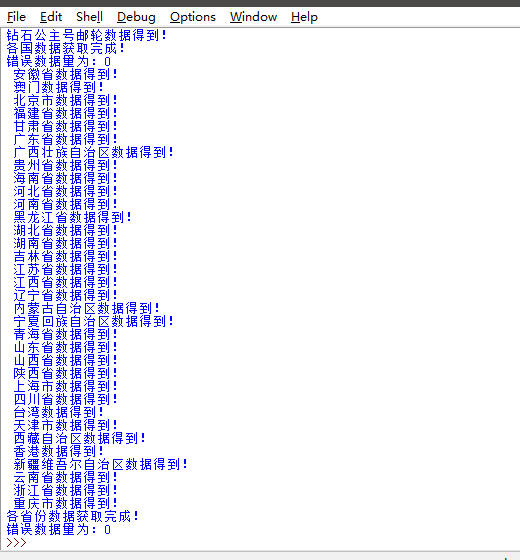
成功获取国内和外国疫情的json数据

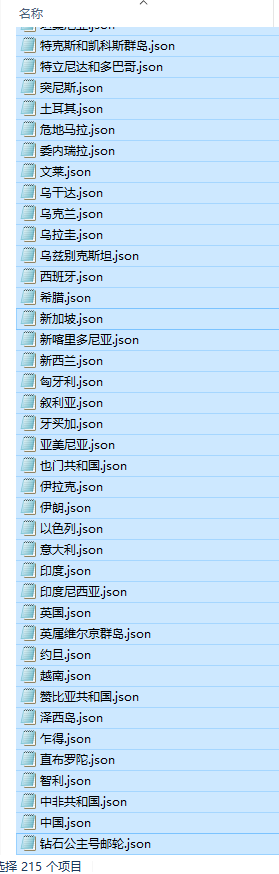
获取的数据都是json格式的,现在我们将数据导入数据库,这里使用的是mysql,先给python安装pymysql库。
我们在目标文件夹创建一个.sql的文件,用文本打开编写建表语句:
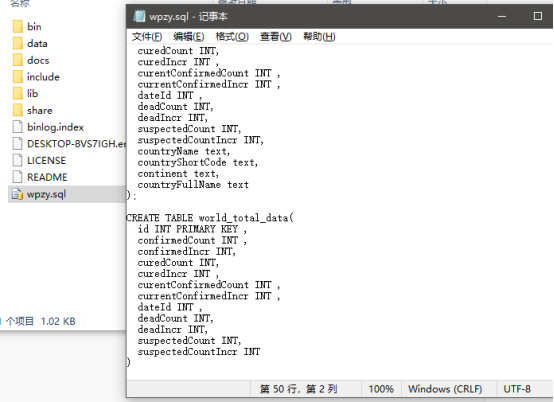
运行mysql,首先先创建一个数据库

 1 CREATE DATABASE test_db;
 2 USE test_db;
 3
 4 CREATE TABLE china_provincedata(
 5   id INT PRIMARY KEY ,
 6   confirmedCount INT ,
 7   confirmedIncr INT,
 8   curedCount INT,
 9   curedIncr INT ,
10   currentConfirmedCount INT ,
11   currentConfirmedIncr INT ,
12   dateId INT ,
13   deadCount INT,
14   deadIncr INT,
15   suspectedCount INT,
16   suspectedCountIncr INT,
17   provinceName text,
18   provinceShortName text
19 );
20
21 CREATE TABLE countrydata(
22   id INT PRIMARY KEY ,
23   confirmedCount INT ,
24   confirmedIncr INT,
25   curedCount INT,
26   curedIncr INT ,
27   currentConfirmedCount INT ,
28   currentConfirmedIncr INT ,
29   dateId INT ,
30   deadCount INT,
31   deadIncr INT,
32   suspectedCount INT,
33   suspectedCountIncr INT,
34   countryName text,
35   countryShortCode text,
36   continent text,
37   countryFullName text
38 );
39
40 CREATE TABLE world_total_data(
41   id INT PRIMARY KEY ,
42   confirmedCount INT ,
43   confirmedIncr INT,
44   curedCount INT,
45   curedIncr INT ,
46   currentConfirmedCount INT ,
47   currentConfirmedIncr INT ,
48   dateId INT ,
49   deadCount INT,
50   deadIncr INT,
51   suspectedCount INT,
52   suspectedCountIncr INT
53 )
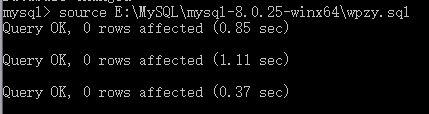
进入数据库后,运行这个文件:source E:\MySQL\mysql-8.0.25-winx64\wpzy.sql
查看表结构:show full columns from china_provincedata;
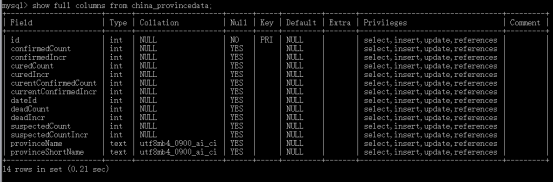
准备就绪,接下来进行第三步:将json写入数据库中
  1 # 将json数据写入数据库
  2 import json
  3 import pymysql
  4 import pandas as pd
  5 nameMap = {'毛里求斯':'Mauritius','圣皮埃尔和密克隆群岛':'St. Pierre and Miquelon','安圭拉':'Anguilla','荷兰加勒比地区':'Caribbean Netherlands','圣巴泰勒米岛':'Saint Barthelemy','英属维尔京群岛':'British Virgin Is.','科摩罗':'Comoros','蒙特塞拉特':'Montserrat','塞舌尔':'Seychelles','特克斯和凯科斯群岛':'Turks and Caicos Is.','梵蒂冈':'Vatican','圣其茨和尼维斯':'Saint Kitts and Nevis','库拉索岛':'Curaçao','多米尼克':'Dominica','圣文森特和格林纳丁斯':'St. Vin. and Gren.','斐济':'Fiji','圣卢西亚':'Saint Lucia','北马里亚纳群岛联邦':'N. Mariana Is.','格林那达':'Grenada','安提瓜和巴布达':'Antigua and Barb.','列支敦士登':'Liechtenstein','圣马丁岛':'Saint Martin','法属波利尼西亚':'Fr. Polynesia','美属维尔京群岛':'U.S. Virgin Is.','荷属圣马丁':'Sint Maarten','巴巴多斯':'Barbados','开曼群岛':'Cayman Is.','摩纳哥':'Monaco','阿鲁巴':'Aruba','特立尼达和多巴哥':'Trinidad and Tobago','钻石公主号邮轮':'Princess','瓜德罗普岛':'Guadeloupe','关岛':'Guam','直布罗陀':'Gibraltar','马提尼克':'Martinique','马耳他':'Malta','法罗群岛':'Faeroe Is.','圣多美和普林西比':'São Tomé and Principe','安道尔':'Andorra','根西岛':'Guernsey','泽西岛':'Jersey','佛得角':'Cape Verde','马恩岛':'Isle of Man','留尼旺':'Reunion','圣马力诺':'San Marino','马尔代夫':'Maldives','马约特':'Mayotte','巴林':'Bahrain','新加坡': 'Singapore Rep.', '多米尼加': 'Dominican Rep.', '巴勒斯坦': 'Palestine', '巴哈马': 'The Bahamas', '东帝汶': 'East Timor', '阿富汗': 'Afghanistan', '几内亚比绍': 'Guinea Bissau', '科特迪瓦': "Côte d'Ivoire", '锡亚琴冰川': 'Siachen Glacier', '英属印度洋领土': 'Br. Indian Ocean Ter.', '安哥拉': 'Angola', '阿尔巴尼亚': 'Albania', '阿联酋': 'United Arab Emirates', '阿根廷': 'Argentina', '亚美尼亚': 'Armenia', '法属南半球和南极领地': 'French Southern and Antarctic Lands', '澳大利亚': 'Australia', '奥地利': 'Austria', '阿塞拜疆': 'Azerbaijan', '布隆迪共和国': 'Burundi', '比利时': 'Belgium', '贝宁': 'Benin', '布基纳法索': 'Burkina Faso', '孟加拉国': 'Bangladesh', '保加利亚': 'Bulgaria', '波黑': 'Bosnia and Herz.', '白俄罗斯': 'Belarus', '伯利兹': 'Belize', '百慕大': 'Bermuda', '玻利维亚': 'Bolivia', '巴西': 'Brazil', '文莱': 'Brunei', '不丹': 'Bhutan', '博茨瓦纳': 'Botswana', '中非共和国': 'Central African Rep.', '加拿大': 'Canada', '瑞士': 'Switzerland', '智利': 'Chile', '中国': 'China', '象牙海岸': 'Ivory Coast', '喀麦隆': 'Cameroon', '刚果(金)': 'Dem. Rep. Congo', '刚果(布)': 'Congo', '哥伦比亚': 'Colombia', '哥斯达黎加': 'Costa Rica', '古巴': 'Cuba', '北塞浦路斯': 'N. Cyprus', '塞浦路斯': 'Cyprus', '捷克': 'Czech Rep.', '德国': 'Germany', '吉布提': 'Djibouti', '丹麦': 'Denmark', '阿尔及利亚': 'Algeria', '厄瓜多尔': 'Ecuador', '埃及': 'Egypt', '厄立特里亚': 'Eritrea', '西班牙': 'Spain', '爱沙尼亚': 'Estonia', '埃塞俄比亚': 'Ethiopia', '芬兰': 'Finland', '斐': 'Fiji', '福克兰群岛': 'Falkland Islands', '法国': 'France', '加蓬': 'Gabon', '英国': 'United Kingdom', '格鲁吉亚': 'Georgia', '加纳': 'Ghana', '几内亚': 'Guinea', '冈比亚': 'Gambia', '赤道几内亚': 'Eq. Guinea', '希腊': 'Greece', '格陵兰': 'Greenland', '危地马拉': 'Guatemala', '法属圭亚那': 'French Guiana', '圭亚那': 'Guyana', '洪都拉斯': 'Honduras', '克罗地亚': 'Croatia', '海地': 'Haiti', '匈牙利': 'Hungary', '印度尼西亚': 'Indonesia', '印度': 'India', '爱尔兰': 'Ireland', '伊朗': 'Iran', '伊拉克': 'Iraq', '冰岛': 'Iceland', '以色列': 'Israel', '意大利': 'Italy', '牙买加': 'Jamaica', '约旦': 'Jordan', '日本': 'Japan', '哈萨克斯坦': 'Kazakhstan', '肯尼亚': 'Kenya', '吉尔吉斯斯坦': 'Kyrgyzstan', '柬埔寨': 'Cambodia', '韩国': 'Korea', '科索沃': 'Kosovo', '科威特': 'Kuwait', '老挝': 'Lao PDR', '黎巴嫩': 'Lebanon', '利比里亚': 'Liberia', '利比亚': 'Libya', '斯里兰卡': 'Sri Lanka', '莱索托': 'Lesotho', '立陶宛': 'Lithuania', '卢森堡': 'Luxembourg', '拉脱维亚': 'Latvia', '摩洛哥': 'Morocco', '摩尔多瓦': 'Moldova', '马达加斯加': 'Madagascar', '墨西哥': 'Mexico', '北马其顿': 'Macedonia', '马里': 'Mali', '缅甸': 'Myanmar', '黑山': 'Montenegro', '蒙古': 'Mongolia', '莫桑比克': 'Mozambique', '毛里塔尼亚': 'Mauritania', '马拉维': 'Malawi', '马来西亚': 'Malaysia', '纳米比亚': 'Namibia', '新喀里多尼亚': 'New Caledonia', '尼日尔': 'Niger', '尼日利亚': 'Nigeria', '尼加拉瓜': 'Nicaragua', '荷兰': 'Netherlands', '挪威': 'Norway', '尼泊尔': 'Nepal', '新西兰': 'New Zealand', '阿曼': 'Oman', '巴基斯坦': 'Pakistan', '巴拿马': 'Panama', '秘鲁': 'Peru', '菲律宾': 'Philippines', '巴布亚新几内亚': 'Papua New Guinea', '波兰': 'Poland', '波多黎各': 'Puerto Rico', '朝鲜': 'Dem. Rep. Korea', '葡萄牙': 'Portugal', '巴拉圭': 'Paraguay', '卡塔尔': 'Qatar', '罗马尼亚': 'Romania', '俄罗斯': 'Russia', '卢旺达': 'Rwanda', '西撒哈拉': 'W. Sahara', '沙特阿拉伯': 'Saudi Arabia', '苏丹': 'Sudan', '南苏丹': 'S. Sudan', '塞内加尔': 'Senegal', '所罗门群岛': 'Solomon Is.', '塞拉利昂': 'Sierra Leone', '萨尔瓦多': 'El Salvador', '索马里兰': 'Somaliland', '索马里': 'Somalia', '塞尔维亚': 'Serbia', '苏里南': 'Suriname', '斯洛伐克': 'Slovakia', '斯洛文尼亚': 'Slovenia', '瑞典': 'Sweden', '斯威士兰': 'Swaziland', '叙利亚': 'Syria', '乍得': 'Chad', '多哥': 'Togo', '泰国': 'Thailand', '塔吉克斯坦': 'Tajikistan', '土库曼斯坦': 'Turkmenistan', '特里尼达和多巴哥': 'Trinidad and Tobago', '突尼斯': 'Tunisia', '土耳其': 'Turkey', '坦桑尼亚': 'Tanzania', '乌干达': 'Uganda', '乌克兰': 'Ukraine', '乌拉圭': 'Uruguay', '美国': 'United States', '乌兹别克斯坦': 'Uzbekistan', '委内瑞拉': 'Venezuela', '越南': 'Vietnam', '瓦努阿图': 'Vanuatu', '西岸': 'West Bank', '也门共和国': 'Yemen', '南非': 'South Africa', '赞比亚共和国': 'Zambia', '津巴布韦': 'Zimbabwe'}
  6 # 将各国json数据写入数据库
  7 def importWorldJsonToDB():
  8     # 建立数据库连接
  9     db = pymysql.connect(
 10         host="127.0.0.1",
 11         user="root",
 12         password="123456",
 13         database="test_db"
 14     )
 15     # 使用cursor()方法创建一个游标对象cursor
 16     cursor=db.cursor()
 17     deleteSql="truncate countrydata"
 18     try:
 19         cursor.execute(deleteSql)
 20         db.commit()
 21         print("删除国家数据成功!进行重新导入!")
 22     except:
 23         print("删除国家数据时出错!")
 24         db.rollback()
 25     with open("E:/Install/python3.9/data/worldData.json",'r') as f:
 26         worldDataJson=json.load(f)
 27     # 批量插入的数据集合
 28     insertValue=[]
 29     # 所插入的主键记录
 30     dataCount=1
 31     for i in range(0, len(worldDataJson)):
 32         # 获取每一个国家的名称,并打开其对应的json文件
 33         countryName=worldDataJson[i]['provinceName']
 34         countryShortCode=worldDataJson[i]['countryShortCode']
 35         continent=worldDataJson[i]['continents']
 36         countryFullName=nameMap[worldDataJson[i]['provinceName']]
 37         countryJsonPath="E:/Install/python3.9/data/worldData/"+countryName+".json"
 38         with open(countryJsonPath) as f:
 39             countryJson=json.load(f)
 40         for j in range(0,len(countryJson['data'])):
 41             tupleData=()
 42             tupleData+=(
 43                 dataCount,countryJson['data'][j]['confirmedCount'],countryJson['data'][j]['confirmedIncr'],
 44                 countryJson['data'][j]['curedCount'],countryJson['data'][j]['curedIncr'],countryJson['data'][j]['currentConfirmedCount'],
 45                 countryJson['data'][j]['currentConfirmedIncr'],countryJson['data'][j]['dateId'],countryJson['data'][j]['deadCount'],
 46                 countryJson['data'][j]['deadIncr'],countryJson['data'][j]['suspectedCount'],countryJson['data'][j]['suspectedCountIncr'],
 47                 countryName,countryShortCode,continent,countryFullName
 48             )
 49             insertValue.append(tupleData)
 50             dataCount+=1
 51     insertSql="INSERT INTO countrydata (id,confirmedCount,confirmedIncr,curedCount,curedIncr,currentConfirmedCount,currentConfirmedIncr,dateId,deadCount,deadIncr,suspectedCount,suspectedCountIncr,countryName,countryShortCode,continent,countryFullName) VALUES(%s,%s,%s,%s,%s,%s,%s,%s,%s,%s,%s,%s,%s,%s,%s,%s)"
 52     # 执行数据插入
 53     try:
 54         cursor.executemany(insertSql,insertValue)
 55         db.commit()
 56         print("插入国家数据成功!")
 57     except:
 58         print("插入国家数据失败!")
 59         db.rollback()
 60     # 关闭连接
 61     cursor.close()
 62     db.close()
 63 # 将各省数据json数据写入数据库
 64 def importProvinceJsonToDB():
 65     # 建立数据库连接
 66     db=pymysql.connect(
 67         host="127.0.0.1",
 68         user="root",
 69         password="123456",
 70         database="test_db"
 71     )
 72     # 使用cursor()方法创建一个游标对象cursor
 73     cursor=db.cursor()
 74     # 同上,不写增量添加了,每一次直接删除所有数据重新添加
 75     deleteSql="truncate china_provincedata"
 76     try:
 77         cursor.execute(deleteSql)
 78         db.commit()
 79         print("删除省份数据成功!进行重新导入!")
 80     except:
 81         print("删除省份数据时出错!")
 82         db.rollback()
 83     with open("E:/Install/python3.9/data/provinceData.json",'r') as f:
 84         provinceDataJson=json.load(f)
 85     #批量插入的数据集合
 86     insertValue=[]
 87     # 所插入的主键记录
 88     dataCount=1
 89     for i in range(0,len(provinceDataJson)):
 90         # 获取每一个省份的名称,并打开其对应的json文件
 91         provinceName=provinceDataJson[i]['provinceName']
 92         provinceShortName=provinceDataJson[i]['provinceShortName']
 93         provinceJsonPath="E:/Install/python3.9/data/provinceData/"+provinceName+".json"
 94         with open(provinceJsonPath) as f:
 95             provinceJson=json.load(f)
 96         for j in range(0,len(provinceJson['data'])):
 97             tupleData=()
 98             tupleData+=(
 99 dataCount,provinceJson['data'][j]['confirmedCount'],provinceJson['data'][j]['confirmedIncr'],provinceJson['data'][j]['curedCount'],provinceJson['data'][j]['curedIncr'],provinceJson['data'][j]['currentConfirmedCount'],provinceJson['data'][j]['currentConfirmedIncr'],provinceJson['data'][j]['dateId'],provinceJson['data'][j]['deadCount'],provinceJson['data'][j]['deadIncr'],provinceJson['data'][j]['suspectedCount'],provinceJson['data'][j]['suspectedCountIncr'],provinceName,provinceShortName)
100             insertValue.append(tupleData)
101             dataCount+=1
102     insertSql="INSERT INTO china_provincedata(id,confirmedCount,confirmedIncr,curedCount,curedIncr,currentConfirmedCount,currentConfirmedIncr,dateId,deadCount,deadIncr,suspectedCount,suspectedCountIncr,provinceName,provinceShortName) VALUES(%s,%s,%s,%s,%s,%s,%s,%s,%s,%s,%s,%s,%s,%s)"
103     # 执行数据插入
104     try:
105         cursor.executemany(insertSql,insertValue)
106         db.commit()
107         print("插入省份数据成功!")
108     except:
109         print("插入省份数据失败!")
110         db.rollback()
111     # 关闭连接
112     cursor.close()
113     db.close()
114 # 反转名字字典
115 def inverse():
116     print("hello")
117     print(dict([(v,k) for (k,v) in nameMap.items()]))
118 def importWorldConToDB():
119     # 建立数据库连接
120     db = pymysql.connect(
121         host="127.0.0.1",
122         user="root",
123         password="123456",
124         database="test_db"
125     )
126     # 使用cursor()方法创建一个游标对象cursor
127     cursor = db.cursor()
128     deleteSql = "truncate world_total_data"
129     try:
130         cursor.execute(deleteSql)
131         db.commit()
132         print("删除世界数据成功!进行重新导入!")
133     except:
134         print("删除世界数据时出错!")
135         db.rollback()
136     searchSql="select sum(confirmedCount),sum(confirmedIncr),sum(curedCount),sum(curedIncr),sum(currentConfirmedCount),sum(currentConfirmedIncr),dateId,sum(deadCount),sum(deadIncr),sum(suspectedCount),sum(suspectedCountIncr) from countrydata group by dateId order by dateId"
137     cursor.execute(searchSql)
138     searchList=cursor.fetchall()
139     dataList=[]
140     i=1
141     for data in searchList:
142         temp=()
143 temp+=(i,int(data[0]),int(data[1]),int(data[2]),int(data[3]),int(data[4]),int(data[5]),int(data[6]),int(data[7]),int(data[8]),int(data[9]),int(data[10]))
144         dataList.append(temp)
145         i+=1
146     # 开始插入数据
147     insertSql="INSERT INTO world_total_data (id,confirmedCount,confirmedIncr,curedCount,curedIncr,currentConfirmedCount,currentConfirmedIncr,dateId,deadCount,deadIncr,suspectedCount,suspectedCountIncr) VALUES(%s,%s,%s,%s,%s,%s,%s,%s,%s,%s,%s,%s)"
148     # 执行数据插入
149     try:
150         cursor.executemany(insertSql, dataList)
151         db.commit()
152         print("插入世界总体数据成功!")
153     except:
154         print("插入世界总体数据失败!")
155         db.rollback()
156     # 关闭连接
157     cursor.close()
158     db.close()
159 importWorldJsonToDB()
160 importProvinceJsonToDB()
161 importWorldConToDB()

导入报错,检查发现是数据库中表的数据字段打错了。。。。修改重来!
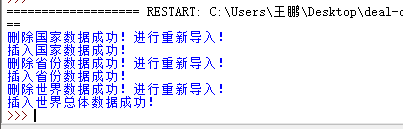
导入数据库成功~
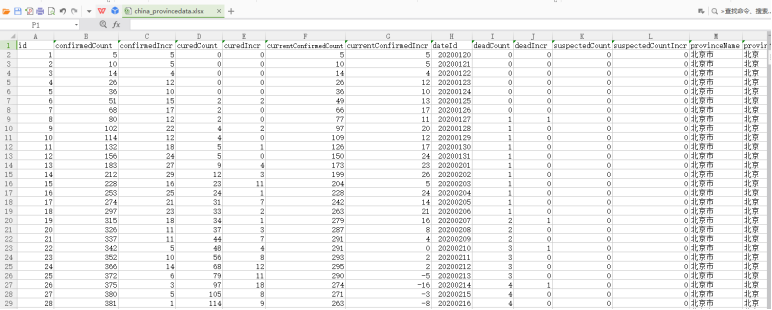
接下来将数据库文件导出到excel表格:
1 select * from china_provincedata
2 into outfile 'E:/MySQL/mysql-8.0.25-winx64/china_provincedata.xlsx';
3
4 select * from countrydata
5 into outfile 'E:/MySQL/mysql-8.0.25-winx64/countrydata.xlsx';
6
7 select * from world_total_data
8 into outfile 'E:/MySQL/mysql-8.0.25-winx64/world_total_data.xlsx';
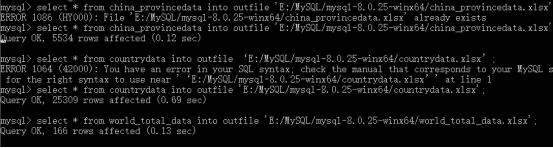
获得文件: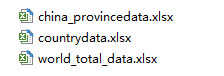
内容:
数据分析
我们取湖北省疫情最严重的一段时间:20200120-20200520期间的当天当前确诊人数,新建一个csv,将其制成折线图:
 1 import numpy as np
 2 import matplotlib.pyplot as plt
 3 import csv
 4 import pandas as pd
 5
 6 data = pd.read_csv('湖北省20200120-20200520.csv',encoding='gbk')
 7 plt.rcParams['font.sans-serif'] = ['SimHei']
 8 plt.rcParams['font.family']='sans-serif'
 9 plt.rcParams['axes.unicode_minus'] = False
10 fig=plt.figure(figsize=(15,10))
11 xdata=[]
12 ydata=[]
13 xdata=data.iloc[:,1]
14 ydata=data.iloc[:,0]
15 plt.xticks([])
16 plt.plot(xdata,ydata)
17 plt.xlabel('时间')
18 plt.ylabel('当前确诊人数')
19 plt.title('湖北省20200120-20200520疫情走势')
20 plt.show()
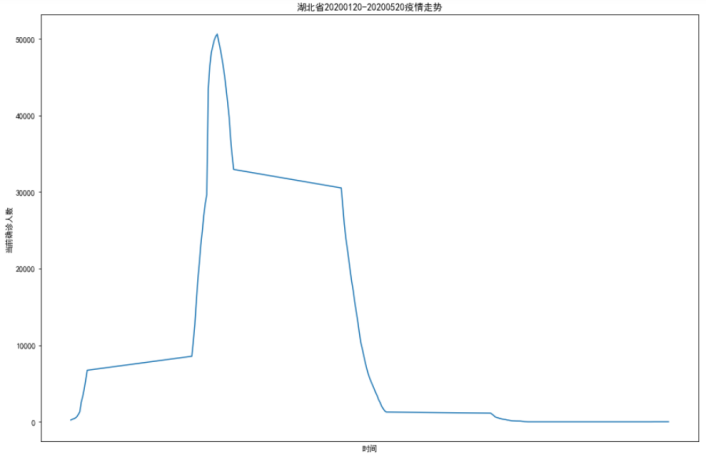
从图中可以看出,疫情在湖北迅速爆发,但是在国家的管控下,得到了很好的遏制,感染人数在百天时间里快速降低直至清零。
总结
今天,疫情在国内已经基本得到了控制,而国外诸多国家依旧疫情肆虐。这次学习让我更加直观的看到,疫情在国内的发展趋势,这得益于国家的领导以及全国人民的努力和奉献。
完成此次设计,我学到了非常非常多东西,查阅了很多资料,也产生了解决不完的各种疑问和错误。。。这次的实践,我也发现了自己许多不足,对数据可视化的不熟练、英语程度不够用、代码细节处理不好、甚至某些基础掌握都不够牢靠...
纸上得来终觉浅,绝知此事要躬行。只有经过实践,才能将课堂上学习到的知识实实在在的掌握,更能在实践中学到一些课堂上没有的东西,不断进步,触类旁通。


 浙公网安备 33010602011771号