
element-ui 业务需求 多选表格
根据公司需求 做部分封装 表格checkout
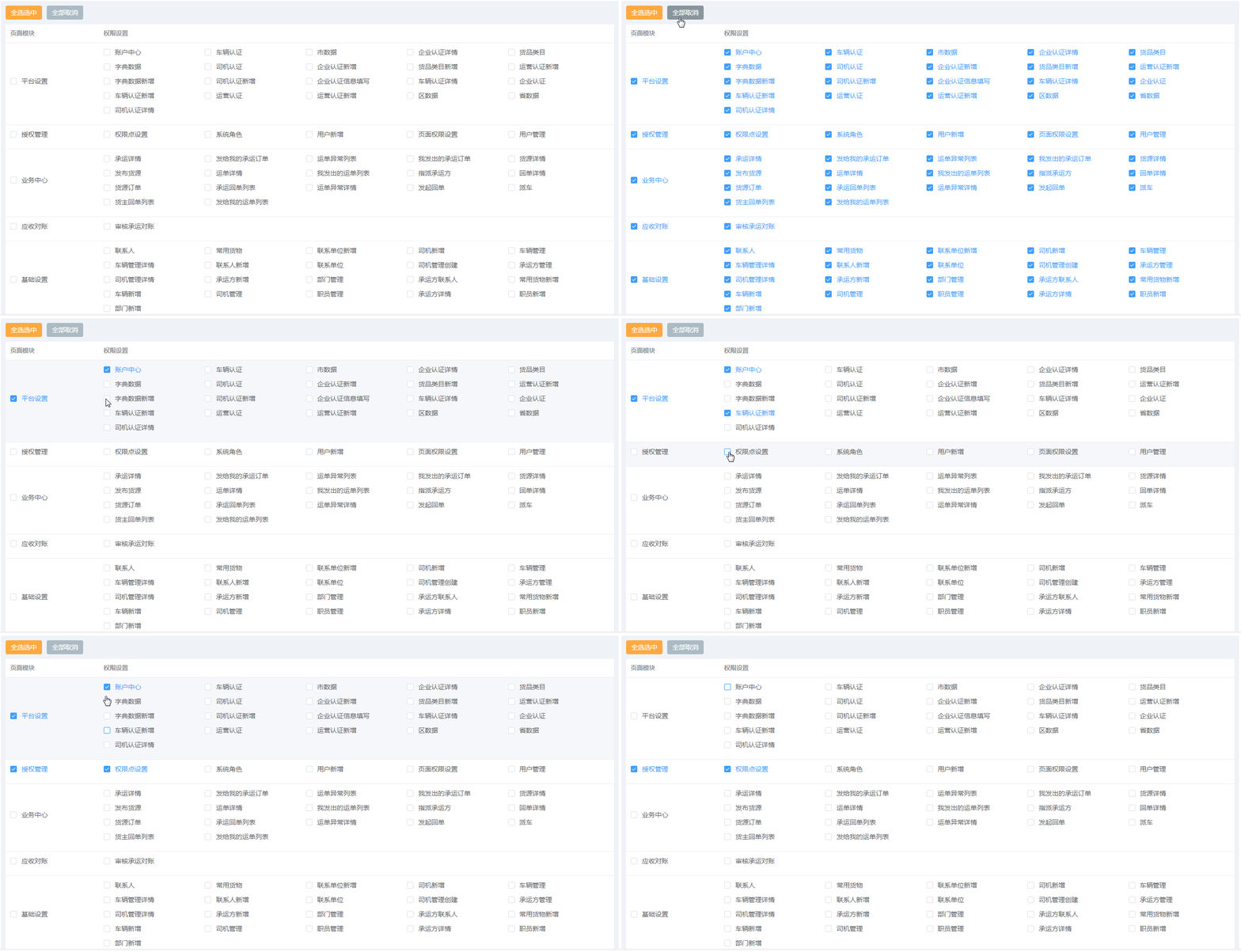
效果
<template>
  <div class="table_common_warp">
    <div class="checked_btn">
      <el-button
        class="hcd_button_default"
        @click="handleCheckAllTrue"
        v-if="table.disabledStatus ? !table.disabledStatus : true"
      >全选选中</el-button>
      <el-button
        class="hcd_button_gray"
        @click="handleCheckAllFalse"
        v-if="table.disabledStatus ? !table.disabledStatus : true"
      >全部取消</el-button>
    </div>
    <el-table :data="table.tableData" style="width: 100%">
      <el-table-column
        v-for="(col, index) in table.tableLabel"
        :type="col.type"
        :fixed="col.fixed"
        :prop="col.prop"
        :label="col.title"
        :min-width="col.minWidth"
        :width="col.width"
        :sortable="col.sort"
        :formatter="col.formatter"
        align="left"
        :show-overflow-tooltip="col.ellipsis"
        :key="index"
      >
        <template slot-scope="scope">
          <div v-if="col.rowSelection">
            <el-checkbox-group
              v-model="checkedAll"
              @change="handleCheckedItemChange"
              v-if="col.checkedStatus"
            >
              <el-checkbox
                :label="scope.row"
                :disabled="table.disabledStatus"
                @change="allCheckedActive(scope.row)"
              >{{ scope.row[col.prop] }}</el-checkbox>
            </el-checkbox-group>
            <span v-else v-html="scope[col.prop]"></span>
          </div>
          <div v-else>
            <el-checkbox-group
              v-model="checkedAll"
              @change="handleCheckedItemChange"
              v-if="col.checkedStatus"
            >
              <el-checkbox
                v-for="(son, index) in scope.row.childrens"
                :label="son"
                :key="index"
                @change="singleChecked(scope.row)"
                :disabled="table.disabledStatus"
              >{{ son[col.prop] }}</el-checkbox>
            </el-checkbox-group>
            <span v-else v-html="scope.row[col.prop]"></span>
          </div>
        </template>
      </el-table-column>
    </el-table>
  </div>
</template>

<script lang="ts">
import {
  Component,
  Emit,
  Inject,
  Model,
  Prop,
  Provide,
  Watch,
  Vue
} from "vue-property-decorator";

@Component
export default class Form extends Vue {
  checkedAll: any = []; // 单行选中
  checkAll: boolean = false;
  isIndeterminate: boolean = true;
  @Prop() table!: any;
  // 单击选中
  handleCheckedItemChange(value: any) {
    this.$emit("CheckedFun", value);
  }
  // 单行选中需整合
  arrayConcatChildrens(arr: any) {
    let newArray = [];
    if (arr.childrens) {
      for (let item of arr.childrens) {
        newArray.push(item);
      }
    }
    return newArray;
  }
  // 合并选中行所有集合
  maxFatherFun(id: string) {
    let arrayId: any = [];
    for (let item of this.checkedAll) {
      arrayId.push(item.id);
    }
    return arrayId.includes(id);
  }
  // 单选返回选中值
  singleChecked(val: any) {
    if (this.table.tableLabel && this.table.tableLabel[0].rowSelection) {
      let allConcat: any = [];
      let FATHER_PAGE_ID: string = val.id;
      let identicalVal: any = [];
      allConcat = this.arrayConcatChildrens(val);
      if (this.maxFatherFun(FATHER_PAGE_ID)) {
        for (let i = 0; i < allConcat.length; i++) {
          this.checkedAll.map((v: any, j: number) => {
            if (v.id === allConcat[i].id) {
              identicalVal.push(v.id);
            }
          });
        }
        if (identicalVal && identicalVal.length === 0) {
          for (let i = 0; i < this.checkedAll.length; i++) {
            if (this.checkedAll[i].id === FATHER_PAGE_ID) {
              this.checkedAll.splice(i, 1);
            }
          }
        }
      } else {
        this.checkedAll.push(val);
      }
    }
  }
  // 单行选中
  allCheckedActive(val: any) {
    let allConcat: any = [];
    let FATHER_PAGE_ID = val.id;
    allConcat = this.arrayConcatChildrens(val);
    // 判断选中的父级ID是否存在checkedAll中
    if (!this.maxFatherFun(FATHER_PAGE_ID)) {
      if (this.checkedAll.length === 0) {
        this.checkedAll = [];
      } else {
        for (let v = 0; v < allConcat.length; v++) {
          for (let i = 0; i < this.checkedAll.length; i++) {
            if (allConcat[v].id === this.checkedAll[i].id) {
              this.checkedAll.splice(i, 1);
            }
          }
        }
      }
    } else {
      this.checkedAll = this.checkedAll.concat(allConcat);
      for (let i = 0; i < this.checkedAll.length; i++) {
        allConcat.forEach((v: any, j: number) => {
          if (v) {
            if (v.id === this.checkedAll[i].id) {
              this.checkedAll.splice(i, 1);
            }
          } else {
            return false;
          }
        });
      }
      this.checkedAll = this.checkedAll.concat(allConcat);
    }
    console.log(this.checkedAll);
  }
  // 全部选中
  handleCheckAllTrue() {
    this.checkedAll = [];
    let childrensConcat: any = [];
    for (let item of this.table.tableData) {
      childrensConcat.push.apply(childrensConcat, item.childrens);
    }
    if (this.table.checkedAllStatus) {
      this.checkedAll = childrensConcat.concat(this.table.tableData);
      this.$emit("CheckedFun", this.checkedAll);
    } else {
      this.checkedAll = childrensConcat;
      this.$emit("CheckedFun", this.checkedAll);
    }
  }
  // 全部取消
  handleCheckAllFalse() {
    this.checkedAll = [];
    this.$emit("CheckedFun", this.checkedAll);
  }
  mounted() {
    this.checkedAll = this.table.defaultData;
  }
}
</script>
<style lang="scss" scoped>
.table_common_warp {
  background: #eff3f8;
  padding: 10px;
  .el-table {
    td {
      vertical-align: top;
    }
  }
  .checked_btn {
    padding-bottom: 10px;
  }
}
.el-button-group > .el-button:not(:last-child) {
  margin-right: 1px;
}
.el-checkbox-group {
  .el-checkbox {
    margin-bottom: 10px !important;
    width: 20%;
  }
  .el-checkbox + .el-checkbox {
    margin-left: 0px;
  }
}
</style>
引入组件
<hcdTableChecked :table="tableAll" @CheckedFun="backCheckedFun"></hcdTableChecked>
配置规则
 /**
   * 多选选框 只支持两级复选
   * 数据格式为两级 树形格式
   * tableLabel:[
   *     prop 显示字段名
   *     title 标题
   *     checkedStatus 是否为选择项
   *     rowSelection  首列设置  是否支持行选
   * ]
   * tableData:[] 树形结构数据
   * defaultData: [] 默认选中数据 平铺数据 子级和父级平级
   * disabledStatus:  是否禁用 布尔值
   * checkedAllStatus: 是否显示全选按钮
   */
参数设置
tableAll: any = {
    tableLabel: [
      {
        prop: "title",
        title: "页面模块",
        width: "200",
        checkedStatus: true, // 判断是否添加选择
        rowSelection: true // 行选
      },
      {
        prop: "title",
        title: "权限设置",
        checkedStatus: true
      }
    ],
    tableData: [],
    defaultData: [],
    disabledStatus: false,
    checkedAllStatus: true // 是否行全选
  };
多选返回参数事件
 backCheckedFun(val: any) {
     console.log(val)
  }
tableData数据格式
[
          {
            hasLimit: false,
            childrens: [
              {
                hasLimit: false,
                id: "2.0",
                path: "/Account/Mmager",
                component: "aa",
                redirect: null,
                title: "用户管理",
                icon: "cc"
              },
              {
                hasLimit: false,
                id: "2.1",
                path: "/Account/Shipper",
                component: "aa",
                redirect: null,
                title: "货主管理",
                icon: "cc"
              }
            ],
            id: "1",
            path: "/plate",
            component: "aa",
            redirect: null,
            title: "平台管理",
            icon: "cc"
          }
]

 浙公网安备 33010602011771号