CentOS 7 安装nginx + 部署站点 + 反向代理 + nginx负载均衡
CentOS 7 安装nginx + 部署站点 + 反向代理 + nginx负载均衡
CentOS 7 安装nginx及配置
安装nginx
1. 安装依赖库
yum install -y gcc patch libffi-devel python-devel zlib-devel bzip2-devel openssl openssl-devel ncurses-devel sqlite-devel readline-devel tk-devel gdbm-devel db4-devel libpcap-devel xz-devel
2. 下载源码包
wget -c https://nginx.org/download/nginx-1.9.6.tar.gz
3. 解压
tar -zxvf nginx-1.9.6.tar.gz
4. 配置,编译,安装,开启nginx状态监测功能
./configure --prefix=/opt/nginx196/ --with-http_ssl_module --with-http_stub_status_module

make && make install
5. 启动nginx

cd /opt/nginx196/sbin
# 启动
./nginx

# 关闭
./nginx -s stop

# 平滑重启
./nginx -s reload
 nginx的configure配置参数
6. 安装完成后测试
netstat -tunlp|grep 80
ps -ef|grep nginx
nginx的目录结构
[root@rpw nginx196]# ll
drwxr-xr-x 2 root   root 4096 Dec 27 10:41 conf
drwxr-xr-x 2 root   root 4096 Dec 27 16:26 html
drwxr-xr-x 2 root   root 4096 Dec 27 10:22 logs
drwxr-xr-x 2 root   root 4096 Dec 27 10:20 sbin
[root@rpw nginx196]#
- conf 存放nginx所有的配置文件,主要是nginx.conf
- html 存放nginx默认站点的目录,index.html.error.html...
- logs 存放nginx默认日志的目录,如error.log,access.log
- sbin 存放nginx主命令的目录, ./nginx
部署一个web站点
1. nginx默认站点是nginx目录下的html/index.html,可以在 conf/nginx.conf配置文件下查看
server {
        listen       80;
        server_name  www.rpw.com; # 域名,记得在本地的win机器上修改hosts文件
        location / {
            root   html; # 默认的站点html文件夹,如 /opt/nginx196/html/
            index  index.html index.htm; # 在html目录下的站点首页文件
        }
    }

# win10本地文件夹路径
C:\Windows\System32\drivers\etc\hosts
2. 通过访问 www.rpw.com 域名可以访问 index.html网页
nginx虚拟主机
1. 虚拟主机就是将一台服务器分割成多个虚拟服务器,每个站点使用各自的硬盘空间,节省资源.
2. 每个server{}代码块都是一个虚拟主机.只要是来自www.rpw.com的请求,都会被转发给对应的server{}代码块
#user  nobody;
worker_processes  1;

#error_log  logs/error.log;
#error_log  logs/error.log  notice;
#error_log  logs/error.log  info;

#pid        logs/nginx.pid;

events {
    worker_connections  1024;
}

http {
    include       mime.types;
    default_type  application/octet-stream;

    #log_format  main  '$remote_addr - $remote_user [$time_local] "$request" '
    #                  '$status $body_bytes_sent "$http_referer" '
    #                  '"$http_user_agent" "$http_x_forwarded_for"';

    #access_log  logs/access.log  main;

    sendfile        on;
    #tcp_nopush     on;

    #keepalive_timeout  0;
    keepalive_timeout  65;

    #gzip  on;

    upstream rpw_upstream {
        server 120.78.234.181;
        #server 10.0.3.126:8080;
        server 10.0.3.161;
    }

    server {
        listen       80;
        server_name  localhost;

        #charset koi8-r;

        #access_log  logs/host.access.log  main;

        location / {
            #proxy_pass http://rpw_upstream;
            root   html;
            index  index.html index.htm;
        }

        error_page  404              /404.html;
        location = /404.html {
            root html;

        }

        # redirect server error pages to the static page /50x.html
        #
        error_page   500 502 503 504  /50x.html;
        location = /50x.html {
            root   html;
        }

        # proxy the PHP scripts to Apache listening on 127.0.0.1:80
        #
        #location ~ \.php$ {
        #    proxy_pass   http://127.0.0.1;
        #}

        # pass the PHP scripts to FastCGI server listening on 127.0.0.1:9000
        #
        #location ~ \.php$ {
        #    root           html;
        #    fastcgi_pass   127.0.0.1:9000;
        #    fastcgi_index  index.php;
        #    fastcgi_param  SCRIPT_FILENAME  /scripts$fastcgi_script_name;
        #    include        fastcgi_params;
        #}

        # deny access to .htaccess files, if Apache's document root
        # concurs with nginx's one
        #
        #location ~ /\.ht {
        #    deny  all;
        #}
    }
    server {
        listen       80;
        server_name  www.rpw0.com;

        location / {
            proxy_pass http://rpw_upstream;

            #allow 10.0.3.47;
            #allow 10.0.3.158;
            #allow 10.0.3.126;
            #deny 10.0.3.47;

            root   /opt/web_nginx/rpw0;
            index  index.html index.htm;

        location /status {
            stub_status on;
        }
        error_page   400 402 403 404  /404.html;
        }
    }
    server {
        listen       80;
        server_name  www.rpw1.com;
        location / {
            root   /opt/web_nginx/rpw1;
            index  index.html index.htm;
        }
    }
    server {
        listen       80;
        server_name  www.rpw2.com;
        location / {
            root   /opt/web_nginx/rpw2;
            index  index.html index.htm;
        }
    }


    # another virtual host using mix of IP-, name-, and port-based configuration
    #
    #server {
    #    listen       8000;
    #    listen       somename:8080;
    #    server_name  somename  alias  another.alias;

    #    location / {
    #        root   html;
    #        index  index.html index.htm;
    #    }
    #}


    # HTTPS server
    #
    #server {
    #    listen       443 ssl;
    #    server_name  localhost;

    #    ssl_certificate      cert.pem;
    #    ssl_certificate_key  cert.key;

    #    ssl_session_cache    shared:SSL:1m;
    #    ssl_session_timeout  5m;

    #    ssl_ciphers  HIGH:!aNULL:!MD5;
    #    ssl_prefer_server_ciphers  on;

    #    location / {
    #        root   html;
    #        index  index.html index.htm;
    #    }
    #}

}
3. 配置多个域名的虚拟主机,可以在nginx.conf配置文件中增加server{}代码块,每个域名对应一个server{}代码块.
4. 修改配置文件nginx.conf之后,记得重启nginx服务
[root@master conf]# ../sbin/nginx -s reload
nginx错误页面优化
优化404等错误页面,在server{}代码块中的error_page处修改配置.
server {
        listen       80;
        server_name  www.rpw0.com;

        location / {
            proxy_pass http://rpw_upstream;

            #allow 10.0.3.47;
            #allow 10.0.3.158;
            #allow 10.0.3.126;
            #deny 10.0.3.47;

            root   /opt/web_nginx/rpw0;
            index  index.html index.htm;

        location /status {
            stub_status on;
        }
        error_page   400 402 403 404  /404.html;
        }
    }
nginx限制网站IP
- allow 允许IP访问
- deny 拒绝IP访问
server {
        listen       80;
        server_name  www.rpw0.com;

        location / {
            proxy_pass http://rpw_upstream;

            allow 10.0.3.47;
            allow 10.0.3.158;
            allow 10.0.3.126;
            deny 10.0.3.47;

            root   /opt/web_nginx/rpw0;
            index  index.html index.htm;

        location /status {
            stub_status on;
        }
        error_page   400 402 403 404  /404.html;
        }
    }
nginx代理
1. 正向代理和反向代理
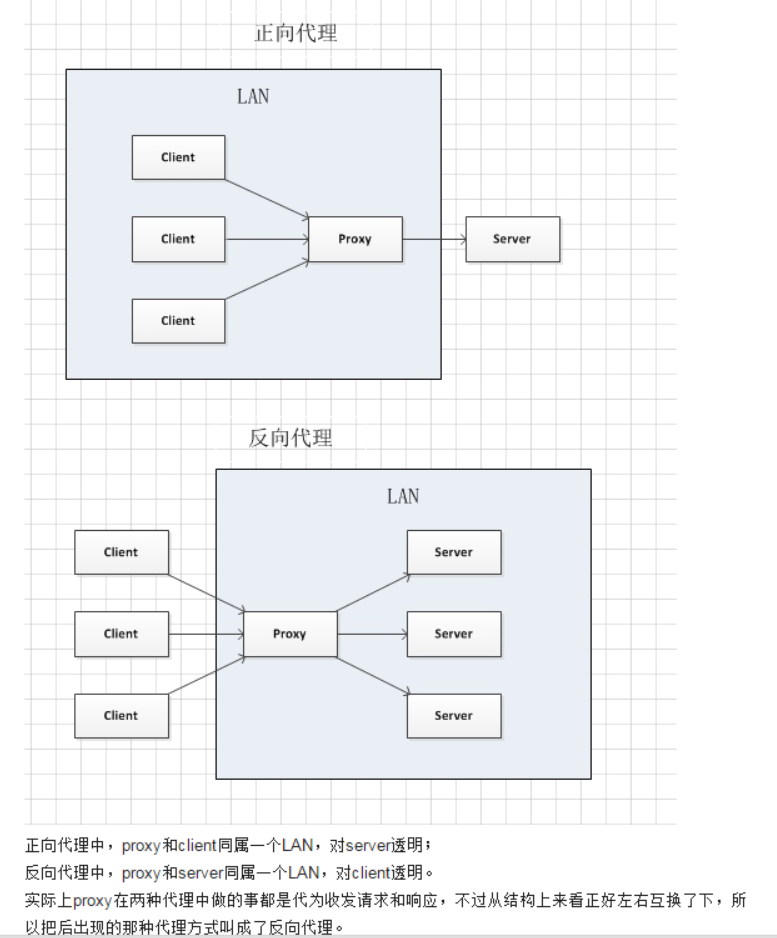
2. 实现一个反向代理
如 10.0.3.158 代理 10.0.3.161,在 10.0.3.158上配置nginx.conf文件
server {
        listen       80;
        server_name  www.rpw0.com;
        location / {
            proxy_pass http://10.0.3.161; #只要是请求10.0.3.158的用户,都会被转发给10.0.3.161服务器
            root   html;
            index  index.html index.htm;
        }
    }
nginx实现负载均衡
1. 三台服务器,一台作为nginx代理服务器(负载均衡调度器),另两台是web服务器
10.0.3.156 # 负载均衡调度器
10.0.3.126 # web服务器1
10.0.3.161 # web服务器2
2. 在负载均衡调度器上配置
# http{}代码块中添加

upstream rpw_upstream {
        server 10.0.3.126 weight=10; # weight 权重
        server 10.0.3.161 weight=5;
    }

# server{}代码块中添加
location / {
            proxy_pass http://rpw_upstream;
            root   html;
            index  index.html index.htm;
        }
3. 三台服务器都平滑重启
./nginx -s reload
4. 配置权重
调度算法      概述
轮询        按时间顺序逐一分配到不同的后端服务器(默认)
weight       加权轮询,weight值越大,分配到的访问几率越高
ip_hash      每个请求按访问IP的hash结果分配,这样来自同一IP的固定访问一个后端服务器
url_hash      按照访问URL的hash结果来分配请求,是每个URL定向到同一个后端服务器
least_conn    最少链接数,那个机器链接数少就分发


 浙公网安备 33010602011771号