
2025年最新python转xmind测试用例为excel格式教程
1、背景:在日常工作中,作为测试人员,我们需要将excel格式的用例导入到BUG管理平台,但是在写用例的时候,我们为了方便,使用xmind写用例,写好之后需要转换成excel格式,这个时候就需要用Python来实现。
2、xmind用例示范:
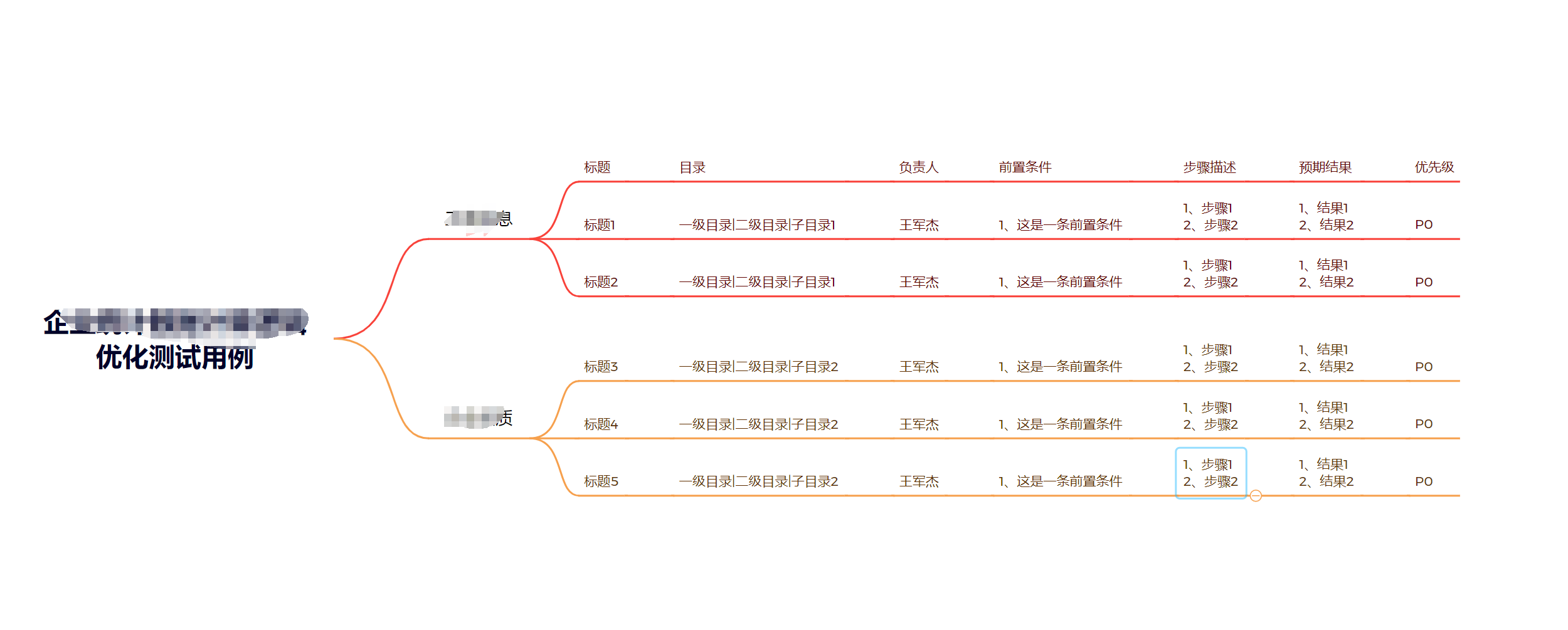
3、上代码:
from xmindparser import xmind_to_dict
import pandas as pd
from openpyxl.workbook import Workbook


# 可以设想为一个树结构,利用递归函数,获取由根至各叶子节点的路径。
def xm_parse(dic, pre_data=[]):
    """输入一个由xmindparser,转换而来的字典形式的数据,将之转换成列表"""
    title_list = []
    topic_list = []
    try:
        topics = dic.get("topics")
        title = dic.get("title")
        # 将前缀追加
        title_list.append(title)
        title_list = pre_data + title_list
        # 如果到达末尾(无子节点),则生成当前路径并返回
        if not topics and title:  # 修改条件判断,处理topics为None或空列表的情况
            yield title, title_list
            return
        # 处理存在的子节点
        elif isinstance(topics, list) and title:
            for topic in topics:
                topic_list.append(topic)
    except AttributeError as e:
        print("异常结束")
        return
    # 递归处理子节点
    if topic_list:
        for topic in topic_list:
            yield from xm_parse(topic, title_list)


def main():
    x_flie = r"测试用例.xmind"
    out_file = r"测试用例.xlsx"
    temp = []
    max_cols = 0
    json_data = xmind_to_dict(x_flie)
    # 提取数据并确定最大列数
    for i, j in xm_parse(json_data[0]['topic']):
        temp.append(j)
        max_cols = max(max_cols, len(j))
        # 补全缺失的列
    for i in range(len(temp)):
        temp[i] += [None] * (max_cols - len(temp[i]))
    result = pd.DataFrame(temp)
    # 此方法通过iloc[:, 2:]选取所有行、第三列及之后的列(Python 索引从 0 开始),index=False参数用于禁止输出行索引。
    result.iloc[:, 2:].to_excel(out_file, index=False, header=False)  # 双重保障:既移除列名定义,又禁用表头输出


if __name__ == '__main__':
    main()
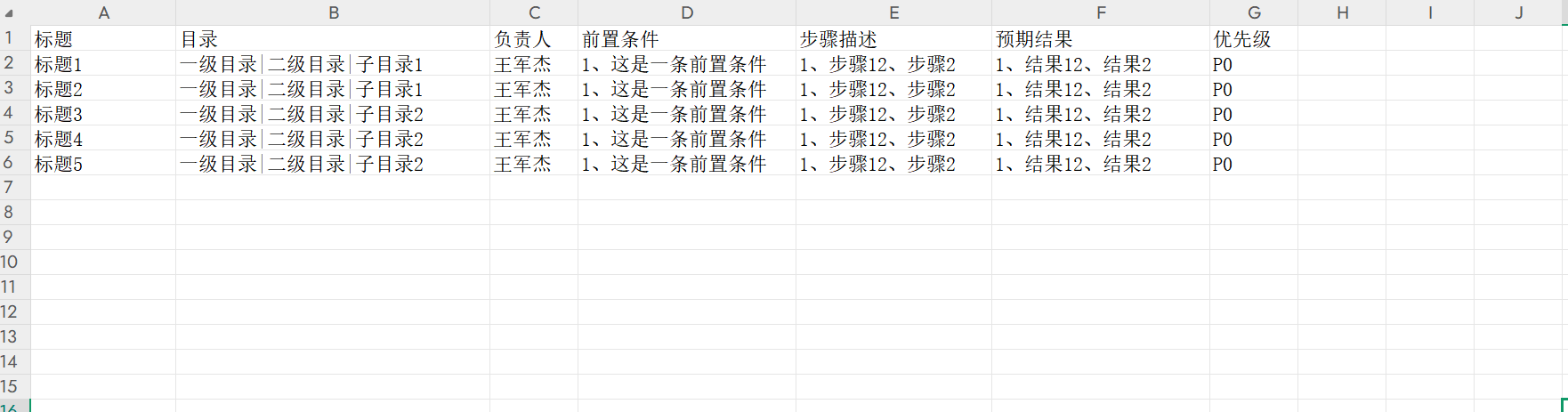
4、运行代码,生成excel格式用例如下,完成使命:

 浙公网安备 33010602011771号